In addition to hundreds of bug fixes, iOS 26.2 brings much-needed refinement to the iPhone’s operating system — along with more than 20 new features.
iOS 26.2, which Apple released Friday, lets you turn your reminders into alarms, so they’re impossible to ignore. Apple Podcasts gains automatic chapters and links. And the controversial Liquid Glass user interface continues to be refined and tweaked.
There are subtle improvements everywhere. Here’s the complete list of exciting changes in iOS 26.2. Keep reading or watch our video.
Everything new in iOS 26.2
With its controversial new Liquid Glass interface and dozens of new features, iOS 26 took a big leap into the future — but it’s not quite finished. That changed when Apple released iOS 26.2, which irons out most of iOS 26’s worst bugs.
The tweaks in the update make iOS 26 feel like it’s finally ready to be adopted by the masses. In fact, I bet Apple will begin actively notifying holdouts to update their iPhones from iOS 18 with the release of iOS 26.2. It feels far more stable than in iOS 26.1.
Table of contents: New features and tweaks in iOS 26.2
- Alarms in Reminders
- Automatic chapters and links in Apple Podcasts
- Sleep tracking tweaks
- Liquid Glass changes
- Other changes in apps
- System features
- More recent updates
Alarms in Reminders

Screenshot: D. Griffin Jones/Cult of Mac
If you have a bad habit of ignoring notifications and badges, iOS 26.2 lets you add an alarm to a reminder. If you already have a date and time assigned to a reminder, you can also set it as Urgent to automatically turn it into an alarm. It’ll ring your iPhone even if you have a Focus mode enabled. Look for the “Urgent” toggle at the bottom of a new reminder card.
New Podcasts features in iOS 26.2
Screenshot: D. Griffin Jones/Cult of Mac
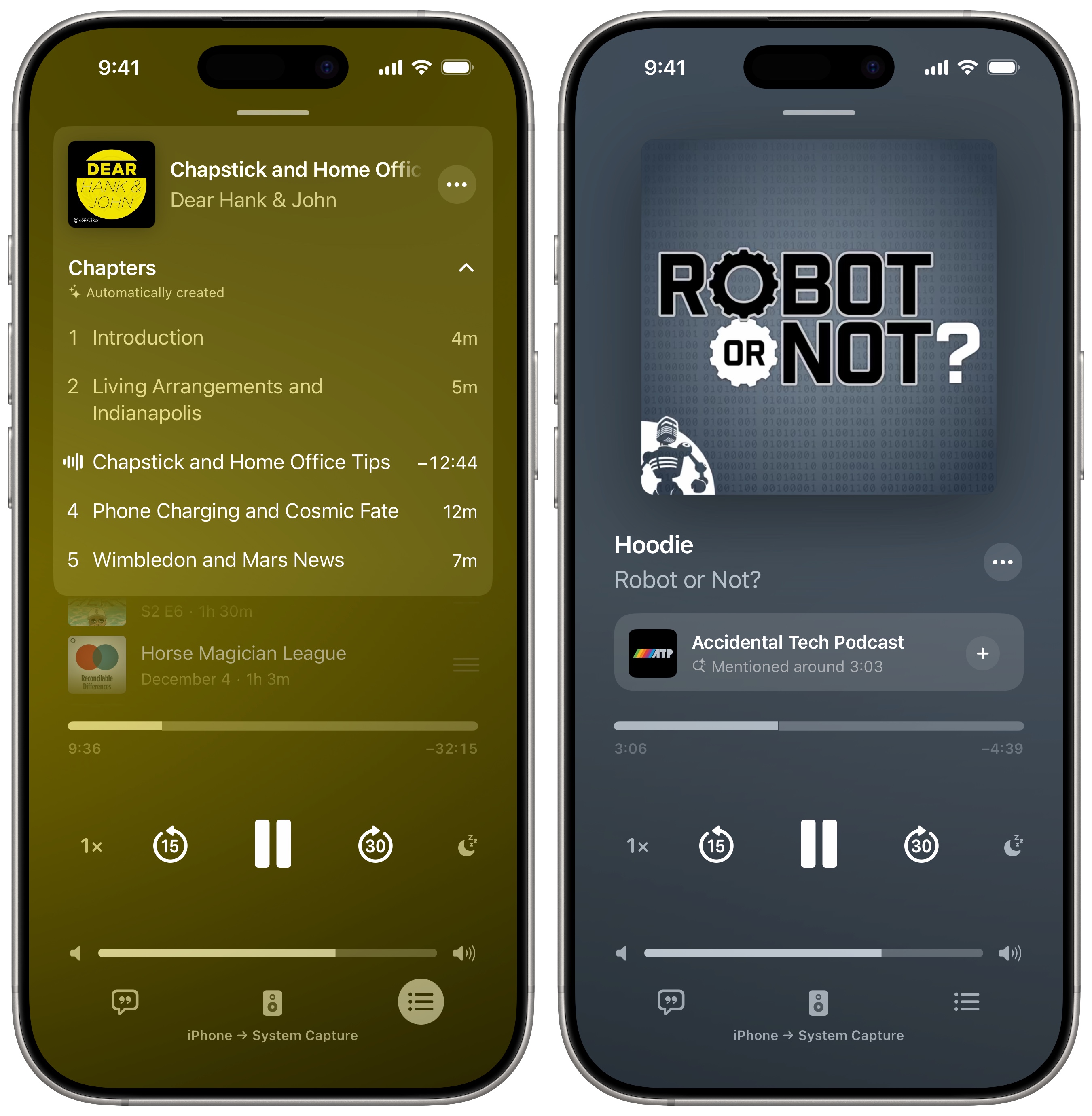
Apple’s Podcasts app gains some useful new features in iOS 26.2. For one, the app will automatically generate chapters if a particular podcast episode doesn’t come with its own chapter markers. (This feature only works with public podcast episodes, not private or members-only shows.)
In my testing with Dear Hank and John, a podcast that typically consists of an intro, five or six listener questions, and a closing segment, the Podcasts app incorrectly grouped several of the questions together. However, I can see this feature being useful if it lets you skip a section of a podcast that you’re not interested in.
Additionally, after you upgrade to iOS 26.2, you’ll see pop-ups when another podcast is mentioned, right on the Now Playing screen. You can tap it to see details about the show in the Podcasts app. From an episode’s description, you’ll see a full list of all podcasts mentioned.
You’ll also see timed links to Apple content on Apple Music, Apple TV and Apple News. This is like chapter links, a feature supported in other podcast apps like Overcast, except it only works when the link in question goes to one of Apple’s own services.
Sleep-tracking tweaks
Screenshot: D. Griffin Jones/Cult of Mac
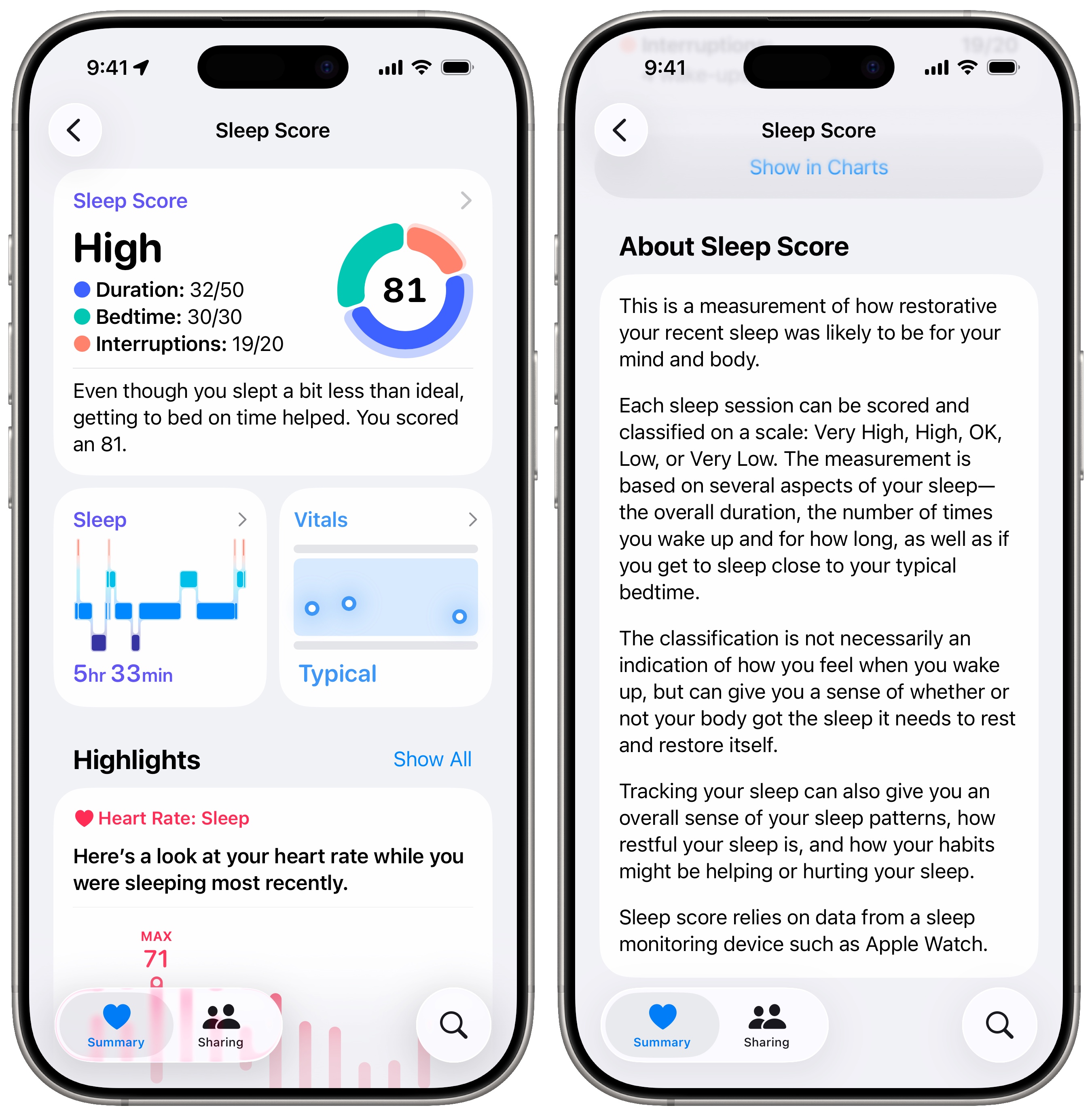
In iOS 26.2, Apple changed how it grades the Sleep Score on the Apple Watch and Health app. The feature launched in watchOS 26 and gives you a score between one and 100 based on your bedtime, your sleep duration and interruptions.
The threshold for each grade becomes higher than before in iOS 26.2. (Previously, ome users thought the scores seemed somewhat optimistic.) Apple also renamed the “Excellent” rating as “Very High” to match the others. Now, the Sleep Score tiers look like this:
- Very Low: 0 to 40 points, previously 0 to 29
- Low: 41 to 60 points, previously 30 to 49
- OK: 61 to 80 points, previously 50 to 69
- High: 81 to 95 points, previously 70 to 89
- Very High: 96 to 100 points, previously 90 to 100
New Liquid Glass features in iOS 26.2
GIF: D. Griffin Jones/Cult of Mac
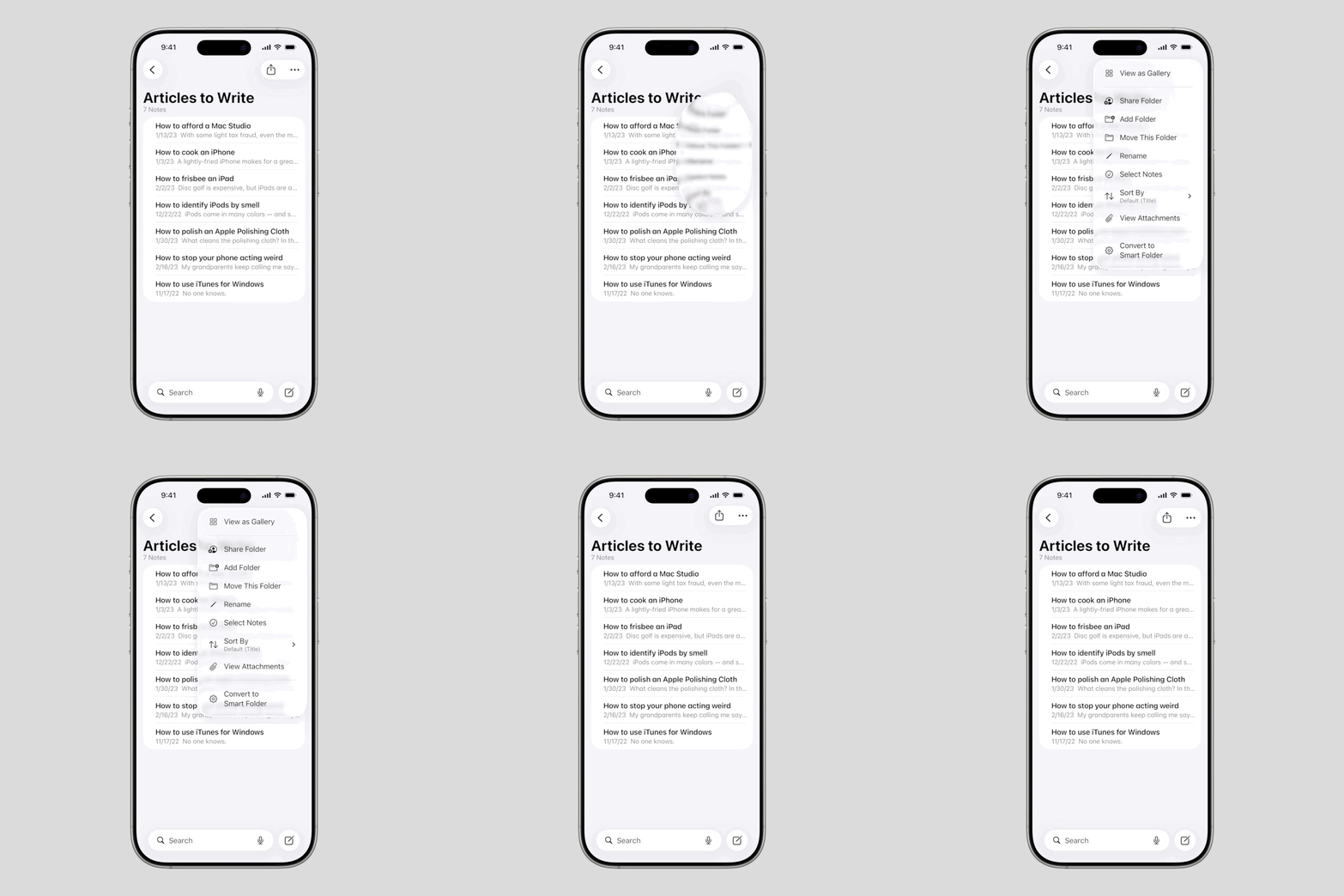
In iOS 26.2, context menus gain a new animation that looks even more fluid, flashy and glassy. It’s closer to the original Liquid Glass concept shown off at WWDC25 in June. Now, when you tap a menu, it shoots out, grows into a big bubble, and morphs into a rectangular shape. The menu items appear inside. And when you dismiss the menu, the same animation plays in reverse. It’s pretty cool.
You can adjust the clock transparency on your iPhone’s Lock Screen. If you set it to the Glass style, a slider lets you adjust the effect from more opaque to completely clear. To set it back to its default, switch it to Solid and then back to Glass. The slider is available for the clock font options.
The Measure app also adds Liquid Glass on its level tool in iOS 26.2. The bubbles are now Liquid Glass bubbles floating over a grid. You can see how the Liquid Glass bubbles interact and flow into each other, as well as how the glass chromatically refracts and bends light beneath it. Also very cool.
Other changes in apps
Screenshot: D. Griffin Jones/Cult of Mac
Apple Music will download song lyrics to your iPhone so you can toggle them on instantly in iOS 26.2. This should help if you want the words while you jam out while riding in a subway or driving through a spot with no service.
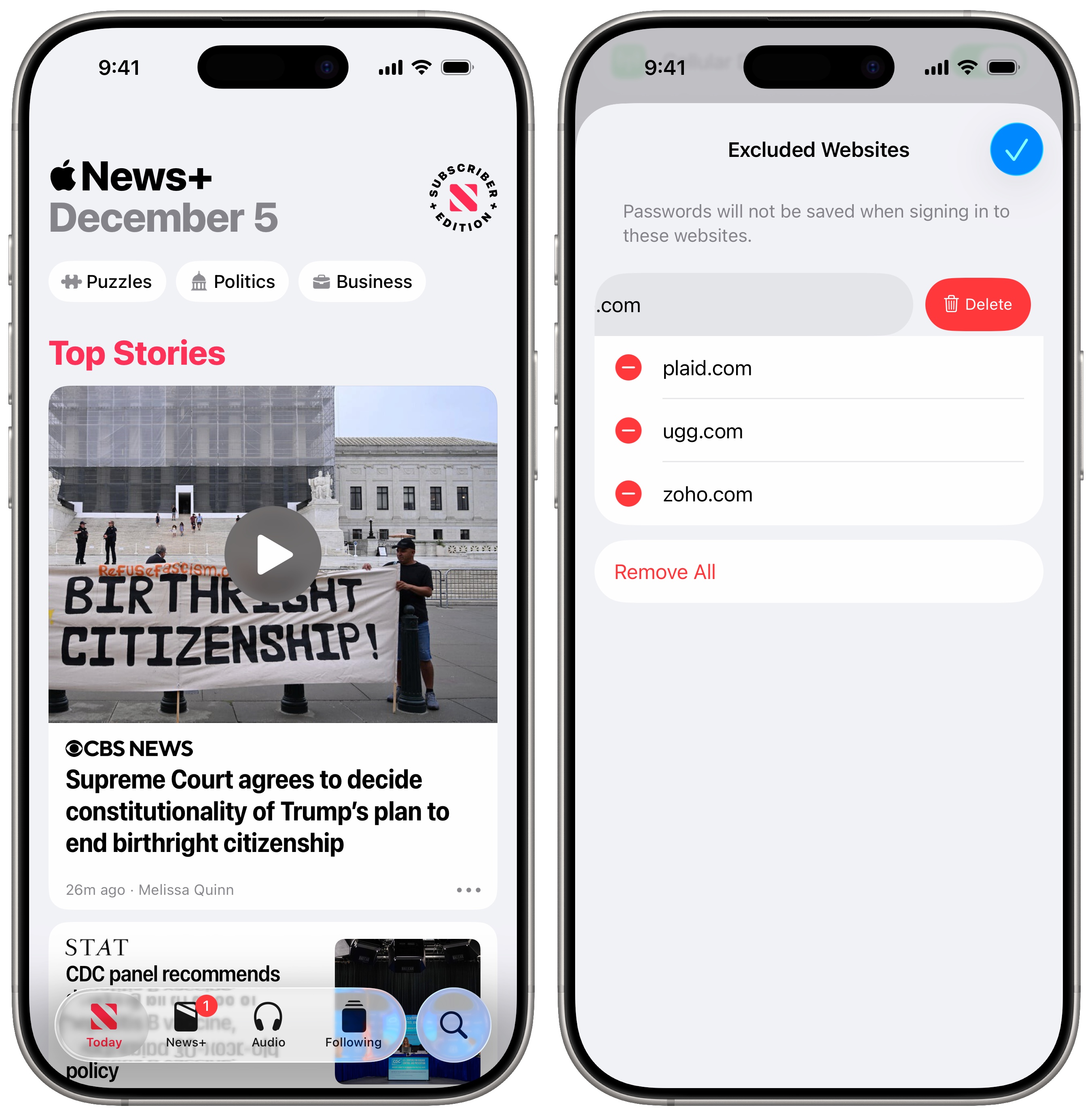
Passwords gains a setting in iOS 26.2 that lets you see the websites you’ve prevented from saving a password. If you’ve ever been offered to save a password, and hit “Never for This Website” accidentally, you can now make sure the Passwords app will save your details the next time. Go to Settings > Apps > Passwords and tap Show Excluded Websites to remove a website from the list.
Freeform, the collaborative infinite whiteboard app, now supports adding tables to a board.
Apple News in iOS 26.2 benefits from improved navigation. You will see links along the top of the app for the daily puzzles, politics, business news and food sections. You’ll also see a new Following tab at the bottom, separated from the Search tab.
Apple Games gains three new enhancements:
- You can sort games in your library by size, name and how recently you’ve played them.
- Controller support for navigating the user interface is improved.
- Your scores and challenge progress now update in real time as you play a game.
CarPlay users can hide pinned messages in iOS 26.2. While the Messages app in CarPlay added support for pinned conversations in iOS 26, the feature faced some pretty heavy criticism. It doesn’t display them in the same grid as iOS, breaking muscle memory. Unread badges for pinned conversations aren’t in the same spot, so it’s not easy to see what’s new. Disabling pinned messages in Settings reverts the CarPlay app to a simple most-recent list.
System features
Screenshot: D. Griffin Jones/Cult of Mac
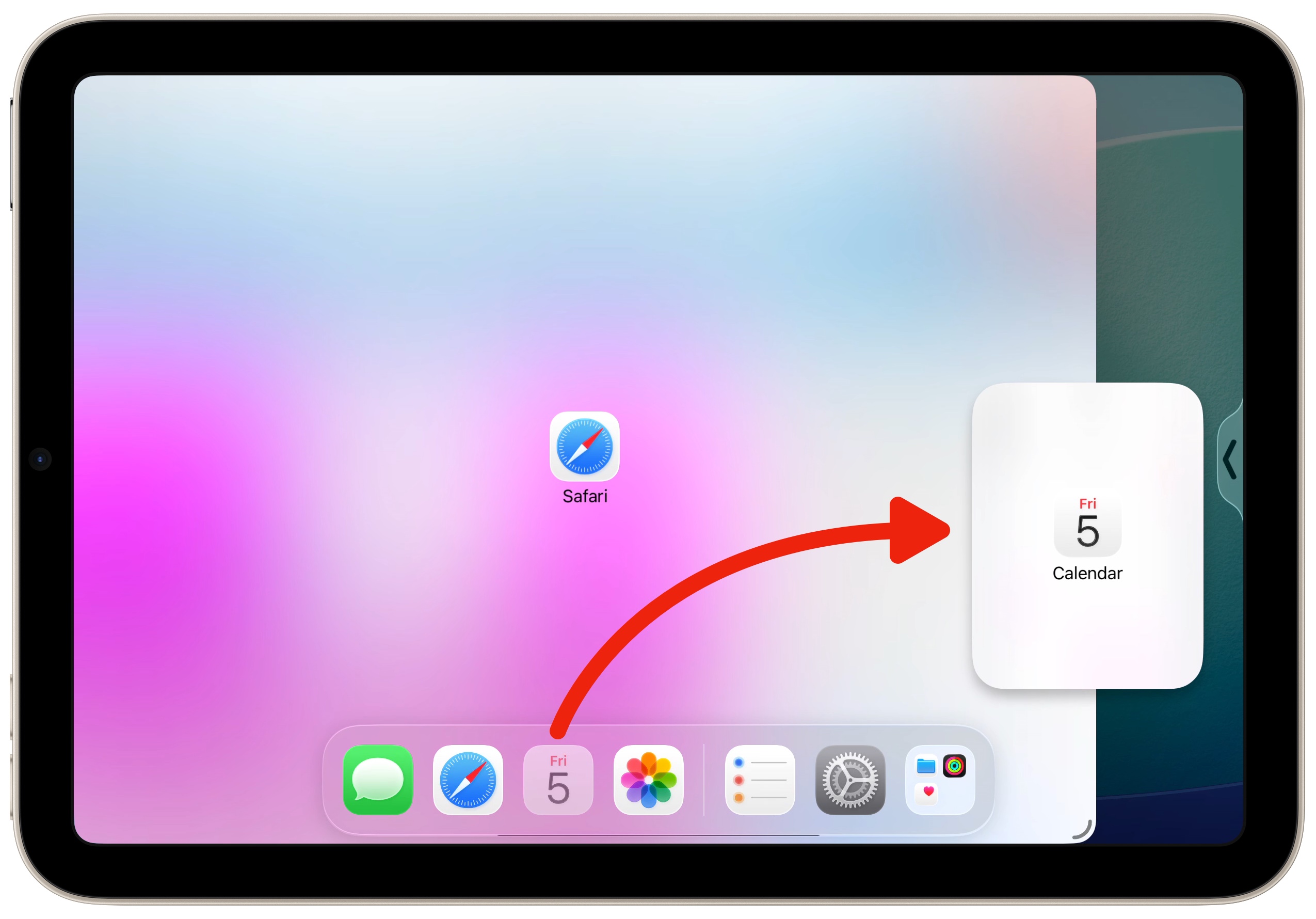
The iPhone isn’t the only device getting tweaks and refinements when the next version of Apple’s software arrives. On the iPad, in iPadOS 26.2, you can drag an app icon directly into Split Screen or Slide Over. Apple continues to merge the old method of split-screen multitasking into its new freeform windowing system.
Just like before, you can drag an icon out of the Dock or Spotlight. When you let go, the app will fill that half of the screen. Plus, you can drag another icon on top of it to replace it. And now, you can drag an icon to the edge of the screen (on the arrow) to make it a floating Slide Over window.
Also in iPadOS 26.2, you can now AirDrop with strangers using a temporary code. This will be a convenient way to remotely send pictures, videos and files to strangers and people outside your contacts. Generating a code lets you AirDrop with a stranger for 30 days. You can manage this in Settings > General > AirDrop by tapping Manage Known AirDrop Contacts. However, creating a code is not yet available at the time of writing.
Enhanced Safety Alerts are a new type of emergency notification enabled by default. You can enable earthquake alerts and imminent threat alerts. If you’re comfortable with sharing location data with Apple to help improve the feature’s reliability, you can enable Improve Alert Delivery as well.
You can now make the screen light up for alerts in addition to (or instead of) the LED camera flash on the back. Find this setting in Settings > Accessibility > Audio & Visual > Flash for Alerts. With Flash for Alerts enabled, you can now set it to LED Flash, Screen or Both.
Region-exclusive new features in iOS 26.2
In Japan, iOS 26.2 supports replacing Siri with another voice assistant. Holding the side button will allow other apps like Gemini, Alexa or ChatGPT’s voice mode to be activated instead, according to the user’s preference. These third-party apps will need to be updated to take advantage of the feature, which is new for developers, so they may not be available on day one.
Also, Japanese users will be able to install alternative app marketplaces like AltStore and the Epic Games Store, just like in the European Union.
Live Translation comes to users in the European Union (with compatible AirPods) in iOS 26.2. The feature allows you to get a real-time translation in your ear when speaking to someone in another language.
To use Live Translation, you need AirPods Pro 2, AirPods Pro 3 or AirPods 4 with Active Noise Cancellation. The feature currently supports Chinese, English, French, German, Italian, Japanese, Korean, Mandarin, Portuguese and Spanish.
More recent updates
If you’re only now updating from iOS 18, as many people are, you should brush up on the many new changes in iOS 26 and later:
- Everything new in iOS 26: Liquid Glass and 70+ new features
- Everything new in iOS 26.1: Tone down Liquid Glass, if you dare

D. Griffin Jones was a writer, podcaster and video producer for Cult of Mac. Griffin has been a passionate computer enthusiast since 2002, when he got his first PC — but since getting a Mac in 2008, he hasn’t turned back. His skills in graphic and web design, along with video and podcast editing, are self-taught over 20+ years. Griffin has a bachelor’s degree in computer science and has written several (unpublished) apps for Mac and iOS. His collection of old computers is made up of 40+ desktops, laptops, PDAs and devices, dating back to the early ’80s.
Griffin writes for his personal blog, Extra Ordinary, and is currently looking for work.

