Mobile menu toggle

Leander Kahney - page 44

Apple Earns 8% PC Market Share on 34% YoY Growth — Gartner

By

Gartner_Q1_2010

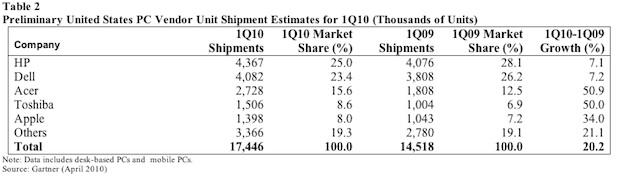
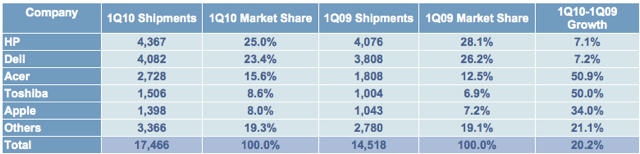
Apple sold an impressive 1.4 million Macs in the first quarter of 2010, says research firm Gartner, recording very healthy 34% year-on-year growth. The PC market as a whole grew about 25% — the biggest first quarter volume ever, Gartner says. Apple is the fifth-largest PC maker in the U.S. with an 8% share of the PC market. Gartner attributes the massive Mac sales to “hype” around the iPad, but it’s more likely the ever-popular MacBooks and new iMacs, which were refreshed before the holidays.

“Apple created major attention with its media tablet, the iPad, which launched in April. The hype around the iPad certainly added positive sentiment to the company as PC shipments. Early estimates showed that Apple grew 34 percent in the U.S. market.”

Meanwhile, rival research firm IDC released significantly different estimates. According to IDC, Mac shipments were 1.13 million units, earning Apple a 6.4% market share. IDC also pegs Apple as the fifth-largest U.S. PC maker, but estimates Apple’s year-over-year growth is just 8.3 percent, and market share is 7.2%. Both Gartner and IDC warn that their numbers are preliminary and final numbers will be “available soon to clients.”

Seventy-Year-Old Retiree: My First iPhone App

By

post-38108-image-07e16bc6b3a419125186b894f5ea96bf-jpg

Here’s a nice story from Victor Keegan, the Guardian’s recently-retired technology editor, about how he created his own iPhone poetry app.

This month I finally left the Guardian after nearly 47 years. At the end of last week I had my 70th birthday and today my first iPhone app came out. Life is full of surprises.

More info about Keegan’s City Poems app can be found here on Facebook.

For Writing and Real Work, iPad Needs a Keyboard Dock [Review]

By

IMG_9188

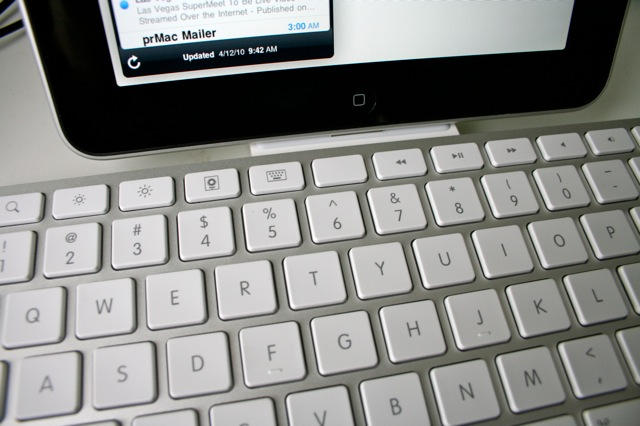
The weirdest thing about using Apple’s iPad Keyboard Dock is that you are constantly reaching for a mouse — a mouse that isn’t there, of course. The iPad doesn’t support mice. Instead, you should be tapping and swiping the screen.

Using the keyboard to work with the iPad takes you out of the multitouch mode and puts you back in mouse/keyboard mode. And while you can use the keyboard in a limited way to navigate the iPad, you can’t use many of the desktop shortcuts you’ve learned over the years, like Command-Tab to switch apps.

So using an iPad with a keyboard takes a little getting used to, but the $69 iPad Keyboard Dock is a very handy accessory, with a couple of caveats.

Set Up Network Drives Easily, Cheaply With Iomega’s iConnect [Review]

By

iomega_iconnect_2

Of all the accessories for the iPad, a networked-attached storage device may not be the first thing that comes to mind, but a NAS may actually prove to be very handy.

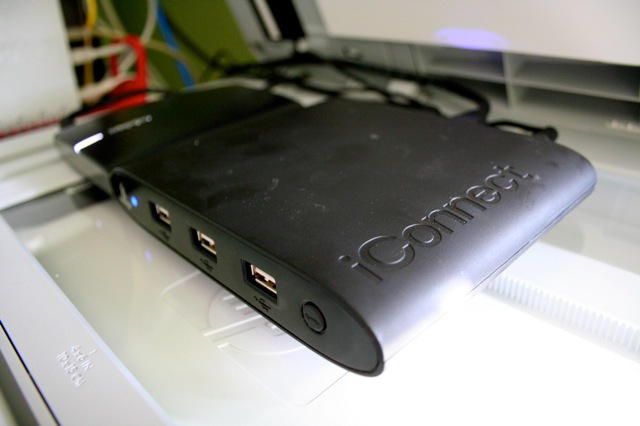
A NAS allows you to store all your memory-hogging media cheaply and in one place. Instead of buying the more expensive 64GB iPad, which will soon get filled with movies, music and other media, get the 32GB model and invest $100 in Iomega’s iConnect Wireless Data Station.

The iConnect is perhaps the easiest and fastest way to get an iTunes share on your home or office network.

Steve Jobs On Tradeoffs In New 13″ MacBook Pro

By

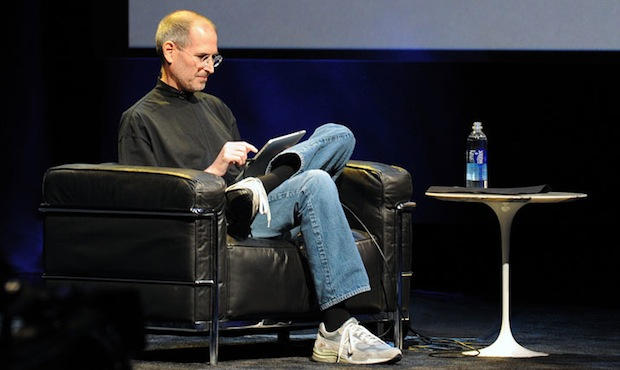
steve_jobs_ipad_typing

Steve Jobs has sent another of his off-the-cuff customer emails, this time about the not-so-fast chip in the new 13-inch MacBook Pro.

Some observers are complaining that the 13-inch MacBook still sports a rather lowly Core 2 Duo chip, which also powered the previous generation machine. Meanwhile, the 15-inch and 17-inch MacBooks got speedy Intel Core i5 and i7 processors.

One MacRumors reader sent Steve Jobs a note about it, who responded that Apple chose to offer better graphics and battery life rather than an increase in CPU performance.

The iPad Is The New Puppy

By

Mashable's Christina Warren checking out the iPad. CC-licensed photo by Grant Robertson. http://bit.ly/bjAX7S

The iPad is a total babe magnet, writer Jim Colgan has discovered.

Colgan took his new iPad on the streets of New York and got so much attention, he says it’s better than borrowing a puppy to talk to girls.

“If you’re looking for a dating aid, leave your friend’s dog alone and borrow an iPad,” he says.

Adobe To Apple: “Go Screw Yourself”

By

flash_on_iphone

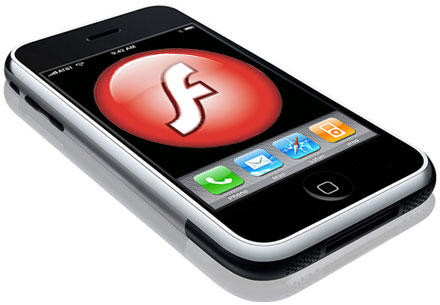
Even in the age of blogs, this has got to go down as a first for corporate PR. Adobe is telling Apple to “go screw yourself” over the new iPhone developer’s license that appears to ban apps made with Adobe’s Flash-to-iPhone programming tools.

Writing on the Flash Blog, Lee Brimelow, Adobe’s Flash Platform Evangelist, writes:

What is clear is that Apple has timed this purposely to hurt sales of CS5. This has nothing to do whatsoever with bringing the Flash player to Apple’s devices. That is a separate discussion entirely. What they are saying is that they won’t allow applications onto their marketplace solely because of what language was originally used to create them. This is a frightening move that has no rational defense other than wanting tyrannical control over developers and more importantly, wanting to use developers as pawns in their crusade against Adobe. This does not just affect Adobe but also other technologies like Unity3D. […] Now let me put aside my role as an official representative of Adobe for a moment as I would look to make it clear what is going through my mind at the moment. Go screw yourself Apple.

Note: this is an earlier version of the post copied by Via 9to5Mac.com before someone at Adobe ordered edits.

Steve Jobs Modestly Downplays iPad [Blockquote]

By

post-37210-image-d9d9a84b5eaaced81542475c50b77299-jpg

With typical modesty and restraint, Steve Jobs today downplayed the iPad hype. Pouring cold water on some of the hyperbole pundits have lavished on the device, he said:

“We think this is a profound gamechanger. We think when people look back some number of years from now, they’ll see this as a major event in personal computation devices.”

He was responding to a question about being surprised by the initial reaction. Here’s what he said in full:

Why the iPhone 4.0 Update Is a Very Big Deal (Hint: Apple v. Google)

By

iphone40software279

OPINION: Steve Jobs saved the most important part of his iPhone 4.0 announcement today till last — the new in-app advertising system, called iAds.

The iAds system is important because it allows the App Store to create a completely self-sustaining app economy that is sealed off from the wider Web.

Tech guru Tim O’Reilly says the App Store is already becoming a rival to the web itself. The App Store, he says, is “the first real rival to the Web as today’s dominant consumer application platform.” Consumers will have no need to visit the web on their iPhones and iPads if they get everything they need from apps, which is bad news for companies like Google.

“This is a new phenomenon,” Jobs said about apps at today’s presentation. This is the first time this kind of thing has ever existed. We never had that on the desktop, so search was the only way to find a lot of things.”

The App Store economy is already pretty well developed. There is the app purchase mechanism itself through iTunes, and in-app purchases, which allow consumers to buy stuff from inside apps themselves. But there was a big hole: advertising. Ads are already a big part of the app economy, but clicking on them typically takes consumers out of the app and into the browser, an experience Steve Jobs describes as jolting.

But now Apple has built a sophisticated ad-serving mechaninsm right into the iPhone (and iPad, natch), which will make the App ecosystem like AOL in the early days —  a walled garden. And one that has it’s own economy: in-app purchases, and now in-app advertising. There will be no need to go to the wider web anymore — and that cuts out Google.

“What’s happening is that people are spending a lot of time in apps,” Jobs said today. “They’re using apps to get to data on the internet, rather than a generalized search.”

No wonder Apple and Google are at war. Google swooped in a bought AdMob just to keep it out of Apple’s hands (so Apple snapped up Quattro instead). Of course, Google isn’t on the ropes yet. Android is Google’s attempt to keep it relevant in mobile, and so far it’s holding its own against the iPhone.

But if early numbers are any indication, the iPad is going to be an iPhone-sized hit. Combine the iPad, iPhone and iPod touch, and that’s a lot of mobile devices in Apple’s walled garden.

UPDATED: Steve Jobs Personally Demoed iPad for His Daughter at Apple Store

By

post-36685-image-ced4ab0b36c795a9a7fe6dd192355c9b-jpg

UPDATED: Steve Jobs personally demoed the iPad for his daughter at his local Palo Alto store on Saturday, and not, as this post originally reported, “for one lucky customer.” Confusion in the initial post stemmed from typos in a Tweet communicated to Cult of Mac by Twitter user Cédric Lignier, who wrote today to clarify his communication, which should have read:

“Met Steve Job @ Palo Alto today! I gave up my iPad spot 4 let him demoed the iPad 2 his daughter. Unbelievable!”

Jobs was at his local Apple Store on University Avenue in Palo Alto, which did brisk business in iPads Saturday, attracting big crowds. It looks like Jobs walked to the store (he lives nearby and is often spotted walking around Palo Alto). No one seems to have paid him much attention. The staff in the picture above, taken by Lignier, seem more concerned with crowd control.

Meanwhile, the iPad’s top designer, Jonathan Ive, quietly watched the mobs at his local Apple store in San Francisco.

Ive, who is famously shy and self-effacing, attended the iPad launch event at the flagship Stockton Street store, which was a mob and media frenzy. It seems few noticed him either, despite being the most famous designer in the world. The one person who did, Matt Galligan, scored this nice picture with him.

The iPad Review For The Rest of Us

By

P1060501_2

The first thing I notice about the iPad is that it’s wicked fast. Everything happens in a snap. Apps fly open. They close even faster. Web surfing is lickety-split, especially on a fast Wi-Fi connection. Netflix movies load almost immediately, and scrubbing through them is quick and painless.

I marvel at how seamless it is. Turning the pages of Winnie The Pooh is so gorgeous, I spend five minutes just turning and returning the pages.

Some new email comes in. Everything’s synced: email, address book, calendars, music and movies — all thanks to a two-minute setup in iTunes. I dash off a quick reply, and am pleased how easy it is to type on this thing. Woah — this is one slick gadget!

I know what you’re thinking. Should I get one for the kids instead of a nasty netbook? Can we replace our old PowerBook with it? Should I take it to a confernece next month instead of my heavy MacBook?

Read on…

iPad Not Charging Over USB? You Need a New Computer

By

IMG_9149
The iPad won't charge using the USB 2.0 ports of some older machines, like my $2,500 Mac Pro from 2006.

Lots of people are complaining that their iPads aren’t charging when plugged into their computer’s USB port. The battery indicator in the upper right corner says “Not Charging.” The iPad still syncs, however.

Don’t worry, it’s not a glitch. The iPad needs a high-power USB 2.0 port to charge, which are less common on older computers. Many USB hubs and keyboards with USB ports won’t work either.

The complaints seem to be coming from users of older Macs and some Windows laptop users. The front-facing USB ports on a 2006 Mac Pro, for example, don’t put out enough power to charge the iPad, but the ports on a 2009 MacBook Pro (13-inch) do.

Apple has published a support document that advises charging the iPad using the included power brick.

Better get a new Mac to work with your new iPad.

First Impressions – The iPad Seriously Rocks

By

IMG_9104

Although the kids have already monopolized CoM’s brand new iPad, here are some initial impressions. My colleague Jose Gutierrez also chipped in.

* It’s seriously WOW. A huge grin broke on my face the first time I swiped the lock screen. It’s so much better than just a big iPod touch. The size of the screen makes it a very different experience. I can already tell, using a mouse and keyboard is going to get old fast.
* It’s got great heft and feel. It feels tough and substantial, but the 1.5 lbs weight is going to take some getting used to. In fact, it’s heavy. Definitely need an armrest. Next model will likely be plastic backed. The glass screen makes it top heavy, especially when typing it portrait mode.
* At first I thought the screen was scratched — but there are shooting time lapse images of stars on the Home screen wallpaper. Hard to believe Steve Jobs didn’t spot this.
* The screen is bright and very sharp. HD video looks astonishing.
* It picks up greasy fingerprints super fast — in spite of the oleophobic coating.
* Out of the box it won’t turn on until you set it up through iTunes.
* Set up is super simple. Connect to iTunes (you need version 9.1) and there’s two choices: start from scratch or back up from iPhone.
* The UI is very fast. Apps launch instantly.
* Being able to put six apps in the dock is awesome. Many features like this and the custom wallpaper need to make it to the iPhone. Bookmarks bar in Safari is very nice.
* Keyboard needs work. Very difficult to type in portrait mode. In landscape, the keyboard dominates the screen. Might be a deal breaker for some.
* iPhone apps look horrible, especially Facebook.
* Some apps have bugs, due to lack of hardware availability to developers. Simulators can only do so much. Expect firmware upgrade soon as well as many app updates.
* The iPad’s speaker is pretty loud and perfectly adequate for watching TV or movies, even with background noise.

Overall a good product but will become an awesome product when people’s favorite apps are optimized for the iPad. A firmware update is needed to work out some bugs. Perfect for relaxing at home or on a plane. Not ready for the working world. iWork just not quite good enough due to file management constraints.

Please chip in your impressions in the comments. What do you guys think?

Pic of The Day: The iPad Instruction Manual

By

IMG_9106

Here’s the user manual for the iPad. It’s a single sheet that shows the layout of the three buttons. That’s it.

There’s some info about syncing on the back, and I know there’s a bunch of guided tour videos on Apple’s website, but this is a stark illustration of the radical simplicity of the device. And it is radical. You need no introduction. You pick it up and use it: no RTFM necessary.

(The backside picture is after the jump. It says download the latest version of iTunes and plug in your iPad to sync.)

How To Find In-Stock iPads

By

The iPad line in Miami. CC-licensed pic by Gubatron.

If you’re looking to score an iPad this AM, it may be wise to check the shopping site Milo.com before heading out.

The site has a page listing the availability of iPads at Apple’s retail stores and Best Buy.

The system hooks into the internal stocking systems at Best Buy and thousands of other retail stores (not sure how it has data from Apple).

Milo.com, tracks the real-time in-store availability of Best Buy products, and almost 50,000 other retail stores nationwide. No more driving to or calling all of the Best Buy stores in a hundred mile radius to locate what you are looking for. Early adopters in hot iPad pursuit can simply enter their location and type “iPad” on the Milo.com Web site or from their mobile phones and Milo.com will find the nearest Best Buy location with it in stock.

The 15th Guy In Line At San Francisco’s Best Buy

By

IMG_3055

Here’s the 15th guy in line at San Fancisco’s Best Buy on Harrison Street (the one sitting down). Everyone behind him — and there’s about half-a-dozen — better have both fingers crossed. There’s reportedly only 15 iPads at each Best Buy (but the limit is one-per-customer). Doors open any minute now. Good luck guys!

UPDATE: @Brent Jones in the comments says Best Buy seems to have plenty of iPads. “A Best Buy in St. Louis had at least 30 or 40 on hand. People walking up after the 10 a.m. opening had no problem getting one.”

Where the F*@k Is UPS?

By

Leigh_UPS_scan

Anyone having a UPS anxiety attack? Hitting refresh every 30 seconds and still not seeing those magic words: “out for delivery.”

Our friend Leigh in Texas says he still hasn’t received his iPad, and it’s after 10AM. He’s standing by the window, acting like a “nervous mother.”

Are you freaking out? Please tell us what’s going on in your neck of the woods.

Watch iFixit’s iPad TearDown As It Happens

By

post-36514-image-47a66944d4e06691755104fd3951500a-jpg

iFixit sent three staffers to the east coast to score an iPad as early as possible, CEO Kyle Wiens told me yesterday. Looks like it worked and they are busy tearing it apart. They are posting the dissasembly as they go — you can watch the action as it happens. It’s the perfect distraction while standing in line for an iPad.

Some highlights:
* This machine is absolutely gorgeous inside. There’s clear symmetry that is there for aesthetics alone.
* The rear case is CNC machined from a solid block of aluminum, using the same process as the MacBook Pro.
* Apple has used more epoxy to secure chips to the board than we’ve seen before. This indicates that it is designed to be even more rugged than their laptops.
* The battery isn’t soldiered onto the motherboard. That means replacing the battery *is* feasible for users who do not want to give up their precious for a week. (And then get back someone else’s iPad!)
* This unit is different from the FCC photos. Toshiba DOES NOT have the flash memory in the production units! Instead, Samsung has secured a major win.

Update: Wiens’ local paper has a story about what iFixit is up to this morning and how they document the teardowns.