Mobile menu toggle

Charlie Sorrel - page 111

System Service To Save Text to Notes.app In Mountain Lion

By

new-note-sshot.jpg

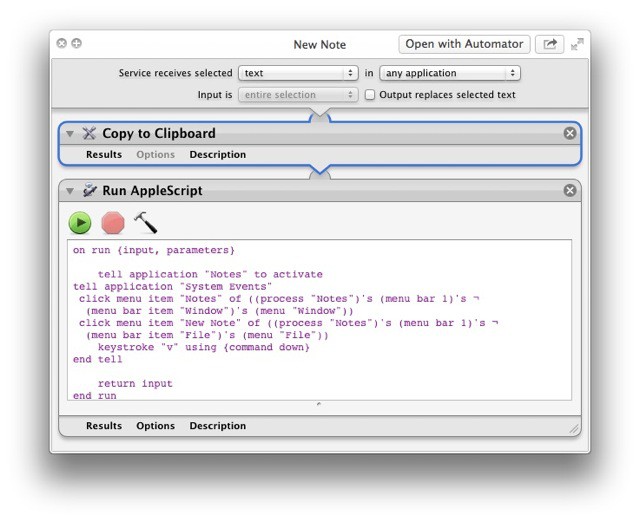
When you think about it, it seems absurd that there’s no way to add the currently highlighted text on your Mac to your notes. The Notes app, which is the spiritual successor to Stickies, with the advantage of a) not clogging up your screen with yellow squares and b) syncing with your iPhone and iPad, is pretty great. But it lacks, inexplicably, a way to quickly clip the selected text.

This little System Service, which runs an Applescript, will fix that for you.

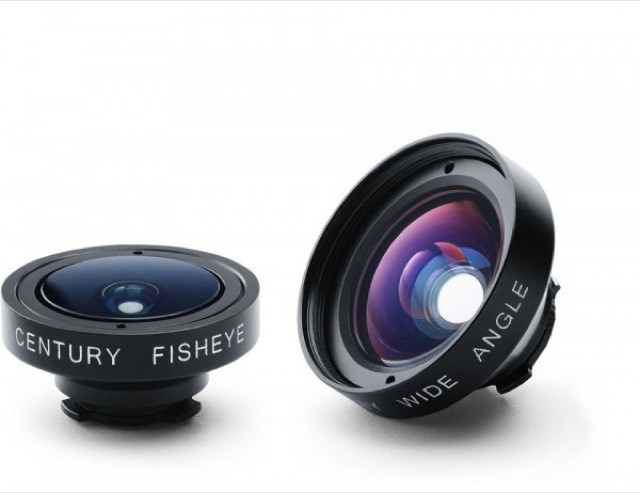
Schneider iPro Series 2 Adds Two New Lenses And iPhone 5 Compatibility

By

lenses-600x462.jpg

Yesterday, I visited the nerd-o-rama that is the annual Barcelona comics convention, and along with the overweight folks in too-tight superhero costumes, there were overweight folks in black t-shirts and sweatpants taking lots of photos. And their comfy clothing choices were explained by the fact that they had to carry like 20 kilos of glass in their camera bags.

Next year, they might be able to dress a little better whilst also saving their spines, using the Schneider iPro Series 2 lenses for the iPhone 5.

Smarter Stand For iPhone Really IS Pretty Smart [Review]

By

smarterstand-1.jpg
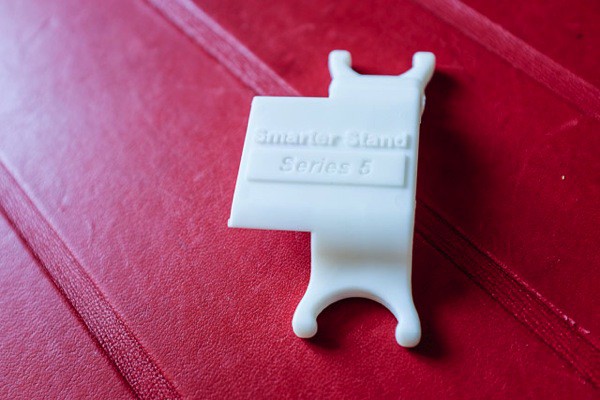
Smarter Stand by SmarterFlo
Category: Stands
Works With: iPhone 5
Price: $12-ish

Don’t you hate it when your earbud cable gets tangled? I know I do (but not as much as I hate Apple’s stupid earbuds themselves). Luckily, Dotan Saguy has come up with the Smarter Stand for the iPhone, a pliable plastic widget which not only acts as a place to wrap your earbud cable, but also as a handy-dandy stand for the iPhone.

I have been using one for a little while now and it turns out to be a pretty useful little gadget.

Tips For Living Frugally & Saving Drive Space On A Tiny Mac SSD [Feature]

By

5386712834_3a00a0d392_z.jpg
Don't end up like this. Photo Pennuja/Flickr

I recently switched to a MacBook Air for writing, and it is easily the best Mac I’ve owned in terms of speed and comfort. But, like the sports car your friends assume you’ll sell now that you have kids on the way, the Air is also lacking in space1.

Now, I’m using this 128GB (with 4GB RAM) 13-inch MacBook Air primarily for work, but that doesn’t mean I want to ditch my music, TV shows and photos altogether. Luckily, with modern Internet™ Technology™ I don’t have to. I can use cloud services and a little judicious tidying to make my New York walkup-sized MacBook Air feels like a mansion.

The Pad&Quill Aria Will Still Be Around After You And I Are Dead [Review]

By

1365692756.jpg
Ariaby Pad&Quill
Category: Cases
Works With: iPad mini
Price: $90

I called the Pad&Quill Aria the “classiest iPad mini case yet,” and I’ll stand by that after using it for a week or two. It’s also most definitely the sturdiest, best crafted case I’ve ever seen, and the fanciest that Brian Holmes and the P&Q crew has come up with to date.

But can such a fancy case ever be practical? Let’s take a look.

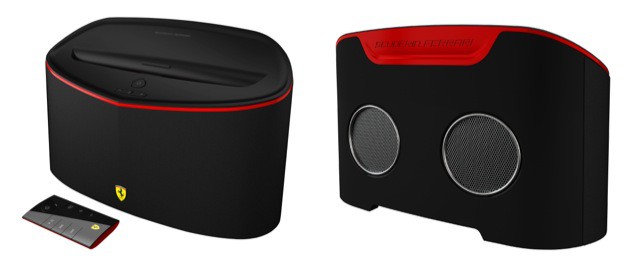
Vrooooom! Single Men Everywhere Will Love The “Ferrari” AirPlay Speaker

By

Front_Back.jpg

Hey fellas. You know what the laydeez love more than anything? Ferrari-branded gear, that’s what. When they see a man in a Ferrari jacket, or toting a Ferrari laptop, or – best of all – topped with a Ferrari baseball cap, do you know what she thinks? She thinks that you must own a Ferrari! Or that you drive one for a living, probably in those macho Formula One races.

More than anything, she can’t stop thinking about your Grand Prix.

Manfrotto Brings “Stile” And Bad Spelling To Camera Bags

By

stileee.jpeg

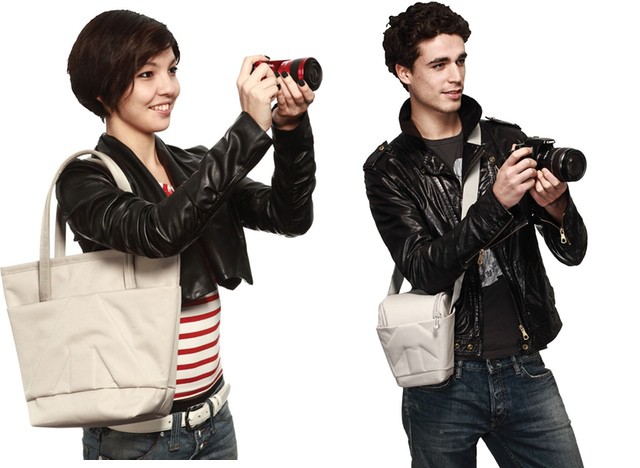
Face it. Camera bags are dorky as all get-out. I avoid them entirely, either dropping my camera into the pocket of a regular bag with a pair of woolen socks underneath for padding (true, and it works great in my Rickshaw Zero Messenger) or putting it and its accessories into a padded liner that slips into any other bag I might want to use.

But Manfrotto (Bogen in the U.S) has hit on the formula for cool camera bags. The secret? Calling them “Stile” bags and taking photos of them being used by young people in leather jackets.

MagSkin Case Will Stick Your iPhone To Almost Any Kitchen Appliance

By

cult_logo_featured_image_missing_default1920x1080

You know when you make a Skype call and your own voice echoes back at you, and you find it impossible to concentrate on anything except VIOLENCE and KILLING! Please make it STOP!?

And you also know how cool it is when you pull out your credit card, or slip your bank card into an ATM and it just doesn’t work? Like it’s been zeroed out by magnets? Well, imagine if you could somehow combine these two things into one.

You need imagine no more: Daniel Weyer has done the hard work for you. Behold! The MagSkin case.

Antisocial Place-Tagging App Rego Updated To Use Foursquare Database

By

rego.jpeg

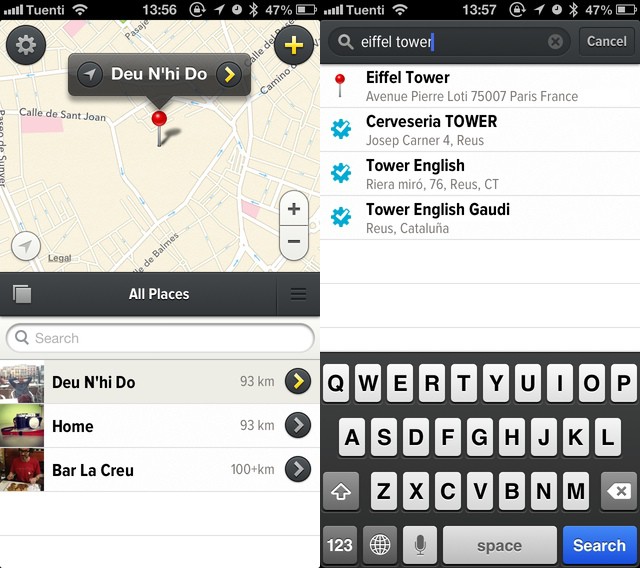
Remember Rego? It’s the place-saving app whose name means “asshole” in Brazil, and which lets you check-into and remember locations without sharing them.

When the app launched a couple of weeks ago, I moaned,whined and complained endlessly about the lack of a search function for places – you just had to swipe and pinch your way there manually. Now v1.1 is here. And it brings search, accessing the Foursquare database, as well as using Apple Maps search and grabbing places from your contacts.

Nikon Hack Removes Arbitrary Tax-Dodging Video-Clip Time Limit

By

post-222876-image-e83fbb2502e35014cfd460cf070501f8-jpg
Warning: Hacking can endanger your camera. Photo: Charlie Sorrel

If you have a Nikon DSLR, then you can now shoot long takes of more than 30 minutes each, thanks to the tireless work of the Nikon Hackers team. This might be of limited interest even to our camera-loving readers, but what is interesting is the reason Nikon added the 30 minute limit in the first place.

$6,000 Walnut Desk With Clever Dual-Opening Drawers

By

colors-cartesia-desk-xl.jpg

You know what? I’ve never looked at my desk and thought “I really wish that I could open two drawers at the same time, and yet still have easy access to the bottom one.” That’s not to say the Cartesia Desk is a bad idea. Rather, it shows my lack of imagination. The only thing I think of when I look at my desk is “where the hell am I going to put all my junk while I use the ironing board to actually iron some clothes.”

ZenDock Hides All your Messy Peripherals And Cables Out Of Site

By

zendock.jpg

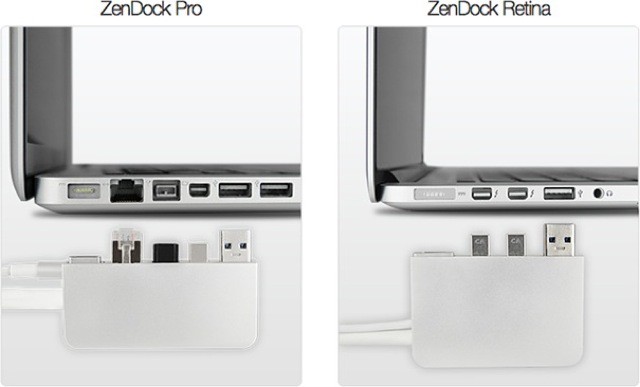
Zenbox’s slogan really says it all: “Hide the mess behind the desk.” As a dedicated throw-everything-in-the-closet-and-slam-the-door-before-it-falls-out practitioner, I can get behind this 100%. The Zenbox is a dock for your MacBook Pro: you plug one end into the left side of your Mac, and plug your various peripherals into the other.

The USP of this dock over others is that those peripherals sit at the end of a cable, letting you throw all of your junk behind the desk and only have to deal with one tidy box.

Get Started Pano Glitching With Your iPhone Camera

By

glitchy.jpg

Pano Glitches are a the new fake light leaks. Only they’re better. Pano Glitching involves setting your iPhone to shoot a panorama and then dicking with it on purpose. Instead of following the instructions to smoothly sweep the iPhone across the scene in front of you, you can quickly switch views, or just jerk the phone in your hand. 

Panasonic GF6 Talks To Your Phone With Wi-Fi And NFC

By

gf6.jpg

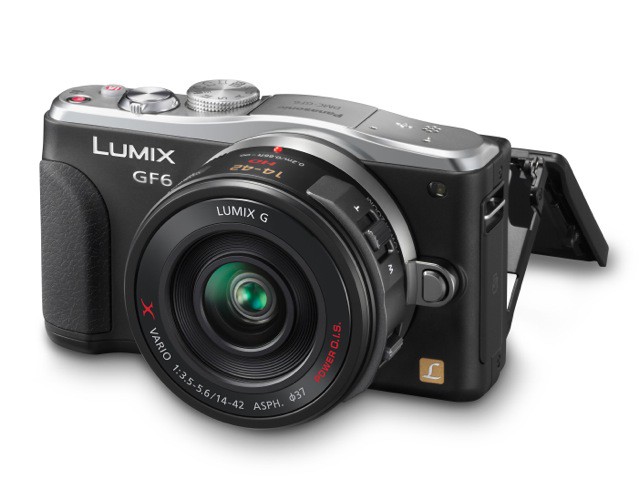
Panasonic’s new GF6 Micro Four Thirds camera has two new gimmicks: NFC and Wi-Fi, with the latter acting as a fast way to set up a Wi-Fi connection between the camera and an NFC-enabled phone.

Along with this it brings a new 16MP sensor, fast startup and the promise of great low light performance. Let’s take a look.

How Instagram Made Me a Better Photographer [Opinion]

By

Unknown.jpeg

A few weeks ago I plugged in an old hard drive and saw some scanned photos from when I used to shoot film. In my memory these pictures were some of the best I had ever taken, and I naturally blamed my tools for the fact that I hadn’t snapped anything better with my various digital cameras in the years since.

But you know what happened? I saw these old pictures and realized that they just weren’t that good. The fact is, I snap better pictures every week using my iPhone. And I think I know why. It’s all Instagram’s fault.

PopAGraph Is A Fun Masking App For iPhoneographers: With A Twist

By

popagraph.jpeg

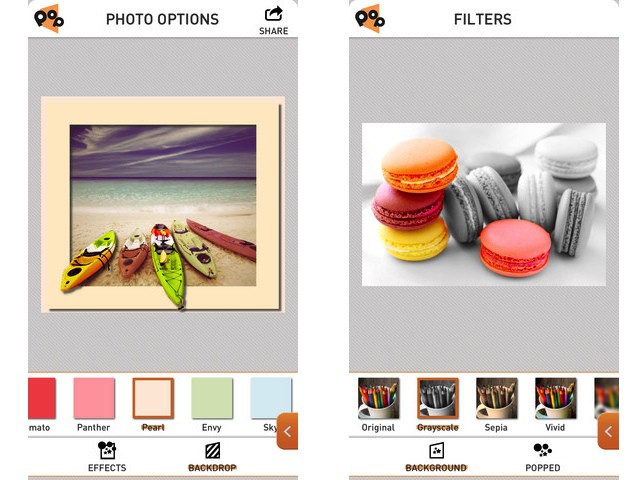
PopAGraph is Yet Another iPhone Photo Editing App (YAIPEA), but it brings a slick interface and a nice new gimmick to the game. The idea is that you create quick masks for your photos, and then apply effects to the masked (and unmasked) sections. Then – and here’s where the name comes from – you can frame the picture so that the subject pops out over the edge.

The example picture of the boats at the top of this post shows exactly how it looks.

Pixter, A Fast, Accurate And Good-Looking OCR App For iPhone

By

pixscan.jpeg

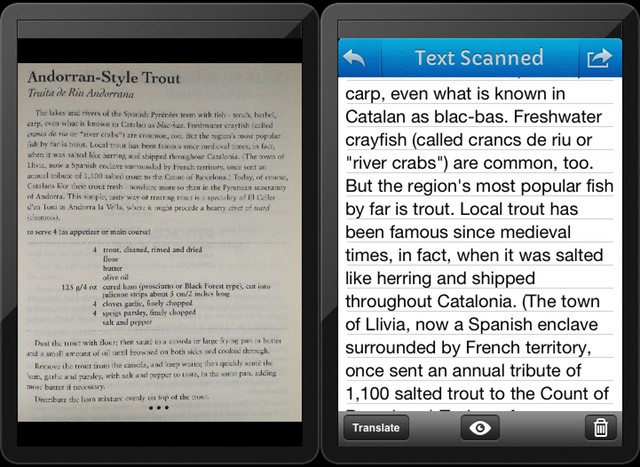
A few months back, I spent far too many hours trying to find an app which would scan a page of text and turn into actual, editable text. I found none. Or rather, I found nothing good. There are plenty of OCR (optical character recognition) apps in the store, but they were either inaccurate, or ugly, or (most often) both.

And while Evernote is excellent at letting you search on scanned pages and even your handwritten notes, you don’t get to touch the text itself.

I gave up, and now – as usually happens with my “urgent” research projects, I’ve forgotten why I needed it on the first place. Which is a shame, as Pixter Scanner has been launched,and it is quite excellent – with one huge annoyance, for me at least.

Ulysses 3, A Text Editor From The Future [Review]

By

umaster.jpg

Ulysses 3 by Soulmen
Category: Text Editor
Works With: Mac
Price: $40

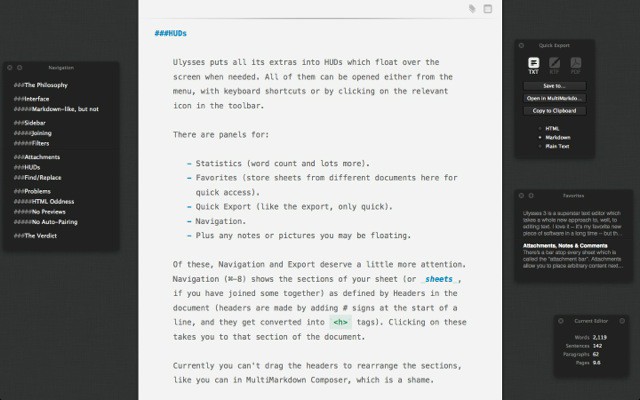
Ulysses 3 is a superstar text editor which takes a whole new approach to, well, to editing text. I love it – it’s my favorite new piece of software in a long time – but there are one or two gotchas which could stop me using it full-time to write posts for the web.

Want to know more?

Samsung Wi-Fi Galaxy Camera Will Cost Almost $600

By

TS520x0cms_posts-5821902581-Samsung_Galaxy_camera.jpeg

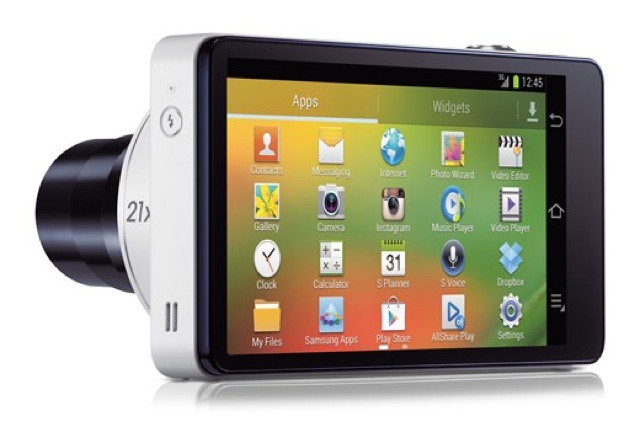
There seem to be two ways to make a Wi-Fi-enabled camera. The first is to build an actual camera and add a Wi-Fi radio. The second is to make an iPod Touch with a decent 5MP camera module inside. Depending on your requirements, either one can be great.

But there now appears to be a third way. Samsung has taken a camera, added an Android phone, and then taken away the phone part of that phone. Behold! The Wi-Fi Galaxy Camera.

Keyper, A Lovely Leather Wallet For Keeping Keys

By

keyper-xl.jpg

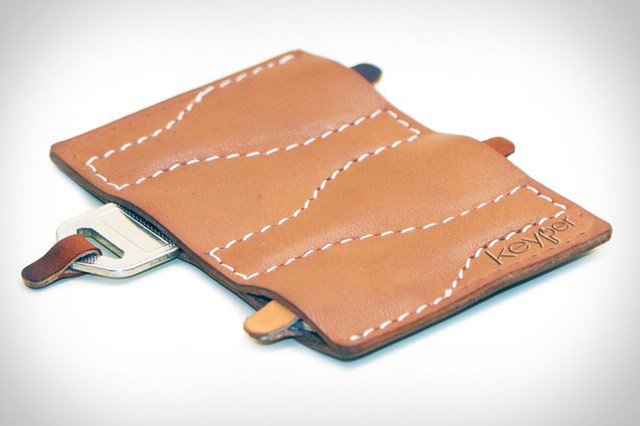
The Keyper isn’t strictly a Mac-related gadget, or even an iOS-related one. But I’m writing it up for a few reasons anyway. One, it’s gorgeous. Two, leather confections are a favorite of our esteemed deputy editor John Brownlee. And three, it actually is pretty iPhone and iPad friendly because it’ll stop your keys from scratching up their screens if you toss the lot n a bag or pocket together.