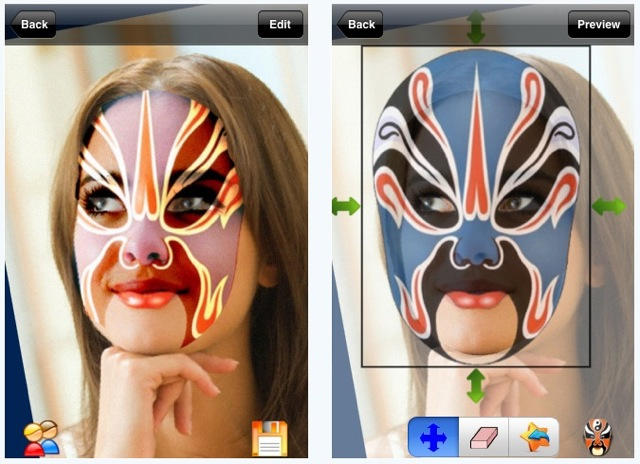
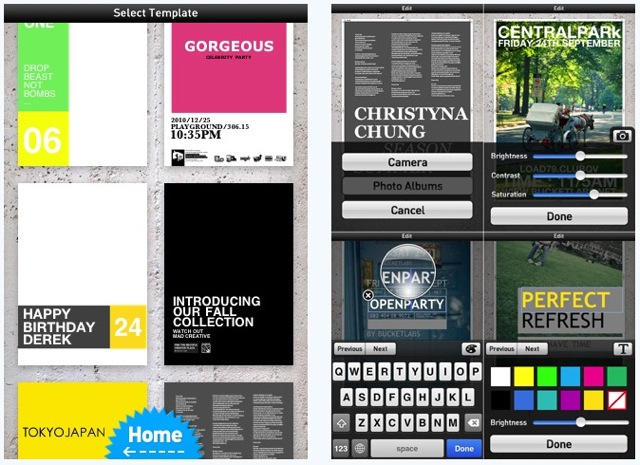
Photo effects apps are two-a-penny on the App Store now, so if your photography app is going to make a splash it needs to offer something more than just whimsical visual effects and a selection of fake-Polaroid borders.
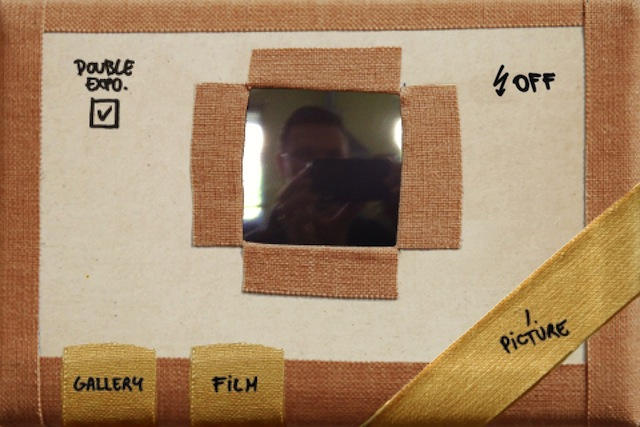
Pinhole Camera claims to turn your iPhone into a digital pinhole camera. It’s quite fun to use, mocked up like a home-made pinhole cam made of sticky tape and cardboard.
But what sets it apart isn’t the basic photos – it’s the double exposure feature that lets you merge two photos into one.
If you’ve not discovered Trainyard yet, it’s high time you got yourself to the App Store and spent a dollar on it. It’s one of those games that offers a great deal of entertainment for a very low price.
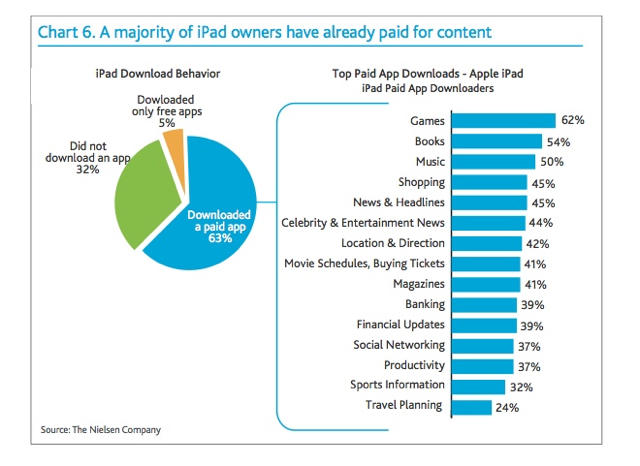
For those of us who practically live in third-party apps, it can be hard to believe that it’s even possible to own an iPad without immediately hitting the App Store… but a new Nielsen survey says that the app-less iPad is a common occurrence.
How common? According to the Nielsen Company, who polled over five thousand owners of “connected devices,” one-third of the iPad owners surveyed have never downloaded an application at all.
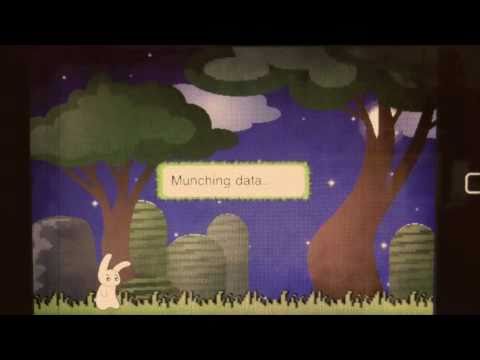
There’s plenty of Twitter clients on the App Store, from Twitter’s official software to power apps like TweetDeck, but watch this peaceful and somnolent video for the somewhat regrettably named Super Twario and you’ll have discovered one of the most pleasant Twitter clients around.
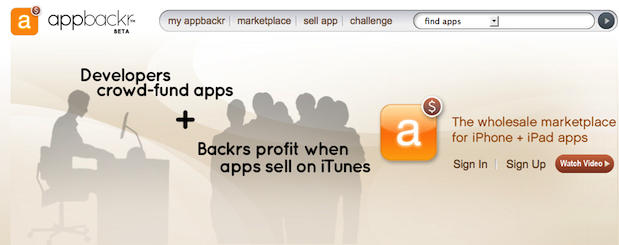
AppBackr was launched this week as an invitation only beta. The service offered by AppBacker, Inc. of Palo Alto, California offers iOS app developers a new way to get cash advances for future app sales. Developers earn these advances by selling their apps wholesale to buyers via the AppBackr online catalog.
The return on the buyer’s investment depends on whether or not the app sells well. This sounds risky for the buyer, but not necessarily since they are expected to promote the app in magazines, blogs, etc. or they might just hire a good public relations firm to help.
Therefore AppBackr provides three very important services to app developers that are not very easy to come by: marketing, financing, and an online wholesale sales catalog.
For new iPhoners, the idea of gulping down unlimited swathes of data is just a magical thing of the past, spoken of with hushed tones, in the days before fear of data overages gripped the iPhone universe.
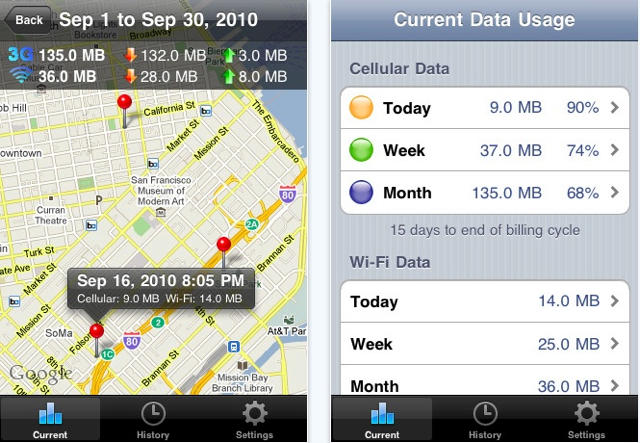
Fear not though, new iPhoner — the tools exist to keep from accidentally punching through the monthly 3G data allotment. Readers who’ve been following our Essential App series (and who live in the States) have no doubt already equipped their iPhones with AT&T’s free myWireless app, which counts and bar graphs data usage; but there’s an even more precise and powerful weapon available: DataMan
Steve Jobs’ hypnotic cadence and idiosyncratic showmanship is obviously well-known enough to be channeled by international comedians looking for a laugh: over in Hong Kong, the Mass Transit Railway has just launched a new app, and they did so by hiring their own Chinese Fake Steve Jobs in the form of Law Kar-Ying to reveal it on stage. Law seems to have studied the man he was emulating quite well: he gets everything right, from the gulps of bottled water to the Levis and turtleneck. Hilarious.
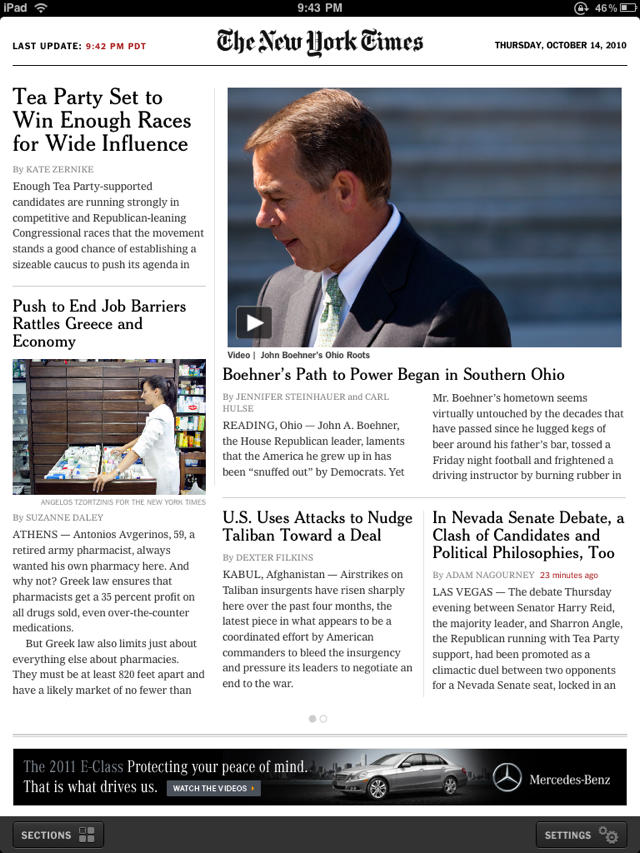
One of the great disappointments of the iPad has finally been remedied. After six months of living with the extremely limited app NY Times Editor’s Choice, the iPad has finally gotten “All the News That’s Fit to Print.”
The App Store pushed out NY Times 2.0 less than an hour ago. The free, all-new iPad appcontains the full content of the Paper of Record, along with the contents of a select number of the Times’s blogs. It’s the whole newspaper, but better than the print edition.
Enjoy it while it lasts, though. The Times promises that a paid subscription will be required starting in early 2011. Here’s hoping that a print subscription will grant access, unlike what the New Yorker is doing with its iPad app.
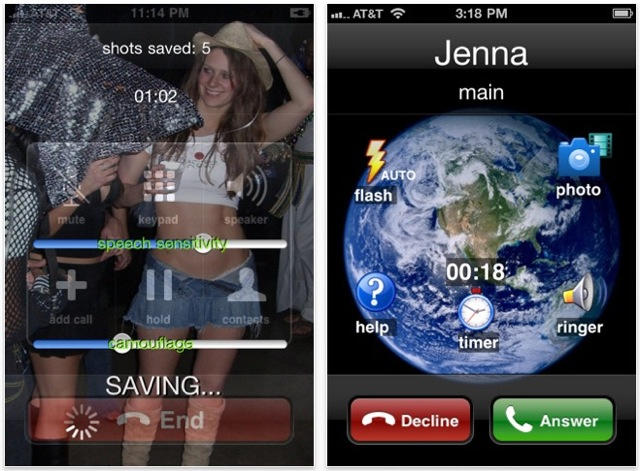
It’s a camera app that goes out of its way to avoid looking like a camera. It disguises itself as an incoming phone call. You can even instruct it to activate your phone’s ringtone, so you can pretend to take the call and hold the phone to your ear.
Up until 1996, id software’s Doom engine was pretty much the de facto technology driving the best and most advanced PC computer games on the market, including Doom, Doom 2, Heretic, Hexen and Strife. Then id software released their next game engine, Quake, which boasted true 3D environments, and any game that still ran on Doom’s 2.5D engine was barely worth a laugh.
That was very unfortunate for HacX when it was released in 1997. The last commercial game using the Doom engine, HacX boasted some incredible enemy, weapons and level design, but was ultimately as ignored at retail (where it was passed over for flashier games running on truly 3D engines) as it has been forgotten by all but the most die-hard retro gamers.
I was delighted to hear, then, that HacX has gotten a new lease on life, as it has been ported as a free app for the iPhone and iPad. It’s still using the Doom engine, just this time it’s using the updated iPhone engine released by id software’s own lead programmer, John Carmack.
Here’s hoping that HacX can finally get some of the recognition it deserves this time around.
It only took hours for the iPhone Dev Team to successfully jailbreak the newest AppleTV through the SHAtter exploit once it slid through their front mail slot, which should at the very least open the door to hacks like native 1080p playback and which might — fingers crossed — allow the new AppleTV to run apps.
But how hard is it going to be to install and execute user apps on the new AppleTV once the jailbreak has been officially released?
iPhone hacker Steven Troughton-Smith has done some homework and there’s good news and bad news. On the one hand, he has confirmed that you can actually install applications to the AppleTV already. The bad news? There’s no way to launch them once they’re on the device.
Taking a break from the Smartphone Wars to fight a growing threat, Apple and RIM are speaking with one voice when it comes to a common scourge afflicting their App Stores: No More Fart Apps!
According to Alan Panezic, RIM’s Vice President of Platform Product Management:
For us, apps are all about adding real value to the end-user’s life and creating revenue for developer. We don’t need 200 fart apps in App World. Those are apps you’ll use three or four times then never open again. [recombu]
This mirrors the sentiment expressed by Apple three weeks ago with the release of their App Store Development Guidelines:
We have over 250,000 apps in the App Store. We don’t need any more Fart apps. If your app doesn’t do something useful or provide some form of lasting entertainment, it may not be accepted. [Apple]
You know the scourge must be serious when Apple is forced to take this stance even though their own Director of Applications Technology (and Influencer of App Store Approvals), Phillip Shoemaker, previously developed fart apps for the iPhone.
This was probably inevitable. I suspect we’ll survive. But Cartman is furious.
We’re giving away a very sophisticated bundle of apps this week. We’ll start out in the study, browsing through and listening to the Classics. Then we might dabble in a little alchemy with the flaming Professor Helsing! We’ll pick 5 random winners to win 4 great apps and if you want a chance to get your hands on some these iPhone apps this week, then follow the instructions carefully below:
Tag us both in your status : “Cult of Mac and Appular are throwing one classy iPhone App Giveaway!”
Your status tag will be your entry into the giveaway, only ONE entry is allowed per person, and the giveaway will last until 11:59pm tonight. We’ll contact the winners on Tuesday or Wednesday about how to get the codes!
Optional step – Tell us what you think about these apps if you own them already in the comments section.
Special Thanks to Appular for helping us put together these app code giveaways! If you’ve got a mobile app that you’d like marketed effectively, contact the good folks at Appular!
More and more, the publication of Apple’s App Store Review Guidelines is starting to seem like it might be a promise of the end of arbitrary app rejection. Following the surprise about course by Apple when it comes to allowing Google Voice apps on the App Store, it now appears that they’ve also rescinded their long-standing ban on App Store ringtone makers.
Pretty much since the App Store’s inception, applications that allowed users to make ringtones from the songs on their iPhone have been verboten. Exactly “why” has always been up for debate: although Apple did sell ringtones through iTunes, they clearly didn’t mind users rolling their own, as evidenced by GarageBand’s Export Ringtone feature. Whatever the reason, though, it was plenty hard to sneak a ringtone maker by Apple up until recently. Since the publication of Apple’s App Store Review Guidelines, though, no less than five ringtone makers have gone live on iTunes… seemingly ending the arbitrary blacklisting.
If you’ve ever wondered what killed off AT&T’s unlimited bandwidth plans, look no further than the App Store.
The study was performed by Finnish analytics company Zokem, which analyzed the mobile web usage of over 10,000 smartphone users across 6.5 million sessions in sixteen countries over the past year.
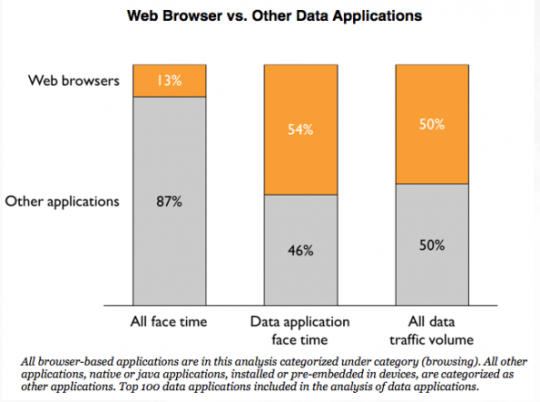
What Zokem found was that while a smartphone’s mobile browser — Safari, in the case of the iPhone — is still the biggest bandwidth hog on most smartphones, apps are now taking up 50% of mobile data volume. Predictably, the most popular apps across all smartphones are Facebook and Twitter.
Keep in mind that this study was not aimed at any particular platform, so iPhone users were lumped in with Android, Palm and Windows Mobile customers as well. Given how well-developed the iPhone’s App Store is compared to its competitors equivalent marketplaces, though, I wouldn’t be surprised if iOS device users use up an even larger percentage of mobile data through apps. At the end of the day, though, the disparity between app and browser usage is only going to get more profound as more media — and perhaps iTunes itself — enters the cloud.
The Parallels Desktop
has been updated to version six today, bringing over eighty new features to the Windows virtualization program, including enhanced performance and vastly improved 3D graphics rendering speeds…. but maybe it’s neatest trick is finally letting you run Windows 7 on your iOS device.
Well, kind of. Parallels isn’t actually virtualizing Windows on your iPhone or iPad. Rather, the Parallels Mobile App is basically a VNC, allowing you to seamlessly connect and control your Parallels Windows install from any network-connected iOS device. Fair warning, though: things get a bit cramped trying to drive Windows from your iPhone.
Parallels Mobile is a free download from the App Store, while Parallels Desktop 6 costs $80, or $50 if you already own version 5.
This weeks must-have iOS apps include Nike’s latest to help you track your run stats, professional HTML emails on your iPhone with MarkdownMail, quick and easy invoice creation for your business, and AppShopper’s new app that helps you keep track of the App Store.
Check out a few of our favorite apps from the past week after the break!
Last year, Apple pulled Google Voice’s official application from the App Store without either ceremony or explanation. The move always seemed pretty suspect, and intended more to protect the interests of AT&T than iOS users, but it seems that there is good news on the horizon: Google Voice is likely heading back to the App Store.
According to the developer of the third-party Google Voice application GV Mobile, he emailed Apple’s approval board after the release of yesterday’s App Store guidelines, pointing out there seemed to be no provision at all explaining a Google Voice ban, and asking what the chances were of getting his app reinstated. Apparently, the response was encouraging, and Kovacs was led to believe that if he resubmitted his app, it would likely be improved.
On Google’s part, they say they have nothing to announce at this time, but if third–party Google Voice applications start getting approved again, it’s very likely the official app will soon possible. Let’s hope that Kovac’s exchange wasn’t a fluke and Apple has come around on its senseless ban against Voice once and for all.
The popular open-source media player VLC is headed to an iPad near you thanks to App Store developer Applidium… and while it’s currently waiting for approval, there’s every indication that this time, Apple will let it through.
That wouldn’t have been the case a few months ago: Apple had tended to reject media playing apps from the App Store for “duplicating functionality.” This was an extraordinary headache for individuals who wanted to watch media on their iOS devices without first undergoing the cumbersome conversion process to QuickTime compatible MP4.
Recently, though, that’s started to change, with Apple approving more universal media-playing apps like OPlayer and CineXPlayer. If the new VLC is subject to the same standards, it should have no problem getting through the approval process.
Let’s keep our fingers crossed that it does. VLC has long obviated QuickTime on my Mac. I’m ready to let it do the same for my iPad as well.
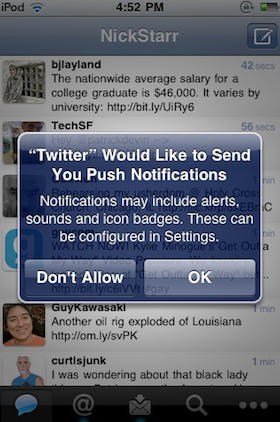
Twitter for iPhone — née Tweetie — is a wonderful first-party client with almost any functionality you could care to name, but one area in which it loses to some of its competitors is in its lack of support for push notifications.
No worries, though, because along with yesterday’s triumphant debut of Twitter for iPad, the iOS team are also working on integrating push for iOS 4.1.
We’ve been testing push notifications internally. When we launched Twitter for iPad, there was a configuration error that caused us to offer push messages to a small set of users. We’ve stopped sending push messages, but users may see an option to turn on push until we release an updated version of the app. So, push isn’t ready yet but we look forward to rolling this out soon.
As Twitter notes, you may be able to turn push notification on under settings even if you aren’t on iOS 4.1 Gold Master, although we’ve heard reports that it may require uninstalling and reinstalling the app to get working.
Perhaps not so coincidentally, push notification service Boxcar — which does a healthy bit of business in the tweet pushing market — has just gone free for all Twitter notifications.
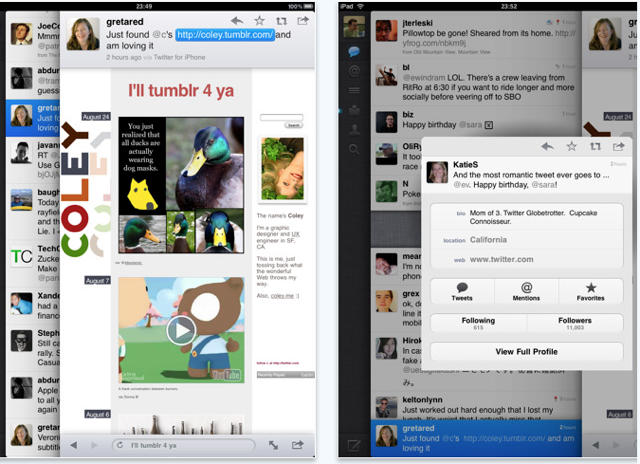
The lack of an official, native version of the Twitter client for the iPad has been a puzzling omission, but now the big blue bird has set things right, having pushed their native iPad app to iTunes.
I haven’t had a chance to play with it, but it seems that a big part of the native client’s delay was because Twitter had big ideas for the app, grafting a truly unique (and, perhaps, a bit quirky) interface on top.
Gizmodo’s Matt Buchanan explains the new interface:
The interface starts out straightforward, like a simple cross between the Tweetie for Mac and the iPhone app. But Twitter for iPad is actually a bit more complicated than it lets on—it’s the most complex of the three. Rather than sticking with the iPad’s standard split-pane views, like in Mail, Twitter is kind of like its own desktop environment, with overlapping, stacked panes that move from left to right. So, on the far left, you’ve got the main control panel, like Tweetie for Mac, which is the bottom pane. To the right of that, and on top of it, you’ve got the tweet list—either the main feed, mentions or direct messages. Whenever you touch on a tweet, a third pane opens to the right, on top of the other two. If there’s a link in the tweet, it’ll open the browser. If not, it’ll open that person’s somebody’s profile. (And if you type a direct message, that’s layered on top of everything else via a popover, for four total layers.) You can switch back to the main tweet list or control pane by touching it, and it’ll load browser pages in the background while you browse through other tweets. It can get cluttered quickly if you’re opening sub-menus and other things—at the same time, it gives you a lot of flexibility.
Buchanan ultimately finds the new interface bold, but quirky, but Techcrunch’s MC Siegler declares it a triumph, announcing that it completely and totally obviates not only any other Twitter app out there, but Twitter’s own website. Then again, I thought pretty much any Twitter client had killed the need to visit Twitter.com over a year ago.
Twitter for iPad is a free download, and it’s available now on iTunes
Popular multi-IM and voice-chat service Fring has just been updated to bring 2-way video calling on iPhone 4 over 3G (Apple’s FaceTime is Wi-Fi only), as well as voice and text chat.
We’ve tested it out; while it has a few minor issues, Fring has freed videochat from Wi-Fi. If you like to videochat on your new iPhone 4, it’s a must-have app.
Apple has set up the most astounding wall we’ve ever seen. It is filled with 30 24-inch Apple Cinema displays that are synchronized and powered by 30 Apple Mac Pro workstations is a Matrix movie like waterfall that displays the top 50,000 apps in the iTunes App Store.