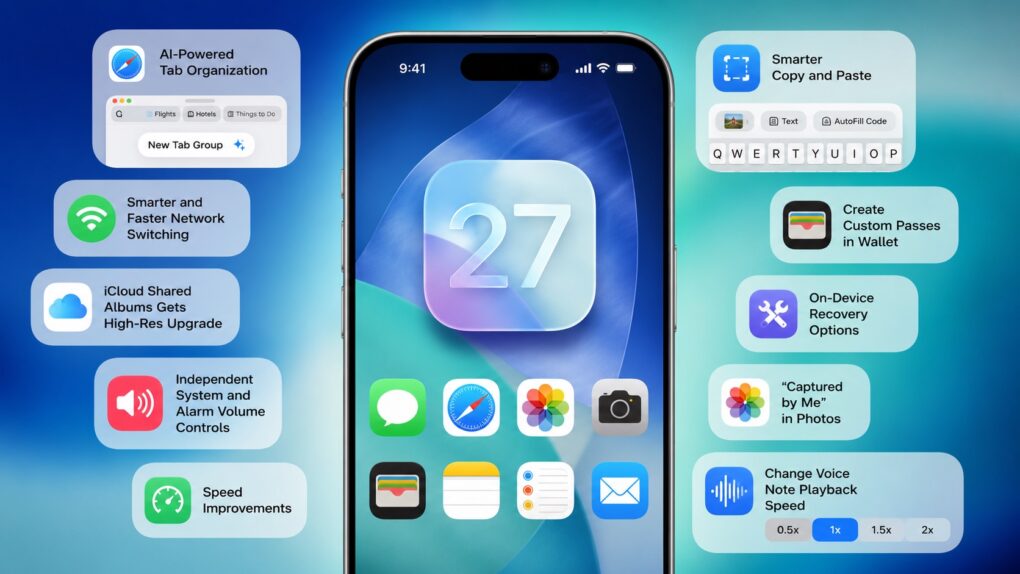
 Apple spent the majority of WWDC26’s opening keynote talking about Siri AI, Apple Intelligence upgrades, Liquid Glass refinements and performance enhancements. But iOS 27 packs much more than that. There are several smaller changes that Apple did not talk about onstage.
Here are some of the best hidden iOS 27 features you might have missed.
10 hidden iOS 27 features Apple barely mentioned at WWDC26
Apple’s AI ambitions stole the spotlight at WWDC26, but the most meaningful upgrades might be the features Cupertino’s execs barely bothered to mention. The iOS 27, macOS 27 Golden Gate and iPadOS 27 updates come loaded with dozens of small fixes aimed at everyday annoyances that have lingered for years.
None will grab headlines on their own, but together they reveal a savvy strategy for this year’s operating system upgrades: less reinvention, more refinement, and a renewed focus on making the iPhone, Mac and iPad feel faster, smarter and less frustrating to use.
Aside from Siri AI and Apple Intelligence, Apple focused on usability upgrades. That’s arguably better than making major changes, as it promises a better overall user experience. Here are the new features coming to iOS 27, iPadOS 27 and macOS 27 that will address long-standing user frustrations or make things more convenient.
Table of contents: Hidden iOS 27 features Apple barely mentioned at WWDC26
- Customize the Messages app text input field
- Smarter and faster network switching
- iCloud Shared Albums gets a high-resolution upgrade
- Independent system and alarm volume controls
- Speed improvements
- Smarter copy and paste
- Create custom passes in Wallet
- On-device recovery options
- ‘Captured by me’ in the Photos app
- Change voice note playback speed in Messages
1. Customize the Messages text field
Following public criticism from Justin Bieber on Instagram last year, Apple addressed a major frustration with the Messages app.
The singer complained about the Messages app’s placement of the dictation button in the same location as the Send button. This led him to accidentally hit the mic button, repeatedly pausing his music.
In iOS 27, Apple added a new Show in Text Field setting to the Messages app. From there, you can choose whether the text input field shows the Record Audio button, the Start Dictation button, or neither, making it easy to customize the compose bar to your liking.
2. Smarter and faster network switching
Here’s a common scenario you’ve probably experienced countless times: You walk out of your house, but your iPhone clings to your home’s weak Wi-Fi signal for a few seconds before finally switching to cellular data.
iOS 27 will solve this problem, with Apple saying your iPhone will now “more seamlessly” select the best network — Wi-Fi or cellular — available. This will ensure your FaceTime calls don’t drop or navigation continues without interruption.
3. iCloud Shared Albums gets a high-resolution upgrade
Apple largely neglected iCloud Shared Albums over the years. Even more frustratingly, the company never addressed the feature’s biggest drawback: Shared photos and videos are always compressed, resulting in a noticeable drop in quality.
iOS 27 finally makes amends, with iCloud Shared Albums getting two notable upgrades. First, you can finally share photos and videos in full resolution with friends and family without any quality loss.
Second, and more importantly, Android and Windows users can now upload photos and videos to a shared iCloud album. While not as seamless as Google Photos, this at least makes iCloud Shared Albums more inclusive and convenient to use.
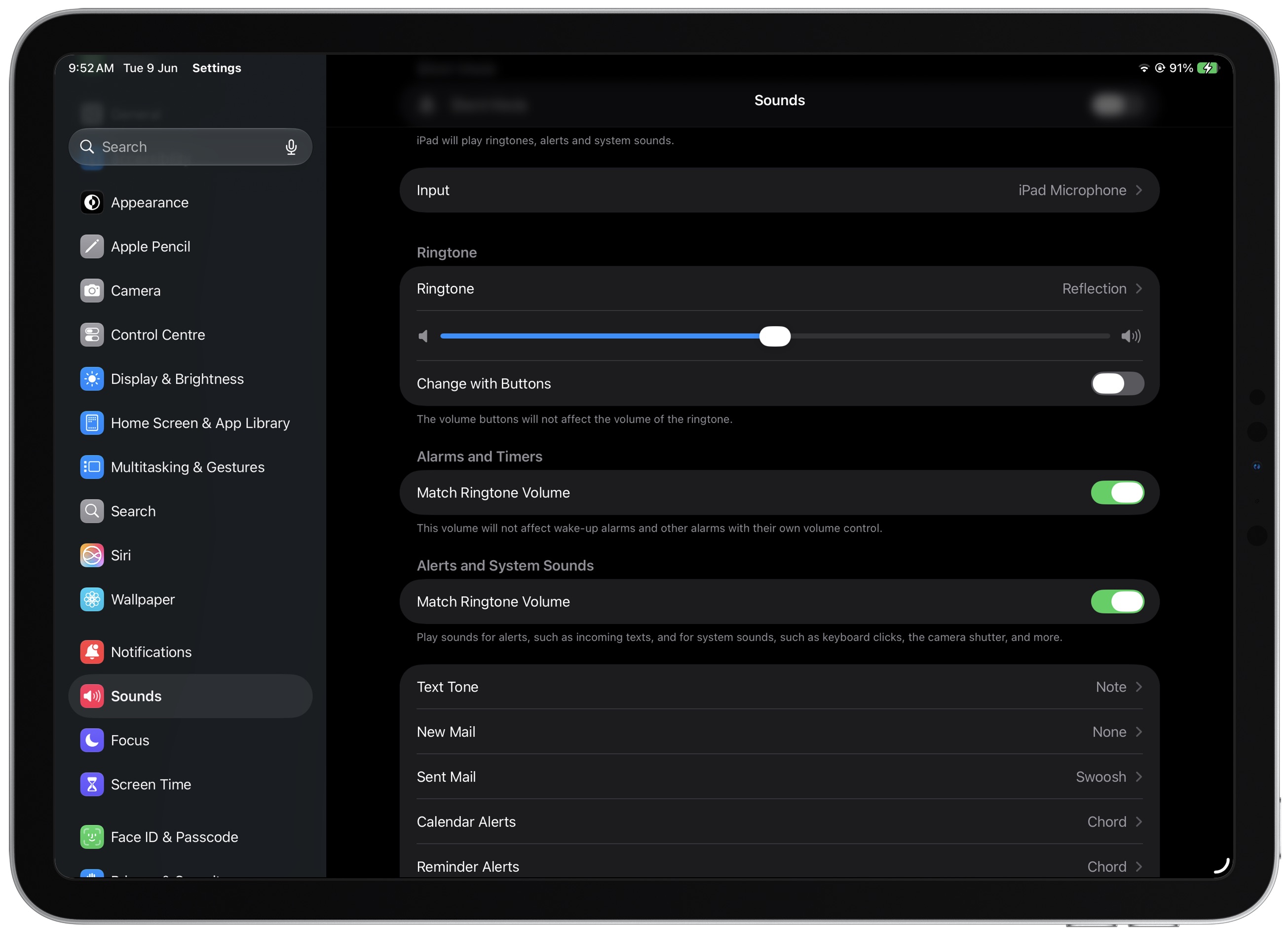
4. Independent system and alarm volume controls
Screenshot: Rajesh Pandey/Cult of Mac
For years, Apple tied your iPhone’s ringtone volume to system sounds and alarms. That meant lowering your ringtone volume also reduced the volume of system sounds and alarms, leaving you with little control over each one individually.
With iOS 27, Apple is finally separating them. You can adjust your ringtone volume independently, while keeping system sounds and alarms at a different volume level.
5. Speed improvements
Apple highlighted iOS 27’s performance improvements during WWDC26, mentioning faster app launch times and quicker AirDrop transfers. But those are only part of the story.
The speed improvements in iOS 27 extend far beyond that. Here are some of the other speed enhancements Apple tucked into the update:
- Up to 30% faster Lock Screen switching
- Up to 30% faster app launch times
- Faster and more reliable NFC reading of tags
- Quicker AirPlay connections to Apple TV and HomePod
- The Now Playing view in Apple Music will load up to 30% faster
- Recent camera images appear faster in the Messages app
- The Camera app opens faster in Low Power Mode
- Safari‘s start page loads faster
- HomeKit accessories pair faster
- Apple Music playback starts faster
- The Mail app loads messages more quickly
- PDFs save more quickly
- The Health app updates data faster
- Safari executes JavaScript faster
6. Smarter copy and paste
When you receive a one-time passcode in the Messages app, it automatically appears as a chip on your iPhone’s keyboard.
Taking this a step further, iOS 27 will also automatically surface your recent screenshot or copied text as a keyboard suggestion, making it faster and easier to paste them into apps.
Guarantee you when iOS 27 rolls out, this is going to become the next “whoever designed this feature deserves a raise” pic.twitter.com/i5vWPXzT4a
— Aaron (@aaronp613) June 9, 2026
7. Create custom passes in the Wallet app
Apple made the Wallet app even more useful in iOS 27 with support for custom passes. After the upgrade, you can create your own passes by taking a photo of a physical ticket or membership card or by entering the details manually.
It’s an easy way to digitize items like your gym membership, library card, loyalty card or other physical passes and keep them all in one place.
8. On-device recovery options
Apple is bringing Mac-like on-device recovery options to iPhone with iOS 27. From a switched-off state, pressing and holding the Power button will bring up the Recovery menu. It provides several useful tools, including Recovery Assistant, Software Update, Diagnostics Mode and the option to completely erase your iPhone.
New in iOS 27: On-Device Recovery Mode Options
When turning on your iPhone, if you continue to hold the power button, you will see new recovery options such as:
Recovery Assistant
Software Update
Diagnostics Mode
Erase All Content and Settings
Recovery Mode via Mac pic.twitter.com/eS404VH8Ca— Aaron (@aaronp613) June 10, 2026
9. ‘Captured by me’ in the Photos app
Apple’s Photos app doesn’t make it easy to find photos you’ve actually taken with your iPhone. The problem only gets worse if your library includes thousands of images and videos from Messages, Mail, WhatsApp and other apps.
iOS 27 fixes that with a new Captured by Me filter in the Photos app. As the name suggests, it shows only the photos you captured on your iPhone, making it much easier to browse your own shots.
It’s a surprisingly useful addition. Previously, the closest workaround was searching for your iPhone model, but that would also surface imported photos taken on the same iPhone model by other people.
10. Change voice note playback speed in Messages
iOS 27’s Messages app adds a playback speed button directly to the voice note, making it easy to speed things up or slow them down. Previously, you needed to long-press the voice note to access the playback speed controls. It’s a small quality-of-life improvement that works much like WhatsApp’s voice message controls.
iOS 27 makes it easier to change the speed of voice notes in the Messages app
Before you had to hold down the message, now you can control it on the message itself. pic.twitter.com/JiODbh7rtQ
— Aaron (@aaronp613) June 9, 2026
iOS 27, macOS 27 and iPadOS 27: New features coming this fall
Apple will likely continue refining iOS 27 and its other operating systems before a public release this fall. And there are probably even more hidden changes waiting to be discovered in future betas.
Even so, when these small quality-of-life improvements go live, they will arguably have a bigger day-to-day impact than the headline AI features. And that should make iOS 27 one of Apple’s most practical updates in years.

Rajesh has been writing about consumer technology for over a decade, with a strong focus on iPhones, Macs and Apple’s ecosystem. He enjoys digging into Apple software updates, hardware changes, and discovering new Mac apps that make work faster and more enjoyable.
You can reach out to him at mail[at]rajeshpandey.me.


One response to “10 hidden iOS 27 features Apple barely mentioned at WWDC26”
There’s not a single thing in the entire 27 series to make any sane person install it. Massive data harvesting through fake AI garbage. Same goes for the nuts who want data centers everywhere.. they’re data centers alright.. stealing your data and selling it to the highest bidder. Truly insane people are fine with this garbage.