Mobile menu toggle

Setups - page 15

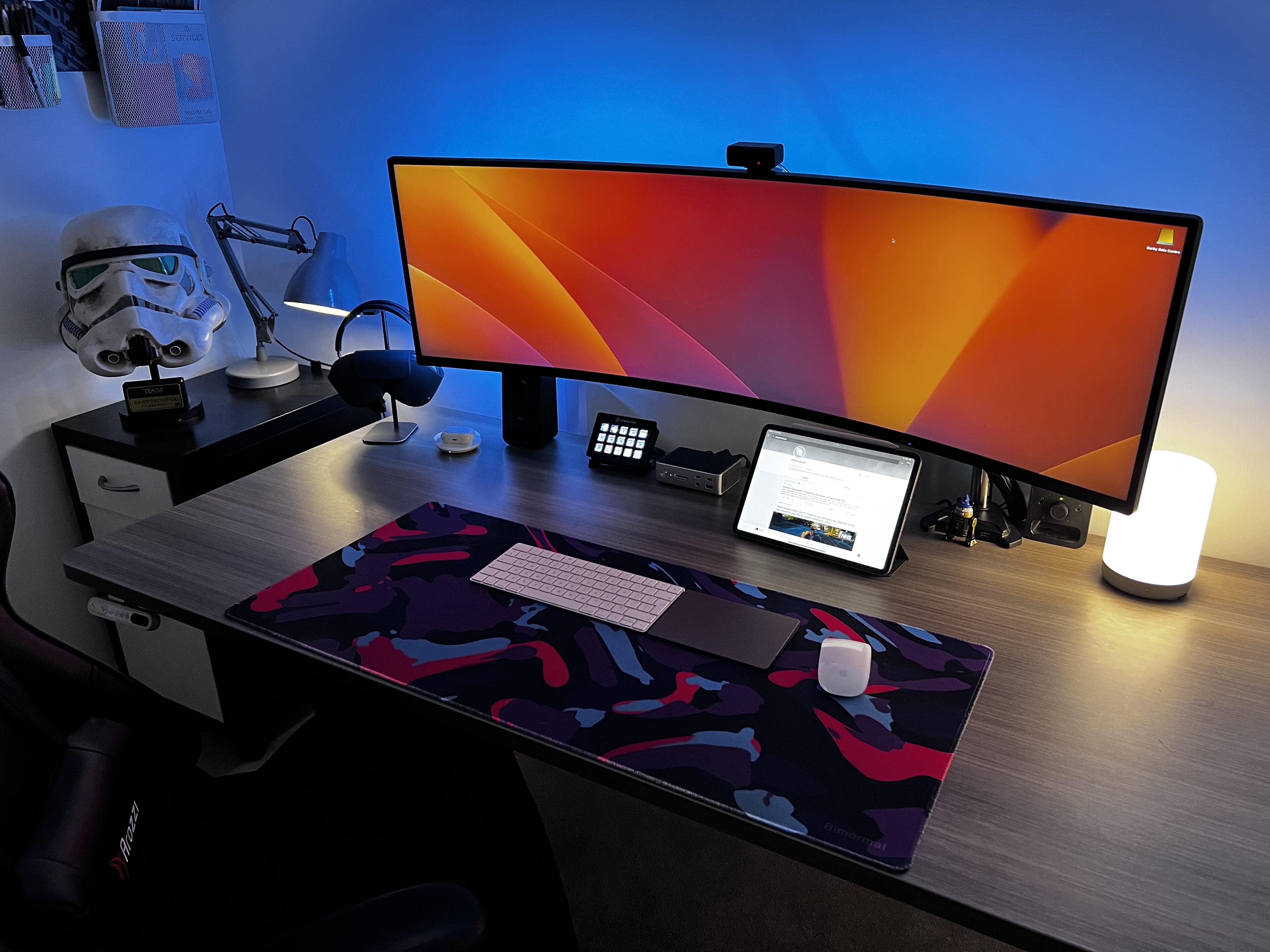
Stormtrooper head haunts Stream Deck-enabled MacBook Pro rig [Setups]

By

The stormtrooper hemet is custom-made and the Stream Deck uses customized shortcuts.
Photo: [email protected]

Attractive or fun decor can really give a computer setup an edge. Real plants. Vintage Apple gear. Epic Lego sets. Today’s featured MacBook Pro setup sports a detailed replica stormtrooper helmet from Star Wars.

It overlooks a Darth Vader-worthy 49-inch Samsung curved gaming display and an Elgato Stream Deck, which is associated with video streaming tasks but can also do a lot for productivity in general through shortcuts.

Under-desk mount keeps pesky Mac mini out of the way [Setups]

By

In the
In the "after" shot, the desk is a little more clear because the M1 Mac mini is nowhere to be seen.
Photo: [email protected]

There’s much to be said for hiding stuff under your desk. And we don’t mean cramming it down there like you shove junk under your bed. We mean mounting it properly out of sight. It gets said stuff — computers, docks, cables — off the desktop for a cleaner look to your setup, not to mention a more-efficient workspace.

Today’s featured setup uses an inexpensive acrylic mount to stash an M1 Mac mini and connected cables under the desk. Below you can see images of the mount itself as well the “before” shot of the setup. The “after” shot appears above.

Major workstation makeover covers all bases [Setups]

By

The nearly maxed-out M1 MacBook Pro is on a shelf out of frame.
Photo: [email protected]

We often see big upgrades to setups we’ve covered here in the past. But they’re not usually comprehensive, where everything from the daily-driver Mac to the input devices to the audio gear gets made over (and in some cases greatly expanded).

Let’s just say today’s featured MacBook Pro setup looked a lot different 2 years ago. It’s more evidence that a setup is never, ever “done.”

A MacBook Pro makes a questionable monitor stand [Setups]

By

It might take a moment to locate the MacBook Pro in this photo, even with the help of that nice Anglepoise desk lamp.
Photo: [email protected]

Today’s featured setup carries a strong vibe of minimalism — so much so it appeared to lack even a computer, at least at a glance at the photograph. But then we realized the laptop was stashed away in unusual (and questionable) fashion.

We recently featured a setup with the MacBook Pro and iPad hidden on a little shelf mounted under the desk. This time the laptop is stashed in a case sitting directly under the monitor stand’s base (not recommended).

Mac Studio stacked on Mac mini looks like a Pixar robot [Setups]

By

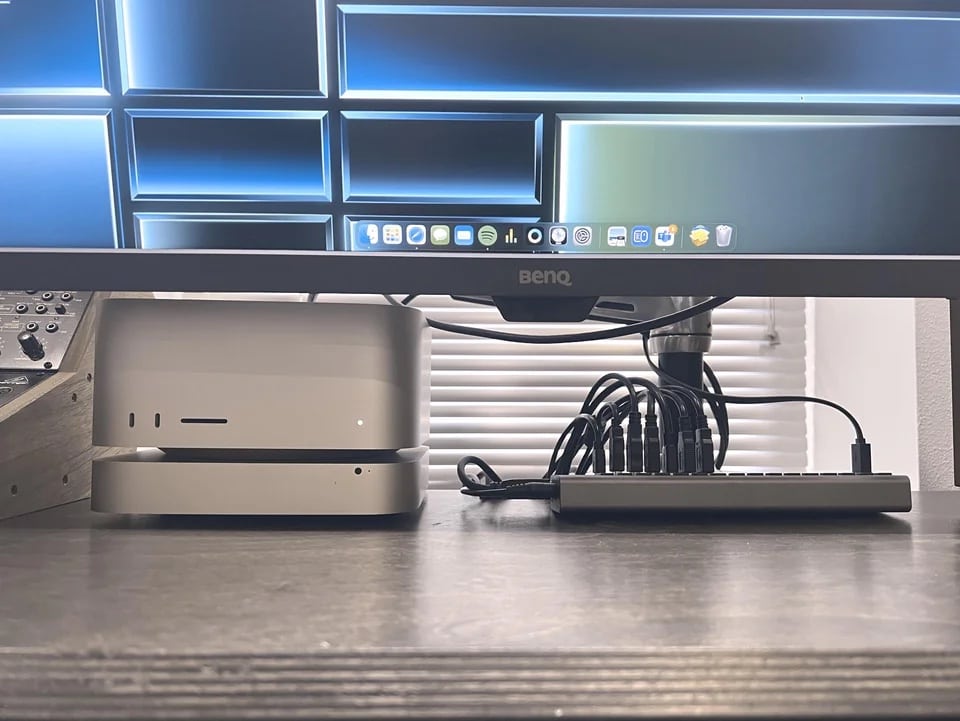
One commenter thought the Mac Studio stacked on the old Mac mini looked like a Pixar robot character.
Photo: [email protected]

This just in from the Things That Look Like Other Things Department: a Mac Studio desktop computer sitting on top of a Mac mini “looks like a small robot from Wall-E or one of the [other] Pixar films.”

Today’s featured setup sports the unintentional character in the form of an old Mac mini acting as a server and a stand for the much-newer Mac Studio. It’s pretty cute. You can imagine it rolling around, beeping and maybe firing off a laser blast.

How fast can you spot the MacBook Pro in this super-clean rig? [Setups]

By

It's an exceptionally clean setup. Even
It's an exceptionally clean setup. Even "absurdly" so, as one admirer said.
Photo: [email protected]

If there’s one thing computer-setup fans on social media value above all else, it’s a “clean” workstation. The best ones — neither messy nor cluttered with cables — place everything just so. Today’s featured MacBook Pro setup does a nice job with that.

And it even hides the laptop as well as an iPad. See how fast you can spot them. One commenter noted it took longer than it should have.

‘Mac setup in a box’ is a dual-Mac Studio powerhouse [Setups]

By

The cabinet on the right holds the computers and more.
Photo: [email protected]

We enjoy a lot of variety in our computer setups coverage, from the ultra-minimalist to the mega-maximalist. Today’s featured rig sports two pumped-up Mac Studios, two old Mac Pro “trash cans,” a gaming PC, dual displays and a tremendous array of audio gear.

It falls in the latter category, obviously (“mega”). The lengthy gear list below doesn’t even cover everything in the powerhouse workstation, but it covers all the key elements.

That’s one (unique) way to mount a MacBook Air [Setups]

By

Want to save some space on the desk? Try mounting your laptop on a pegboard.
Photo: [email protected]

In our never-ending search for interesting computer setups, we love stumbling upon good do-it-yourself (“DIY”) hacks. Today’s featured setup mounts an M1 MacBook Air on the wall in a most-unusual way. It involves a pegboard, a strap and a tablet stand designed for use in the kitchen.

In addition, the setup features a rarely seen mechanical keyboard worth checking out.

An overpowered gas arm is ready to launch this MacBook Pro [Setups]

By

The bass player running this rig said the mount's gas arm is a little over-eager.
Photo: [email protected]

We recently talked about what a boon to computer setups stands and mounts usually are — but not when they cause problems. Today’s featured M1 MacBook Pro setup is an interesting example. The bass player who runs it said the gas-powered arm of the mount where the laptop sits is so hair-trigger it can “randomly launch it into the air.”

That’s not ideal when you have $2,000 laptop not designed for flight. The user also has a PC laptop for work, a massive 4K display and a compact mechanical keyboard and badass speakers we haven’t seen elsewhere.

Dual-display outfit splits the keyboard and goes mouse-free [Setups]

By

How do you navigate without a mouse?
Photo: [email protected]

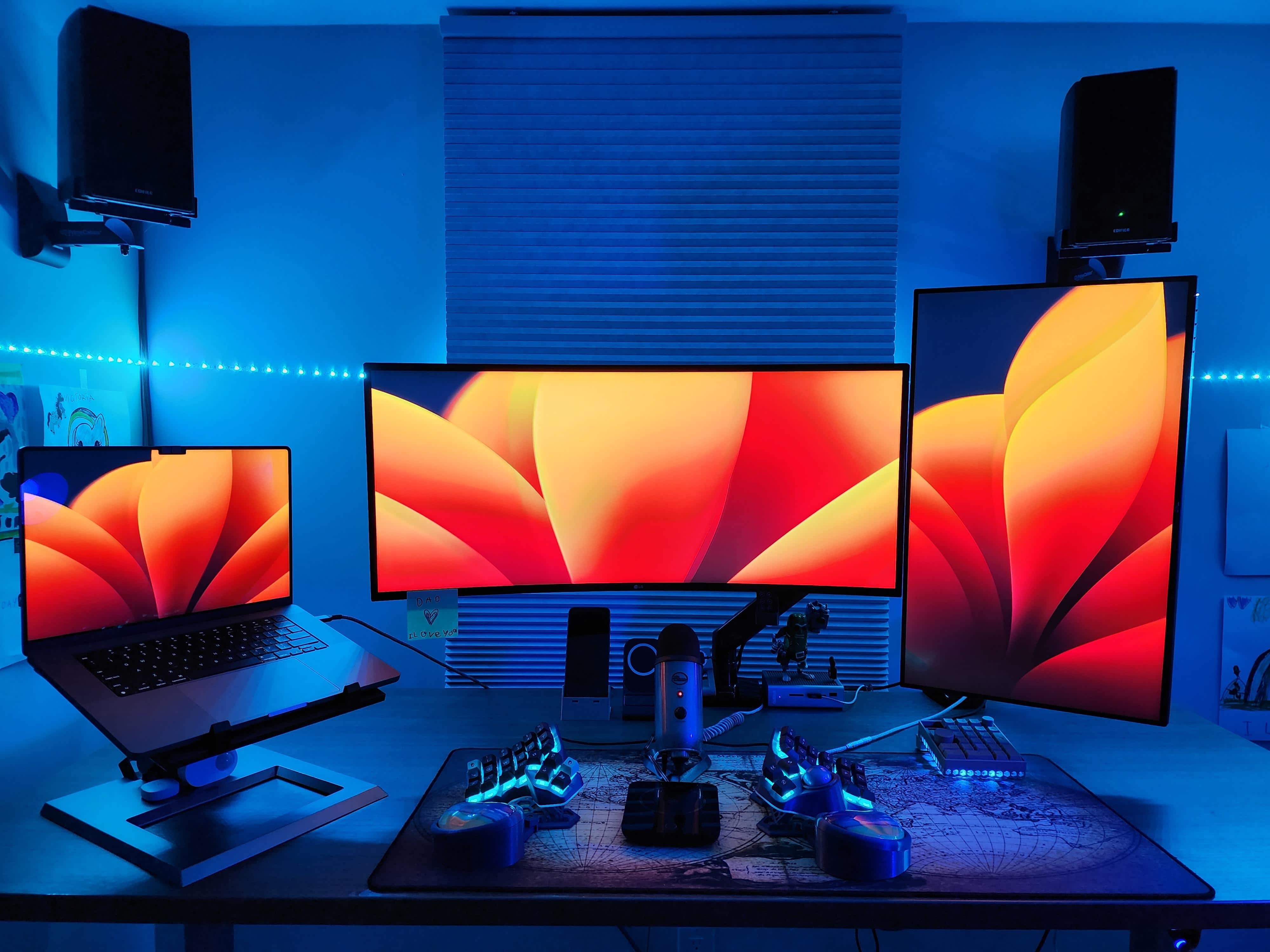
Do you dream of ditching your mouse? Maybe you have the wrong one. Or maybe you’re onto something, like the software developer who works sans rodent with today’s featured M2 MacBook Pro setup featuring dual external displays in different orientations.

Instead of a mouse for input, she relies on a radically split keyboard with a trackball, plus a macropad. See those and all of the other gear in the cool setup below.

Here’s how you put together a tight triple-display rig [Setups]

By

Mounted devices make for a space-saving triple-display setup.
Photo: [email protected]

The sometimes-overlooked heroes of computer setups are stands and mounts. They make a big difference. They free-up space on the desk. They bring screens to eye level for better ergonomics. And they can even help turn a one-display setup into a three-display workstation, as they do in today’s featured MacBook Pro and iPad mini rig.

The user relies on one main external monitor — a Studio Display — but raising the MacBook and the iPad up to eye level and using Universal Control gives him three prominent screens. And that’s without having to buy and make room for multiple external monitors.

Small desk fits mini-but-mighty workstation [Setups]

By

Small desk? No problem. You can still have a solid computer setup.
Photo: [email protected]

Even a small desk can’t keep you from having a powerful computer setup — if you get the right gear and not too much of it. All it takes is a great laptop — like a MacBook Pro or MacBook Air — a vertical laptop stand, a not-gargantuan display and a minimal amount of other gear, as shown in today’s featured setup.

Oh, and consider a monitor arm rather than a stand. That helps keep the external screen out of the way.

Maxed-out Mac Studio drives ‘dream setup’ Down Under [Setups]

By

This handsomely compartmentalized setup gets its computing power from a maxed-out Mac Studio and a MacBook Pro.
Photo: [email protected]

With all the computer setups showcased on social media, it takes something special to earn the description “dream setup.” Today’s featured Mac Studio Ultra and M2 Max MacBook Pro setup, which hails from Australia, could be a contender.

Why? Well, when you combine two of Apple’s newest and most powerful computers with a Studio Display and put them in a beautifully laid out workstation with great cable management and premium audio, you’ve got a real ripsnorter (to put it like an Aussie might).

3 loaded iMacs and a PC pump up 8-display workstation [Setups]

By

Three of the displays are iMacs and five are Dell 4K monitors.
Photo: Hoa Mai

In Monday’s featured computer setup we showcased four tall displays and mentioned we sometimes see six-display setups. But how about eight displays in one setup? That’s today’s outfit.

Hoa Mai, who works in post production on documentary films in Los Angeles, sent Cult of Mac his massive setup. It features three iMacs, a PC and five Dell 4K monitors. Talk about Mission Control.

High-end MacBook Pro sits in a forest of tall 5K displays [Setups]

By

This setup's not exactly lacking for upscale 5K screen real estate, is it?
Photo: [email protected]

At Cult of Mac, we’re no strangers to looking at computer setups loaded with displays — even as many as six. But we’re less used to seeing certain orientations, like in today’s featured M1 MacBook Pro and custom PC setup.

The workstation seems to reach for the ceiling with four 5K displays. Two stack horizontally in landscape mode and two stand tall, shoulder-to-shoulder in portrait mode.

Here’s how you gut a whole office and start over [Setups]

By

De Jong gave his computer setup -- and his whole office -- a makeover.
Photo: Michael De Jong

How refreshing it must be to make over your computer setup and, while you’re at it, gut and refresh your whole home office. That’s what Michael De Jong did recently. And he shared his transition with Cult of Mac.

First, he tinkered with the setup, going with dual displays and adding a soundbar and a slick gaming chair. Later he gutted the whole office and added a whole raft of upgrades. Take a look at his photos and gear, new and old, below.

High praise for hard-to-find Bose speakers [Setups]

By

The little Bose speaker on the stand to the left of the display is, apparently, a keeper. But it's hard to come by.
Photo: [email protected]

The main gear in a computer setup might be perfectly impressive, like the Mac Studio desktop machine in today’s featured setup. But that’s not what everyone looking at the workstation notices and talks about on social media.

Instead, the coveted items in this particular setup are a Bose speaker system folks are having a hard time finding, plus a Belkin Continuity Camera mount that helps you use an iPhone as a webcam.

How old do you have to be to still have a printer? [Setups]

By

You don't see a printer right in the setup all that often. People took notice.
Photo: [email protected]

We come across setups with printers from time to time, though they’re usually off to the side and perhaps only occasionally used. But today’s featured setup with a MacBook Air, a 2016 12-inch MacBook and a 20-inch Cinema Display keeps the printer right in the main mix.

This took some commenters by surprise. They noted why they never print anymore and grilled the user about his age, which turned out to be a lot lower number than expected.

Bizarre LG DualUp display beguiles another Mac fan [Setups]

By

Another oddly shaped LG DualUp monitor finds a home in a Mac setup.
Photo: [email protected]

When the eccentric LG DualUp display came out, its nearly square, 16:18 aspect ratio raised eyebrows. But the monitor is kind of like two displays in one, so it’s making inroads into computer setups like today’s featured MacBook Pro workstation.

The user wanted a Studio Display, but he finds the DualUp an economical alternative and then some.

3 Macs and KVM switch keep remote worker out of trouble [Setups]

By

Three Macs and a KVM switch with a big external monitor can be the perfect solution.
Photo: [email protected]

Today’s featured computer setup employs three separate Macs — MacBook Pro, M1 MacBook Air and M1 Mac mini — connecting two of them to a big external monitor using a KVM docking station.

KVM switches are handy when you don’t want to switch cables from different computers using the same monitor and input devices. But there’s another reason the user, Greg Coit, chose the method.

Stunning Mac Pro rig sees massive audio upgrade [Setups]

By

A pair of KEF LSX speakers on Kanto stands adds to this killer setup's high price tag.
Photo: [email protected]

There’s nothing like a major upgrade. Today we return to one of the most magnificent computer setups we’ve seen lately, as it somehow found a way to top itself. When you’ve already got a loaded Mac Pro, two Pro Display XDRs and a top Apple laptop and tablet, where do you go from there?

You thank the HomePod mini for its service and welcome new $1,250 speakers to the party.

Bare-bones mobile workstation is ready for anything, anywhere [Setups]

By

At home or in a fast-food joint, work is getting done.
Photo: [email protected]

Sure, you only need a MacBook Air or Pro to get things done almost anywhere. Or maybe an iPad with a stand and keyboard. But if you want to be more comfortable (and productive), wouldn’t you want a fuller computer setup? Today’s incredibly spare featured setup gets the job done.

The user is a journalist who takes their work on the road, like the fast-food joint in the photo above. They use just an M1 MacBook Air on a stand, a mini mechanical wireless keyboard and mouse, and sometimes a clamp-on light and iPhone mount to handle quality video calls via Continuity Camera.

Triple-display MacBook Pro rig perches in attic ‘closet’ [Setups]

By

A wall mount lets the huge display sit up and behind the others.
Photo: [email protected]

A room is what you make of it, and today’s featured computer setup finds a home in a room only a computer science student could make. He may have to live in a windowless attic, but he brings a lot of computing power and light to it, making it look and feel larger than it is.

Check out all the gear in the M1 Max MacBook, custom PC and triple-display outfit below.

13 ways to improve this dual-Studio Display workstation [Setups]

By

How can we make this setup better? Let us count the ways.
Photo: [email protected]

Among the everlasting truths about computer setups, first comes “a setup is never finished.” And the second might be, “A setup can always be improved.” The user behind today’s featured setup certainly found out about No. 2  when he asked for advice on how to improve his M1 Max MacBook Pro and dual-Studio Display workstation.

Find all the advice below — jokes ‘n’ all — as well as all of the setup’s excellent gear.

M2 Mac mini drives dual displays in rolling rig [Setups]

By

This user enabled dock-free dual-display use by adding an M2 Pro Mac mini.
This user enabled dock-free dual-display use by adding an M2 Pro Mac mini. And note the can of Death & Taxes black lager, a serious adult beverage.
Photo: [email protected]

“How many external displays can I easily run with my Mac and how” is a common question, and some Macs make it much easier to run more than one external monitor than others.

In today’s featured computer setup, a software developer went out and bought a new M2 Mac mini specifically for its generosity in that regard. It really helped his highly portable setup, which features a Studio Display and an LG 4K screen.