Going down a storm on the App Store this week is the brand new version of Crazy Taxi from Sega. Yes, it’s just like Crazy Taxi you used to play a decade ago. And that’s a good thing.
It’s Back And It’s Still Great: Crazy Taxi For iOS [Review]


Going down a storm on the App Store this week is the brand new version of Crazy Taxi from Sega. Yes, it’s just like Crazy Taxi you used to play a decade ago. And that’s a good thing.
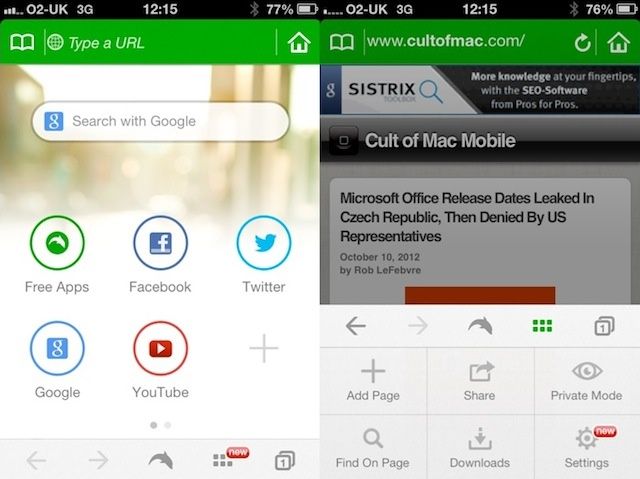
This is Dolphin. It’s a neat web browser for iPhone. You could easily be forgiven for saying: “What’s the point of having an extra browser? Mobile Safari does everything I need.”
Which is true. Safari does everything you need. But try Dolphin for just a few minutes, and you’ll discover a browser that does everything you need but in a totally different way. A way that’s much better suited to using on your phone while you’re moving around.
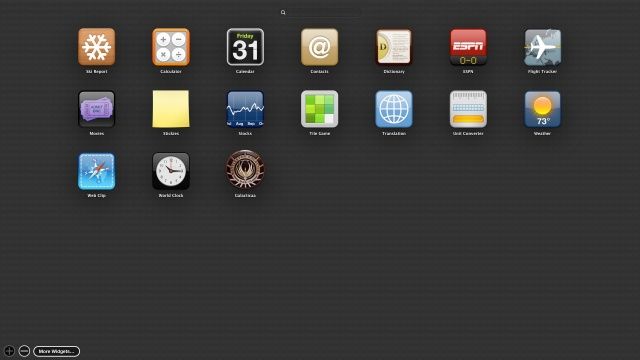
Widgets aren’t new to OS X Mountain Lion, but the way they are presented surely is. If you’re new to the OS X Dashboard, you’re in luck, because adding Widgets is a lot easier than it used to be, and there are a whole lot more of them to choose from.
Notice the screenshot above? That’s what the new Add More Widgets screen looks like. Here’s how to add to the list, until you have more than you can even handle on your Mac, and you need to use that handy-dandy Search field at the top just to find the one you want.

OmniFocus for iPad just got a big old update, and it adds two huge features, along with the usual tweaks (and in this case, iOS 6 compatibility).
Now, iPad users can enter tasks using Siri, and everyone can take advantage of TextExpander Touch support.

Although Apple hasn’t directly confirmed the exact time yet, iPhone 5 preorders look set to begin tomorrow morning at 12:01AM PST, exactly… the same time iPhone 4S preorders started last year.
The iPhone 5 is slated to be Apple’s most wildly in-demand phone yet, and while Apple is attempting to balance the crush on their website by starting preorders in the middle of the night, it will, in all likelihood, still be a madhouse when Apple starts selling iPhones later tonight.
Hence this guide. We’re going to walk you through the best ways to make absolutely sure you get your iPhone 5 preordered right at the stroke of midnight and in your hands next Friday when it officially launches in the minimum amount of time, so you can go right back to sleep.
Wondering which iPhone 5 to buy? Check out our guide to finding the iPhone 5 that is right for you here.

The Tweetbot for Mac saga continues, and this time the guys at Tapbots have come out of left field to release the official beta of their Mac client. The app is available for free now, but there’s a catch: you have to already be a Tweetbot user.
Multiple updates have been released for the alpha version of Tweetbot for Mac, but Tapbots announced earlier this week that it would be discontinuing public testing of the app before it officially launched in the Mac App Store.
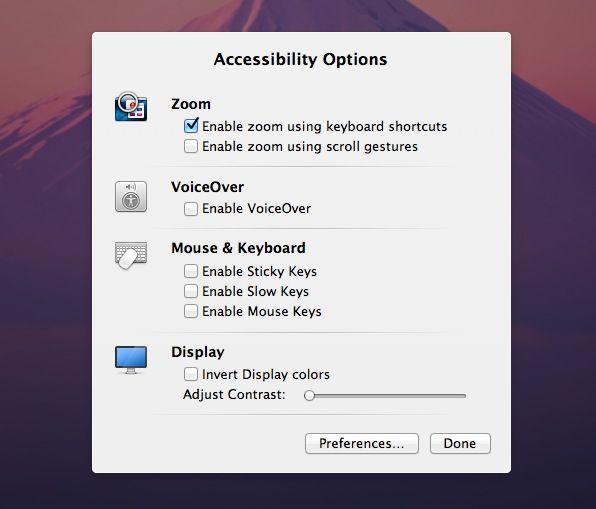
Built into every Mac are a host of accessibility options. People with visual disabilities may need to zoom into the screen, making everything on it bigger in order to see enough to use the Mac. Individuals who experience blindness can use VoiceOver, which has the Mac speak everything on screen, including menus and dialog buttons. Other people with visual impairments may need to invert the Display colors and adjust the contrast to help them with eye fatigue as well as seeing the items on screen.
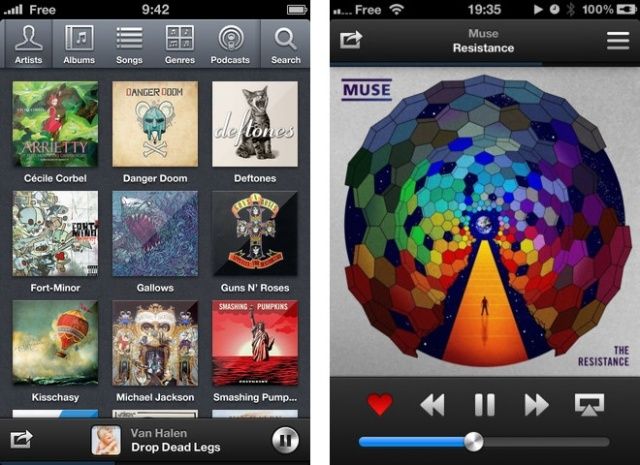
For the past couple of years, Ecoute has been a considered a staple third-party music player on the Mac. Known for its lightweight, minimalistic design, Ecoute works as an iTunes companion. With access to a Mac’s iTunes library, social network integration, shortcuts, and a simplistic design, many Mac users swear by Ecoute as their music player of choice on the desktop.
Today the makers of Ecoute have launched an official iPhone app in the App Store. Ecoute for iOS serves as a beautiful music player with Twitter integration, AirPlay support, music filters, podcast support, and more.

It’s not difficult to open up the Settings app and activate or deactivate things like Wi-Fi, Bluetooth, or Airplane Mode. But it could be a whole lot quicker. Wouldn’t it be nice if you could have an icon on your home screen that allows you to toggle these things instantly — without having to navigate the Settings app? Thanks to IconToggles, you can.

An interesting crop circle was reported at Cheesefoot Head, near Winchester in Hampshire, southern England, last week. An infinite loop, the formation has no beginning nor end. It has been likened to the Tibetan Buddha, symbolizing peace and motion simultaneously. It also reminds us of the command key symbol, an emblem of Mac keyboards over the last thirty years.