Mobile menu toggle

Search results for: shortcuts

Use These Sweet Keyboard Shortcuts To Control iTunes 11 [OS X Tips]

By

iTunes 11 Media Shortcuts

So, now that you’re becoming quite the iTunes 11 power user, it’s time to take that one final step: keyboard shortcuts.

Everyone knows that using the mouse when there’s a keyboard shortcut to be had is tre uncool. I’ve been on some friends’ case for years to get them to actually use Command-C and Command-V to cut and paste their text, sometimes to no avail.

But not you, no. You’re a power user in training. You’re ready to control iTunes 11 with the power of the keyboard. Here’s a few of them to get you started.

Pocket’s Native Mac App Gets Twitter & Facebook Support, New Keyboard Shortcuts, More

By

Pocket now supports multiple Twitter accounts — if you're running Mountain Lion.

Pocket brought us a terrific Mac app back in October, and just over a month on, it’s already back with a new update. This one introduces a nice stack of new features, including native Twitter and Facebook support for those running OS X Mountain Lion, new keyboard shortcuts, better Evernote sharing, and more.

Go To Favorite Mailboxes With Keyboard Shortcuts [OS X Tips]

By

Favorites Bar Mail App

Keyboard shortcuts are great. They let you do things on your Mac faster, letting you get to more stuff in less time. In Safari, for example, Command-1, -2, -3, and so on will open the sites in the Bookmarks Bar in order, from left to right.

There’s a Favorites Bar in the OS X Mail app that works similarly. You can drag Mailboxes that you use often to it. To show it, go to the View menu in Mail and choose Show Favorites Bar.

Use Keyboard Shortcuts To Navigate Spotlight [OS X Tips]

By

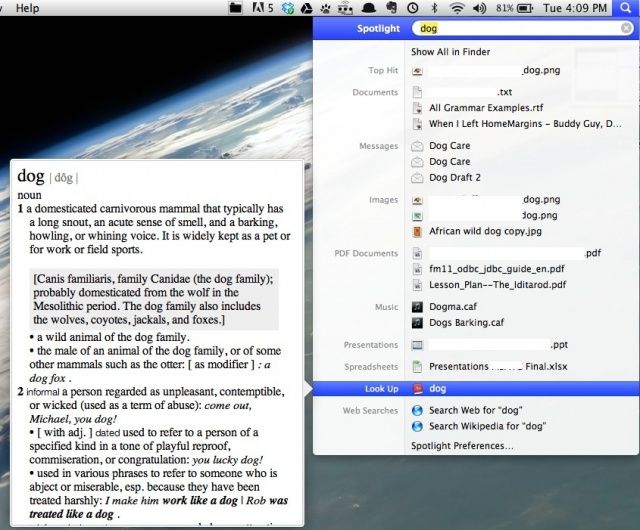
Spotlight Shortcuts

Power users know that the more you can keep your hands on the keyboard, the faster you can get things done on your Mac. That’s the reason keyboard shortcuts exist, like Command-C to copy text, or Shift-Command-3 to take a screenshot. It’s perfectly acceptable to move your mouse to select the command from a menu, of course, but the keyboard shortcuts are just faster.

Spotlight, like most other OS X apps, has several shortcuts that can help you get around much more quickly.

Keyboard Shortcuts Will Finally Sync Across All Your iOS Devices In iOS 6

By

Shortcuts were a nightmare to manage across iOS devices... until now.

After being introduced in iOS 5, keyboard shortcuts is a feature I could no longer live without on my iOS device. I use it for all kinds of things, including email addresses and usernames, so that I never have to type out the full thing 30 times a day. There is one thing the feature has been lacking, though, and that’s the ability to sync your keyboard shortcuts across all your iOS devices.

That is until now; the feature was finally added to iOS 6, which was released to the public yesterday.

FioWriter Text Editor Brings Command, Option And Control Keyboard Shortcuts To iPad

By

cult_logo_featured_image_missing_default1920x1080

FioWriter is yet another new iPad text editor, but with one huge difference: it has Command, Option and Control keys right there on the keyboard.

What’s more, they work as they should: hold down the modifier and hit a key to execute a command. For instance, press Cmd-F (for “find”) and a search box pops up over the keyboard. And that’s not it. Not even close.

Tweetbot For Mac Alpha Updated With Notifications, New Shortcuts, Bug Fixes

By

Screen Shot 2012-07-22 at 4.42.57 PM

When Tapbots finally released its highly-anticpated Tweetbot Twitter client on the Mac, the software was labeled as a free Alpha. This means that the developers are continuing to add major new features and bug fixes leading up to the official 1.0 release in the Mac App Store. In fact, users are warned before downloading that there could be major bugs, and all Alpha testers are encouraged to submit bug reports to Tapbots.

Over the weekend, the first update was released for the Tweetbot for Mac Alpha, and the update packs several new features and improvements.

Learn The Secret Shortcuts For Any Open Or Save Dialog [OS X Tips]

By

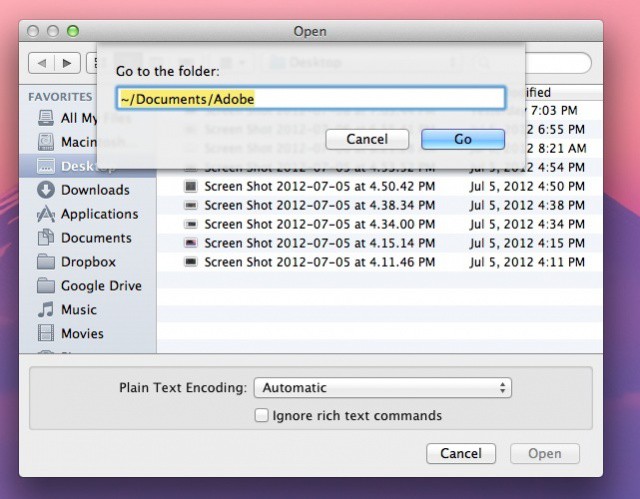
Keyboard Shortcuts Open Dialog

One of the joys of being a power user is when you use keyboard shortcuts to shave precious seconds off of your workflow routines. While you may know all the system shortcuts there are (⌘ + C for Copy, ⌘ + V for Paste, etc.), you may not be as familiar with those in the Open or Save dialog windows that you encounter every day.

Obviously, we’re here to help

See Keyboard Shortcuts Visually With CheatSheet [OS X Tips]

By

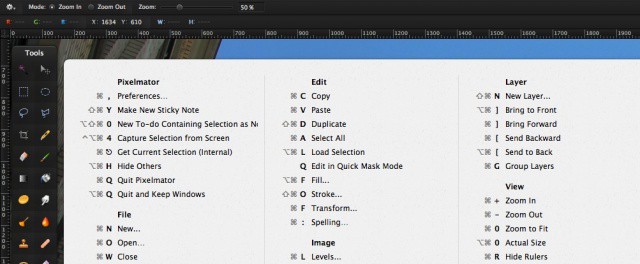
cheatsheet

If you’re a Mac user of some length of time or experience, you know that there are a ton of keyboard shortcuts laced throughout the operating system. In addition, every application you run on your Mac has a ton of these same shortcuts.

One easy way to see them is to click on a menu in a running application. To the right of each menu command, you’ll see the Keyboard shortcut for that particular menu selection. For example, clicking on the Edit menu in most applications on the Mac will give you the Cut (Command-X), Copy (Command-C), and Paste (Command-V) shortcuts.

There’s an easier way, however, to see all the application’s associated keyboard shortcuts, in the form of an application you can download right now.

1 8 9 10 11 12 121