Mobile menu toggle

Happy Birthday, iPad! When You Were Born, Everyone Hated You!

By

Launched in April 2010, the iPad took an idea Jobs had heard about from computer pioneer Alan Kay and turned it into the kind of mass-market product no one else had been able to.Photo: Karl Mondon/Contra Costa Times/MCT

Launched in April 2010, the iPad took an idea Jobs had heard about from computer pioneer Alan Kay and turned it into the kind of mass-market product no one else had been able to.

Photo: Karl Mondon/Contra Costa Times/MCT


Today is the iPad’s third birthday. It was on this consecrated day that Apple shipped the original iPad with WiFi. It’s hard to believe that Apple has invented and popularized an entirely new market in only three years, but it’s the truth. Tablets just weren’t a thing before the iPad, and now they’re cannibalizing PC sales. As Apple calls it, we’re in a post-PC era.

A lot of people mocked the iPad from the beginning. Sure, there were the faithful believes, but many wondered why anyone would want to use a limited, 10-inch slab of glass over a full-fledged laptop. It just didn’t make sense at the time. The iPhone and iPod touch filled the need for portable computing… or so we thought.

The question was, as always with Apple, whether the iPad could live up to all of the hype. Looking back, the answer is obvious: yes. The iPad has seen—and continues to see—monumental success, and competitors are still playing catch up.

In honor of the iPad’s birthday, let’s take a look at some of its early critics. As it turns out, the iPad was rather hated during its infancy:

25 Ways The iPad Has Taken Over The World In Just Three Years [Gallery]

By

pb-120316-ipad-celebrate-ps

It seems like we’ve been using iPads forever now, but the greatest tablet computer ever made is still an incredibly young piece of gadgetry. In fact, it’s celebrating its third birthday today.

What other three year old do you know who has changed the world like the iPad has?

A ton of tech luminaries and pundits thought the iPad wouldn’t even make it this far, but boy, were they wrong. Over the the last three years the iPad has become a cultural phenomenon.

Here are 25 ways showing how the iPad has taken over the world in just three years.

Secret iOS Gestures: The Claw Pinch – Go Home Without The Button [iOS Tips]

By

Pinch Home Claw

Here’s a tip that never fails to amaze my friends and relatives when I show it to them. It may seem a little “meh” when you read about it, but try it and you’ll be sharing this quick “get to home” trick on your iPad, your parents’ iPad, and maybe even the iPad of strangers in the coffee shop.

Just being able to keep your tapping fingers near the screen, without having to drop down to the Home button, is a time and brain saver that should make your workflow on the iPad just that much better in your day to day interaction.

Twitter For iOS Updated With New Cards That Let You Quickly Install Linked Apps

By

blog-image-1

Twitter has updated its iOS app with new “App Cards” it introduced to developers yesterday. Twitter Cards let companies and advertisers embed media like photos and videos directly into tweets so you don’t have to load a separate webpage. Now developers can include download links with info about their apps for Twitter users to see without leaving the timeline.

Amazon AutoRip Now Automatically Adds Vinyl Purchases To Your MP3 Collection

By

Amazon-s-AutoRip-Now-Rips-Any-Vinyl-You-Ever-Bought

Remember Amazon AutoRip?

It was a cool service Amazon launched earlier in the year which did something pretty cool: if you bought an AutoRip-compatible CD at any point since 1998, it’ll automatically show up in your Amazon Cloud Player, which can be accessed either online or through the free iTunes app

Pretty neat, and now, AutoRip is even neater: it now works with vinyl records you’ve purchased too. For example, I bought a copy of the excellent album Stranger by Balmorhea on vinyl a couple months ago, and it’s now in my Cloud Player.

This is pretty neat. Vinyl is already one of the more savvy ways to buy music, not just because of the improved sound quality and presentation over digital or CD, but because when you buy a vinyl album, you often get the digital version for free as a download anyway. With AutoRip now working with vinyl, buying a record is an even more compelling way to consume music.

Dragon Dictate 3: The World’s Best-Selling Speech Recognition Software [Deals]

By

CoM - Dragon

I have done a lot writing in my day, and there are times when I want to just let the words fly freely faster than I can possibly type them. When I’ve worked on my talks for seminars or wanted to work out some thoughts on a major piece of writing, I have given the reins to Dragon Dictate.

This Cult of Mac Deals offer has a huge savings on Dragon Dictate 3 for Mac – which has been an indispensable tool for me as a writer. You can get it for only $100 – that’s 50% off the regular price!

Ending Soon: The Ultimate Python Programming Course [Deals]

By

CoM - Python

If you’ve been itching to start the journey to learning code then Cult of Mac Deals has an excellent offer for you…and at a fraction of the regular price: The Ultimate Python Programming Course.

This tutorial is detailed enough for beginners but is also an excellent reference for various leveled Python programmers. Purchasing this course is like having an expert Python consultant for the rest of your life, and all the lessons are organized for easy access – just like a chapter in a book. You’ll also have certification provided upon completion of the course, making you a certified Python developer. And you’ll get all of this for just $39 – that’s a 60% discount!

What If The Budget iPhone Looked Like The iMac G3? [Image]

By

Budget-iPhone-2

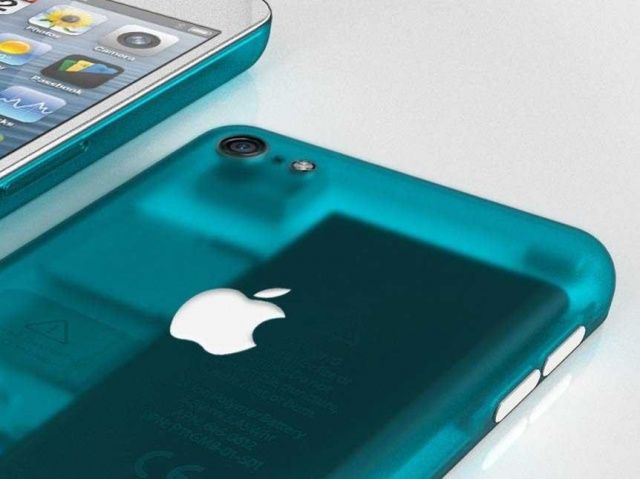
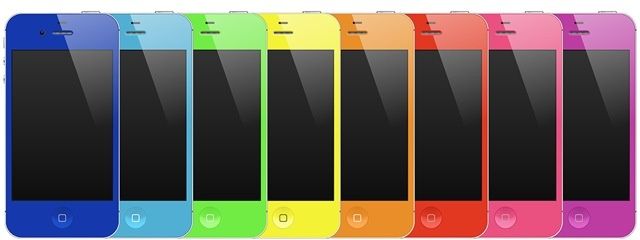
I really like Nikolai Lamm’s concepts for imaginary, rumored, (and possibly forthcoming) Apple products, and this transparent concept for a cheaper budget iPhone is no exception. I love how it merges the 2012 iPod touch’s candy colored backshell with the iMac G3’s transparent casing.

I think there’s little to no chance Apple would actually make an iPhone that looks like this — in the mind of Jonny Ive, transparent gadgets are so 1998, I bet — but heck, I’d buy a phone like this.

Source: Myvouchercodes.co.uk

Analyst: You Won’t Control Your iTV, You’ll Finger Its ‘iRing’

By

It wasn't good enough as a concept for Apple, but since when has that stopped Microsoft?

Brian White, an analyst with Topeka Capital Markets, brings us a crazy new rumor about the much-anticipated Apple television today following recent meetings with supply chain sources in China and Taiwan.

White claims that the “iTV” will finally launch during the second half of 2013, and that it’ll come with a miniature device called the “iRing”, which the user will wear on their finger to act as a pointer. The device will enhance the motion detection experience and take over some of the functions of the traditional remote control, apparently.

Is Apple Working On Building An iRobot?

By

robojobs
The Steve Jobs robot, invented by the genius humorists over at Scoopertino.com

One would think that the self-evident answer to the question posited in this post’s headline would be “No,” followed by a pregnant pause, a licking of the lips and then followed it up with the words “You idiot.”

And, in fact, that probably is the answer. But if Apple’s not working on a robot, then why the heck is Apple hiring one of the country’s foremost robotics experts, John Morrell?

LIT Tracker Measures Big Air, McTwists And General Rad-Ness

By

LIT.jpeg

Remember when your phone seemed neat because it could actually tell you where you were on a map? That seems pretty quaint now that the gyroscopes and compasses and magic location beetles [1] not only tell our photons where they are, but how they’re moving and even which direction they’re pointed in.

And now that same quantum leap is about to happen in the world of personal fitness trackers. Oh boy.

Use iCloud-Enabled Notes App To Store Bookmarks [OS X Tips]

By

Bookmarks in Notes

Bookmarks are a great way to return to the websites you’re most often interested in. However, there are a ton of times when you just want to remember a specific website once, maybe to show to another person or do some research with. There are a ton of online bookmarking services, like Delicio.us and Pinterest, but they have a whole social networking layer that maybe you just want to skip.

If you want to save the URL of any website in an iCloud-synched app, look no further than Apple’s own Notes app.

Xerox PARC Legend Alan Kay Says Apple Is Dysfunctional, With Or Without Steve Jobs

By

AlanKay

Alan Kay is a bit of a legend at Apple. A computing pioneer, Alan Kay’s lab at Xerox PARC led Steve Jobs to commercialize the concept of a graphical user interface and a computer mouse, and Alan Kay’s philosophy that “people who are really serious about software should make their own hardware” is one of Apple’s core principles.

But Kay doesn’t think much of Apple these days, and in fact, seems to think the company has always been broken.

Ulysses 3 Lands In The App Store With $20 Introductory Price Tag

By

main-001.jpg

Ulysses 3, the awesome next-generation text editor from the Soulmen, has just landed in the Mac App Store. It's $20 for a week, going up to $40 after that, and is worth every damn penny. And lest you think I'm some pussy-assed blogger who gets everything for free, I'm not. I just dropped my $20 like everyone else. And this is despite the fact that, so Killian tells me, I have a quote right there on the MAS page.

Beautiful Acoustic iPhone Speaker Dock — With DIY Plans

By

iphone-diy-box.jpg

You could easily make your own iPhone amplifier dock from a shoebox. Or better, an old wooden wine case. Or best of all, you could get out your clamps, drills, router and hot glue and go medieval on some pile of wood’s ass. If you choose the latter route, then you should download the plans (totally SFW) from Renee at Red Bird Blue – her amazing creation is what you see in the picture above.

What Your Instagram Filter Says About You

By

What-Your-Instagram-Filter-Says-About-You3.jpeg

What’s your favorite Instagram filter? We all have one. Mine is X-Pro, and I almost never use anything else (except for no filter, which – according to Statigram – is my second most used “filter.”)

But what does this excessive use of one particular look say about me? Or – less importantly – about you? Luckily, there’s an info graphic for that, and it tells you your personality type according to InstaFilter Preference:

X-Pro II

The Optimist

The users see the world a little brighter and they want you to see it that way too. So what if it’s a gray day? They’ll make sure those raindrops pop against a windshield – and will then make the photo their new wallpaper.

Better is the definition of a “Normal” shooter. Anyone who goes commando in Instagram is either a techno-illiterate idiot, incapable of even tapping on a brightly-colored thumbnail, or “tech-savvy frauds, passing off pictures they fixed in other applications as #nofilter works of art. You’re not fooling anyone.”

As somebody whose first Instagram picture was a “#nofilter work of art,” imported into my iPad 2 from a Panasonic GF1, I can say that this entry at least is pretty accurate. Go check the rest out at the links below.

Source: Marketo

Via: Apartmant Therapy

Digested Sucks Notes And Highlights From iBooks And Spits Them Out In Evernote or PDF

By

Screen-Shot-2013-04-03-at-12.00.58-PM.jpg

It seems like just yesterday that I was complaining about the lack of sharing and export in iOS reading apps… Maybe that’s because it was only yesterday. I was actually moaning about Read Later apps, but I mentioned Kindle and iBooks as being equally bad.

Now, just a day later, I discover that there’s a free Mac app which will suck the notes and highlights out of your iBooks and package them up in a nicely-formatted PDF, or direct to Evernote. It’s called Digested, and it does exactly what it says it does.