Mobile menu toggle

Hacker Magic Allows iOS Core To Run On Nokia N900

By

Screen Shot 2013-11-25 at 7.36.20 AM

When you look at iOS, you’re looking at a user interface more than an operating system. Beneath the animations, transparencies and rounded-corner icons is the core of the operating system… basically, a bunch of ASCII text, similar to a Terminal window, that is what iOS looks like before it puts its face on.

In a rather interesting twitch, Winocm — one of the hackers behind the iH8Snow iOS 6.1.3/6.1.4 jailbreak — has managed to get iOS’s core running on a Nokia n900 smartphone.

VSCO Adds Following To Grid, Turns Into Social Network

By

grid

VSCO, the iPhoneography app which retro-fies your pictures and turns all blacks into shades of dark gray, has taken what looks like the final step to become a social network: The VSCO Grid, a place for you to group and display your best work in – yes – a grid, is now followable. As in Twitter or Instagram-like followable.

Fonts For Mac Offers Beautiful Type Browsing And Organization

By

screen800x500

Remember Mac font managing apps? I do: I hated them. Extensis Suitcase caused more problems with my old G5 PowerMac than anything else, ever, and I was fairly conservative in my font use back when I worked as a designer.

Thankfully, Macs these days don’t need the user to manually switch fonts on and off: our computers are powerful enough to handle it. Which is why Bohemian Coding ditched its old Fontcase app and replaced it with the shiny new Fonts, an app that is dedicated to just organizing and looking at your fonts.

Apple’s First Foray Into Wearable Computing To Be iHearing Aid?

By

iHearing Aid

When the topic of Apple expanding into wearable computing comes up, few people are likely thinking that a logical starting point is a new hearing aid.

But according to numerous reports, that is exactly the direction Apple is heading in. The Danish-based, fourth-largest hearing aid manufacturer in the world has been collaborating with Apple to develop a device, called the LiNX, that will allow users to stream voice and music from their iOS devices without the need for an intermediary device.

Marvin, The Do-Everything E-Reader App, Gets Universal iOS 7 Update

By

marvin

Marvin is an ebook reading app for the iPad that gathers together all your EPUB ebooks in one place. The idea is that you can keep your book files in your Dropbox and access them from anywhere.

It’s EPUB-only, which means it won’t work with your Kindle titles, but that’s no problem, because Marvin also has tight integration with the Calibre e-book app for desktop computers, and as all avid Cult of Mac readers know, it’s pretty easy to use Calibre to rip the DRM from your Kindle books and save them to your Dropbox as EPUBs.

Rickshaw Sleeve for iPad Air

By

post-255683-image-d1250b00d2e588ad2e23c7f632dd7cb6-jpg

Rickshaw Bags, the finest bag-maker in San Francisco, will now sell you a plush-lined sleeve for your iPad Air. I have tested the mini version and I loved it, although I’d say it’s actually better suited to the bigger iPad thanks to the fact that the mini looks after itself so well, even when left naked and cold in the basement of a dark messenger bag.

Apple Officially Buys 3D Sensor Company Behind Original Xbox Kinect

By

136698928

Remember the rumblings about Apple acquiring PrimeSense, the Israel-based company behind the 3D motion tracking in the original Xbox Kinect? It turns out that the rumor is true, as Apple has officially confirmed the buyout.

Reports dating back to this summer have said Apple and PrimeSense were in talks, and just last week it was being reported that the deal was close to completion. Israeli business site Globes said the deal is valued at $300-$350 million earlier today, and AllThingsD later said the asking price is “around $360 million.”

PrimeSense certainly has expertise in full-body motion tracking, as evidenced by the Kinect, but lately the company has been focusing more on mobile. Its Capri 3D sensor is the smallest in the world and is designed for implementing natural gestures for smartphones and tablets.

Source: AllThingsD

How Google Play Newsstand Could Rule the News

By

post-255662-image-e568ce1d2e6d2fd3f98e16c841dc38cc-jpg

Google announced this week Google Play Newsstand, an app for reading non-book content (magazines, newspapers, blogs and more) on an Android phone or tablet.

Google Play Newsstand is an alternative to Flipboard. But Google gives us no strong reason to choose that alternative.

Here are the three things Google needs to change in order to turn Google Play Newsstand from also-ran to awesome sauce.

Jony Ive Talks Link Between Apple And… Star Wars?

By

starwarsdesktop

While there are plenty of revelations about how Jony Ive’s aesthetic developed in Leander Kahney’s NYT bestselling biography, Apple fans got a unique glimpse into an informative childhood inspiration for Ive this past week thanks to a television appearance on the Charlie Rose show.

Ive and industrial design pal Marc Newson have been making the media rounds recently to promote a charity auction featuring special items customized by the pair.

However, one item in the auction was neither designed nor modified by the pair: a Star Wars Stormtrooper helmet signed by none other than George Lucas.

Unleash Firepower And Fun With The iPhone-Controlled Cobra iHelicopter [Deals]

By

redesign_ihelicopter_mainframe_630x473

With this Cult of Mac Deals offer, you can turn your living room into a war-zone with this iPhone-controlled, missile-firing helicopter.

Forget toy remotes – you control this hovering hellion with your iPhone, iPod Touch, or
iPad! Just download the free app, plug the transmitter into your headphone jack, and take flight. Grab one of these for just $49.95 – a savings of 28% – and make it a holiday the tech-lover in your life will never forget.

How Apple’s ‘Blacklist’ Manipulates the Press

By

blacklist

Yes, Apple maintains a press “blacklist,” a list of people in the media who are shunned and ignored — “punished,” as it were, for “disloyalty.”

“Blacklisted” reporters, editorialists and media personalities are denied access to information, products and events.

Once you’re on the list, it’s almost impossible to get off. (I’ve been on it for more than a decade.)

Here’s what everyone needs to know about Apple’s press “blacklist.”

13” iPads Plus How To Backup Your Camera Roll The Right Way On Our Newest CultCast

By

cultcast-iPad-Mini-new-logo.jpg

Apple and a 12.9-inch iPad; the first iOS 7 game controller is long overdue; Retina iPad Minis are almost perfect; strategies to backup all those iPhone photos you take; and Adam Christianson from the Maccast podcast joins us on this time on The CultCast!

Have a few laughs and get caught up on each week’s best Apple stories. Stream or download new and past episodes of The CultCast now on your Mac or iDevice by subscribing on iTunes, or hit play below adventure begin.

This Week In Cult Of Mac Magazine: Vintage With A Vengance

By

Cover design Craig Grannell.

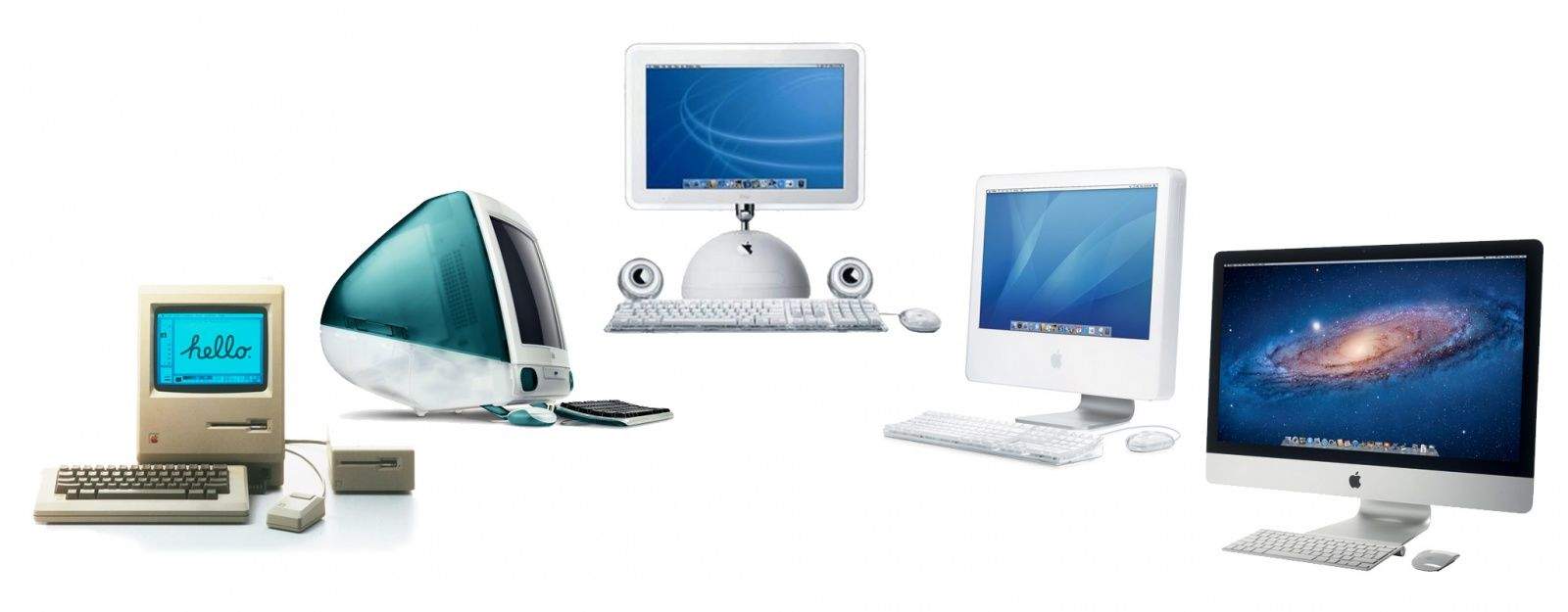
This week in Cult of Mac Magazine: how some collectors are making serious money with old Macs.

Well, that and how some are discovering that it may be sentimental value that keeps the old machines humming – as it turns out for our publisher, Leander Kahney, who reminisces on the antiquated machines in his life.

And if you dream of finding an Apple 1 or coming across a Twiggy Mac and making a pretty penny, we’ll tell you what happens when those machines roar back to life and come up at auctions.

We’ll also help you figure out what to keep – and toss! – in your collection and showcase some of the coolest ways Apple lovers have repurposed those aging computer carcasses to give them new life.

Our Apple Genius dishes on how to keep your privates protected when you bring your machine in (it’s not as hard as you think) and the best way to let your technician know you’re not a total moron – so you can get your device fixed and get out as soon as possible.

Cult of Mac Magazine

Keep Your Hard Drive In Top Shape With The Stellar Drive ToolBox for Mac #BlackFriday [Deals]

By

redesign_stellar_mainframe_630x473

Never suffer from a system crash, failed hard drive, or dip in system performance again.
The Stellar Drive ToolBox for Mac is a comprehensive bundle of utilities to keep your system healthy and optimized.

All 14 utilities help optimize hard drive performance, protect your data and provide an easy way to repair your hard drive’s volumes – it’s all you need to optimize, repair, and maintain your Mac. And Cult of Mac Deals has it for just $49.99 – 49% off the regular price of $99!

The RHA MA750i Might Be The Last Best Earphones You’ll Ever Need [Review]

By

post-255574-image-b7d52787811342add80223059f4abfad-jpg
MA750i by RHA
Category: canalphones
Price: $130

There aren’t many in-ear monitors made of steel. Aluminum? Yes. Plastic? Wads. But steel-bodied IEMs — now that’s a rare find. There’s good reason for this: Though the material is solid, hard-wearing and, according to some, produces a cleaner sound, it’s heavy — which can make steel-housed IEMs often uncomfortable and annoyingly ill-fitting.

But forget all that. Scottish-based RHA have managed to make the stainless steel-bodied MA750i supremely comfortable and well-fitted, even under heavy action. In fact, RHA absolutely nailed it perfectly with these ‘phones in every single category that matters, with only two or three minor trade-offs.

With New Templates, Springpad App Even More Different To Evernote Than Ever Before [Daily Freebie]

By

springpad-1


Springpad launched on the heels of Evernote in 2008. Though the two are superficially alike — they’re both cloud-based note-taking services often accessed though their respective iOS and Android apps — Springpad was always a little more geared toward collecting and organizing groups of things, like products or recipes.

Springpad’s latest update further underscores this difference; it now has a set of templates that can be used for organizing different categories of saved items, as opposed to the more open format of Evernote.

Find The Popular Apps In Your General Location With Near Me [iOS Tips]

By

Near Me

One of the newer features of iOS 7 is in the App Store. No, I’m not talking about the Wish List feature, which is pretty slick, but the “near me” function of the App Store. It’s a pretty cool thing to play with when you’re traveling, if nothing else.

You can get a neat little list of the hot apps of other people in your general area with this cool little feature, and I did so on my current trip to Hawaii, just to see what people were downloading here in the beautiful city of Honolulu.

You can see my results above, and then try it on your own.

Apple Collectibles, Keep This — Toss That

By

-VMM Macintosh Way

Have you ever looked around your garage or spare bedroom and thought: “There’s enough Apple stuff here to start a museum?”

That’s pretty much what happened to Adam Rosen, who runs the Vintage Mac Museum, a private collection of all working machines, out of his Boston-area home. (Take a peek at his prized pieces in the gallery in this edition.)

The certified Apple consultant and Cult of Mac contributor on all things vintage gave us the skinny on what to do with your burgeoning collection: what to toss, what to hunt for on eBay and what to beg your significant other to let you keep.

Cult of Mac: Since 2009 when the Apple 1s started resurfacing the prices have gone from under $20,000 between private collectors to over $300,000 at Christie’s – any thoughts on whether this is having any effects on the general market for Apple collectibles?

Adam Rosen: Apple 1 prices have been unreal, they’ve sold as high as $670k!  This has definitely had an effect on the size of the market for Apple collectibles, expanding it significantly.  The effect on value is more variable.

For rare items and prototypes, value has definitely gone up. If you have a prototype clear case Macintosh SE, yeah, that’s gonna interest people.  But there were a lot of Apple IIs and Macs manufactured.  With so many more people aware of the prices of rare Apple systems the market gets flooded with common models. A Mac Plus today is only worth about $100, even if it’s been in the attic for 20 years.

CoM: A few years back,  you said the size of a collection depends on what the person you live with will tolerate – does that still stand? Is there stuff you’ve decided to sell or give away that you were previously holding on to?

AR: That definitely still stands.  I’ve been contacted more than once by fellow collectors whose significant other has decided that it is Time for Things to Go, and they are willing to offer me a good deal!

I’m currently single – which lessens pressure from others to shed possessions – but it’s still necessary to purge occasionally in order to reclaim living space.

CoM: You have also said that the original 128K Macintosh is always desirable, does that still stand?

 AR: That is still true, and the value has increased.  A working 128k Mac is currently worth $750-1,000, one with an original box and packaging can command double that.  Vintage Mac prices spiked after Steve Jobs passed away, they’ve come down since but the first model will always be desirable.

CoM: If taking up space with old computers is a problem – what smaller collectibles are worth having?

AR: Funny you should ask that, as my collection has expanded I’ve become more interested in smaller promotional and marketing items.  They cost less and look nice next to other equipment.  Few are investment worthy yet, but collectively they have some value.

Original Apple marketing schwag is always desirable – posters, pins, buttons.  Store display banners are prized, though these can be large. “Think Different” posters are nice but still fairly common – buy a set and hold on to those.  Items signed by Steve Jobs are highly valuable; things by Woz not as much, since he has signed so much.  Apple clothing, manuals and stationary don’t really command much value.

CoM: What’s the most prized piece in your collection and why? How has that changed over the years?

AR: This has definitely changed over the years. I have a Mac Plus where the back and one side have been replaced with plexiglass to show off an internal hard drive upgrade.  This isn’t a translucent prototype, more like a working “cutaway drawing” of the Macintosh.  It’s a very unique piece.

I recently bought a 128k Mac with original packaging, I’ve wanted one of those for some time.  It’s a must-have for any serious Mac collector.

I’m also a big fan of the Picasso-style artwork.  Last year I bought one of those lighted Macintosh logo dealer signs which Apple supplied for the Mac’s introduction.  These are gorgeous, I love turning it on and looking at the light reflect inside the engraved glass.

CoM: Any thoughts or advice on finding or buying prototypes? That last Christie’s auction also had that clear cased SE, for example…

AR: eBay is probably the most likely place to find prototypes, it’s the biggest worldwide marketplace.  Craigslist can also be a good place to find old tech, especially in the larger cities.  Of course, knowing people who once worked at Apple never hurts!

Prototypes of products nobody cared about may not be worth anything.  For example, nobody is looking for a developmental Apple III system.  But if you can find an unshipped Apple tablet prototype from the 1980s or 90s, grab it.

By the time things show up at Christie’s you know you’re not going to be getting a bargain!  I don’t know how much that clear SE actually sold for, I think the last bid I saw was $5,000.  That’s still a lot more than a standard SE, which sells in the $100 range.


Livescribe 3 Is Fantastic, Right Up Until It Sends Your Writing To Your iPad [Review]

By

IMG_3950

Livescribe 3 Smartpen byLivescribe
Category:
Works With:
Price: From $150

Spoiler: Writing with ink on paper is still way better than stabbing at a hard glass screen with a soft rubbery tip. Double spoiler: writing with a ballpoint pen which records your every stroke for searching and editing on your iPad is amazing, and way better than taking photos of every page you finish just to feed into Evernote. Third spoiler: No matter how good the hardware and the AI behind the scenes, a crappy app lets everything down.