Mobile menu toggle

Furiously Match Lions And Turtles In Ark Saver [Review]

By

Ark Saver 3

I went into Ark Saver expecting it to flounder about like the Noah’s Ark mini game in Bible Adventures on NES. I’m incredibly surprised that it is not only playable but pretty addictive.

Ark Saver by Ignacio Bononi
Category: iOS Games
Works With: iPhone, iPad
Price: Free

The goal in Ark Saver is to match the next animal in a long line with its pair as quickly as you can. Each level gives you 30 seconds to pair 50 or more sets, and each level introduces more creatures to match. To get the highest score, you’ll need to maintain a combo streak that breaks every time you tap the wrong picture. Luckily, the only harm breaking a combo repeatedly has is decreasing your overall score.

Thule’s New iPad Air Case Is Tough & Protective But Still Super Slim [Review]

By

IMG_1075

If you upgraded your old iPad for an iPad Air late last year, you probably did so for several reasons — but I’ll bet one of the biggest was its new form factor, which is substantially thinner and lighter than any of its predecessors. The last thing you want to do with it, then, is slap a big chunky case on it that makes it even bigger than the iPad you owned before it.

Gauntlet by Thule
Category: Case
Works With: iPad Air
Price: $54

Thule took that into consideration when designing its new Gauntlet folio case for the iPad Air. Although its main focus is clearly on protection, so the case is tough and robust and ready to absorb any impact, it’s also surprisingly light, and much thinner than you’d expect a case of this ilk to be.

It’s also practical, with rubber grips that provide a built-in stand for typing or watching movies, and a “stability clip” that keeps its front cover securely closed when your iPad’s not in use. There’s a soft interior lining that prevents scratching, and the Gauntlet provides easy access to all of your iPad’s buttons and ports.

Add Or Remove Filters In iOS 7 Camera App [iOS Tips]

By

Edit1

Apps like Instagram and Hipstamatic have trained us all to find photos with various filters applied attractive and cool. Apple realized this, obviously, when it updated its own built-in Camera app for iOS 7. These are only available on the iPhone 5 and up, though, so don’t worry if your iPhone 4S doesn’t show any filters here.

While filtering your photo is pretty darn easy, it might not be super intuitive for everyone. Plus, removing the filter is straight up non-intuitive. Launch your camera app and take a photo to walk through the steps involved.

‘Better Every Time’ Thinks You Can Improve Yourself Without Being Shamed On Facebook

By

Better Every Time

Better Every Time — Productivity — Free

The App Store is full of things to help you set goals and keep you accountable, usually by making everything visible to your friends so they can goad you into persevering. Better Every Time takes a different approach, offering no social media connectivity whatsoever. Instead, it turns your quest of betterment into a journey to the top of a mountain and leaves it to you to check in along the way. Doing so just takes a few seconds, leaving you free to improve yourself.

So it’s basically an app that doesn’t want you to use it too much, which is an interesting angle.

Better Every Time

Atomic+: You’re A Dot Picking Up Squares And Avoiding Other Dots. And It’s Fun. [Review]

By

Atomic+

Okay, so you’ve mastered Super Crate Box, and you’re so good at Super Hexagon that you can’t play it anymore without yawning. And maybe you’ve also bested a Sasquatch at arm-wrestling, and you’re the King of the Oompa-Loompas because those two things are just as likely.

Atomic+ by Amidos
Category: iOS Games
Works With: iPhone, iPad
Price: $1.99

But if you like those other games and are looking for something “inspired by” them, you’d do well to check out Atomic+, a recently released arcade/twitch/minimal title that puts you in the position of an electron that can leap between atomic orbits and has a lot of stuff flying at it constantly.

So maybe not quite like an actual electron, but you get my point.

Become A Top Developer With The Secrets To App Store Success In iOS 7 Course [Deals]

By

redesign_marketinghacks_mainframe

Just because you’ve built a great app doesn’t mean that they will come. It hasn’t been that way for years. Have you ever wondered what it takes to get into the top charts of the app store? What are the top apps doing that you aren’t? Is it luck?

Cult of Mac Deals has an offer on a course that will provide the answer: The Secrets to App Store Success in iOS 7 Course. And it’s available for 59% off for a limited time – just $99.

Turn Your Photos Into Reminders With Shoots & Leaves

By

Never forget bulbs again.

Every time I walk into a bookstore, I want to buy a book. Or three. Sadly, my budget doesn’t cover that all the time, because I go into bookstores quite a bit. To scratch that itch, I’ve turned to taking a photo of the book covers with my iPhone; that way, I get the satisfaction of doing something about my book lust without having to pull out the wallet each time.

Shoots & Leaves is a new iOS app that aims to solve the same problem, but for all those things you need to be reminded of, not just books you want to buy (though you can use it for that, too, I suppose).

New iPhone 5s Jailbreak Lets You Simulate Home Button Using Touch ID

By

5s home button gold

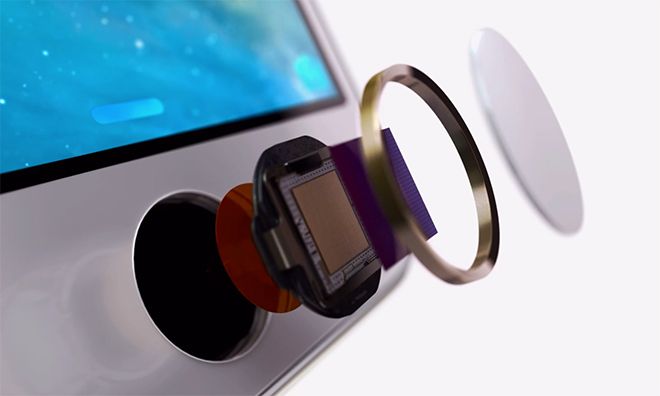
With the iOS 7 jailbreak finally worth installing on newer iPhones and iPads, it seems the floodgates have finally been opened.

Virtual Home is one of the first Touch ID based jailbreak tweaks available for the iPhone 5s. Working with the Touch ID sensor, Virtual Home can help save wear and tear on the iPhone’s Home button by eliminating a large percentage of button presses. Instead users can replicate much of the functionality of the Home button simply by touching it.

Zoom It App Puts Your Mac’s Screen In The Loupe

By

mac-img

Fact: I’m currently waiting for my lazy optician to supply my first pair of “old-man glasses” aka specs with progressive lenses. In young-folk terms that means I get glasses which let me read without holding the iPad at arms-length.

In the meantime, I have boosted the size of my iPad’s text, but on the Mac I might give Zoom It a spin. It’s a loupe app that magnifies whatever is under it’s little virtual glass eye, and it’s now compatible with Mavericks.

Amazing Tablet Desk Is Perfect For Tiny Apartments

By

tablet desk

My current desk cost me around €30 in the local flea market, comes from the GDR and is awesome. But it’s not a great desk for piling up with tech, thanks to a complete lack of charger cubbyholes and cable wranglers.

If you put my desk at one end of the tech-configurability spectrum, and a neat, modern desk on the middle, then the Bee9 Tablet Desk 2.0 would be way off at the other end of the scale.

Japanese Apple Store Sells “Lucky Bags” Containing All Kinds Of Apple Goodies [Video]

By

(Credit: RocketNews24)

Forget Black Friday or Cyber Monday, New Year in Japan is the time of choice for retailers and shoppers alike — since this means Fukubukuro.

Literally translating as “lucky bag”, fukubukuro gives stores a chance to make room for incoming stock and drum up some publicity by selling off inventory at a massively discounted rate. The catch? That customers hand over their money for a grab bag they have no idea of the contents of.

Write for Mac Beta Now Available

By

write beta

Write, the slick iPhone and iPad text-editing app, is now available in beta form on the Mac. It doesn’t yet have many of the fancy trimmings of its iOS siblings, but it is already a rather nice place to write your Markdown, rich text or plain text notes.

Call Of Duty: Strike Team Offers A Whole Lot Of FPS Bang For Your Buck [Review]

By

callofduty

Call of Duty: Strike Team by Activision Publishing, Inc.
Category: iOS Games
Works With: iPhone, iPad, iPod Touch
Price: $2.99

It’s been a while since we had a Call of Duty game for iOS. This latest incarnation — first released back in September — is set in the Black Ops II universe, and follows a Joint Special Operations Team in the year 2020, as they battle Cordis Die, a pseudo-terrorist organization with unfriendly intentions. (Don’t they all seem to have those?)

Double Your Mac Productivity With The OS X Mavericks Productivity Course [Deals]

By

redesign_macdojo-mainframe

After the holiday season, there are usually a lot of new Mac owners. Many of those new Mac users aren’t familiar with the platform, having switched from a Windows machine. Instead of relying on more seasoned Mac owners, wouldn’t it be great if there was an easy way to point new users in the right direction? Thanks to Cult of Mac Deals and Mac Dojo, now there is.

The Mac Dojo Productivity Course couldn’t come at a better time in the twilight of the holiday season. There’s a lot of you with new Macs out there, and if you want to get the most out of it – this is the course for you. And you can get it for a limited time for only $25 – a savings of 74%!

Last Chance! Get The Merry Mac Bundle: 8 Of The Most Advanced Media Apps To Make Your Mac Bump [Deals]

By

CoM - MerryMacBundle

If you’ve looking for a great sounding deal during the holidays, then with no further. The Merry Mac Bundle: Beats + Media Edition features 8 killer apps that will make your Mac handle allsorts of media like a pro. And the best part? Cult of Mac Deals has it for 95% off the regular price – only $34.99 – during this very limited time offer.

Ergotron Workfit-A Standing Worstation: Like A Terminator Holding Your iMac [Review]

By

ergotron-2
WorkFit-A by Ergotron
Category: Desks
Works With:iMac
Price: $650

If you own a laptop, it’s pretty easy to up and move to a more comfortable workplace when your joints start to stiffen. But if you have a giant 27-inch iMac or Cinema Display, you’re kinda stuck at your desk. You could opt for a standing desk, but what if you want to sit? Or you could go for one of those adjustable numbers, but what about the perfectly good desk you have already? That’s where the WorkFit-A comes in. It’s a big robot arm that lets you swing around even a 27-inch (2013 model) iMac as if it were an iPad. A really, really big iPad.