Mobile menu toggle

Amazon App Now Lets You Shop With Your iPhone’s Camera

By

photo_7_

From quadrocopter deliveries to rumors of a 3D Kindle smartphone coming in 2014, Amazon has been on the cutting edge of tech for quite some time now. The company’s latest update for its iOS app, however, might be among the most fun new developments we’ve seen.

Along with the ubiquitous bug fixes seen in practically every iOS app update, version 3.2.1 of Amazon’s retail app includes a feature called “Flow” which lets users quickly and easily search for products using their iOS camera.

Evasi0n Updated to Jailbreak iOS 7.0.5 [Jailbreak]

By

evasi0n7-7

We said it wouldn’t be too long until a jailbreak was available for iOS 7.0.5, and thankfully the good folks at Evad3rs haven’t let us down — since Evasi0n has just released its untethered iOS 7.0.5 jailbreak.

U.S. iPhone users won’t get a whole lot from the iOS 7.0.5 update, since its changes mainly deal with minor bug fixes to network errors on Chinese carriers — but for those looking for assurance that their unlocked iPhone can be used internationally without problem, it may be worth a download.

Apple Removes Popular Bitcoin Wallet Blockchain From The App Store

By

Screen_Shot_2014-02-06_at_07

Apple’s dislike of bitcoin has been on display for quite some while now, but the cyber-currency has been hit yet again as Apple removed Blockchain — the world’s most popular bitcoin wallet — from its App Store late Wednesday.

Apple had previously removed fellow wallets BitPak and Coinbase — while Blockchain had previously found itself excised, only to later be re-accepted.

Final Fantasy VI Makes Its Long Awaited iOS Debut [Video]

By

post-265348-image-b4f912a2c11401f19c62a0b8d99617c6-jpg

After what seems like a lifetime of anticipation, Final Fantasy VI for iOS has finally touched down in the App Store.

Representing the FF series at its 2D peak, the game (which originally hit consoles back in 1994) takes place in an eye-popping Industrial Revolution-inspired world, as characters Terra and Locke battle to escape the clutches of an evil Empire.

Editor’s Letter

By

striscia

The 2014 Winter Olympics may be the first quantified games in history. Sure, coaches have been standing by with stopwatches and clipboards since, well, some dude sprinted down dusty roads in sandals, probably. But now, there’s an app for that.

Elite athletes are using apps to keep them on top of their game – physically and mentally. We talked to Steve Portenga, who has worked with winter and summer Olympians, and created iPerformancePsychology to help give the rest of us the winning mindset. He admits there’s less to be done about your hopeless snowplow on the bunny slope, but more on that in the story.

I’m excited about these apps, and that’s saying a lot. There are only two times you’ll find me interested in sports: the Olympics and the World Cup. Even then, it’s usually not so much the sport that captivates me — though the winter games have the edge when it comes to mesmerizing sequins — it’s the epic international battles played out in the name of gymnastics or soccer.

When the question of who lands on the podium speaks to age-old predilections rather than strictly by GDP, things get interesting. Norway, for example, is a nation of just five million souls but is expected to make mammoth countries like the U.S. eat ice dust in Sochi. Jamaica’s bobsled team, which qualified for the first time since 2002, is coming to Russia courtesy an international crowdfunding campaign. I plan to re-arrange my schedule to view all of their matches. And what about host country Russia? Can pumping millions into sports bring back the glory days, especially after the embarrassing showing in Vancouver? The thrill of victory and the agony of defeat take on a larger meaning when countries go for for the gold.

Once again, I’ll be watching exclusively on my MacBook Pro, iPhone or iPad. (When I moved back to San Francisco from Milan with exactly four boxes, buying a set never became a priority.) Watching sports this way brings interesting aspects to viewing not limited to the tiny screen and intermittent buffering. For instance, I ended up watching the last World Cup entirely in Spanish, which definitely has an edge over the more buttoned-down English-language commentary. Note to U.S. broadcasters: you really need to hire a guy to give rat-a-tat-tat play-by-play climaxing in “GOOOOOOOOOOLLLLL!” People would watch soccer, then.

Fortunately, this time around our own Charlie Sorrel has chimed in with all the tips you need to watch without a traditional TV. And we’re off, for 18 days of sport!

Platforms Unlimited Is An Assault Course For Your Reflexes [Review]

By

photo_6_

When I was young, maybe between the ages of twelve and fifteen, I used to make very basic games with a friend of mine called James Brzezicki. They were almost always the simplest things imaginable: a single sprite jumping over other sprites, or a ball bouncing back and forth between two paddles. This wasn’t because we had worked out how to strip gaming down to its most base elements, but rather because it was all we could work out how to program.

Platforms Unlimited by XperimentalZ Games
Category: iOS Games
Works With: iPhone, iPad, iPod Touch
Price: $0.99

Close to twenty years on, I had a very similar experience playing Platforms Unlimited for the first time. Platforms Unlimited is a minimalistic, twitch-style endless platformer. There’s one goal — jump over red enemies — and one button to do this, with the jumps increasing in length the longer you touch the screen. Your score increases for every second you stay alive, and additional points can be racked up by collecting coins, which can then be traded in for gameplay bonuses.

Samsung Asks Olympic Athletes To Cover iPhone Apple Logos During Games

By

Olympic athletes receive Note 3 phones with their country's flag on the back.

Samsung is an official sponsor of the Sochi 2014 Olympics, and the Korean company has been giving athletes Galaxy Note 3 phones to use during the games. In exchange for the gifts, Samsung has reportedly asked the athletes to specifically cover the Apple logos on their personal iPhones.

What happens if athletes don’t respect the rule remains unclear. Logos were also asked to be covered by Samsung when it was a sponsor of the London 2012 Olympics, so this isn’t a new tactic. However, it does illustrate Samsung’s corporate contempt for Apple.

Add Your Own Mailboxes To iOS 7 Mail App [iOS Tips]

By

final mailboxes

We’ve shown you how to enable the hidden Smart Mailboxes in iOS 7, which is a great way to manage your email in Apple’s own built-in Mail app.

If you’re like many of us, though, you’ll have a few folders for organizing your mail as it comes in. I use Mailbox on my iPhone, but Mail app on my iPad, and I want to be able to access the Mailbox “Follow Up” folder on my iPad without having to tap through a ton of different folder hierarchies.

It’s relatively easy to set your Mail app up to add any folders you have in any of your email accounts.

Get Your Game On With The Mac/PC/XBOX 360/PS3 Gamer Hardware Bundle [Deals]

By

medium_gamer_mainframe

If you’re into gaming, then having a versatile experience at your disposal is ideal. This Cult of Mac Deals offer gives you just that — and at a price that is tough to beat.

That’s right. The Mac/PC/XBOX 360/PS3 Gamer Hardware Bundle gives you a universal controller and headset that lets you game with top-notch quality and on multiple platforms. And you’ll get this bundle at a 20% savings — just $48!

Top iOS Apps Of The Week

By

Slip

Browsing the App Store can be a bit overwhelming. Which apps are new? Which ones are good? Are the paid ones worth paying for, or do they have a free, lite version that will work well enough?

Well, if you stop interrogating me for a second, hypothetical App Store shopper, I can tell you about this thing we do here.

Every week, we highlight some of the most interesting new apps and collect them here for your consideration. This time, our picks include some interactive art, a quick way to exchange contact information, and a really rude personal trainer.

Here you go:

Slip — Utilities — Free

Slip knows that exchanging business cards can be annoying. You have to find your cards and then take theirs and then maybe jam it into the back of the thing where you keep your cards, and hopefully it fits. And then later, you find their card and can’t remember why you’d met in the first place.

So instead of that, Slip uses Bluetooth to exchange contact information wirelessly. You go in and toggle which bits of information you want to share and just flip it over to another user with a single swipe. You can also text or e-mail it to people without Slip, but that’s not as much fun.

Slip – Yodel Code

CARROT Fit

CARROT Fit — Health & Fitness — $1.99

It isn’t hard to find a fitness app that offers enthusiastic and positive encouragement to keep you motivated and working toward your goals. CARROT Fit is not one of those apps.

Following its predecessors, CARROT To-Do and CARROT Alarm, Fit brings the you-deprecating artificial intelligence program to bear on your weight-loss plan. You set your goal, and “she” gives you points and virtual medals for doing well and mocks you if you don’t. It’s basically like if GLaDOS, the comical, murderous A.I. from developer Valve’s Portal series, were sent to whip you into shape.

By which I mean that CARROT Fit is kind of amazing.

CARROT Fit – Talking Weight Tracker

Phone Price

Phone Price — Reference — Free

If you’re due for an upgrade to your iPhone, you might be wondering what to do with your current one. You could go to a bunch of different websites and search for buyback values or try to just sell it yourself, but that sounds like a lot of work, and living in the future like we do means things should be easy.

Phone Price is an app that aggregates phone trade-in values from a variety of sources so that you can get the most for your old device. So you’re basically making the phone a party to its own rejection and disposal, and that’s pretty cold.

Phone Price – K Mobile Solutions

iHud

iHud — Utilities — Free

You can pop into iTunes and find several dozen apps that will use the GPS in your iPhone to create an accurate speedometer, but most of them have a major problem: You have to look down.

iHud tries to solve that issue. You open it, and your velocity appears. It reads backwards, but if you place your phone up under your windshield, the reflection will look right, and you won’t have to look away from the road to check your speed.

I’m not sure how you keep your phone from sliding off your dash when you turn, but that’s for the engineers.

iHud – Anders Sperling

Colour by Numbers

Colour by Numbers — Lifestyle — Free

Have you heard of Colour by Numbers? It’s a light installation in Stockholm in which anyone with a mobile phone can participate.

The top 10 floors of the Telefonplan tower contain colored lights, and you can change their hues by either calling in and punching in a bunch of numbers or using this app. For five minutes at a time, you can select floors and mix red, blue, and green to create any color you want. And you can watch the live feed online to see your contribution in real time.

It’s kind of eerie, actually.

Colour by Numbers – Milo Lavén

Contact Alias

Contact Alias — Utilities — Free

People love their privacy, but you can’t play Phone Goalie all the time. What if there were some way to hide who your iMessages and texts are coming from, even if whichever nosy person you’re with is looking right at your screen?

Enter Contact Alias, an app that lets you set alternate names for anyone on your list and toggle them on and off with a single touch of a comically large button. I’m sure it has practical applications for sneaky sneakers, but I’m probably just going to use it to quickly change people’s contact names to “A**hole” when I’m mad at them.

Contact Alias – Ryan Siegel

theScore Has All The Winter Olympics Coverage You Need

By

Winter Olympics coverage right on your iPhone

Winter Olympics fans rejoice, for theScore is here to deliver unique sporting content and breaking news direct from Sochi to your iPhone. The app has its own team of news hounds who will push news on heats, medals, and podium positions in real time right to the app, which has been updated for this specific feature.

The app will show new in little bites that break down the big stories in to easily digestible snacks. Each update will come in on top of the previous, along with images, animated gifs, videos, and tweets from the events.

Wally Wallet iPhone Case Is A Minimalist’s Dream [Review]

By

DSC05155

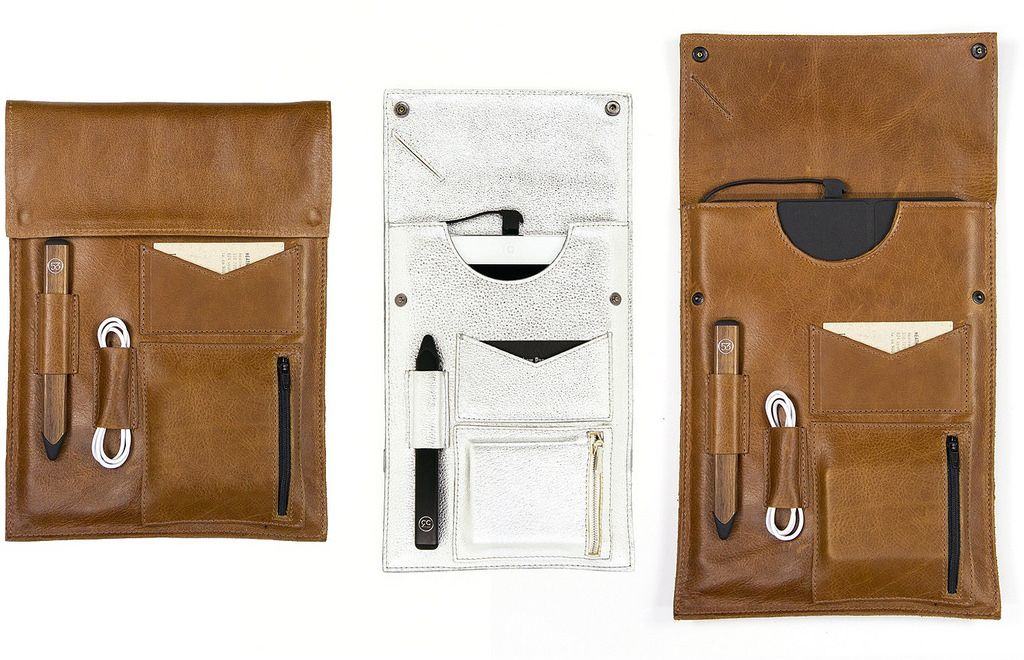
I hate thick wallets. I carry mine in my left front pocket most of the time, and I really don’t need something huge and bulky in there to both look dorky and hurt.

Wally Wallet iPhone Case by Distil Union
Category: iPhone Cases
Works With: iPhone 5, iPhone 5s
Price: $49.99

I’ve spent some time paring down the stuff in my wallet, too, making it as minimal as possible. I usually carry my driver’s license, my Visa debit card, a bit of cash, and a couple of shopping club cards, like Costco and Safeway. I rotate a credit card in on occasion, too, if I need the extra buying power.

Usually, and especially when I go out on the town for an evening, I only need the ID, some cash, and my debit card.

That’s exactly what fits easily in the new Wally Wallet iPhone case, making it a dream come true for this wallet minimalist.

‘Contact Alias’: Because Everyone Wants To See Who Is Texting You

By

Contact Alias

Contact Alias — Utilities — Free

People love their privacy, but you can’t play Phone Goalie all the time. What if there were some way to hide who your iMessages and texts are coming from, even if whichever nosy person you’re with is looking right at your screen?

Enter Contact Alias, an app that lets you set alternate names for anyone on your list and toggle them on and off with a single touch of a comically large button. I’m sure it has practical applications for sneaky sneakers, but I’m probably just going to use it to quickly change people’s contact names to “A**hole” when I’m mad at them.

Contact Alias – Ryan Siegel

Spell Quest: Grimm’s Journey Gives New Meaning To ‘Spellcasting’ [Review]

By

Spell Quest

I’m a big fan of words. The idea that you can arrange letters and spaces in such a way as to change minds, inspire emotion, and create art is powerful and almost magical.

Spell Quest: Grimm’s Journey by Bacon Bandit Games
Category: iOS Games
Works With: iPhone, iPad
Price: Free

And the idea that you can do the same thing to ruin someone’s day or knock them down a peg is a different kind of magic, but just as eagerly sought. Spell Quest: Grimm’s Journey falls into the latter, “words can hurt” camp.

But they’re hurting monsters, so it’s probably alright.

Compete In Cult Of Mac’s Selfie Olympics To Win Prizes And A Spot In Our Magazine

By

selfieolympics

The Winter Olympics are just three days away so of course we’re working on a special edition of Cult of Mac Magazine all about the intersection of the winter games and Apple.

99.997% of us aren’t talented enough to get an invite to Sochi, but we can all take a damn good selfie. So with the spirit of competition upon us, we’re introducing the Cult of Mac Selfie Olympics – a competition to see which of our readers can take the absolute best selfie before the real athletes battle it out in the 2014 Winter Olympic Games.

Never Have To ‘Finder’ A File Again With Trickster [Sponsored Post]

By

image

This post is brought to you by Trickster.

The Mac’s Finder is great at locating files if you know the file’s name and likeliest folder. But often you don’t, and end up searching through your entire computer to find that one file. Now, Trickster does a fantastic job at keeping track of all the files you’ve been using recently. You won’t ever need to open Finder again on your Mac. With Trickster you can simply drag and drop files exactly where you want them. Trickster gives you quick and easy control over finding your files and documents–just a mouse click away right there in your Menu bar. Read on to see the video and get the special deal here.

How The iPhone 6’s Camera Will Get Supercharged [Rumor]

By

video_hero

Generally speaking, you can count on the latest iPhone to improve upon the camera of the model that preceded it. That means that when the iPhone 6 comes along, we can expect it to have a better camera than the iPhone 5s’s 8-megapixel camera with an f/2.2 aperture.

Now a new rumor suggests that Apple has already selected a supplier for the iPhone 6, which will have a 10-megapixel camera with a f/1.8 aperture. Moreover, it will replace the hybrid IR filter used on the iPhone 5s with a resin lens filter, which would allegedly result in clearer images.

How To Use Spotlight Search As A Calculator [OS X Tips]

By

Spotlight as Calculator

When I’m sitting at my Mac and need to do a quick bit of calculation, I typically launch the Calculator app with my app launcher of choice, Alfred.

If you don’t want to launch the app, click on the numbers, or enter in the calculations via that graphical interface, you can just use Spotlight.

First off, activate Spotlight by hitting the Command and Space keys on your keyboard, or by clicking on the little magnifying glass in the upper right of your Mac’s screen.

Google Escapes Fine In Europe By Reaching Antitrust Agreement With Regulators

By

post-265254-image-a4d6febd352f26902ec6ab4f56a91993-jpg

Google has reached a tentative agreement with the European Commission following a three-year antitrust investigation into how it displays search results in Europe. As part of the agreement, the company will display search results from three of its competitors — such as Yahoo! and Bing — alongside results that promote its own services.

By reaching this agreement, Google has escaped a fine of up to $5 billion, or 10 percent of its revenue from 2012.

Apple’s Radical New File System May One Day Replace The Mac’s Finder [Patent]

By

Screen_Shot_2014-02-05_at_12

A new Apple patent describes an invention that may one day replace the Mac’s Finder.

Referring to a method for classifying documents in such a way as to allow for a multi-dimensional graphical representation of their contents, the patent would move away from the way information is currently structured toward a “graphical multidimensional file management system and method” that would be far more intuitive than the system used today.