Mobile menu toggle

Cool new HealthKit gadgets can measure practically anything

By

Cool new HealthKit-compatible gadgets at MWC
New HealthKit gadgets make health and fitness easier than ever.
Photos: Graham Bower/Cult of Mac

Mobile World Congress 2018 BARCELONA, Spain — Smart sperm testers, body cavity inspectors, Bluetooth pillows, holographic jump ropes and contactless thermometers. It’s all just another day at Mobile World Congress, where more and more companies show off their new HealthKit-compatible gadgets.

If you want your iPhone to know absolutely everything about what’s going on with your body, these handy medical devices are for you. Here’s what they do — and why they’re cool.

This could be the best Mac cleaner for your money

By

Dr. Cleaner Mac cleaner will get the cruft out of your Mac.
Dr. Cleaner will get the cruft out of your Mac.
Photo: JÉSHOOTS/Pexels CC

This post is presented by Trendmicro, maker of Dr. Cleaner.

Spring is coming, and the urge to tidy up follows close behind. Of course, our computers can get just as cluttered as our homes. We use all kinds of cleaning supplies for tidying up our homes easily and effectively. It’s also a good idea to get the right tools for cleaning your Mac.

Musicians: Here’s how to lock down your iPad to prevent accidents on stage

By

guided access ipad
Stage performers don't want their iPads launching Facebook mid-show.
Photo: Charlie Sorrel/Cult of Mac

Apple’s iOS accessibility features might be hidden away in the Settings app, but they are useful for everyone. For instance, Guided Access lets you lock your iPhone or iPad so it can use only one app, and you can even disable parts of the screen just by drawing on them. If you’re looking for a feature similar to iPad guest mode, Guided Access can be a great way to limit app access for kids or individuals with specific needs. This is handy for giving the iPad to kids, or to people with impaired motor skills, but it is also fantastic for stage performers.

A musician, for instance, might be using the iPad to produce or process their sound. The last thing you want to do in the heat of a performance is to accidentally do a four-finger swipe and end up on your Facebook page.

Today, then, we’ll see how to use Guided Access to keep your iPad safe on stage, but the same tips apply if you’re deploying an iPad as a cash register in your coffee shop, or as an information point at an exhibition.

Pro Tip: How to use Safari’s super-quick pop-up tab history shortcut

By

Safari pop-up tab history
Here's Safari's pop-up tab history
Photo: Cult of Mac

Pro Tip Cult of Mac bug When you want to get back to a previously viewed page in Safari on your iPhone, what do you do? Do you keep tapping the back button until you find the page you want?

If so, you can forget that nonsense right now, because there’s a super-quick way to see a list of all the web pages you’ve recently viewed in a Safari browser tab.

6 things Apple should do to fix Siri

By

Siri display
"I don't have these features. Would you like me to search the web for you?"
Photo: Ste Smith/Cult of Mac

Siri kind of sucks, despite its increasingly prominent role in the Apple ecosystem.

With the general verdict on the HomePod being “great speaker, shame about Siri,” what does Apple need to do in order to catch up with its rivals? Here are six Siri improvements we’d love to see Apple implement as soon as possible.

Worries arise as Apple hands over iCloud accounts to China

By

Apple Store
Apple has had a number of challenges growing its market in China.
Photo: Apple

Apple has completed the transition of iCloud accounts registered in China to state-run Chinese servers, and privacy and human rights advocates are (rightfully) worried.

In addition to transferring the accounts to state-run servers, Apple may have also transferred the digital keys to Chinese jurisdiction, although Apple says it retains control of them. Nonetheless, it’s a concerning event — especially at a time when people are already worried about Xi Jinping, ruler of the Communist Party of China, ramping up censorship as part of the bid to establish himself as president for life.

4 tools that make iPhone a better road warrior [Deals]

By

Auto Roundup Collage
Perfect for those long commutes or road trips, these four gadgets will make driving a bit more fun.
Photo: Cult of Mac Deals

Your iPhone makes daily life a lot easier. But when driving, the most you can expect is getting directions. That’s why we’ve rounded up four awesome iPhone car accessories. From smart license plates to wireless charging, speed trap detectors and more, there’s something in here for anyone who wants their phone to be a true road companion. Read on for more details.

Apple Watch can now track snowboarding and skiing activities

By

Skier
The Apple Watch is an incredibly versatile fitness tracker.
Photo: Apple

The Apple Watch continues its mission to become the most versatile fitness trackers around, with Apple today introducing the ability for Apple Watch Series 3 wearers to track detailed information about both snowboarding and skiing runs.

Skiers and snowboarders running watchOS 4.2 can now use their Apple wearable to measure these activities, via new updates to apps available in the App Store. Users can record runs, see vertical descent and other stats, and contribute active calorie measurements directly to the Apple Watch Activity app.

Tekken card battler smashes its way onto iPhones

By

Tekken Mobile
It's just like the fighting game you know... but with cards.
Photo: Bandai Namco

Like Tekken? Have an iPhone? Then you might just want to check out Tekken Mobile, a new worldwide release of the iOS fighting game that soft-launched this past summer.

Unlike it’s console big brother, however, this isn’t a direct port of Tekken in the style of, say, Street Fighter IV: Champion Edition. Instead, it’s a simpler card-based “swipe fighter” game reminiscent of a title like the mobile version of Injustice 2. Check out a couple of videos below.

Activists want you to boycott Apple over NRA app

By

NRA app
Celebrities and activists want Apple to ditch its NRA apps.
Photo: NRA

Apple is one of three companies, including Amazon and FedEx, named in a celebrity and activist boycott of companies with supposed ties to the National Rifle Association (NRA).

If you’re wondering about what possibly links the typically progressive Apple could have with the more conservative NRA, it’s apparently related to Apple’s silence over whether it will remove the NRAtv streaming TV station.

Vintage computer museum on sale with 80 classic Macs

By

Benj Edwards Computer Collection
This is about half of Benj Edwards‘ computer collection
Photo: Benj Edwards

Many people can’t bear to part with their old computers, and slowly build a collection of aging models in their basement. Benj Edwards took that impulse to the next level: He owns at least 228 unique devices, many of them classic Apple products going back to the 1980s.

Now he’s put them all up for sale. Ready to start your own computer museum?

Former Apple exec tapped to lead Computer History Museum

By

Dan’l Lewin in NeXT’s Palo Alto, California, offices, 1986–1987.
Photo: Doug Menuez

The Computer History Museum named former Apple executive Dan’l Lewin as its new CEO and President today.

Lewin was one of Steve Jobs’ top guys back in the early days of Apple. He served in a number of marketing roles from 1981 to 1985 and was recruited by Jobs to join his new company, NeXT, after Jobs was fired from Apple.

ShotBox brings instant screenshot markup to the Mac

By

shotbox
If you've used screenshot markup on iOS, you already know how ShotBox works.
Photo: Josh Parnham

If you like Instant Markup on iOS, then you’re going to love ShotBox. It’s a free app, available from the Mac App Store, that automatically pops up a panel of markup tools whenever you take a screenshot. It’s almost exactly like the Instant Markup tools built into iOS 11.

Apple drops some photography tips in new iPhone ads

By

iPhone X
iPhone X takes the best still images.
Photo: Ste Smith/Cult of Mac

Want to take your iPhone photos to the next level? Apple’s got a few tips that just might do the trick.

The iPhone-maker dropped two new ads today that are focused on helping iPhone users improve the composition and framing of their photos. Apple’s new how-to videos cover using the telephoto lens on the iPhone 7 Plus, iPhone 8 Plus and iPhone X. There’s also some info on how to experiment with framing.

Watch both ads right here:

How to stream Xbox One games to your Mac

By

OneCast Xbox One for Mac
OneCast in action on macOS.
Photo: OneCast

Microsoft lets Windows 10 users stream Xbox One games to their PC, but it doesn’t support Mac. Now there’s a third-party solution that lets Apple fans get in on the action.

Here’s how to stream Xbox One games to your Mac using OneCast.

Gold iPhone X mockup looks absolutely stunning

By

iPhone X
The 2018 iPhone lineup could be prettier than ever.
Photo: Martin Hajek

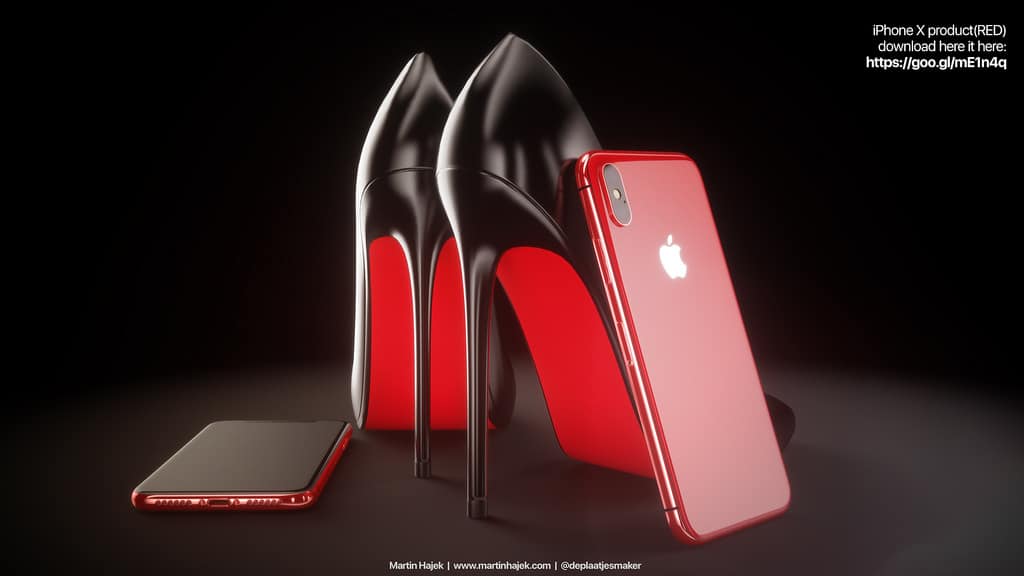
Gold iPhones are set to make a big comeback in 2018 and based on these gorgeous mockups, the wait will definitely be worth it.

Concept designer Martin Hajek has busted out a few mockups on what the 2018 gold iPhone X might look like with both black, white and gold highlights dominating the device.

Take a look:

Apple picks up thriller series from M. Night Shyamalan

By

Apple TV
Apple is loading up with original content.
Photo: Ste Smith/Cult of Mac

Apple is teaming up with M. Night Shyamalan for a mysterious new TV project.

Shyamalan reportedly struck a deal with Apple to executive produce a new TV show that’s being described as a psychological thriller, but other details are being kept under wraps.

Pro Tip: How to pick a new thumbnail for your Live Photos

By

live photos key
With Live Photos new key-photo settings, you can go back in time.
Photo: Cult of Mac

Pro Tip Cult of Mac bugWhen you take a Live Photo, your iPhone automatically picks a key frame to serve as the non-animated thumbnail. Depending on your subject, this automatic pick may be terrible, showing a blurred frame, or worse. If you’ve shot a photo of a skateboarder popping a sweet heel flip, for example, the still frame may not even have the skater in it.

The good news is that you can easily choose your own key frame.

These smart glasses get me excited about how cool Apple Glasses could be

By

Trying out the Vuzix Blade augmented reality smart glasses at Mobile World Congress 2018.
The Vuzix Blade AR smart glasses offer a glimpse of the future.
Photo: Graham Bower/Cult of Mac

Mobile World Congress 2018 BARCELONA, Spain — The best product I’ve tried out at this year’s Mobile World Congress is the Vuzix Blade AR glasses. These smart specs superimpose a sharp, high-definition display over your regular vision, making real life resemble an awesome Xbox game.

The Blade basically delivers on everything that Google Glass tried to do, but without sucking. I was skeptical about the rumors that Apple is developing its own augmented reality glasses. But what I saw through the lens of a Vuzix Blade showed me how far this technology has come — and just how cool Apple AR glasses could be.