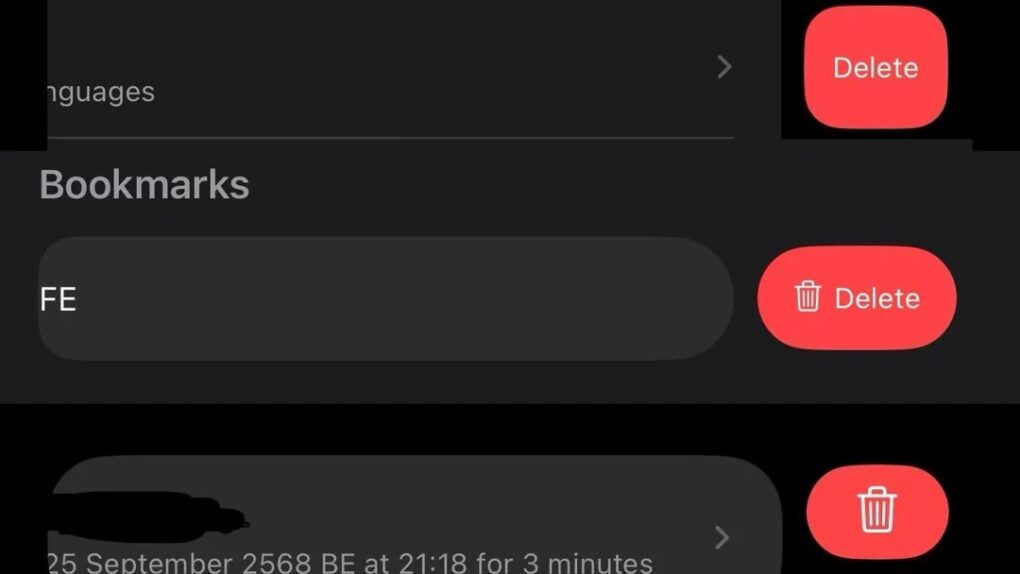
Apple built a reputation for meticulous design consistency, but a growing number of users keep noticing cracks in that polished facade. A recent social media discussion highlights how longtime Apple fans wonder why delete buttons vary so much across iOS apps.
“Steve Jobs would be absolutely livid about the state of Apple UIs today,” wrote one irate user about the steadily less-consistent state of the iOS user interface.
Why delete buttons vary across iOS apps
The issue of differing delete buttons in iOS apps isn’t subtle, as a recent Reddit post by rod8711 points out. Swipe to delete an email in Mail, and you’ll see one style of delete button. Navigate to Photos and try to remove an image, and you see a different interface. Open Settings, Notes or any number of other native Apple apps, and the inconsistency continues.
For a company that once set the gold standard for interface uniformity, these variations seem to undermine that effort.
“This is one of the first things I noticed with iOS 26,” wrote BigMasterDingDong on Reddit. “Buttons and actions were inconsistent, and some had changed position from years of previous iOS.”
Apple has its reasons
According to Apple’s own Human Interface Guidelines, the company encourages developers to tailor delete actions to specific contexts. The documentation emphasizes that different types of content may require different approaches to deletion, with visual cues designed to fit particular workflows.
A message deletion in a messaging app carries a different weight than removing a photo from an album, and Apple’s guidelines suggest that user interfaces should reflect these distinctions.
This context-dependent approach makes sense in theory. Different apps serve different purposes. And what works for one type of content might not work for another. However, the practical result is a patchwork of delete button styles, positions and behaviors that can feel jarring to users.
The human factors behind inconsistent design
Delete button styles are inconsistent between apple apps
byu/rod8711 inios
Part of the variation stems from deliberate psychological design choices. Designers reference the Von Restorff effect, as a post on Medium points out. The effect is a cognitive principle suggesting that items that stand out are more memorable and noticeable. By making delete buttons look different in various contexts, designers aim to prevent accidental deletions by ensuring these potentially destructive actions capture appropriate attention.
Apple provides developers with SF Symbols, a comprehensive icon library meant to ensure visual consistency across apps. However, developers often customize these symbols to match their apps’ specific personalities or to accommodate limited screen space. While this flexibility allows for more tailored user experiences, it also contributes to the fragmentation that users keep noticing.
Varying delete buttons: Symptom of a larger design drift?
The delete button inconsistency points to a broader shift in Apple’s design philosophy. Multiple development teams work somewhat independently. They each optimize for their specific app’s needs. And that gradually erodes the strict uniformity that once defined iOS.
Where early versions of the iPhone operating system featured rigid, company-wide design standards, modern iOS embraces more flexibility and context-specific solutions.
Apple enthusiasts who remember the company’s obsessive attention to interface coherence see a troubling trend here. The question remains — does Apple view this as intentional evolution toward more sophisticated, context-aware design, or is it simply a consequence of an expanding ecosystem that has become harder to manage with the same level of control?

David Snow, an expert on Apple hardware and software, writes on a variety of technological and cultural topics for Cult of Mac. They include Apple news, technology buying guides, and features about computer setups and Apple TV shows and movies.
With 30 years of experience covering technology and other subjects, he has written and edited for numerous print and online publications, including CMP Media, TechTV.com, CNET, Wired News, Red Herring magazine, Law.com, The National Law Journal and Law Technology News magazine. Among other roles, he served as executive editor of the Law.com network of websites and editorial director, technology, for ALM Media.
Snow graduated with a B.A. from Syracuse University with majors in magazine journalism and psychology. While there, he worked as a reporter for The Daily Orange newspaper and associate editor of Equal Time magazine.
Founder of the blog At the Waterline, he can be reached on X (formerly Twitter) via @atthewaterline and on Mastodon via @dsnow.

