Mobile menu toggle

OS X Lion Allows You to Send Text to iTunes as a Spoken Track

By

Lion-text-to-speech-spoken-track-2.png

Here’s a nifty feature that’s just been discovered in Lion: the ability to send text to iTunes as a spoken track for those who would prefer to listen rather than read.

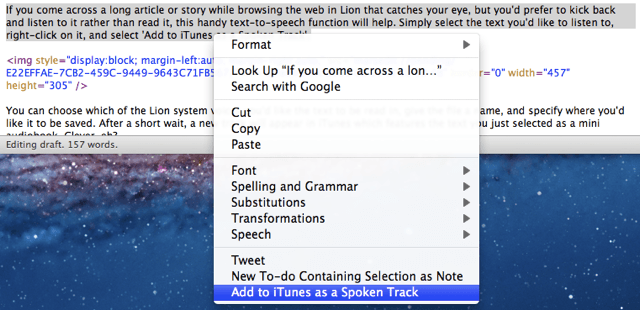
If you come across a long article or story while browsing the web in Lion that catches your eye, but you’d prefer to kick back and listen to it rather than read it, this handy text-to-speech function will help. Simply select the text you’d like to listen to, right-click on it, and select ‘Add to iTunes as a Spoken Track’.
Screen Shot 2011 06 29 at 10 38 48

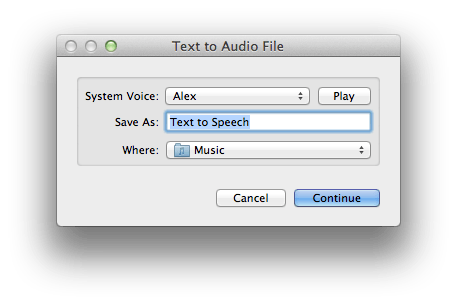
You can choose which of the Lion system voices you’d like the text to be read in, give the file a name, and specify where you’d like it to be saved. After a short wait, a new track will appear in iTunes which features the text you just selected as a mini audiobook. Clever, eh?

Update: Apparently, this feature is also present within Snow Leopard — you just have to enable it in services.

[via MacStories]

  • Subscribe to the Newsletter

    Our daily roundup of Apple news, reviews and how-tos. Plus the best Apple tweets, fun polls and inspiring Steve Jobs bons mots. Our readers say: "Love what you do" -- Christi Cardenas. "Absolutely love the content!" -- Harshita Arora. "Genuinely one of the highlights of my inbox" -- Lee Barnett.

18 responses to “OS X Lion Allows You to Send Text to iTunes as a Spoken Track”

  1. Chris says:

    I was just about to point out that it’s already in Snow Leopard…it’s just not that obvious to find

  2. Grahas says:

    I was about to point out the same.

  3. Michael Solomon says:

    Where in Snow Leopard is this? i just spent 2 hours using automator to replicate exactly this – ironic it should be the lead article on COM on the same day (twilight zone music plays in head!)

  4. WebGalPat ? says:

    I was going to point out the same thing! I have it set up and use it. Here’s a link to directions for Michael: http://www.youtube.com/watch?v

  5. fernando says:

    running 10.6.8 no text-to-speech option avaiable in snow leopard.

  6. AlmostDoneWith CoM says:

    I’m running the same version and I found it. Go to System Pref > Keyboard > Services and scroll down to Text. It’s right there.

  7. facebook-505899793 says:

    Dunno … If I just want the system to speak some text, this is more trouble than its worth, as it adds it to the iTunes library.

  8. Connor O'Neill says:

    This was in leopard… I used it multiple times!

Leave a Reply

