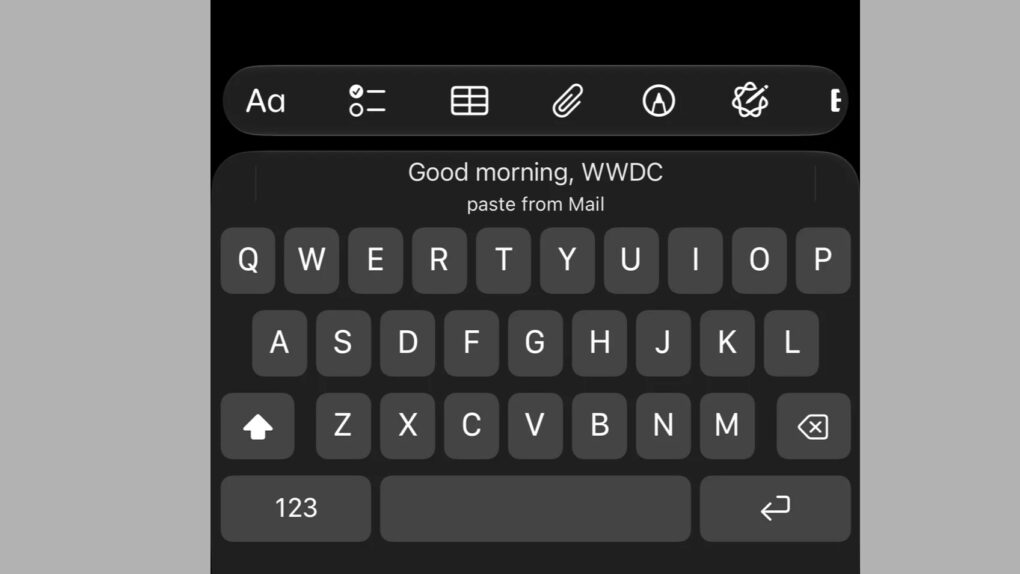
Copy something, and the iOS 27 paste shortcut now pops up right above your keyboard, ready in a single tap.
The new shortcut shows a live preview of your clipboard, meaning you’ll always know exactly what you’re about to paste, whether it’s text, a link, or a photo.
How the iOS 27 paste shortcut works
Copy a link in Safari, switch over to Notes, and a “paste from Safari” button will automatically appear above the keyboard, link and all. Simply tap it once, and the link will drop straight into your note.
The same trick works with images as well. Copy a photo from Reddit, open Messages, and you’ll see a “paste from Reddit” option complete with a small thumbnail.
With iOS 27, you’ll no longer have to open the old copy/paste menu at all (though it’s still around) because the keyboard will do all the guesswork for you. And because the feature is built into the keyboard itself, it works across a huge range of app combinations, not just Apple’s own apps.
It’s a small trick, but it’s genuinely a useful one. Your iPhone is betting that you just copied something and will paste it somewhere else. More often than not, that bet pays off.

Photo: freaktheclown/Reddit
It matters more than it sounds
Apple’s keyboard already does a version of this trick. Since iOS 12, it has automatically surfaced one-time verification codes. That saves you a trip to Messages every time you log in to an app. But the new paste shortcut simply extends that same logic to everything else you copy.
The shortcut works across a wide range of app combinations, not just a handful. This is exactly the type of small addition that’s easy to miss in a list of beta notes, but sticks right when you start using it every day.
It’s very easy to overlook a feature this small next to a rebuilt Siri. Still, it’s exactly the kind of everyday convenience that shapes how you actually use your iPhone.

Anurag Chawake is a tech-focused writer specializing in smartphones, apps and consumer technology. His interest in computers began during the Windows 98 era, eventually leading him to explore everything from operating systems to mobile devices and PC hardware. Anurag previously contributed to The Indian Express, covering Apple, Android, gaming and the broader technology landscape.

