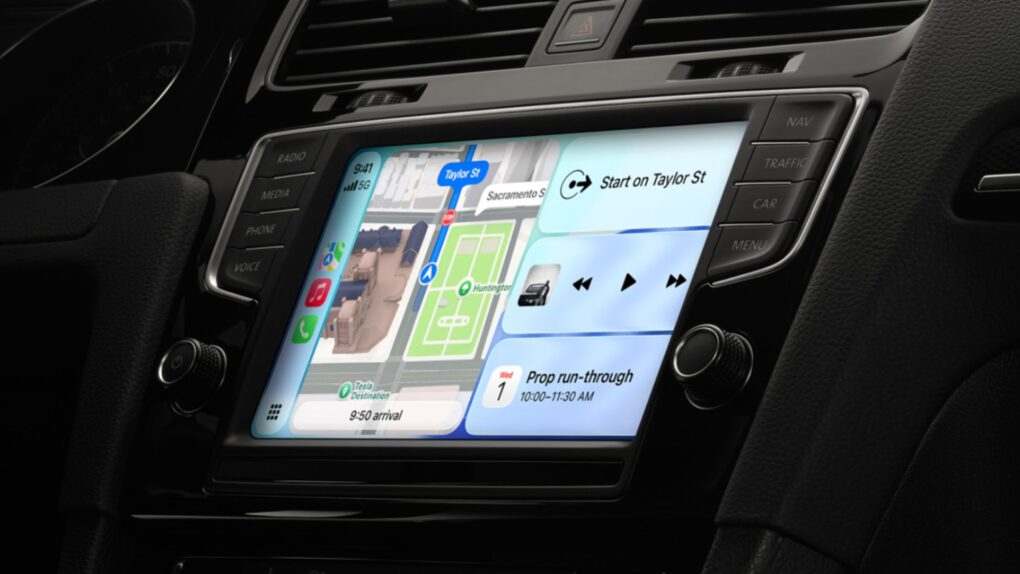
With iOS 27, Apple is giving CarPlay one of the biggest quality-of-life upgrades in years. The showcase feature is the ability to browse and watch videos, right on your car’s display, without touching your iPhone. But that’s just the start.
iOS 27 brings video playback to CarPlay
Ever since CarPlay arrived in 2014, Apple’s in-car infotainment system has solved the biggest problems of modern driving — getting directions, making calls and listening to music, all while keeping your eyes on the road.
With iOS 27, Apple is adding long-requested features like native video browsing, a universal media mini-player, improved playback controls and smarter location tracking. It’s also making under-the-hood changes to address one of CarPlay’s most persistent annoyances: unreliable wireless connections.
iOS 27 addresses all this, starting with the native video browsing that CarPlay users have wanted for a long time.
Video playback in CarPlay isn’t particularly new — Apple added AirPlay video streaming support for compatible vehicles with iOS 26.4, letting users cast videos to their cars’ screens while parked. But iOS 27 makes it more convenient.
The update will allow developers to build CarPlay apps with native video browsing, which means you’ll soon be able to find and play videos directly from your car’s screen. It should prove useful if you often find yourself waiting at school pickup or just want to kill time at the airport or an EV charging station.
When you start driving, CarPlay will cut the video feed and resume playback when park again.
The feature will require a compatible vehicle, though, and Apple has yet to name any specific models. It also requires iOS 27, which is currently in developer beta.
A mini-player that stays out of your way
Apple is also adding a persistent audio mini- player with a compact overlay you can use alongside your maps. The best thing? It works with every audio app. Whether you use Apple Music, Spotify or any other podcast app, you’ll always see what’s playing and be able to pause or skip without having to bounce between screens.
Now Playing gets a scrubbing slider
It took Apple years to get here, but the CarPlay screen will soon get an audio scrubbing slider. Previously, you were limited to the back and skip buttons. This made rewinding an audiobook or podcast more of an ordeal than it should be. The new scrubbing slider gives you more precision over media playback.
More reliable GPS in tunnels
Apple is also improving how iOS 27 handles GPS accuracy, using better algorithms with your iPhone’s sensors. The end goal is to prevent freezing maps and dropped position readings in tough environments like dense urban canyons, underpasses and underground parking.
In short, expect fewer “recalculating” alerts and more accurate arrival times.
Wireless CarPlay that actually stays connected
Apple is also improving CarPlay’s wireless reliability. The company hasn’t shared specific details about what’s changing, but iOS 27 is said to reduce dropouts and reconnections by improving Bluetooth and Wi-Fi handling.
iOS 27 is expected to arrive as a public beta in July, with full rollout expected in September.

Anurag Chawake is a tech-focused writer specializing in smartphones, apps and consumer technology. His interest in computers began during the Windows 98 era, eventually leading him to explore everything from operating systems to mobile devices and PC hardware. Anurag previously contributed to The Indian Express, covering Apple, Android, gaming and the broader technology landscape.


One response to “Apple will fix CarPlay’s most annoying shortcomings in iOS 27”
They need to allow me to connect to Starlink while also connected to Carplay. I live in a cellular deadzone and use my Starlink when driving and it doesn’t work with carplay enabled.