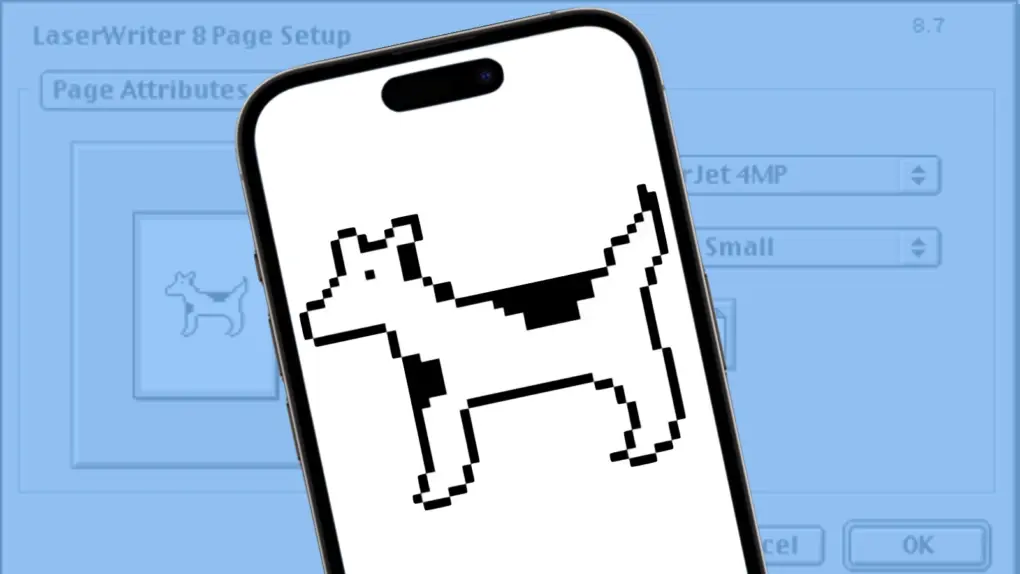
Clarus the Dogcow is back! The beloved Macintosh mascot, famous for her distinctive “Moof!”, appears as an Easter egg in iOS 27.
It’s a fun nod to Apple’s early days, when the company had a much quirkier personality and even a tiny illustration created to help demonstrate printer settings could become a beloved part of Mac culture.
And four decades after her debut, Clarus is still finding ways to make Apple fans smile.
Moof!
Clarus the Dogcow began life in 1983 as a tiny illustration of a dog created by Apple icon designer Susan Kare for the Cairo dingbat font. The creature took on a new role in 1986, when Apple designer Annette Wagner enlarged it for the LaserWriter’s Page Setup dialog to demonstrate how printing options affected page orientation.
At the larger size, the animal looked like a cross between a dog and a cow, inspiring Apple’s developer support staff to dub it a Dogcow. They also named her Clarus and gave her the distinctive sound: “Moof!”
With the appearance on the printer settings page, Clarus became a familiar part of using a Macintosh for millions of users in the 1980s and 1990s.
But she didn’t survive Apple’s transition into the Steve Jobs era. When Mac OS X arrived in 2000, the familiar Dogcow got cut from the Page Setup screen, replaced with a conventional human figure.
But now she’s back! An Easter egg in iOS 27 puts Clarus the Dogcow on today’s iPhone. And iPad, too. Here’s how to find her.
How to find the Clarus the Dogcow Easter egg in iOS 27

Photo: Ed Hardy/Cult of Mac
Sadly, Apple didn’t return the Dogcow to the Printer Options page in iOS 27 (whee she belongs!). Instead, she’s hidden away.
To see her, go to Settings > Appearance and then tap on Liquid Glass.
On that screen, there is a slider to set the opacity of floating screen elements, and above it sits a window that shows a real-time preview of what the Liquid Glass changes made by the slider look like.
Scroll the preview all the way to the bottom, then keep pulling. Continue pulling the preview upward. As you drag upward, “Moof!” will gradually appear in the simulated search box.
Drag upward some more, and a 3D render of Clarus the Dogcow will appear.

Ed Hardy has been writing full-time about tech for 26 years, and using it for much longer than that. His intro to Apple was a Macintosh SE/30 (which he still has), but now he uses a 13-inch iPad Pro as his primary computer.
That’s because he’s a “tablet first” type of guy. Rather than use a Macbook, he connects a keyboard case to the iPad. And instead of a desktop Mac, he connects his tablet to a 27-inch display and full-size keyboard. (So don’t try to tell him that everyone has to use a Mac to be productive.)
Before coming to Cult of Mac, Ed wrote for NotebookReview, TabletPCReview and Brighthand, as well as other sites.