Mobile menu toggle

iOS - page 163

Apple Is Revamping Notification System For iOS [Exclusive]

By

ios_notifications

UPDATE: I sent an email to App Remix’s CEO Jonathan George asking whether his company was going to be bought by Apple. His response? “No comment…” he said.

Apple is working on a new notification system for iOS and will be buying a small company to build its technology into the operating system, according to one of our sources.

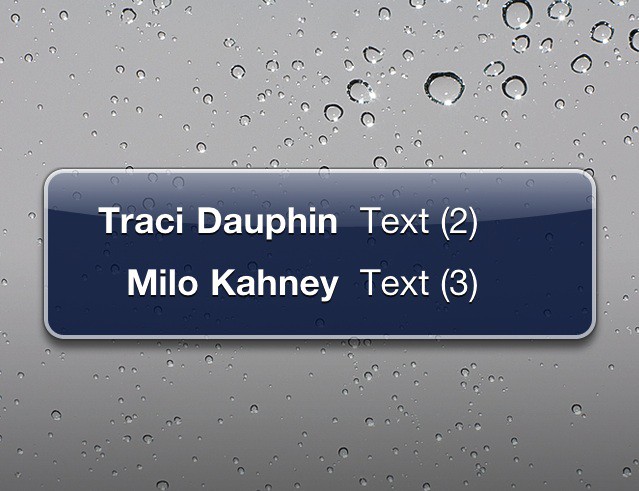
Apple’s pop-up notification system for new text messages, voicemails and the like has often been criticized as one of the weakest parts of the iOS. Notifications are intrusive, modal and often cryptic. It’s a mess.

HP/Palm’s webOS banner notification system, on the other hand, has been widely praised for its utility and ease of use. And from this week’s preview, it looks to be getting better.

There were rumors last year that the iPhone’s notification system would be fixed after the chief architect of Palm’s system, Rich Dellinger, returned to work at Apple. However, the system still hasn’t been fixed, and according to our source, Apple is now trying to buy a small app developer to fix it.

Our source, who asked to remain anonymous, didn’t know the identity of the company, except it already has an iPhone app in the App Store.

One candidate is Boxcar, a free app from App Remix that enables push notifications for Twitter, Facebook, and email. Boxcar’s system has been highly praised, especially the new iPad version.

Other than that, we couldn’t find other obvious possibilities for the company Apple is buying. If anyone has a good idea, please leave it in the comments.

Tracker App Hunts Down Great Free iOS Games

By

20110209-freeapphero.jpg

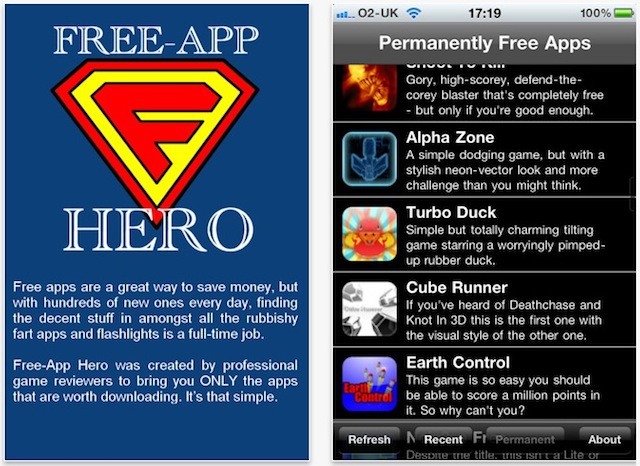
Free-App Hero is a clever tracker for good quality free games on the iOS App Store. Note the use of the words “good quality” there; Free-App Hero has an editorial team that’s fussy, and cares about the recommendations it makes.

So they won’t recommend rubbish games, or ad-supported games, or games that start good but get worse, or games that claim to be free but turn out to be useless without an in-app purchase.

All they’re interested in is finding the good free stuff, and passing it on to you.

Free-App Hero isn’t free, but neither is it expensive. And if you really don’t want to pay for it, the Cheapskate Edition is just as effective.

As a direct result of downloading Free-App Hero, I’m now completely obsessed with King of Tennis, which is probably the most bonkers game I’ve ever seen. Great fun, though. And that’s what Free-App Hero is all about; delivering fun.

Index Card is “Superb” for Screenwriters [Review]

By

Index_Card_iPad

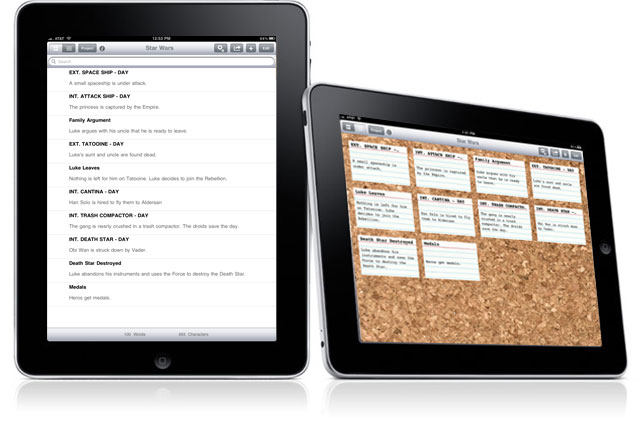
Landing in the iOS App Store tomorrow is Index Card v2 for iPad, a multi-touch version of the corkboard-and-index-cards system popular with screenwriters and others who need to arrange multiple ideas within a project.

Inspired by the Corkboard feature of Scrivener for Mac (the Scrivener people know), Index Card allows users to move cards around, label by color, and even write on the back of cards (the ‘flip’ arrow changes color if there’s something written on the back).

This latest version adds a trio of new features: Stacks, customizable label names, and the option to export notes with the rest of your project to RTF for Word or Final Draft.

Testing the app last week, I found it to be responsive and easy to use. It does exactly what it it promises.

That said, at least on the surface, Index Card is very much about the needs of screenwriters. Developer DenVog would do well to add options in its next release to make the app more appealing to general productivity users. More backgrounds than just cork and solid black would also be welcome.

I can’t say I use index cards in my daily life, but for those that do, Index Card should prove practical. The app already counts a couple of Emmy-nominated producers as users.

William N. Fordes, a Co-Executive Producer/Writer on Law & Order, tells me that he finds Index Card “superb” and “well thought out”.

“The ease with which the individual cards can be moved around is terrific, and makes rethinking the shuffle of scenes so much easier,” he says.

Why iOS and Mac OS X Won’t Ever Merge, But Can Still Learn From Each Other [Opinion]

By

bridges_converging

It is a popularly held belief that one day Mac OS X and iOS are destined to merge into one OS to rule them all. When Apple announced last October that Lion, the next major update of Mac OS X would feature some of the best ideas from iOS, it only added to the convergence speculation.

But are Apple’s two operating systems really destined to converge? After all, they both seem to be doing very well by themselves. The Mac may benefit from some iOS features, but it’s hardly struggling on its own. Mac sales are stronger than ever. So what exactly would the advantages be?

FaceTime Now Available on iPad with Hack

By

cult_logo_featured_image_missing_default1920x1080

httpv://www.youtube.com/watch?v=wqr7a0ekmS8&feature=player_embedded

FaceTime is now available on most of Apple’s iOS devices, and through its OS X operating system for Mac, however, there is one device that’s still sat out in the cold. The incredibly popular iPad is still patiently awaiting FaceTime compatibility, but now, thanks to a hack, it’s possible to enjoy the feature on Apple’s first-generation tablet.

Courtesy of “Intell,” the hack uses a version of the FaceTime application created for the iPod touch, which has been optimized for the larger device and boasts a full-screen user interface.

Of course, you won’t currently get the full FaceTime experience on your iPad because of its lack of front-facing camera, but it’s certainly a start and a nice little taste of things to come. You will be able to see your FaceTime partner on your iPad, and they will be able to hear you.

You’ll need to be connected to Wi-Fi to enjoy FaceTime on your iPad, just like you currently do for other iOS devices.

If you’d like to try the hack yourself, check out the lengthy step-by-step guide copied, from Intell’s post on the iFans forum, after the break. Be warned, however, this process is noted to be risky.

If you try the hack out for yourself, let us know how it went.

This Week’s Must-Have iOS Apps: Google Shopper, The Daily, PaperHelper & More!

By

Screen shot 2011-02-06 at 11.55.13

One of our favorite applications to make it in to the App Store this week is Google’s latest iPhone app, Google Shopper. By recognizing products by barcode, voice and text search, and even cover art, Google Shopper helps you find the information you need on millions of products, including online prices, reviews, specifications, and more.

Also to feature in this week’s list of must-haves is The Daily, the first digital news publication created exclusively for the iPad. The long-awaited publication boasts original content every single day, covering breaking news, sports, pop culture, entertainment, apps, games, technology, and lots more.

PaperHelper for the iPad also makes our pick of the best apps this week thanks to its innovative design and excellent user interface, which makes writing essays and papers on your device a great deal easier. Its unique split-screen feature enables you to write your document on one half of your iPad’s display while you browse the web for information and reference on the other half.

Find out more about the applications above and check out the rest of this week’s must-haves, including IntoNow and Thermo, after the break!

This Week’s Must-Have iOS Games: Bop It!, Sacred Odyssey, Battleheart & More!

By

Screen shot 2011-02-05 at 22.44.52

First on our list of must-have iOS games this week is EA’s latest hit, Bop It!, which brings all of the crazy fun from the incredibly popular Hasbro handheld game to your iPhone and iPod touch. Listen to the whacky commands and get ready to test your reflexes in this frantic mega hit.

Also on our list of favorites this week is Gameloft’s latest App Store release, Sacred Odyssey: Rise of Ayden. Plunge in to the most ambitious action RPG ever made for iOS in this amazing adventure that features countless hours of fascinating gameplay set in a glorious 3D world.

Battleheart is a unique fantasy combat game from the creators of Zombieville USA and OMG Pirates, which distills some of the greatest elements of roleplaying and real-time strategy games and incorporates them in to this remarkable battler that also earns a place in our pick of this week’s top games.

Find out more about the games above and check out the rest of this week’s must-haves, including Who Wants To Be A Millionaire 2011 and New Bust-A-Move, after the break!

Top 10 iOS Features That Should be Brought “Back to the Mac” (But Probably Never Will Be)

By

Mac OS X 10.7

Last October, Steve Jobs gave us a sneak peek at the next major update to Mac OS X, codenamed “Lion.” The theme for this update is bringing the best iPhone and iPad features “back to the Mac.” Features such as the Mac App Store, a home screen for apps, and a new full screen mode. But this sneak peak only scratched the surface of the possibilities for Lion. Here’s my top 10 wish list. If you’ve got any better ideas, let’s hear them in the comments at the bottom of the page.

WTF App Of The Week: iCheeseHead

By

20110203-icheesehead.jpg

At long last, ladies and gentlemen, after all these years of waiting, we finally have it: an app that puts cheese on your head.

Other folks have been waiting for Duke Nukem Forever, or for a 15-inch MacBook Air, or for democracy in their dictatorships, or even for basic stuff like world peace and an end to disease. Oh, and flying cars, people are still waiting for those.

But for the rest of us – for those of us who have longed for an app that puts cheese on our head – the waiting is over. iCheeseHead fulfils all our virtual cheese-on-head needs, and costs less than most real cheese.

Rupert Murdoch can keep his $30 million iPad newspaper. We can all have cheese on our heads now, and nothing else matters.

Augmented Reality TV Show Lets German iPhone Owners Have Way More Fun

By

galileo

What with Apple and TV both as American as pecan pie (which, ironically, is actually way more American than apple pie), you’d think the U.S. would have a chokehold on TV-iPhone innovation. Nope — besides Al-Jazeera now streaming live news on the iPhone for free, last week Germans had a chance to watch and interact with the world’s first augmented-reality TV show.

Viewers of Galileo, a quiz show that airs on the German ProSieben channel, were able to interact with the questions on the TV screen by viewing and interacting with augmented reality versions of the questions on their iPhone screens, courtesy of augmented-reality app Junaio (For a visual demo, suffer through a short ad and watch the cute video). Not to worry though — Metaio, the German-based developer that makes Junaio, says similar stuff is on it’s way to the U.S. soon. Fantastisch!

GIFVid, A Neat Animation App For iPhone [Review]

By

20110131-gifvid-icon.jpg

Back in the web’s Dark Ages, before anyone even dreamed of creating a logo for a markup language, and when messing around with default link colors was adventurous web design, the closest thing anyone had to online video was the animated GIF.

It was just a small series of still image files glued together, but when played in sequence they looked like movement. A million “UNDER CONSTRUCTION” animated signs bloomed across the early web.

Since then, the animated GIF has gone out of fashion. You don’t see them so much. But you might see more soon, and enjoy making your own, thanks to a new photo toy for iPhone called GIFvid.

This Week’s Must-Have iOS Apps: BEP360, Task Eater, Essay & More!

By

Screen shot 2011-01-30 at 20.50.31

This week’s must-have iOS apps features the impressive new BEP360 application from the Black Eyed Peas, which boasts the first jaw-dropping ‘3D360’ mobile music video, as well as access to each band member’s Twitter feed, an addictive little mini-game, and more.

Task Eater is a beautifully simple task management application that helps you to stay organized with the help of your iPhone. It offers all of the great features you need to manage your todo list, including notes; color highlighting; and due dates with alarms, and its minimalistic user interface makes everything very easy.

Essay is a rich text editor that provides only the most essential formatting options to keep you focussed on your document. It uses the HTML file format and offers a wealth of features that make it a fantastic writing application for any writer.

Find out more about the applications above and check out the rest of this week’s must-haves, including 3D Audio Illusions and CelebrityBooth, after the break!

This Week’s Must-Have iOS Games: Dead Space, Zombie Cafe, Grim Joggers & More!

By

Screen shot 2011-01-29 at 22.10.12

One of the most impressive iOS games included in our must-haves this week is the much anticipated Dead Space from Electronic Arts. Delve into an all-new Dead Space story three years on from the destruction of Marker in the first Dead Space release, and find yourself on a mission of uncertain purpose in the Mines of Titan. Experience first-hand the events that unleash Necromorph hordes once again in the first ever Dead Space storyline devised for iOS.

Zombie Cafe is a unique cafe management sim in which you use zombies for your workers as opposed to living humans. In a town where it’s hard to find good employees, you’ve partnered up with an evil corporation to use zombies as free labor to build your cafe empire. What’s great about Zombie Cafe is that when your local competition gets too fierce, you can summon your team of zombie workers to attack your neighboring rivals and steal their secret recipes.

In Grim Joggers you have control of a group of 15 joggers and your mission it to take them as far as you can before each and every one of them faces their gruesome end. This arcade-style survival game sees casual jogging become a gory bloodsport.

Find out more about the games above and check out the rest of this week’s must-haves, including Pocket Dinosaurs 2 and Aerial Assault, after the break!

FlightTrack Pro Puts Every Flight Detail At Your Fingertips, Beautifully [Review]

By

flighttrack pro

Flying is always a bit of a conflicted experience for me. On the one hand, I’m off on an adventure; on the other, I have to deal with unpredictable flight schedules, labyrinthine terminals and $9 burritos. But FlightTrack Pro — with its attractive, clean-looking pages offering an abundance of detailed information — makes everything better (except the burrito prices).

Follow The iOS App Store On Twitter

By

20110125-appstore.jpg

It’s only been active for a matter of hours as far as I can tell, but already at the time of writing, the official App Store Twitter account has over 36,000 followers and I expect it will soon attract many more.

This appears to be an account for the old skool iOS App Store. No doubt the newer Mac App Store will get an account of its own in due course.

Best Apps to Help You Save Money [New Year’s Resolutions]

By

Save Money iOS

Did you promise yourself that 2011 would be the year that you would take control of your finances and start saving money? Are you having trouble sticking to your new year’s resolution? Well maybe there’s an iOS app that will make things a little easier for you. Here’s our list of the best iOS apps that may help you succeed on your mission to save money.

So that you don’t just forget about your resolution by the end of January, we’ve compiled a great list of apps that will help you stick to your targets and achieve your goals. We’ve divided them up in to the most popular resolutions, and in this post we’ll look at the best iOS apps to help you save money. We’ve chosen apps that will help you track where your money is going, apps that will help you create a budget and stick to it, and apps that will help you find the best deals in town.

Check them out after the break and get help to save money!

Best Apps to Help You Quit Smoking [New Year’s Resolutions]

By

Quit-Smoking-iOS-e12943437159851.jpg

Did you promise yourself that 2011 would be the year that you would quit smoking? Are you having trouble sticking to your new year’s resolution? Well maybe there’s an iOS app that will make it a little easier for you. Here’s our list of the best iOS apps that may help you succeed in your quest to quit this year.

The apps we’ve selected will help you find the motivation you need to stamp out those nicotine cravings. Quickly calculate how much money you spend on cigarettes each week and see how much you could save as a non-smoker; create personalized plans that are tailored to help you quit in a way that suits you; and even estimate how much of your life you might be saving by saying no to cigarettes. If that’s not enough motivation, we don’t know what is!

Check them out after the break and get help to kick the habit in 2011.

WTF App Of The Week: Cat Camera

By

20110114-catcamera.jpg

It’s a problem I’m sure you’ll be familiar with: whenever you want to take a picture of your cat, said cat suddenly becomes utterly disinterested in you and everything you stand for.

Will the cat humor you, and turn its face to the camera? Will it hell.

What you need in situations like this is Cat Camera, the camera app that makes a reasonable stab at meeowing like a cat, in the hope that this provocative sound will make your cat turn its head in the right direction. It’s a bit basic and rather buggy, but hey, it’s a start.

I tried it on my neighbour’s cat, it still continued to ignore the hell out of me, despite Cat Camera’s fake meeowings:

20110114-meeow1.JPG Didn't you hear me?

Your milage, as well as your cats, may vary.

Find My Friends Feature Coming To MobileMe Soon

By

010021-findfriends1.jpg

It’s not a live feature in the recently released iOS 4.3 dev beta, but it looks as if Apple will be adding a new feature to its MobileMe service sometime soon, making it easy to see where your friends — or, at least, their iPhones and iPads — are when they’re late for dinner and drinks.

Spotted by MacRumors, several strings in the new Settings app reference a “Find My Friends” feature.

How To Lightpaint With Your iPhone

By

20110112-lightpaint.jpg

If you saw our previous posts about light painting using an iPhone or iPad, you’ll enjoy this brief video demonstration of how to make a very cool New Year greeting.

The lightpainting was done using Penki, an app developed by the people who sparked off this idea in the first place, Dentsu London/BERG.

All that’s needed in addition is a ruler, a camera with a flash (for the portraits), and a shiny table. And perhaps a few rehearsals to get the timing right. There’s a pile more lightpainting images in the Penki Flickr pool, if you feel the need for some further inspiration.

EDIT: Video embedding didn’t work – go here to see the video in full.

It Isn’t Quite AirPrint — But PrintJinni Gives Epson A Fighting Chance [Review]

By

printjinni-app1.jpg

With the release of AirPrint late last year, Apple finally gave iDevice users what they’d been clamoring for (and quite loudly, since the iPad’s debut): the easy ability to print from a wifi connected printer. Hurrah! Problem is, it only works with printers made by HP — owners of Epsons, Canons and the rest were left out in the cold.

However, for Epson owners willing to shell out $10, Thinxtream‘s PrintJinni app already provided a means to print to select Epson wifi-connected printers. In late December PrintJinni became a free download to put itself on even footing with AirPrint, pricewise  — question is, how good of a solution is it?