Logging how you feel throughout the day with your iPhone can help you identify what’s causing you trouble or what works for you, whether it’s work, family, exercise, sleep or other things. You don’t need to hand your data over to a third-party app; the built-in and totally free Apple Health app comes with a built-in mood tracker that helps you keep tabs on your mental well-being.
In order to make any kind of meaningful change, you need to understand fully what helps, what doesn’t, and what you can do. And that means effectively tracking your mental health. Luckily, starting your log is easy. Set it up once, and your phone will ask you every day so you don’t forget.
Let me show you how to set up a mood tracker on your iPhone.
How to use the mood tracker built into Apple Health
As with so many health and fitness features on the iPhone and Apple Watch, this mental health feature serves as a way to keep track of your daily status. While no Apple Watch sensor can log your emotional state, the mental health tracker in Apple’s Health app turns your iPhone into a persistent journal that can pull together data.
Once you log your data, it can help you notice trends — and take action, if appropriate.
Table of contents: How to use the Apple Health mood tracker
- Get started and set up the mood tracker
- Add an entry to your mood tracker
- Remind yourself to log your state of mind
- Browse your mood tracker history
- Take a quick survey on your well-being
- A great feature off to a good start
- More Health and Fitness features
Get started and set up the mood tracker
Screenshot: D. Griffin Jones/Cult of Mac
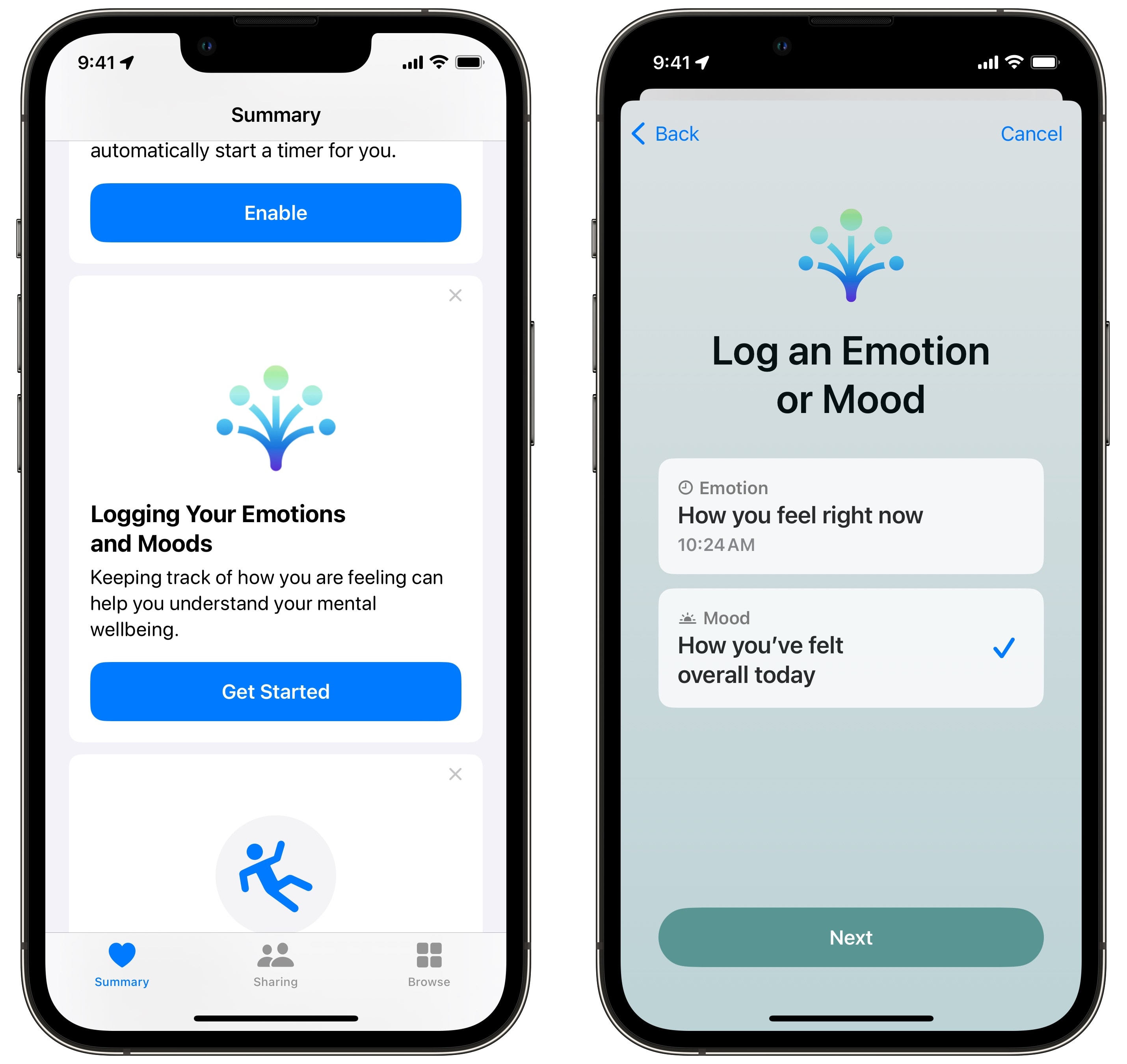
To set up the mood tracker, open the Health app and scroll down the Summary page until you get to the panel that says, “Logging Your Emotions and Moods.” Then tap Get Started. The first page briefly explains how you can record what you’re feeling in the moment or an overall mood for the day. Tap Begin to make your first entry. Specify what you want to log right now and tap Next.
Add an entry to your mood tracker
Screenshot: D. Griffin Jones/Cult of Mac
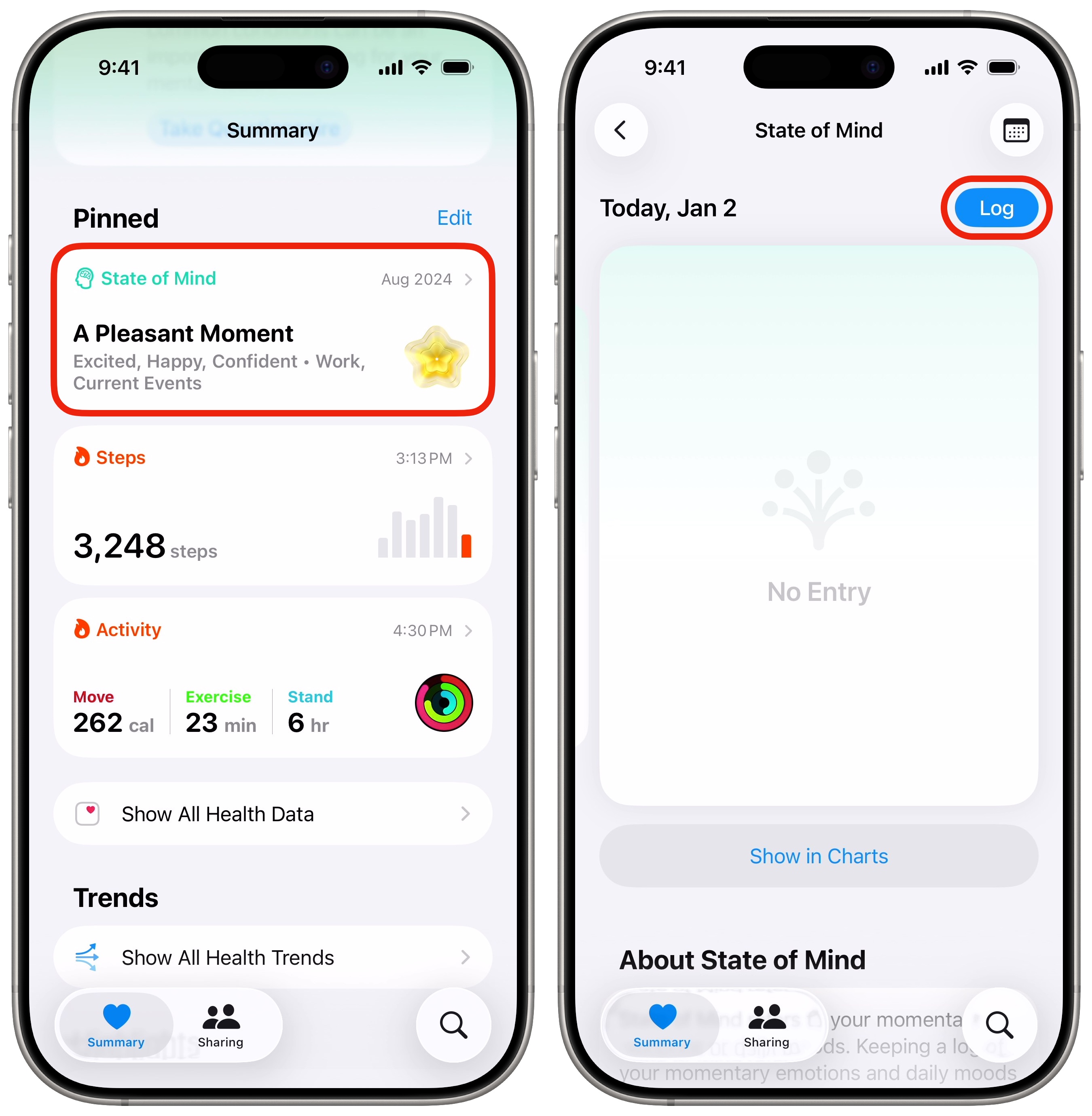
To add a new entry, look for the “State of Mind” section on the Summary tab. You can also tap the Search tab, tap Mental Wellbeing, and find it there. Tap Log to add a new entry.
Screenshot: D. Griffin Jones/Cult of Mac
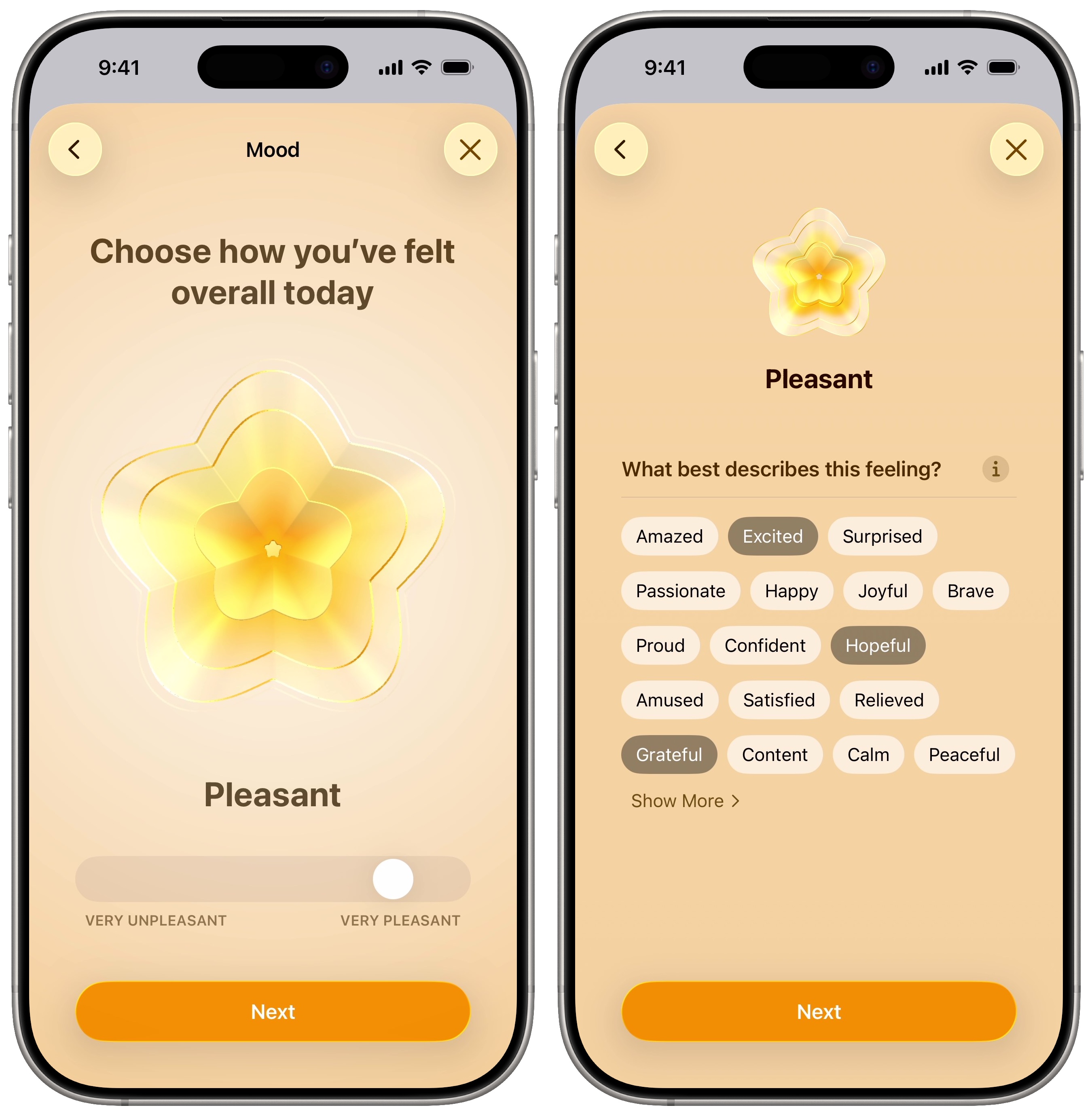
Simply log what you’re feeling at the moment. You will see a slider that you can move on a range from negative to positive, or that you can leave in the middle to indicate neutral feelings. Then tap Next.
On the next screen, you can get more specific by tapping on one or more feelings. If none of these sound quite right, tap Show More for additional choices. Then tap Next.
The last step in tracking your mental health on iPhone is marking a few things that might be influencing your feelings, like Health, Fitness, Friends, Work, Money, etc. If you scroll down, you can write in some notes, too. Tap Done to finish your first log.
Remind yourself to log your state of mind
Screenshot: D. Griffin Jones/Cult of Mac
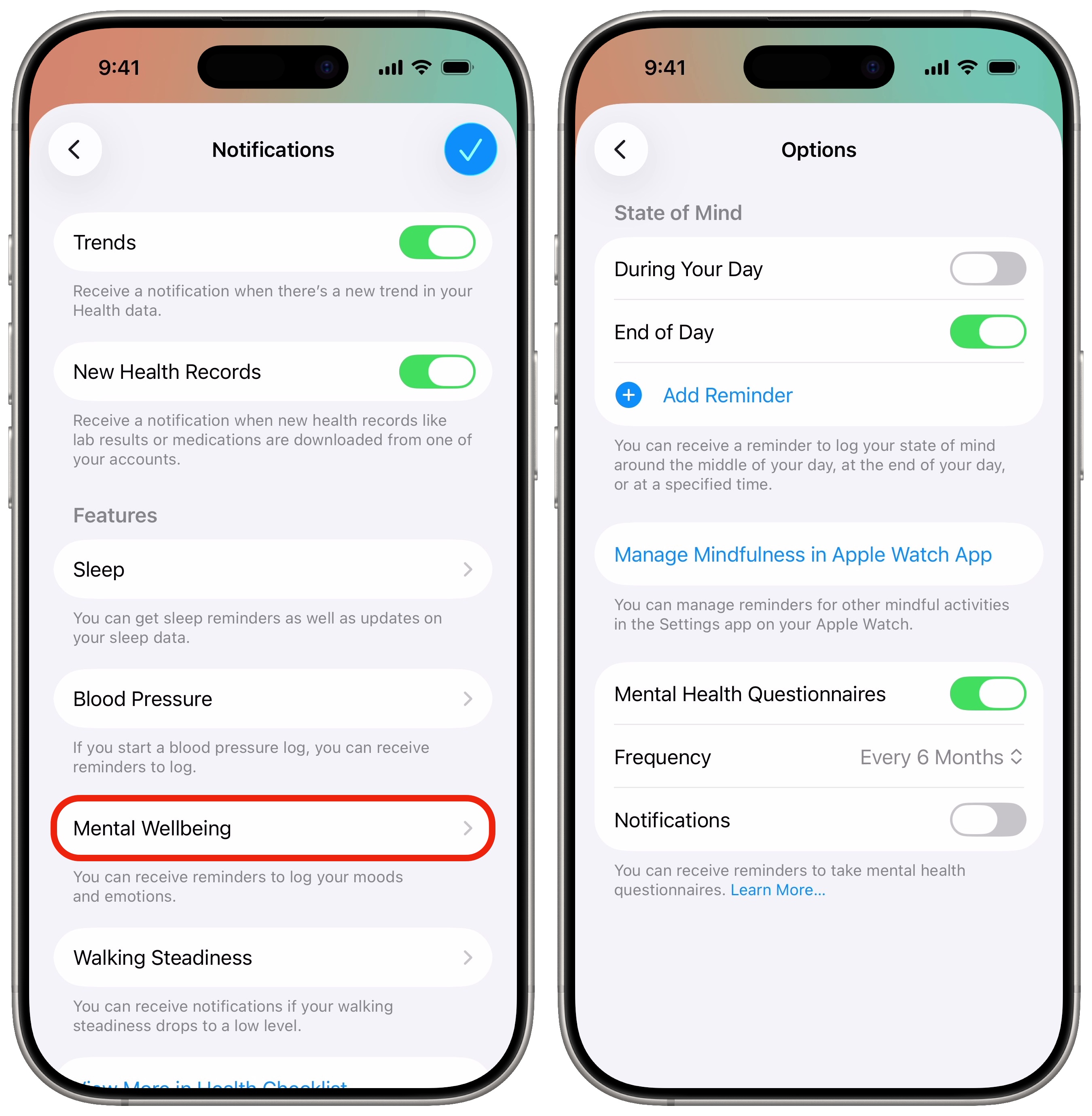
A mood tracker only works if you actually use it to track your mood. If you want to effectively track your mental health with your iPhone, I recommend setting a reminder. Tap on your icon in the upper right of the Summary tab, then tap Notifications > Mental Wellbeing. You can enable a reminder for During Your Day, End of Day or a custom time. I went with end of day, but pick whatever will work best for you.
You can also enable periodic notifications to take a mental health questionnaire, shown below.
Browse your mood tracker history
Screenshot: D. Griffin Jones/Cult of Mac
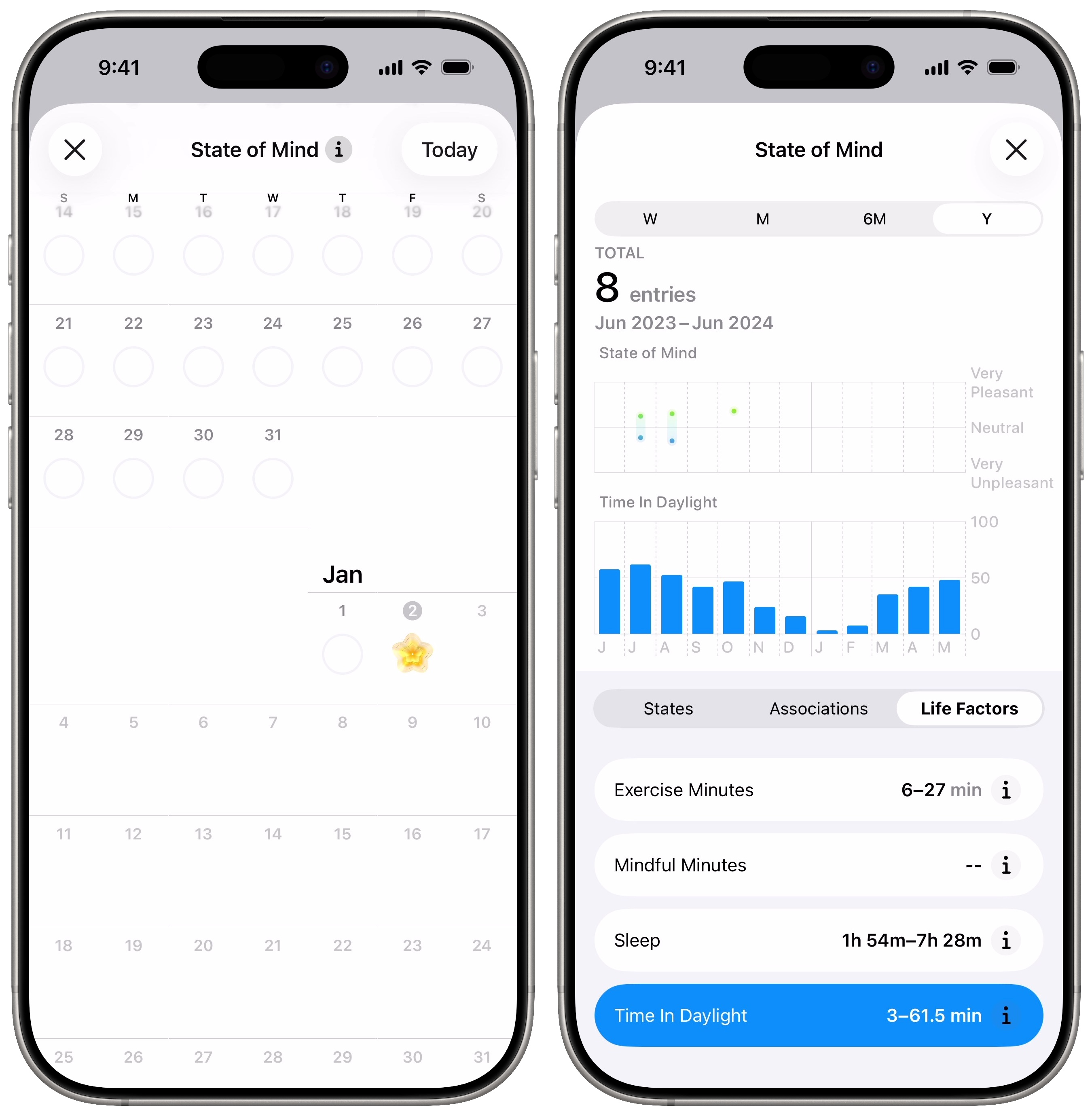
In the State of Mind section of the Health app, you can tap the Calendar icon to see your history on a scrollable calendar. Or you can tap Log to add another record, or tap Show in Charts to see all the mental health data you’re tracking in detail.
The States tab will show you how your emotions range, from positive to negative, over time. On the Associations tab, you can see what external factors are causing the most pain or bringing the most relief in your life, listing which ones have the most related entries.
You likely will find the most useful information in the Life Factors tab, where you can see how your mood correlates to exercise, mindfulness, sleep and time spent outside.
Take a quick survey on your well-being
Screenshot: D. Griffin Jones/Cult of Mac
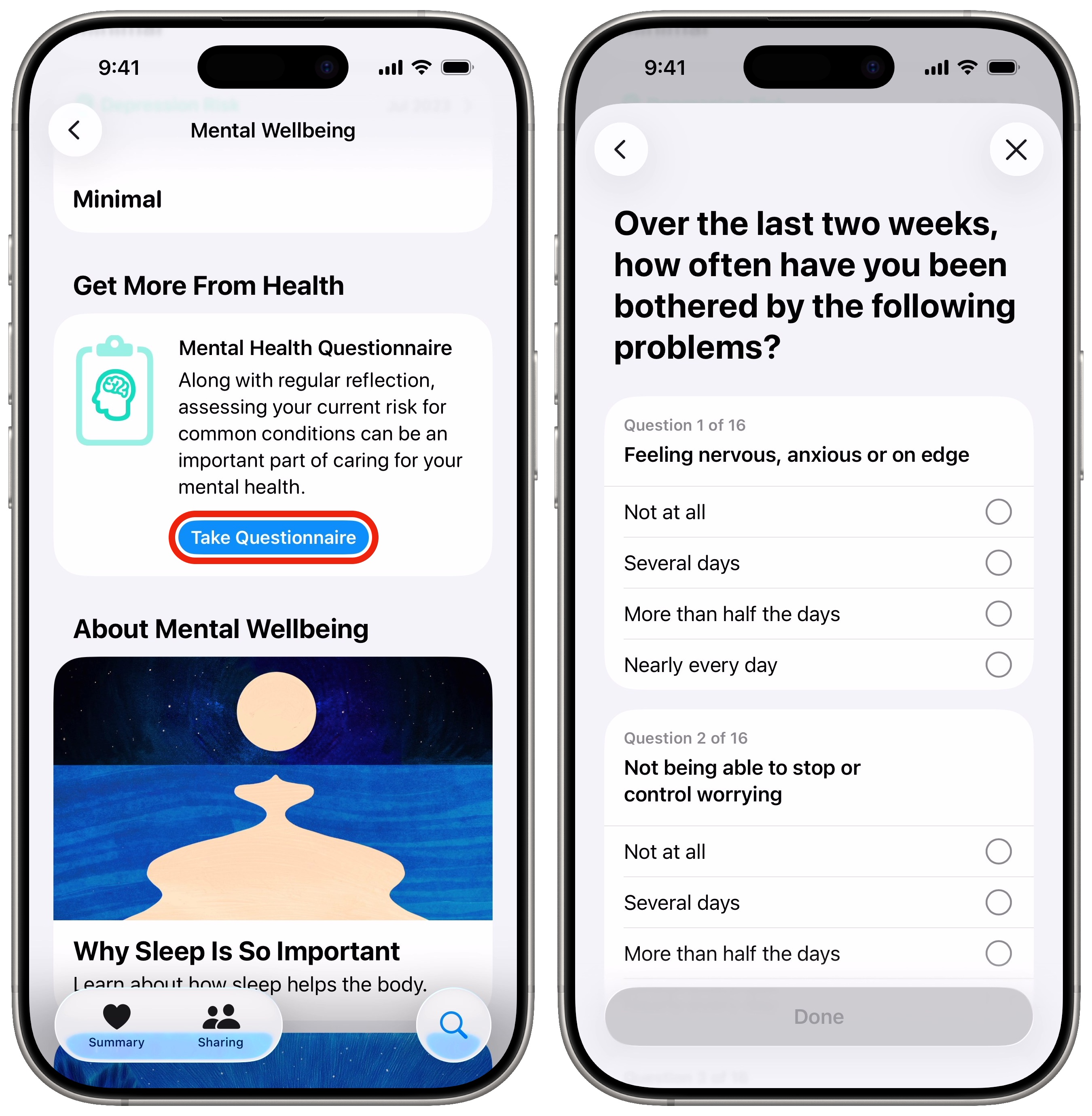
Scroll down in the State of Mind section, and you will see the option to take a short survey on your overall mental well-being. It only takes a minute or so — you just answer 16 simple questions.
At the end, a scale will show how likely you are to be experiencing anxiety and depression based on your answers. If you’re not doing too well, you can scroll down to read more or get immediate help.
Apple Health mood tracker: A great feature off to a good start
I’m glad Apple lets everyone use the Health app to track their mental health on their iPhone. As usual, Apple implemented this feature very thoughtfully and carefully. I really like the design of the geometric flower shape that represents your mood.
I think the correlations between exercise, sleep and time spent outside are the best part of the feature, but I wish it were a little more discoverable. Maybe once you log a few weeks’ or months’ worth of data, the app will present you with a graph showing the correlation by sending you a notification.
It would be neat if Apple added more factors — perhaps some that tie into Focus modes or your location to see how time spent at work, at the store, traveling, etc., affects your mood.
More Fitness & Health features
- Track your medications to get reminders to take your pills, set up a schedule and even get advice on drug interactions. You can quickly add medications using your camera.
- Track your Apple Watch activity rings to see how much exercise and activity you get in a day. And now, you can pause your streak if you need a break.
- Apple Watch sleep stage tracking shows you how much time you spend overnight in each stage of sleep and gives you a score out of 100.
- Connect Apple Watch to a treadmill at gyms like Planet Fitness for even more accurate data from your workout.
- You can add your medical records to Apple Health by connecting it to your account with a supported healthcare provider. It’ll automatically add in tons of data and medical history.
We originally published this article on the Apple Health mood tracker on September 27, 2023. We updated it with the latest information on August 9, 2024 and January 6, 2026.

D. Griffin Jones was a writer, podcaster and video producer for Cult of Mac. Griffin has been a passionate computer enthusiast since 2002, when he got his first PC — but since getting a Mac in 2008, he hasn’t turned back. His skills in graphic and web design, along with video and podcast editing, are self-taught over 20+ years. Griffin has a bachelor’s degree in computer science and has written several (unpublished) apps for Mac and iOS. His collection of old computers is made up of 40+ desktops, laptops, PDAs and devices, dating back to the early ’80s.
Griffin writes for his personal blog, Extra Ordinary, and is currently looking for work.

