Desk lighting plays a surprisingly transformative role in creating memorable workspaces. Here are seven Mac setups where lighting — whether RGB gaming effects, professional video illumination or ambient mood enhancement — elevates the entire experience.
This post contains affiliate links. Cult of Mac may earn a commission when you use our links to buy items.
Why desk lighting matters in computer setups
After writing hundreds of articles about computer setups in recent years, I’ve noticed several lighting trends. Gaming setups embrace RGB effects for immersion and personality. Professional workstations prioritize video call lighting and eye strain reduction. Creative spaces combined ambient, task and accent lighting for both functionality and aesthetic appeal.
The Mac community’s approach to lighting often differs from PC gaming culture’s often excessive RGB everything, instead favoring purposeful illumination that enhances productivity and comfort. Whether through built-in monitor features, strategic LED placement or smart lighting systems, the setups below demonstrate that thoughtful lighting design transforms a functional workspace into an inspiring environment where you actually want to spend time.
7. Good setup desk lighting can take many forms

Photo: [email protected]
We’ll start off with a lighting-aspirational setup. This MacBook Pro user sought advice on improving their somewhat dark-looking setup and received excellent suggestions that could boost this setup or yours:
- LED light strips behind the desk
- Philips Hue Play Bars for ambient lighting behind the monitor
- Two Amazon desk lamps with Satco Smart bulbs set to 4K color temp flanking the monitor.
- BenQ e-Reading Desk Lamp in the center behind the display
- Double-headed LED desk lamp that clamps to the desk and comes up over the monitors like a ‘T’ shape.
Smart LED light strips create great lighting the bedroom and other rooms. Includes Bluetooth LED lights, app control, multiple colors, music sync and more in 16.4-foot length.
- Customizable mood lighting
- Easy installation
- Expand with more strips
- Not great as task lighting

This kit includes two black Hue Play light bars, a Hue Hub and Power Supply. Compatible with Alexa.
- Create vibrant lighting displays
- Works with other Philips Hue products
- There are cheaper options

6. Monitor RGB lighting turns display into gaming light show

Photo: [email protected]
This dual-display MacBook Pro setup sits on a desk up against a mirrored wall. In the photograph, we see the nifty ring of colorful monitor RGB lighting built into the back of the LG UltraGear display — a decorative and functional touch included in an aging but still formidable external display for serious gamers.
The RGB lighting ring isn’t just eye candy; it’s part of a gaming-focused design that includes 1ms response time, 144Hz refresh rate, NVIDIA G-SYNC and AMD FreeSync Premium Pro compatibility, and DCI-P3 98% color coverage. The owner calls it the best gaming monitor they’ve ever owned. While RGB lighting strips are common additions to setups, having the lighting built directly into a high-performance gaming display eliminates extra purchases and cable management headaches while creating an integrated aesthetic. The rig also features a mechanical keyboard with RGB lighting.
This 27-inch UHD (3840 x 2160) Nano IPS display features 1ms response time, 144Hz refresh rate, G-Sync compatibility, AMD FreeSync Premium Pro and a tilt/height/pivot adjustable stand.
- RGB sphere lighting on back
- 1ms response time
- 144Hz refresh rate
- Not the latest (2020)

5. Advanced monitor lighting for eye strain reduction
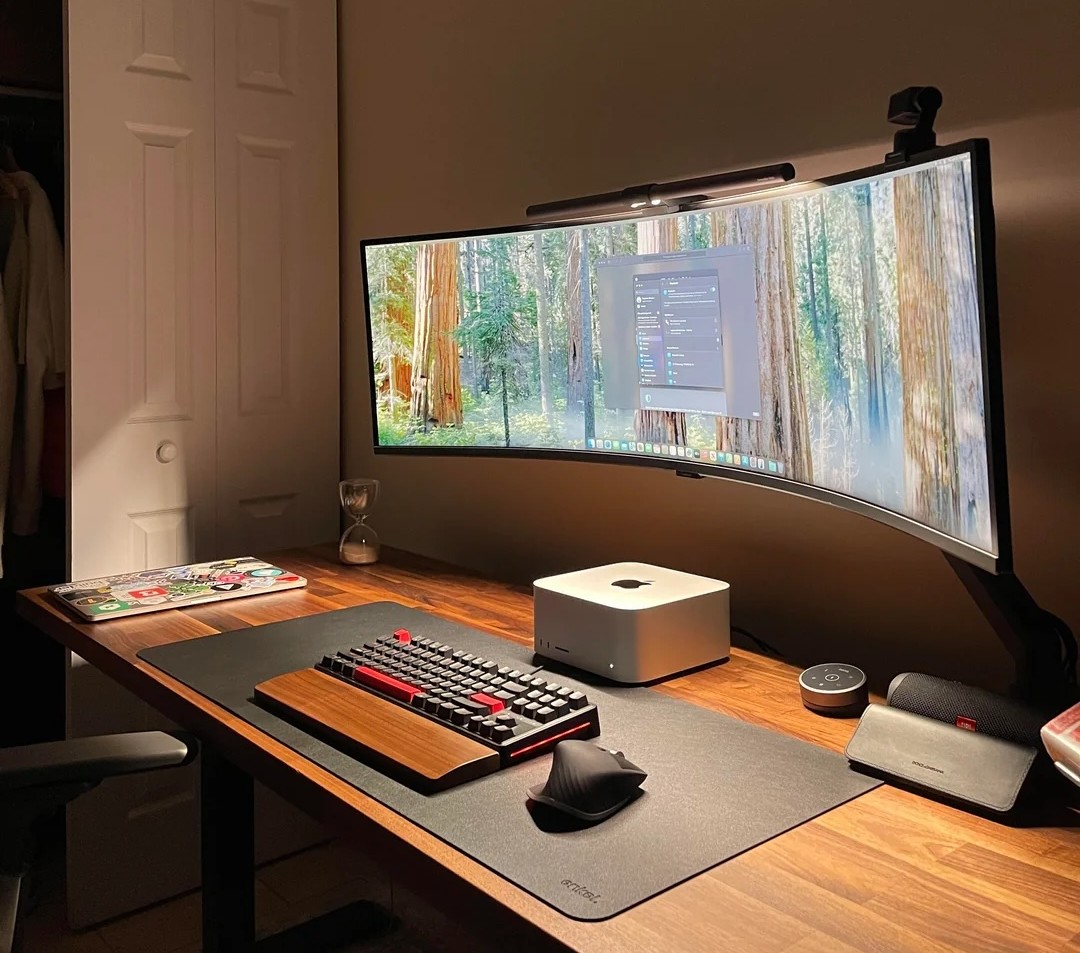
Photo: [email protected]
This setup uses a Mac Studio to drive a huge, 49-inch, curved Samsung gaming monitor — a recent switch from dual 27-inch displays. The user loves the giant screen, but said it took some getting used to. And a cool element is the BenQ ScreenBar Halo, which not only fits the giant curved display, but lights up the whole desktop below without causing screen glare.
These practical lighting solutions serve dual purposes: reducing eye strain during long work sessions and providing task lighting for paperwork or keyboard visibility. The latest models include auto-dimming based on ambient light and adjustable color temperature from warm (2700K) to cool (6500K). Users consistently praise these lights for making extended computer use more comfortable, particularly in rooms without ideal natural lighting.
Complete with a wireless controller, this glare-reducing monitor light bar lets you adjust brightness and color temperature.
- Glare-free front lighting
- Ambient back lighting
- Wireless controller
- Somewhat expensive

4. Video panels, monitor light and ambient backlighting
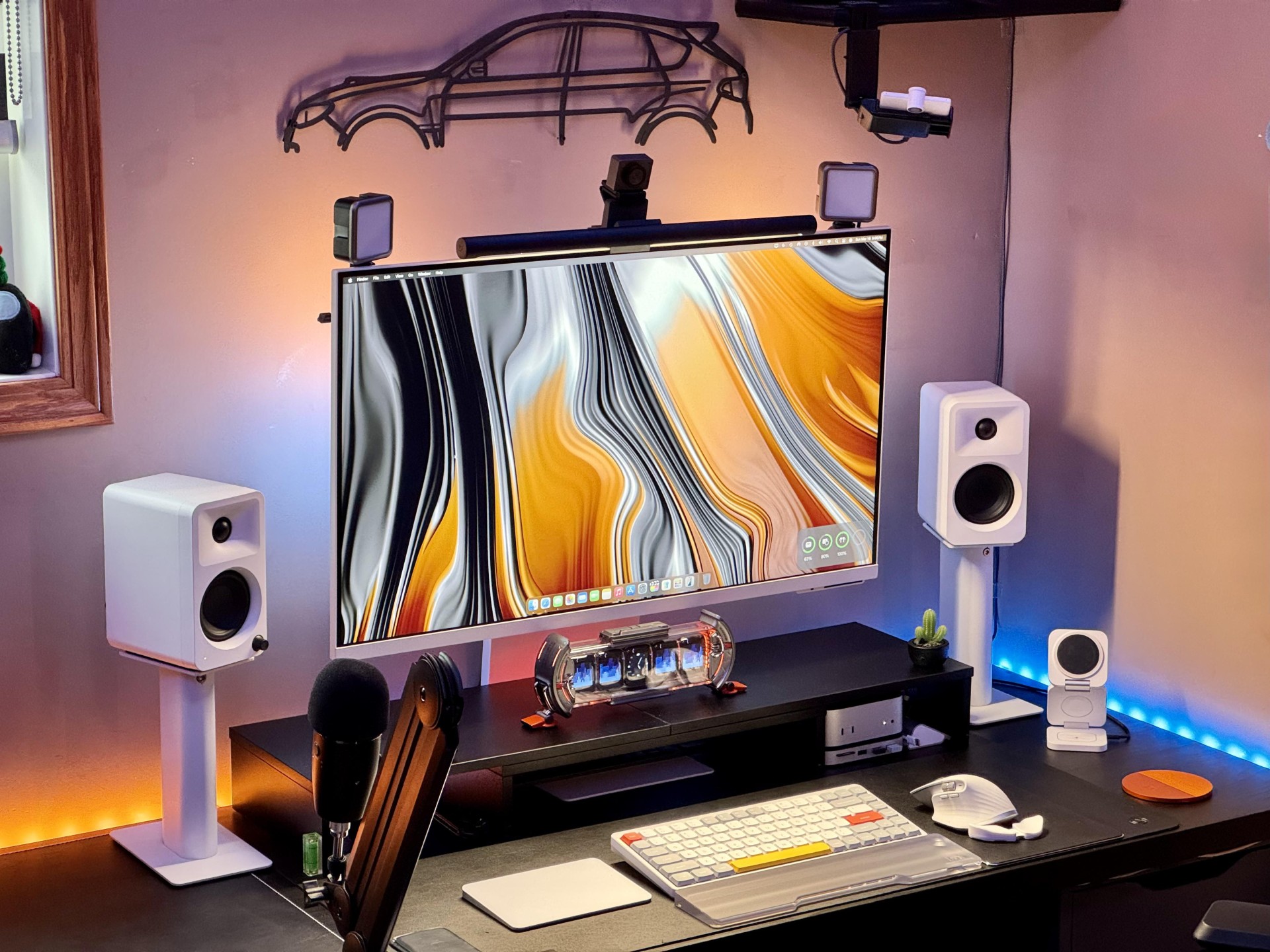
Photo: [email protected]
This M4 Mac mini setup jumped out at me not because of the powerful little desktop or the gorgeous-but-distracting display wallpaper, but because of all you can see riding on top of the monitor. It features a typical monitor light bar with a pronounced webcam riding on top. But look to the corners and notice something I’ve never seen: two separate LED light panels — Ulanzi lights — mounted there to make the user look better on video calls. This one also topped our best setups of 2025 list.
To look good on video calls. The user mounted two Ulanzi V49 mini LED light panels at the corners of their Samsung M8 4K display, flanking an Obsbot Meet 2 4K webcam in the center, with a Xiaomi monitor light bar providing additional illumination.
The setup also includes Govee strip lights for ambient backlighting behind the desk. These rechargeable panels feature 49 LED beads with a 5500K color temperature that mimics natural light, making faces appear more natural rather than washed out. The user runs them at 5600k and 35% brightness for optimal results in their darker corner office. The panels can connect together via cold-shoe mounts for expandable brightness, and the owner emphasizes they make a genuine difference for afternoon and evening calls when natural window light fades.
This small, rechargeable 2,000mAh LED video light brings soft, natural-looking light to your videos. It can connect to other light panels for more brightness.
- Upgraded soft lighting mimics natural light
- 2 hours' use at max brightness
- 3 cold shoe mounts for expandability
- Small size might require expansion

This monitor lamp lights up the desktop without causing glare or taking up desk space. It's easy to install and includes a wireless remote control for lighting adjustment.
- Easy installation
- Includes remote control
- Adjustable brightness and temperature
- Not as feature rich as some light bars

3. Whoah, these wild gaming light bars look like antennas

Photo: [email protected]
Every so often a computer setup on social media throws me for a loop with some odd visual — and it’s often related to desirable gear. This M4 Mac mini workstation looks like it keeps a pair of walkie-talkies in the mix. But they’re actually Logitech computer speakers with tall, stick-like Govee light bars for gaming sitting right behind them. The way the light bars stick up makes them looks like antennas.
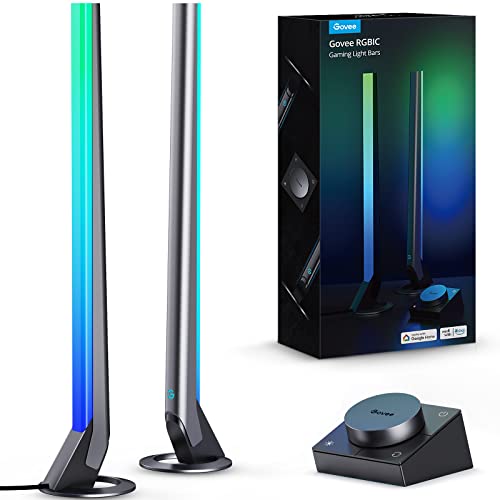
The tall, stick-like design of the light bars makes them stand out visually, but their real magic happens during gaming. These Wi-Fi smart LED lights pack 60+ scene modes and use Govee’s RGBIC technology to emit different colors across each part of the bar, creating dynamic lighting effects. The lights react to game sounds from both speakers and headphones, enhancing immersion. With a desktop dial controller for easy adjustments and compatibility with Alexa and Google Assistant, these lights prove that gaming ambiance isn’t just for PC setups — Mac gamers can join the party too.
Equipped with a smart controller, these Wi-Fi smart LED gaming lights include music modes and 60+ scene modes. Works with Alexa and Google Assistant (H6047).
- Enhances immersive gaming
- Smart controller
- Works with Govee app
- Not made for Siri or Homekit
2. Varied mood lighting makes or breaks a setup
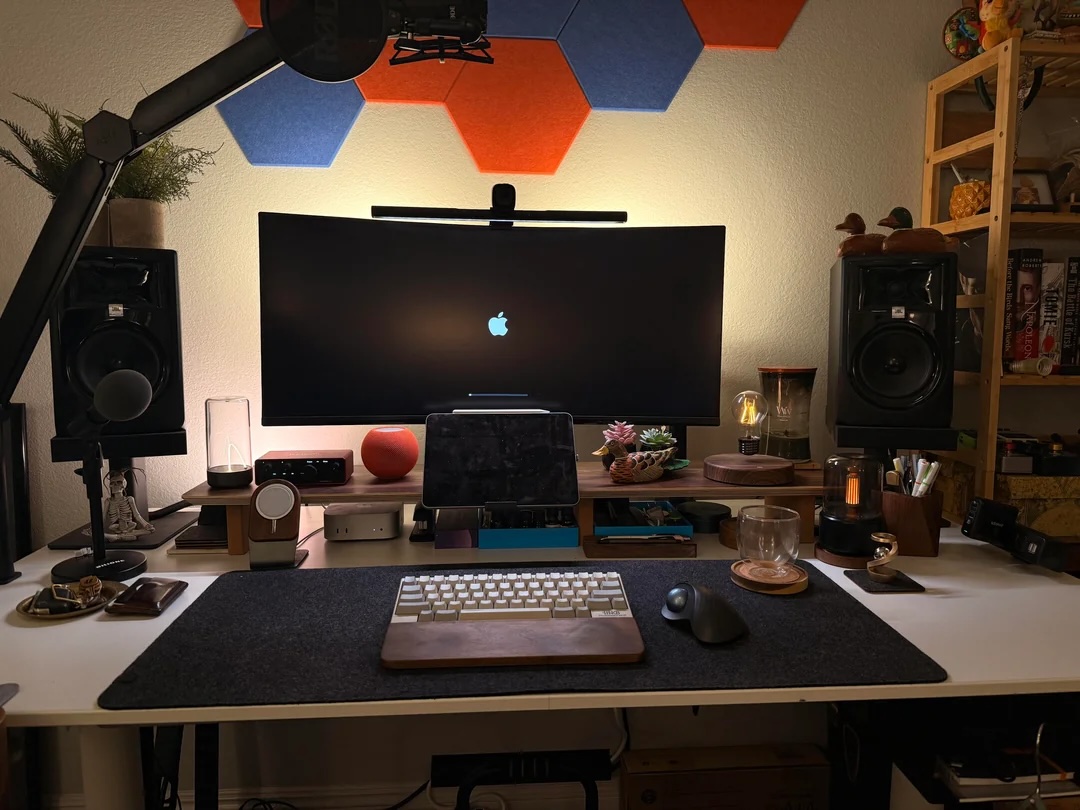
Photo: [email protected]
This M4 Mac mini and iPad Pro setup showcased Nanoleaf Shapes light panels demonstrates how wall-mounted smart lighting can dramatically enhance a workspace’s ambiance. These hexagonal panels can be arranged in custom patterns and programmed to display millions of colors, react to music, or sync with on-screen content. The setup owner used them to create a geometric pattern behind their displays, adding visual interest and customizable lighting that adapts to different times of day or work modes.
But three other lighting elements also grabbed attention:
- The Auge Light Mini Minimalist Table Lamp features a flexible magnetic filament under glass that you can shake to reposition, creating a mad-scientist aesthetic with adjustable brightness.
- The Aekan Candlelight Flame Air Diffuser uses ultrasonic vibrations to atomize water and essential oils into therapeutic mist without heat, providing both ambient glow and aromatherapy.
- The HCNT Levitating Bulb Lamp, which uses magnetic levitation technology to float and rotate 360 degrees in mid-air without any noise.
This cordless LED desk and night stand lamp features a moving magnetic filament for ambient lighting. Rechargeable.
- High quality mood lighting
- Just shake to move filament
- Touch control for brightness
- Somewhat small

This waterless portable essential oil diffuser noiselessly distributes therapeutic essential oils in the air. Includes 120ML aroma diffuser and auto-off functionality.
- Diffuses your choice of essential oil in the air
- Operates silently
- Auto-off feature
- Plastic construction

This desk lamp's magnetic floating LED light can rotate 360 degrees. When power is cut, it magnetically adheres to the base.
- Great conversation piece
- Did we mention it levitates?
- Won't break even without power (magnetically adheres to stand)
- More decorative than highly functional as lighting

This advanced Quntis models includes 15 modes of gaming backlight, four colors and adjustable brightness/dimming.
- Adjustable brightness and dimming
- 15 gaming modes
- Some bars have more color options

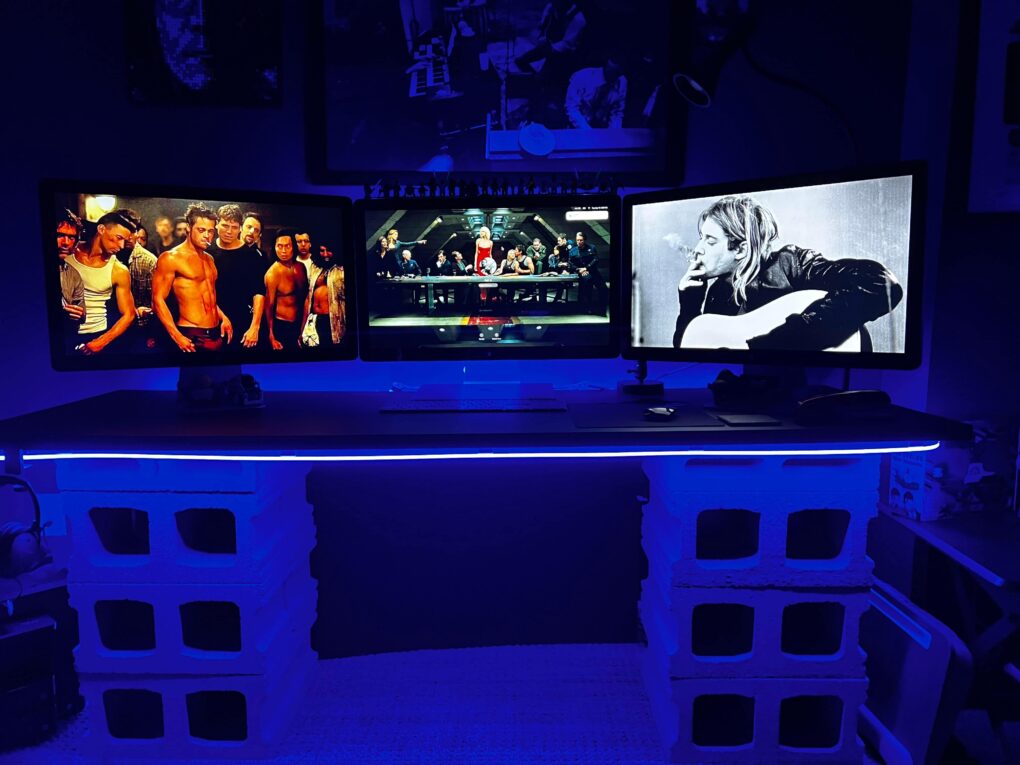
1. Take RGB lighting to the otherworldly max
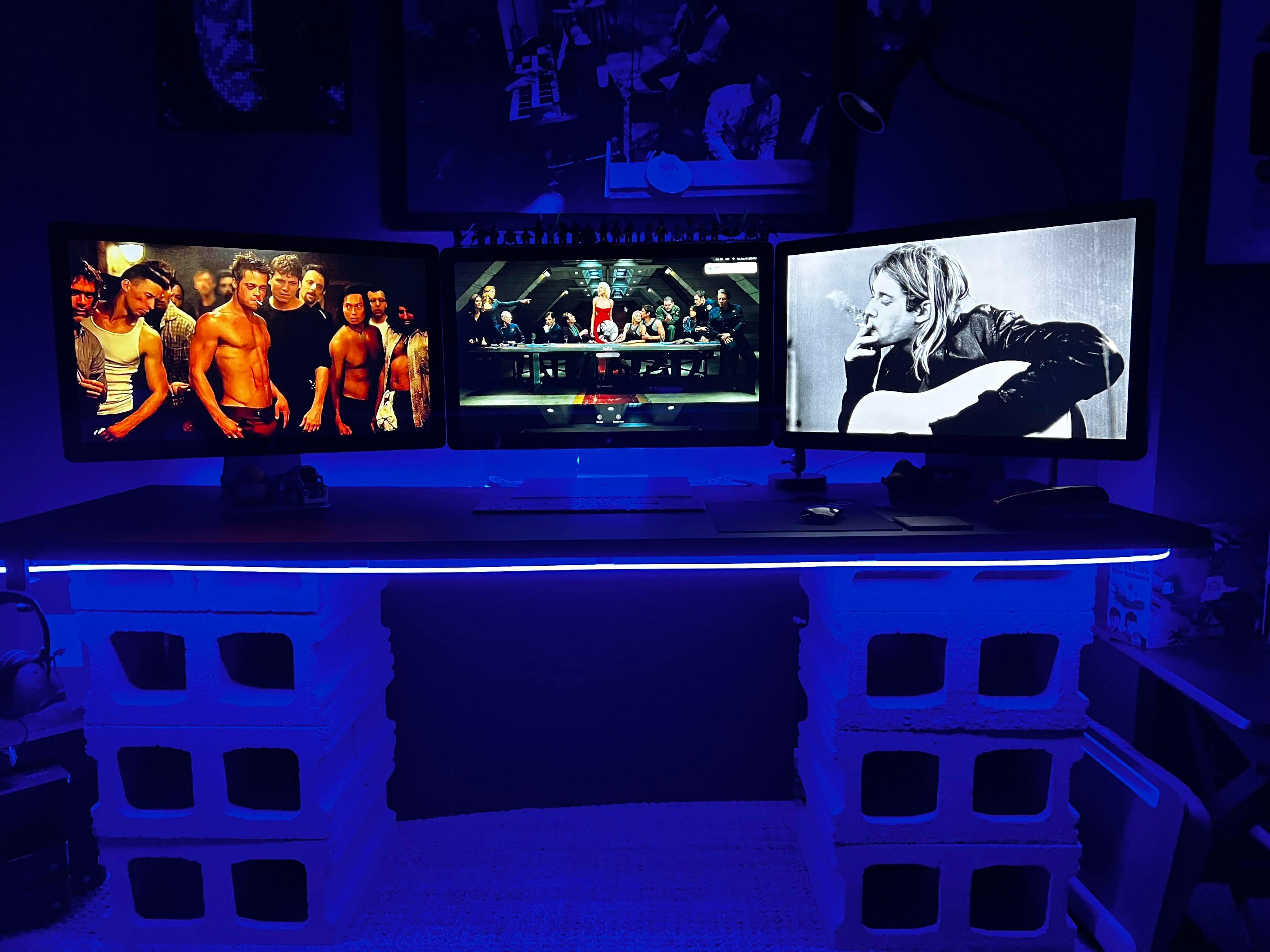
Photo: [email protected]
This Beatles-themed, retro Apple rig with Cinema Displays uses three forms of RGB lighting to really set a mood. In addition to Ikea lamps and a Wyze gooseneck LED floor lamp, the setup takes advantage of three kinds of RGB lighting. It sports Govee RGB bulbs, Govee light strips and one we hadn’t seen before, a Govee rope light with music syncing and more.
Smart LED light strips create great lighting the bedroom and other rooms. Includes Bluetooth LED lights, app control, multiple colors, music sync and more in 16.4-foot length.
- Customizable mood lighting
- Easy installation
- Expand with more strips
- Not great as task lighting
These A19 color-changing light bulbs work with Alexa and Google Assistant. They pack 16 million colors RGBWW, Wi-Fi and Bluetooth connectivity, music sync and 800 Lumens. Comes in a 4-pack.
- 16 million colors
- Music syncing
- Easy connectivity
- None to speak of

Govee's smart RGBIC rope lights works with Matter, Alexa and Google Assistant. The custom DIY neon strip lights work well in bedroom and wall decor.
- Cool decorative lighting
- Customizable
- You may need multiple lengths depending on use

More Cult of Mac Setups articles focused on lighting:
- Don’t sleep on perfect ambient lighting
- Maximum mood indigo: Go crazy with the lighting
- iMac-based gaming rig shows off RGB lighting
- You, too, can achieve pleasing symmetry and soft lighting
- Behind-desk lighting takes MacBook Pro rig to ‘next level’
- Dazzled: A tale of two lighting schemes

David Snow, an expert on Apple hardware and software, writes on a variety of technological and cultural topics for Cult of Mac. They include Apple news, technology buying guides, and features about computer setups and Apple TV shows and movies.
With 30 years of experience covering technology and other subjects, he has written and edited for numerous print and online publications, including CMP Media, TechTV.com, CNET, Wired News, Red Herring magazine, Law.com, The National Law Journal and Law Technology News magazine. Among other roles, he served as executive editor of the Law.com network of websites and editorial director, technology, for ALM Media.
Snow graduated with a B.A. from Syracuse University with majors in magazine journalism and psychology. While there, he worked as a reporter for The Daily Orange newspaper and associate editor of Equal Time magazine.
Founder of the blog At the Waterline, he can be reached on X (formerly Twitter) via @atthewaterline and on Mastodon via @dsnow.

