Here’s a quick follow-up to my last Camino screencast. In this short video, I’ll show you how to get a little more control over your windows and tabs while using Camino.
More screencasts are forthcoming. Got a topic you’d like to see covered? If I know something about them, I’ll be happy to explore your suggested topics. Give me a shout in the comments.
XMenu from the Devonthink people is one of those freeware apps that I recommend to every Mac user I meet. The latest update, version 1.9, is newly released and boasts visual refinements and a helpful new feature.
For the uninitiated, XMenu is a Menu Bar widget for getting to stuff quickly without leaving the app you’re in. What I like most about it is its flexibility. You can have six different shortcuts in your Menu Bar if you like, or just one if you prefer to keep things simple.
That’s what I do. I use the user-defined widget and throw aliases for useful files and folders into ~/Library/Application Support/XMenu – that way, I keep my Menu Bar uncluttered but XMenu still gives me quick click access to stuff like my todo.txt, my income and expenses records, and a handful of use-them-every-day folders.
If your Dock is overcrowded with folders or stacks that you don’t use because, well, because it’s overcrowded, then you should have a look at XMenu. This latest update adds a text snippets manager that works just the same as the user-defined widgets. Put some plain or rich text files in the right place, and XMenu will let you insert them into any app with two clicks.
What it is: A multi-account Twitter client, available for iPhone and Mac OS X.
Why it’s good: Both versions of Tweetie succeed in marrying a usable UI with a strong feature set. Although Tweetie for iPhone and Tweetie for Mac share some aspects of design, both play to the strengths of the host platform. On iPhone, Tweetie makes the most of the touch display, and its efficient UI means there’s never any stuttering. On Mac, Tweetie has keyboard shortcuts for practically every action, and its sidebar deals with the thorny issue of multi-account UI without resorting to tabs. In both cases, the app is feature-rich, providing a great experience for most Twitter users. The 1.1 update also brings saved searches, Growl support, and a bunch of other tweaks and fixes.
Where to get it: Tweetie for iPhone is available on the App Store for $2.99. Tweetie for Mac is available from atebits.com. By default, Tweetie for Mac is supported by unobtrusive and surprisingly relevant ads, but you can make them optional by paying $19.95.
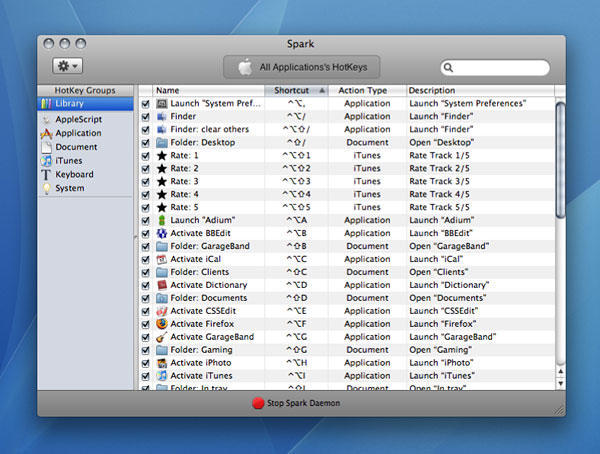
What it is: A hot-key manager, enabling you to define system-wide shortcuts for launching applications, opening folders, and performing other Mac actions.
Why it’s good: For many Mac users, there comes a time when stashing regularly used apps and documents in the Dock no longer cuts it. Spark enables you to define keyboard shortcuts to access these things instead, meaning you don’t have to lift your hands from the keyboard to launch a new app. By defining a personal system (such as Control+Option+letter for apps/Control+Shift+letter for folders), you can set certain modifiers to apply to certain types of item, adding a key letter from an item’s name as a mental trigger. Advanced actions enable you to take things further (turning the trigger into a toggle, launching an app and hiding others, and so on), and shortcuts are also available for iTunes controls (such as rating tracks) and system functions.
In use, Spark is stable, set-up is simple and flexible, and after a week’s use the shortcuts you define become second nature, burned into your muscle memory. In fact, new Macs feel naked without Spark.
Where to get it: Spark requires Mac OS X 10.4.11 or later, and is free. It’s available from Shadow Lab—and please bung them a few bucks as a donation if you use Spark regularly.
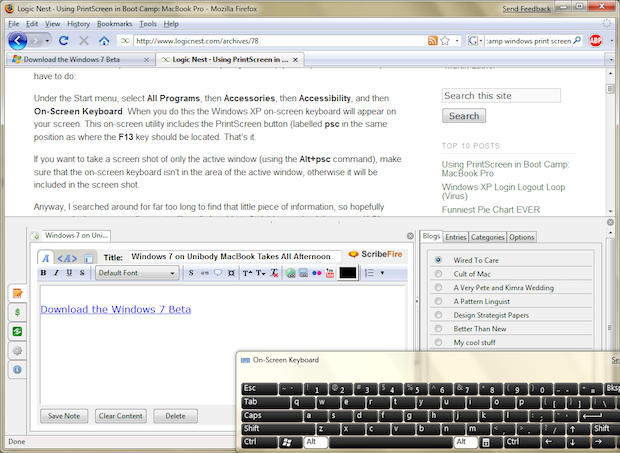
Having read a few of the tutorials on how to install the new Windows 7 beta on a Mac with Boot Camp, I decided to take the plunge myself today on my still sparkling-new unibody MacBook 2.4 Ghz. (This post is actually being written in Firefox on Windows 7 — eww)
And what I learned is that you had really better be prepared to spend several hours to get it working properly. The link I’ve provided above is pretty handy, but it has some tricks to it that will not be immediately apparent without some trial and error. Read on to make the essential tweaks to the tutorial needed to make it work on MacBooks, not just MacBook Pros, read on!
Apple may be adding useful swipe gesturing functionality to the virtual keyboard on the company’s mobile devices, according to a report at MacRumors.
Blogger Arnold Kim describes two potentially effective additions to Apple’s touch interface contained in a patent application filed yesterday with the US Patent and Trademark Office.
Aside from the single finger swipes depicted in the diagrams below, multi-touch gestures (two and three fingers) could invoke other special functions. If a single finger left-swipe might delete a letter, a two finger left-swipe could delete a whole word, and a three finger left-swipe could delete a line. Similarly, a single finger right-swipe could add a space, while a two finger right-swipe could add a period. Up swipes and down swipes could also invoke different functions based on the number of fingers used.
As with Apple’s evolving multi-touch notebook trackpads, these optional functions could provide iPhone and iPod Touch users with useful and welcome shortcuts.
Some people are frantically asking “WHY GOOGLE, WHY?” but to me it makes perfect sense. Gmail now has a simple task manager and I love it. It works nicely within my copy of Mailplane, as do the keyboard shortcuts. You can enable it from inside the Labs settings tab (which is where you can mess with keyboard shortcuts too).
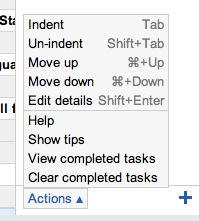
It made me smile when I looked at the hints. Gmail knew I was using a Mac and showed me the appropriate Command keystrokes to make stuff happen. Move items up and down the list with Command+Up or Command+Down, indent them with Tab, unindent with Shift+Tab. All makes sense.
But my favorite feature is that any email can be turned into a task. These tasks appear with a little “Related email” link so you can instantly see their context.
Anytime you can pick up something for $50 that would otherwise cost you more than $450, it’s worth a second look. Such steep discounts can be a sign of utter worthlessness in some cases, in others, possibly a short-lived bargain you’re thankful to have come across.
MacUpdate has one such opportunity Mac users might want to take a look at. They even have a cute little countdown clock on the page telling you how long you’ve got left to decide to pull the trigger. At this writing the clock stands at 10d 21h 2m 42s.
Among the software titles in the bundle:
Drive Genius 2 ($99): Currently the highest-rated disk utility on the market. Used by Mac Geniuses at Apple Stores, Drive Genius diagnoses and repairs problems with your hard drive, optimizes your system, and much more. Buyers receive a link to download a bootable DVD image of the software to burn, which can be used to boot and fix any Mac that can run Mac OS X 10.5, including Apple’s newest laptops.
RapidWeaver 4 ($79): Create powerful, professional-looking Web sites quickly and easily.
MacGourmet Deluxe ($44.95): Think iTunes for food – track recipes, plan meals, manage wines, and more.
LittleSnitch 2 ($29.95): Monitors your network connection to make sure your Mac only sends out what you want it to.
KeyCue 4 ($27): Displays full keyboard shortcuts for all your applications; learn them and work faster.
MacPilot 3 ($19.95): Access hundreds of hidden features to customize and improve your Mac OS X experience.
iVolume 3 ($29.95): Ensures all your iTunes tracks play back at the same level, so you never have to adjust the volume individually.
There’s more. See the post at MacMerc or head on over to MacUpdate. The clock is ticking.
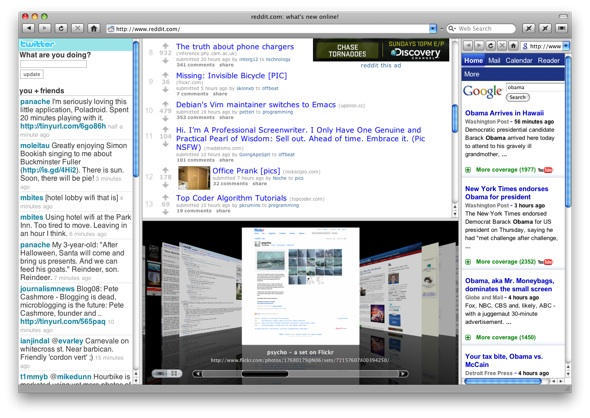
Hands up if you’re a fan of Fluid, the app that turns any web site (or web application) into a standalone application. Yeah, me too.
If you’ve been following the screencasts and Twitterings of Fluid developer Todd Ditchendorf, you might have noticed some news floating around; he has now launched his official browser spin-off, Cruz.
If you’re confused about the name, don’t worry, you have every right to be. This app was going to be called “Mecca”, but then Todd changed his mind. What was that all about?
The Cult decided to get in touch with Todd and ask him to explain the background. He was kind enough to give us some answers…