Mobile menu toggle

Search results for: shortcuts

Ulysses 3 Might Be The Mac’s Best Text Editor [Preview]

By

ulysses.jpg

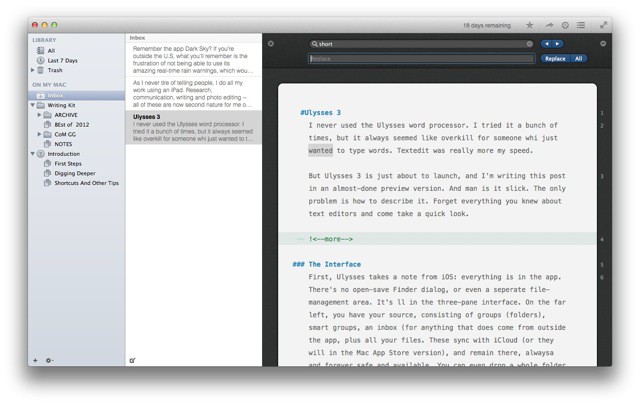
I never used the Ulysses word processor. I tried it a bunch of times, but it always seemed like overkill for someone who just wanted to type words. Textedit was really more my speed.

But Ulysses 3 is just about to launch, and I'm writing this post in an almost-done preview version. And man is it slick. The only problem is how to describe it. Forget everything you knew about text editors and come take a quick look. It really is something completely new.

Ending Soon: The Mac Productivity Course [Deals]

By

CoM - Hackers

If you paid a couple thousand dollars for your Mac, but you’re currently not taking advantage of its hidden features, then you’ve wasted a lot of money. Your Mac has a ton of useful capabilities – don’t let those features go to waste. Especially when they’re going to directly benefit your life by saving hundreds of hours over the course of a year.

Have you ever found yourself doing tedious work copy and pasting, moving files around, or boring data entry stuff? Most likely, that’s a “yes”, isn’t it? Everyone comes across these daily tasks and sometimes this repetitive grunt-work can take up 2 to 3 hours of your precious time. Your Mac can slice that time in half if you know the proper techniques.

You deserve to work faster because the potential with your Mac is right at your fingertips. Let The Mac Productivity Course (featuring over 18 lectures and 1.5 hrs of content) turn you into a Mac dojo master for only $29!

I’m Ditching The iPad For Work And Going Back To The Mac [Opinion]

By

wpid-Photo-24-Sep-2012-1439.jpg

As I never tire of telling people, I do all my work using an iPad. Research, communication, writing and photo editing – all of these are now second nature for me on both the iPad mini and the full-sized iPad 3. I love the portability, I love the stripped-down “workflow” which lets me get stuff done way faster than I can on the Mac, mostly due to lack of OS X’s inherent distractions.

In fact, I am so happy with the iPad as a work machine that I thought that I’d never buy another Mac. I figured that, by the time my iMac died, iOS would have caught up with most of the “truck” tasks I still need to do: keeping a big photo library, running a BitTorrent client.

So why am I writing this post on a brand-new MacBook Air? One thing: My arm is fucking killing me.

Quicksilver App Launcher For Mac Hits Version 1.0 After 10-Year Beta

By

Screen Shot 2013-03-26 at 11.55.11 AM

Remember Quicksilver? The lightweight Mac utility used to be the go-to app launcher on the desktop, but that was years ago. A lack of updates combined with the rise of more feature-rich alternatives like Alfred turned the attention away from Quicksilver long ago.

Now the developers behind the app are breathing new life into Quicksilver with a major update. Quicksilver 1.0 has been released, which marks the end of the 10-year beta period the app has been in since 2003.

Great Workflows To Help You Get More Done With Alfred 2.0 [Feature]

By

There's a lot you can do with this tiny launch bar.

Alfred is a great shortcut and productivity tool for the Mac that received a huge update last week. In case you don’t know, Alfred allows you to quickly perform tasks with a series of keyboard shortcuts. If you’ve used similar tools like Quicksilver or LaunchBar, then you already have an understanding of how Alfred fundamentally works.

Over the past couple of years, Alfred has matured from a little app launcher into a full-fleged base station for getting things done on the Mac. Alfred 2.0 is a huge step forward with additional features like customizable themes, but the biggest addition is undoubtedly workflows. You can, for instance, hit a keyboard shortcut, type in the name of a new movie, and have related browser windows from IMDB, YouTube and Rotten Tomatoes instantly pop up.

Alfred has built up a community of users who have created some pretty cool Alfred 2.0 workflows you can download and use for free. Whether you’re a coder or a complete novice, it’s easy to get started with workflows and take control of your Mac.

Ending Soon: The Mac Essentials App Bundle [Deals]

By

CoM- Essentials Bundle

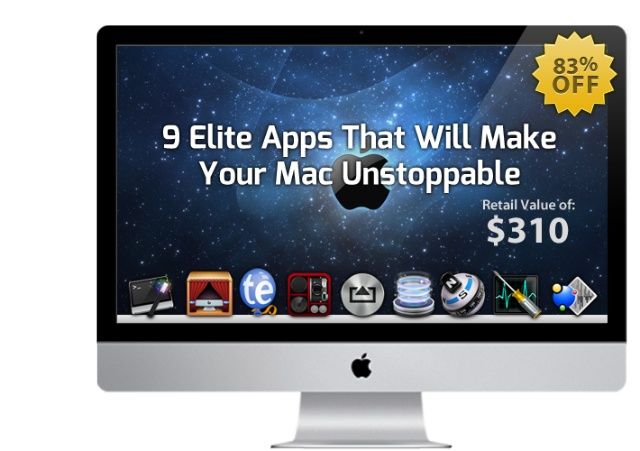
Got a new Mac? Trying to get the most out of it – or perhaps the one you’ve had for a few months? There are countless tools out there than can help – but rarely can so many of them be found in a bundle such as this: The Mac Essentials Bundle.

Cult of Mac Deals has assembled 9 apps that can take your productivity on your Mac to the next level…and we’re offering it at a fraction of the regular price. You can get The Mac Essentials Bundle for only $49.99 for a limited time – that’s 84% off the price you’d pay for all of these apps separately!

Become A Mac Expert With The Mac Hacker Course [Deals]

By

CoM - Hackers

If you paid a couple thousand dollars for your Mac, but you’re currently not taking advantage of its hidden features, then you’ve wasted a lot of money. Your Mac has a ton of useful capabilities – don’t let those features go to waste. Especially when they’re going to directly benefit your life by saving hundreds of hours over the course of a year.

Have you ever found yourself doing tedious work copy and pasting, moving files around, or boring data entry stuff? Most likely, that’s a “yes”, isn’t it? Everyone comes across these daily tasks and sometimes this repetitive grunt-work can take up 2 to 3 hours of your precious time. Your Mac can slice that time in half if you know the proper techniques.

You deserve to work faster because the potential with your Mac is right at your fingertips. Let The Mac Hacker Course (featuring over 18 lectures and 1.5 hrs of content) turn you into a Mac dojo master for only $29!

Get Things Done With The Mac Essentials App Bundle [Deals]

By

CoM- Essentials Bundle

Got a new Mac? Trying to get the most out of it – or perhaps the one you’ve had for a few months? There are countless tools out there than can help – but rarely can so many of them be found in a bundle such as this: The Mac Essentials Bundle.

Cult of Mac Deals has assembled 9 apps that can take your productivity on your Mac to the next level…and we’re offering it at a fraction of the regular price. You can get The Mac Essentials Bundle for only $49.99 for a limited time – that’s 84% off the price you’d pay for all of these apps separately!