Mobile menu toggle

Search results for: Apple One

The Agony of a Brand-New MacBook Pro Purchase

By

post-2094-image-d00c509ff72b781b7d6d4363fe956586-jpg


By the time this message posts, I might have already put in an order for a brand-new MacBook Pro. And, like any good Machead, the prospect of new hardware makes me miserable. After all, my old PowerBook G4 is incredibly obsolete, and I’m used to its idiosyncrasies. But I can’t deal with the idea of something spendy, flashy and new that’s behind the curve. I’d rather be way behind the times than just a few minutes off the mark.

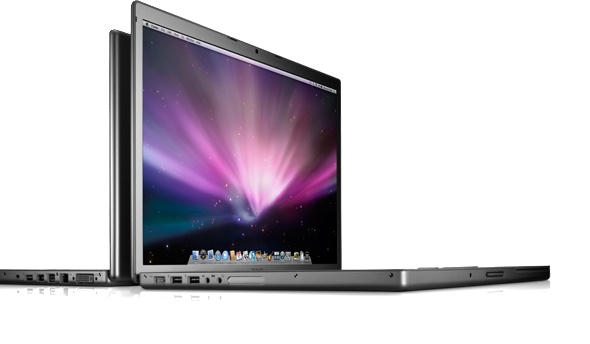
This is the tremendous irony of loving Apple. The company’s computers are more elegant and functional than any other devices on the market, even without OS X. Unfortunately, Apple does such an amazing job adding features over time, that even a three month-old Mac can look a little long in the tooth. Now, I know this is meaningless quibbling. There will always be a great reason not to upgrade. New software, new I/O, new GPU, new processing architectures. But that’s particularly unlikely these days. The current MacBook Pros have multi-touch, very strong graphic processors, high-end Core 2 Duo chips, 802.11n, ExpressCard, MagSafe, and Mac OS X Leopard. That’s a set-up that will rock for years to come.

On the other hand, the following technologies should become relatively ubiquitous and economical in the next two years: SSD, mobile quad cores, WiMax, USB 3.0, ExpressCard 2.0, eSATA, DDR3 RAM, LTE, Blu-Ray, DisplayPort, ray-tracing graphic acceleration. I’m sure I could come up with others if I tried hard enough.Intel is supposed to release a few new Core 2 Duos for mobile with the launch of its Centrino 2 platform on July 14, and the most promising aspect is lower power consumption with a faster front side bus. Which doesn’t mean Apple will have new hardware on the 14th — Steve usually waits a few weeks.

The point being, I’m terrified of Apple taking the wraps off a new set of MacBooks and MacBook Pros the second that I invest, and I’ve lost the ability to accurately predict when the company will jump. Everyone knows the anxiety of the Apple early adopter – what on earth can be done for the agony of the late adopter? Anyone else dealing with the same pain?


WWDC 2008 Preview: Rumors, Speculation, and Innuendo

By

post-2055-image-8de520d5da5dba542714cf4d26b96696-jpg


Image via Uberreview
WWDC is nearly upon us. San Francisco’s Moscone West is plastered with Apple logos. Rumors are in the air. Unannounced products are just out of reach. Rather than try to calm the fervor, I’m just going to pour some gas onto the blaze with the help of my friend Zoltar, The Fortune Telling Machine. It’s that time again — Cult of Mac’s Top 5 Unlikely WWDC wishes! Four of them are credible rumors, the other’s a crazy rumor that I started. See if you can tell the difference!

5. New MacBooks
With the rest of Apple’s product line moving to anodized aluminum cases, having MacBooks in retro-iPod white is looking jankier by the day. It’s high time that Apple revamped its low-end laptops to match the hot design of the current generation iMac. And if Apple wanted to throw a real graphics card and a higher-resolution screen into the mix, that would be nice, too.
Likelihood (out of five): Three. The MacBook has gotten a processor boost as recently as February, but this is a sorely needed shot in the arm for the product line, and Apple likely needs a Mac announcement in addition to whatever happens in the iPhone and iPod universe.

Updated: Cult of Mac WWDC Live Blog With URL

By

post-2049-image-8ca722fb4cf8631b13ee28c51b09a71c-jpg

Updated: The Live blog is now available here. Bookmark it, and I’ll see you bright and early no ON Monday!

The next great keynote from Steve Jobs at WWDC is this Monday in San Francisco, and I’ll be there live-blogging on behalf of Popular Mechanics. I’ll provide the blow-by-blow account, as well as the most rapid-fire analysis I can muster. The actual page for the live blog isn’t up yet, but I’ll provide the link in an updated version of this post when it is. Once things are done over there and I’ve got my top thoughts synthesized, various Cult of Mac folks will be back up here providing our thoughts, speculation and wishes based on the latest and greatest from Apple.

It’s going to be a great one, folks. In the mean time, stay tuned for my two big pre-WWDC posts still to come. One will be a preview of sorts, but the other is something more like the epic analysis of the slow change from Carbon to Snow Leopard. I’m going to look at the designs of the iPhone and iPod touch to shed light on the strategies that they reflect, and also suggest possible future directions for the second iPhone based on those design principles. It will be partly based on a white paper I helped write earlier this year at my day job. It’s a good read and includes a similar dissection of the original iPod. If you want to bone up in advance, you can read it here.

Otherwise, stay tuned. It’s going to be a great week in the world of the Cult!

WWDC Flashback: Why It’s Taken 10 Years from Carbon to Snow Leopard

By

post-2046-image-131ec59367161a5363db14d794bb02ae-jpg


Image: AP, via Guardian UK

Today’s rumors that Steve Jobs may introduce an incremental update to OS X called Snow Leopard at his Worldwide Developers Conference keynote provide a powerful reminder of just how effective the project to replace the Classic Mac OS has been. Buzz on the wires has it that Snow Leopard would be for Intel processors only, completely abandoning the PowerPC platform that Steve Jobs inherited at Apple in 1996. Some have even speculated that Carbon and the last pieces of the original Mac OS toolkit could be similarly discarded in the release. If all that is true (and the latter part is particularly hard to swallow without bricks of salt), it officially marks the death of the Macintosh OS at the hands of its proud successor, OS X.

This is a really significant achievement, and not because I’m nostalgic for MultiFinder. This officially marks the conclusion of the most patient, incremental, and down-right conservative campaign of change ever waged by one Steven P. Jobs. At a WWDC much like this one, just 10 years ago, he began to wage that war. Next Monday, he will have won. The Mac is dead. Long live OS X. To read why and how this happened, please click through.

HP Exec Confirms That MacBook Air Slices. Rumors of Dicing Still Unverified.

By

post-2030-image-fa808b91d7702afba664c524a54eb432-jpg

Rahul Sood, the CTO of HP Gaming and founder of Voodoo PC recently celebrated his birthday, and a friend gave the over-clocking king a MacBook Air as a gag gift. Not one to look a gift-horse in the mouth, Sood used the Air as a knife, cutting his birthday cake quite nicely.

<Mock-Serious Voice>No word from Apple yet on why it kept the Air’s cutting features under wraps for so long, but it’s a classic “under-promise, over-deliver” move in the Steve Jobs mold, so I guess we shouldn’t be surprised to find such major functionality down the road.</Serious>

Rahul Sood via Gizmodo

10.5.3 Fixes WiFi Issues

By

cult_logo_featured_image_missing_default1920x1080

A few months back we reported many Mac users were experiencing problems with WiFi maintaining connections. These connection drops seemed to be mysteriously tied to large file transfers. The issue became so bad that the NYC school system stopped all orders for new Macs until the issue was fixed.

I’m happy to report that for at least this user the issues seem to be resolved. For the past three days I’ve been seeding and leeching “The Cult of Mac” and “The Cult of iPod” by our own Leander Kahney with no interruptions in WiFi service. I’d love to hear if anyone else is still having problems.

Adobe Fireworks CS4 Mac OS X beta—UI hell

By

post-2026-image-013a5a77aefb367b3d693152c9dccb2d-jpg

User interface consistency is an important thing. When conventions are broken, users find it harder to achieve their goals. Apple has been guilty of messing around with its UI to a ridiculous level since Leopard’s introduction (and perhaps before, if you think back to the introduction of ‘brushed metal’ during the pre-OS X days), but nothing quite prepared me for Adobe’s latest offering, which not only smacks consistency around the head, but also kicks it squarely in the nuts for good measure.

To be fair to Adobe, some of its applications are of a high standard. Although I mostly hand-code websites, I rate Dreamweaver quite highly, and Photoshop and Illustrator remain excellent, if bloated, tools. CS3’s interface approach irked a little—not least with the Windows-oriented palette controls—but I dealt with it. However, if what I’ve just seen in the Fireworks CS4 beta ends up rolled out across the entire CS suite, I’m going to seriously be on the lookout for CS killers in the near future.

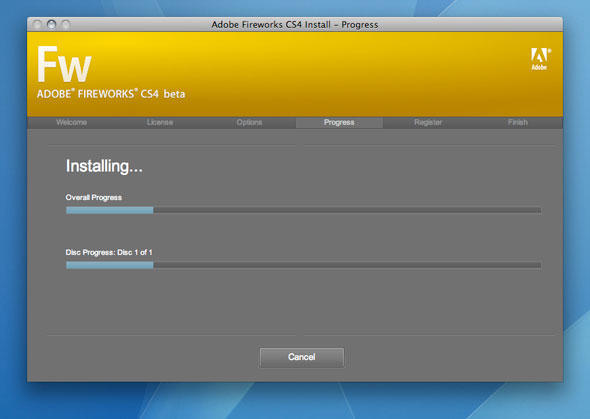
I started feeling uneasy right from the off, with the non-standard buttons and feedback in the installation dialog…

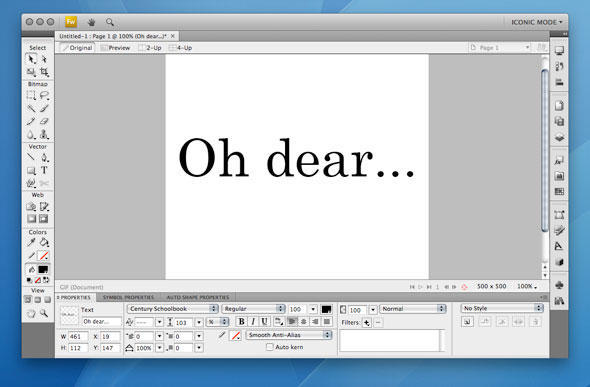
But then, the following blazed on to my monitor, nearly knocking me for six…

FW4 beta 2

If you fancy a quick check of steamrollered Mac UI conventions, there are: non-standard window controls at the top-left (although, oddly, other windows in the application use OS X’s defaults, clashing nicely); buttons in place of the window’s title; and no standard window resize widget. Also, everything’s within a single window, Microsoft Windows-style. Furthermore, the interface is astonishingly ugly, and while I might be able to forgive this kind of UI car-crash from a shareware developer, the fact it’s arrived from Adobe is shocking.

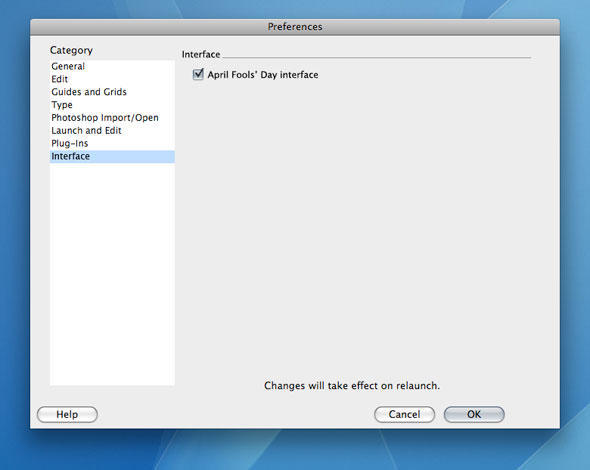
The worst elements of this UI disaster can at least be dispensed with. By deselecting Window > Use Application Frame, Fireworks returns to something resembling a typical (and more usable) interface. Also, I concede that the beta does offer one useful feature—the ability to resize windows from any edge. However, I’m desperately hoping user feedback forces Adobe to have a swift change of heart, or that it’s just a merry jape on the part of the software company, and the final product will in fact ship with the following additional preferences…

FW4 beta 3

‘Get a PC’ Ads Coming Soon?

By

post-2010-image-1459e66a040075f8bbf7b25b9de65a21-jpg
Original Photo: Brian Smith/Corbis Outline, Modifications: Leigh McMullen

UPDATE: I certainly got my facts messed up on this one. CP+B was not behind the “Get a Mac” commercials. There was a paragraph in the middle of page one referencing them in the Fast Company article, and I mistakenly interpreted this as an attribution to CP+B.

So to Alex and everyone at CP+B sorry for the mis-characterization.

To our faithful readers: Sorry for not checking facts more closely.

Alex Bogusky, the creative genius behind Apple’s “Get a Mac” campaign, has switched sides in the brand war between Apple and Microsoft.

According to a Junecover story in Fast Company, Bogusky is going to work for Microsoft.

His marketing firm, Crispin Porter + Bogusky, once credited the power of Macintosh computers to it’s ability to compete against bigger companies.

Newly relocated to Boulder, Co., Bogusky sat with FC’s reporter to discuss how CP+B intends to instill some “cool” in the Borg.

While The Cult can certainly appreciate the allure of the intellectual and creative challenge this endeavor presents to Bogusky and his firm, we have to wonder if CP+B isn’t also trying to corporatize it’s own image a bid to collect more blue-chip clients.

Leaving us to wonder: is $300 million of Bill’s dollars worth your soul, Alex?

You can read all about it in Fast Company on newsstands this month, or online here.

Review: Default Folder X 4.0.5

By

post-1956-image-97268faee05b15c7b6d398acbfa9edae-jpg

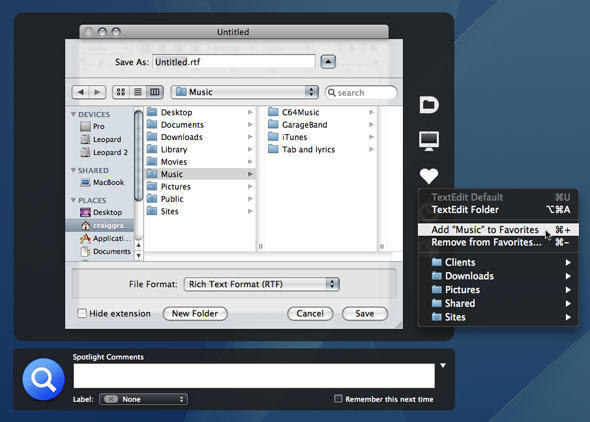
Open and Save dialogs are as unsexy as things come on the Mac, but every Mac user has to deal with them daily. Despite Mac OS X being in its fifth major incarnation, these dialogs are still limited, but with Default Folder X, everything changes, and even a little sleekness is thrown into the mix.Once Default Folder X is installed, a black HUD-style overlay surrounds Open and Save dialog boxes, its toolbar providing access to user-definable favorites, recent folders, and a slew of handy options (such as rename, reveal and move) that puts Apple’s own dialogs to shame. Usefully, favorites can have hot-keys assigned via Default Folder’s preferences pane, which also provides the means to create a default Open/Save folder for each installed application.

Other included niceties are the menu/Dock item, providing a system-wide means of rapidly navigating mounted volumes and defined favorites, and a superior preview within Open dialogs, which automatically stretches to fill available vertical space. Spotlight comments and file properties are also possible to manipulate from Open and Save dialogs when Default Folder X is installed.

Although at the pricier end of the shareware spectrum—especially for a one-shot utility—Default Folder X is nonetheless an essential purchase. The seconds it saves every time you open or save a file soon add up, and after a few months’ use, you’ll find Macs lacking the application feel naked by comparison.

 Default Folder X screen grab

Default Folder X continues to excel in its fourth major revision, making it much easier for Mac users to open and save files.

Further information

Manufacturer: St. Clair Software
Price: $34.95 (upgrades from $14.95)
URL: www.stclairsoft.com/DefaultFolderX/

Mac Air Tablet Mockup From Isamu Sanada

By

post-1952-image-33ded073d3c66fa224d6b58d38604756-jpg

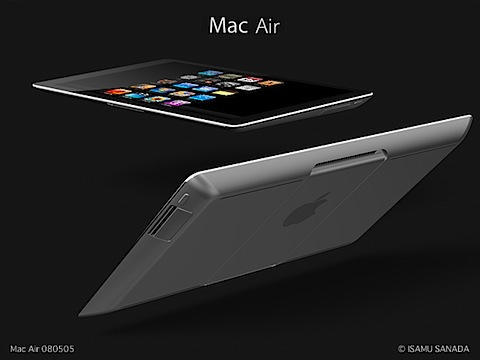
Isamu Sanada, the Japanese photographer who makes Mac mockups, has created a new design for a tablet Mac that blends the iPhone with the MacBook Air subnotebook. He calls it the Mac Air.

According to a rough translation of his site, the Mac Air also doubles as a desktop.

It hooks to a wireless keyboard and uses a wireless Time Capsule-like docking station as a hard drive. The dock includes a SuperDrive for playing and burning Cds/DVDs.

It boots into the iPhone operating system when a tablet, and OS X when used as a desktop.

It’s a great idea, but will Apple  ever make such a device? Maybe. Sanada has once or twice correctly predicted Apple’s products in the past. As previously reported:

Isamu Sanada is a photographer by trade, but an Apple designer by calling.

Sanada is an amateur designer of fantasy Macintoshes. His Applele website is a popular showcase for dozens of speculative designs for future Apple machines.

In fact, Sanada is so adept at mimicking Apple’s look, he created a design for a new laptop that predicted Apple’s distinctive Titanium PowerBook G4 months before it came out.

Link to Sanada’s Mac Air mockup.

08_macair_080505a08_macair_080505b08_macair_080505c08_macair_080505d08_macair_080505e

Sanada hasn’t made a new design for many months. No word why he’s returned to making fantasy Macs. His email simply said:

“I made a new image. Please enjoy it.”