Mobile menu toggle

Search results for: Apple One

Review: Mail.appetizer 1.3b1

By

post-2268-image-54315f76db4fb8ba91933f669c9d1a4c-jpg

Whenever you upgrade an operating system, you inevitably end up leaving a few old friends behind—faithful applications that, for whatever reason, no longer work on your new system of choice. With Leopard, losing Mail.appetizer was a particularly painful wrench, but the current beta now plays nice with Apple’s latest and greatest.

What Mail.appetizer does is save Mail users time. Mail’s Dock icon merely lists the number of new emails, but Mail.appetizer provides a resizable and customizable notification window that enables you to glance at the first few lines of each incoming email. Usefully, the window provides controls, enabling you to mark an email as read, delete it or open it in Mail.

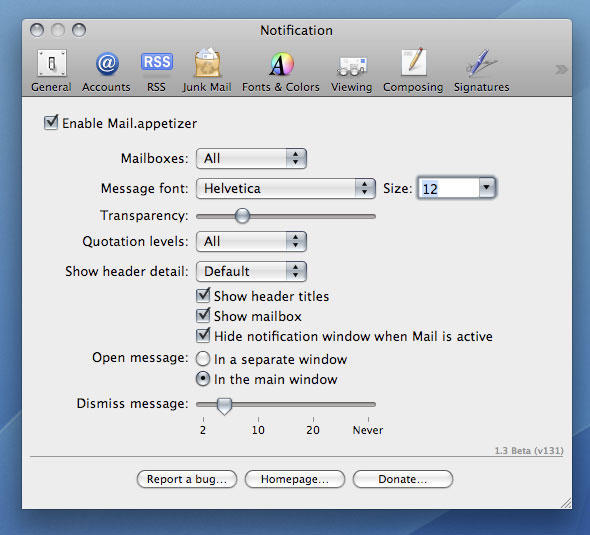
What elevates Mail.appetizer from being merely very handy to being utterly essential is the level of control you have over the notification window’s content. The most obvious settings are all present and correct: the time each message appears for, the window transparency level, font settings, and so on. However, you can also restrict notifications to specific Mail accounts and fine-tune which aspects of messages are shown, including quotation levels and header titles. You can also decide whether Mail.appetizer hides when Mail is active and if it should open messages in separate windows or in the main Mail window.

It’s attention to detail that lifts Mail.appetizer to the dizzying heights of a Cult of Mac Essential award, and although the current release has a couple of niggles (a clash with GrowlMail and not marking as read items deleted using the notification window), it nonetheless comes very highly recommended for all Mail users.

Cult of Mac essential badge

Mail.appetizer prefs

Mail.appetizer provides various options for changing the way its notification window works.

Further information

Manufacturer: Bronson Beta
Price: free
URL: bronsonbeta.com/mailappetizer/beta/

Six of the best: Mac OS X menu extras

By

post-2234-image-a27fa7e674dae5163a36295ea76c8ae6-jpg

In the first of a new series covering overviews of collections of Mac ‘stuff’, we present our favorites from the slew of apps vying for a place in your menu bar.

iStat menus 1.3

($free) islayer.com
There are loads of system monitors available for the Mac, but few hold a candle to the flexibility, good looks and usability of this beauty. With almost no effort, you can bung usage statistics for CPU, memory, disks and networks into the menu bar, along with fan, temperature and Bluetooth information. Drop-downs then provide access to extended data.

But perhaps the best trick iStat menus has up its sleeve is the Date & Time module, which offers many more settings than Mac OS X for displaying the date and time in the menu bar. It also offers a handy option for bunging a set of user-configurable world clocks in the drop-down, an implementation that manages to better the competition. The fact that iStat menus is free means you’re a bit strange if you don’t at least check it out.

iStat Menus
All the times in the world, at your fingertips, with iStat Menus.

iTunesMenu 0.1

($free) programmerslife.co.cc
With the alumin(i)um Mac keyboards, Apple finally provided built-in system-wide iTunes controls, thereby placing dozens of iTunes controllers on to the ‘soon to be redundant’ list. However, when you’ve hundreds of CDs that have been ripped to iTunes, chances are you won’t know every track that pops up. iTunesMenu cunningly commendeers some menu-bar space for displaying the current track, and you can mess about with the preferences to include the artist and album name, too. Growl notification and scrolling support also exist, along with the option to define system-wide hot-keys for common iTunes controls. We’d love to also see iTunesMenu display the current track’s rating, but aside from that minor shortcoming it’s fab.

Cult of Mac recommended

Check Off 3.8

($free) checkoffapp.com
With everyone and his dog rattling on about Get Things Done (GTD) processes and applications, it’s a wonder anyone actually does get anything done. By the time you’ve learned how to use applications and rigorously apply procedures, entire days have been sucked up by trying to be more efficient, which has resulted in many a Mac user being harshly beaten by the giant no-no stick of ironic doom. Check Off keeps things simple–it sits in the menu bar, and enables you to create a list of labelled things to do. Once you’ve done a ‘thing’ you can check it off (bonus points, Mr. Developer, for actually using a sensible name for your app!).

It’s simple, it does the job, and we like it. And Version 4’s due soon, so pop over to the developer’s website and offer your two cents regarding the feature set for the next major release.

Cult of Mac recommended

ASM 2.2.7

($15) vercruesse.de
Time to show our age (or experience, depending on your point of view). Back in the days where OS X was just a glint in the mailman’s eye, there was no Dock. App-switching was instead done via a menu at the top-right of the screen. Old-hands often tearfully think back to those halcyon days, wishing nostalgia could replace the present day–at least when it comes to switching apps. ASM makes such dreams come true.

If you’re thinking “that’s great, granddad, but really what is the point, you old fart?”, we’ve some wise words for you, young whippersnapper. First, it’s irritating how the Dock’s apps can’t be ordered outside of launch order, unless they’re permanently housed. ASM enables you to list open apps in alphabetical order. Furthermore, ASM can dim hidden apps, and force single-application mode (auto-hiding everything else when you switch apps) or ‘Classic Window Mode’, which brings all of an application’s windows forward when one is clicked.

Cult of Mac recommended

Simple WindowSets 2.0

($12.95) hamsoftengineering.com
If you regularly work on projects requiring a bunch of Finder windows, you’ll know how much of a pain it can be to set them up every time. Also, Finder isn’t the most stable of apps, and one quick crash is all it needs to take with it your careful planning. This latest release of Simple WindowSets does away with such problems, enabling you to define window sets based on currently open Finder windows and restore said sets from its menu-bar extra’s drop-down. Usefully, existing sets can be updated, and preferences settings enable you to append or replace on-screen Finder windows with a selected set. Simple WindowSets doesn’t currently play nice with smart folders, but that’s our only niggle and it’s therefore an essential download.

Isolator 3.3

($free) willmore.eu
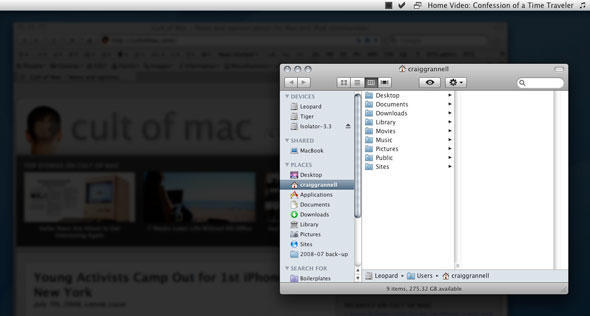
A bit of a leftfield choice, this one, but it’s useful for the easily distracted, like your correspondent. Having grown increasingly used to WriteRoom’s ‘block out all distractions’ display option, it’s interesting to see another app provide similar focus for any application, and once installed, Isolator does just that. Click on the menu-bar icon and all background apps are hidden behind a user-definable level of blur and darkness. Another click and normality resumes. Options for system-wide hot-keys, Dock-hiding and the ‘clickability’ of dimmed windows and icons ensure this application is on the right side of the ‘configurable but simple’ line.
Cult of Mac recommended

Isolator
Isolator helps you focus on your work by displaying background apps in fuzz-o-vision.

So, that’s our half-dozen menu-bar wonders. What do you think of our selection? Do you have any favorites of your own that you think we should have covered? (We already hear Butler uses grinding some axes!) Let us know in the comments!


Counterpoint: “Hello”, Don’t Change the Design

By

post-2229-image-659b8d05878130bec8ec2c36c2538ebe-jpg

Pete’s post yesterday, “Hello: Macs Are About to Get Interesting Again“, was pure Mortensen: articulate, insightful, well researched, and on the topic of Apple needing to change designs, dead wrong.

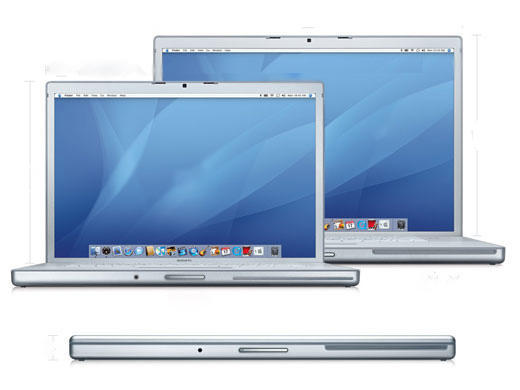
While the Macbook / Pro line as well as the MacPro’s are essentially indistinguishable from their predecessors, that’s not necessarily a bad thing. It’s a design philosophy that has powered BMW and Mercedes for a good long while. To that end, other than adding bling to satisfy a generation of new money rappers, Rolex has never fundamentally changed the design of the Datejust, Daytona, or Day/Date (aka President) watches.

The point: A classic is a classic.

Watch a television program. The majority of the time they show someone working on a laptop, it’s a Macbook Pro. Sure, it might have a Pear or an Orange on the back, and sometimes a nasty sticker of some sorts, but it’s identifiably a MBPro.

When a product’s design is raised in the cultural consciousness to be synonymous with the artifact it’s portraying (eg MBPro = Laptop), it becomes the archetype for that artifact. It means that whenever a consumer goes laptop shopping, their mental image for a laptop is of a Apple Macbook Pro, and any other purchasing decision they make will be an explicit compromise from the archetype.  This is not just a crazy theory of Leigh’s, Apple’s sales figures in the high-end laptop space prove this out.

Apple has attained this rarified place in the minds of consumers, with both the iPod and Macbook Pro lines. That is the very LAST time to fundamentally change a design.

July 7 Deadline for Apps in AppStore Launch

By

post-2224-image-4f68f2455ee2015e09e1f02efe959530-jpg

Apple has issued a July 7 deadline for third-party developers hoping to have their applications considered for inclusion in the AppStore launch expected this month, according to iPhone Atlas.

Applications will continue to be accepted after the deadline but are not guaranteed to be included in the AppStore debut. The AppStore is expected to open with the release of 2.0 firmware to coincide with the launch of the iPhone 3G on July 11.

Hello: Macs Are About to Get Interesting Again

By

post-2221-image-dce82bec4f7ef3e765bfe10ec775cb2a-jpg

Update: For a well-reasoned rebuttal to at least my views on design, check out Leigh’s counter-post once you’re done reading here.

I’ve been alluding to this for a few months now, but let me repeat: The Mac is poised for innovation over the next few years on a scale that we haven’t experienced since the initial move to OS X in the previous decade. After five years of focusing on new categories like the iPod and the iPhone while gradually improving its Mac product line, the company has now freed up the resources to strengthen its core and highest-revenue business: Macs. And at the same time, new technologies are emerging to take the Mac to the next level. To read why, click through.

Jonathan Ive Wins Award for Advancing Cause of Mobile Data

By

post-2218-image-276d4562dccbea664d6263e050071539-jpg

Winning awards for the product design is old hat for Jonathan Ive and his team in the Apple Design Group. The company’s Senior Vice President, Industrial Design has won every honor that a product designer can claim, and then some. But today, he won an award unlike any other. He was recognized for a design that drove the adoption of an obscure technology.

Ive was honored with the Personal Achievement Award by the Mobile Data Association, a UK group that recognizes “those UK companies and individuals who have made an outstanding contribution to the uptake and success of mobile data over the last 12 months.”

The iPhone can be credited for many things — upsetting the existing mobile phone market, increasing demand for cool touchscreen interfaces, creating a new icon to be used as short-hand for innovation — but, as the MDA notes, its biggest accomplishment probably is in driving demand and adoption of mobile data plans. Data plans have been available for a very long time, but the appeal of the mobile web wasn’t obvious to most of us until we first got to try the stupendous Mobile Safari. By itself, the iPhone has made HTML browsers a near-standard feature for a modern smart phone.

And the industrial design is a big part of the success of Mobile Safari. Wiithout the finger-flicking scrolls and double-tapping zooms, the iPhone wouldn’t be what it is and mobile data wouldn’t be so hot. It’s nice that an organization that has been promoting mobile data for years recognizes that design’s contribution to the iPhone goes far beyond aesthetics and software. It was designed to make the mobile web accessible and appealing. And it succeeded wildly.

Via Ars Technica.

7 Weeks Later: Life Without MS Office

By

iWork vs. Microsoft Office: An image woman works with a laptop on a beach.
Just how possible is it to use iWork instead of MS Office?

Back on May 11, I promised to try and live without Microsoft Office in a “corporate setting” for 30 days. It’s been seven weeks in my iWork vs. Microsoft Office challenge now. And I’m none too happy to report that a copy of MS Office must go with me to the desert island.

However, in an interesting twist, it turns out I can’t live without iWork either.  Follow me after the jump to discuss what worked and what — surprisingly — didn’t.

Rhapsody Takes on iTunes, Offers Free Albums on New Store

By

post-2198-image-0a67548d8a7bf0b9de39229cf63f9459-jpg

More evidence of the primacy of digital downloads in the music distribution business: Rhapsody announced today it will offer DRM-free MP3 downloads in a $50 million effort to wrest market share from Apple’s iTunes, which earlier this year became the largest music retailer in the United States. As part of its marketing launch, the first 100,000 sign-ups to the store until July 4th get one album for free, according to Gizmodo.

Previously known for its subscription-based music streaming service, Rhapsody is partnering with Verizon Wireless to offer music downloads on mobile phones and will also be the music store back-end to MTV’s music Web sites and iLike, one of the most widely used music applications on the social networking site Facebook.

Describing their strategy as “Music Without Limits,” Rhapsody executives tacitly recognized the necessity of selling music that can be played on iPods, Apple’s industry-leading digital music player. Said company Vice President Neil Smith, “We’re no longer competing with the iPod, we’re embracing it.”

5 Time Capsule Tips from Channel Flip, UK

By

post-2193-image-f26e4ea8492dc7e021dab5e58058eccf-jpg

Channel Flip is a “video magazine” produced in London with a focus on Mac tech-tips, video gaming and film. Instead of writing articles, the Channel Flip team produces short, snappy clips of how-tos and reviews of mobile phones, HDTVs, laptops and portable technology, as well as gaming titles on console, portable and PC. The film department looks at the week’s must-watch DVD releases, including film analysis and a close view of things going on in the movie world.

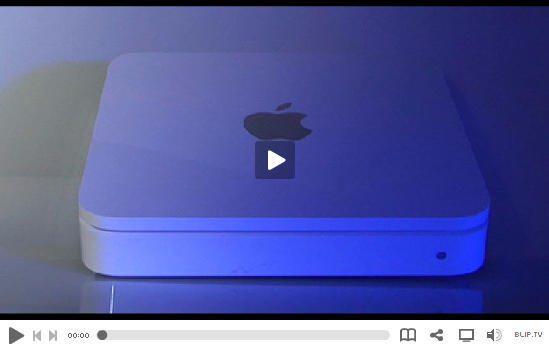
The clip above shows how to use Apple’s Time Capsule for something more than a mere back-up device and network router.