Mobile menu toggle

Search results for: Apple One

‘Get a Mac’ is Running Out of Gas

By

cult_logo_featured_image_missing_default1920x1080

I just caught the “Pizza Box” Get a Mac spot during the Top Design premiere, and it struck me. Not because it’s particularly brilliant — it hits the same mark exactly that all the other college-related Apple ads have lately — but because I realized it was the first time I had actually paid attention to a Get a Mac ad in almost three months.

Nor have I talked about one with anybody in more than a year. People don’t even get upset about it or make parody ads anymore. PC and Mac have been up there so long that I’m expecting them to introduce their children at any minute. Worse than being annoying or controversial, Apple’s core Mac marketing campaign has become the one thing the Cupertino Collective can never allow itself to be: boring.

Apple’s been here before. Switch had its (rather desperate) day. Think Different saved Apple during its darkest times. But each of them eventually outlived its usefulness based on where Apple was as an organization.

Today, Apple has become a powerhouse in media and a top-three computer maker. The iPhone is poised to become as ubiquitous as the iPod. And Get a Mac‘s playful jabs are starting to make Apple look small. “Able to run Microsoft Office” isn’t news to anyone who could be swayed by a TV ad. What’s the next narrative? How does Apple start its next growth curve, whether through marketing or design?

Sync iTunes with Mobile Devices from Sony, Nokia, Sony Ericsson

By

post-2682-image-6886f31b986d5a01a72a5cfc4090d9f3-jpg

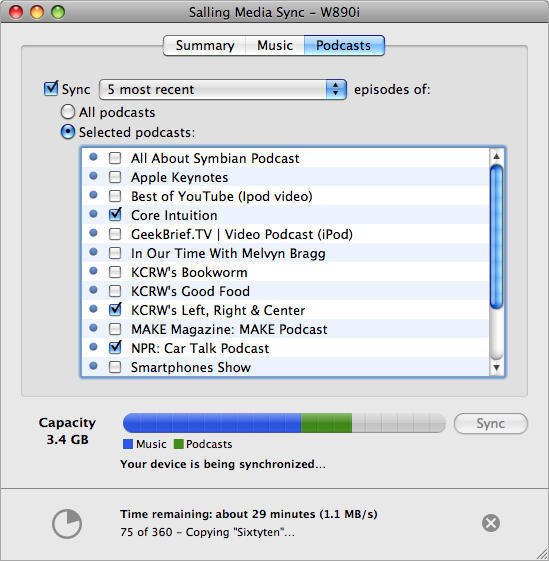
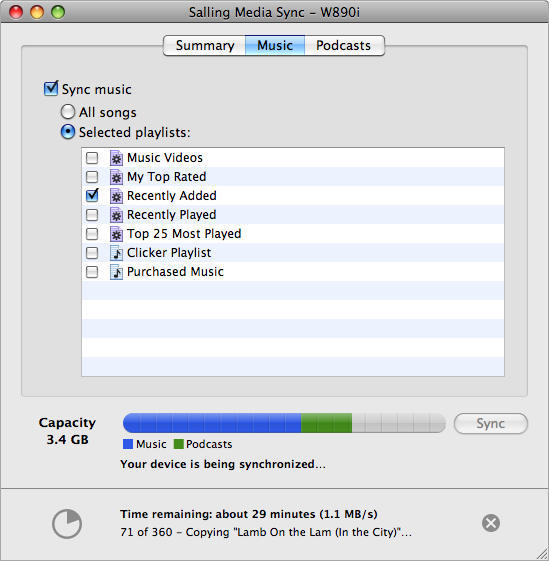
Salling Software’s MediaSync is a brand new application that synchronizes playlists, music, and podcasts in iTunes onto mobile devices from Sony, Nokia and Sony Ericsson. President of the Swedish software maker, Jonas Salling, says “There are a lot of frustrated phone owners out there who love iTunes, but can’t easily get their tracks onto their non-Apple device.” His application works with iTunes 7.6.x and 7.7.x, is compatible with many popular phone models, and requires Mac OS X 10.4.11 or 10.5.x. A Windows version is also available for Windows XP SP2 and Vista with Windows Media Player 11.

The basic installation is free, though the paid app features “smart” sync, allowing you to sync faster by minimizing the amount of data transferred in incremental syncs.

With a compatible phone connected to a USB port, you simply select the playlists and podcasts you want on your device. Media Sync not only uploads the music tracks and podcast episodes, but also replicates each actual playlist on your device and–on devices that support it–transfers play count metadata for each item, reinforcing the sense of having a piece of iTunes in your pocket. Although Media Sync works with most media in iTunes, it will not transfer DRM-protected content.

ms_mac_syncing_podcasts.png

Google Chrome In VMWare “Way Faster” Than Safari

By

post-2673-image-8fdfbf1641da4244f96e46686ba51088-jpg

Veteran Mac expert and writer Joe Kissell is among the first to report that Google’s brand new Chrome browser appears to be “way faster” than Safari, even running in a virtualization environment like VMWare Fusion.

Kissell ran a quick, informal head-to-head on his MacBook Pro, comparing Safari on OS X to Chrome running under Windows XP and VMWare Fusion.

“Chrome launched in the blink of an eye (really shockingly fast) and I tried a few web pages side by side in Chrome and the Mac Safari, and they loaded noticeably faster in Chrome,” said Kissell.

Chrome is Google’s entry in the web browser sweepstakes, currently a Windows-only offering that launched today. The browser is based, however, on Apple’s webkit, the same rendering engine that powers the Safari browser. Mac and Linux versions of Chrome are in the works but Google has yet to announce a time frame for releasing those versions.

Kissell’s initial report came over Twitter, saying he ran Chrome in XP under VMware Fusion on a MacBook Pro and that it “is way faster than the Mac version of Safari on the same machine. Wow.” But some of his reaction may be chalked up to perception, and later off-the-cuff speed tests presented a mixed bag.

In tests done on a regular work machine with a zillion things running in the background, not a clean environment to be sure, but representative of the “real world” in which many are likely to use the browser,

  • Chrome launched in < 2 seconds in XP under VMware Fusion
  • Native Mac Safari launched in ~9 seconds

LifeHacker Stopwatch

  • loaded in 7.254 seconds in Chrome
  • loaded in 9.531 seconds in Safari

How To Create Css Test

  • rendered in 162 ms in Chrome
  • rendered in 37 ms in Safari

Despite his admittedly highly unscientific testing, Kissell reported “AJAXy things like Google Docs seemed zippier in Chrome, but it’s possible that my perceptions are incorrect, because I expect everything in a Windows VM to be slower.”

Let us know in comments below how Chrome works for you.

Blackberry Tests Point to AT&T as Culprit for 3G Connection Woes

By

cult_logo_featured_image_missing_default1920x1080

Pre-release testing of the Blackberry Bold 3G smartphone appears to show the new handset may suffer from connection problems similar to those that have plagued the iPhone 3G. Citigroup investment research analyst Jim Suva reported occasional 3G signal dropping troubles at some locations, “especially on high-rise building streets on our 34th floor… which may be why AT&T has yet to launch the product,” according to AppleInsider.

Because the Blackberry uses a component of its Marvell processor as its 3G modem, where iPhone 3G uses a different Infineon chipset, previous speculation about problems with Apple’s hardware appears less likely to be the cause of iPhone 3G connection instability.

3G network performance varies greatly among different 3G carriers throughout the world, according to survey released this week on the Wired blog. Users in Europe, which has some of the most mature 3G networks, reported the fastest overall results, while US-based iPhone owners suffer the largest number of failed data speed tests, particularly in dense urban areas, according to the Wired survey.

Citibank’s Suva speculates that the Bold won’t be released in the United States until AT&T rectifies its 3G network issues.

Steve Jobs Still Parking In Handicapped Spaces — The Pictures

By

post-2613-image-0e3c250b769046a49e667e7176cbca98-jpg

Photo by ranajune.

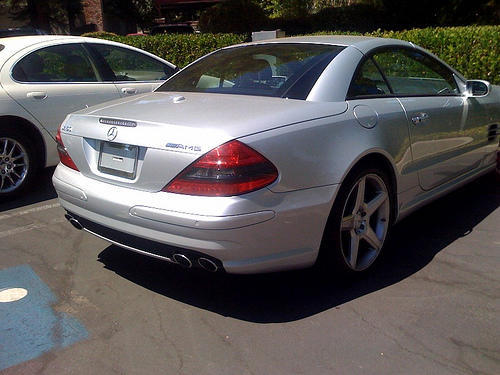
Steve Jobs is still parking in handicapped spaces at Apple, according to a new snap posted to Flickr.

Snapper Rana Sobhany spotted Jobs’ Mercedes SL55 AMG parked in a handicapped spot at the Apple campus over the weekend.

“Mercedes? Check. No license plate? Check. Handicap spot? Yep, this is Steve Jobs’ car!!!” she writes.

Jobs, of course, has a long history of parking in handicapped parking spaces at Apple. The reports go back years, and have recently been documented on Flickr.

Since 2006, Jobs’ car has been snapped in handicapped parking spaces at Apple at least five times. See the pictures after the jump.

Via ValleyWag.

New iPods, MacBook Pros on Sept. 9?

By

cult_logo_featured_image_missing_default1920x1080

It’s been evident to anyone paying attention (even those of us who have been jonesing for new MacBook Pros since early June) that Apple would hold off on any product launches throughout the summer to put maximum focus on the iPhone 3G. Apple just wasn’t going to do anything to distract from that, nor were they going to launch major product in the doldrums of late August.

So it was obvious Apple would wait until after Labor Day to take care of much-needed updates to the iPod and MacBook Pro product lines.  According to rumormongers, it might be just a week after Labor Day that such welcome udpates arrive — eight days to be exact, with an as-yet-unannounced Sept. 9 launch event. Kevin Rose is leading this charge, claiming new, non-stubby widescreen iPod nanos, but I think most people care more about cheaper iPod touches and MacBook Pros with Montevina than anything else.

I think an actual Town Hall event would be a bad move. These are going to be evolutionary updates, and they don’t deserve the fanfare of the iPhone 3G or AppStore launch. My prognostication is that Apple will unveil new product on just about every Tuesday in September. First new iPods, then new MacBook Pros, then new MacBooks, than new Mac minis and AppleTVs. Just keep it coming and pour it on…

Greatest Mac Moment #23: Quick Look

By

cult_logo_featured_image_missing_default1920x1080

Quick Look

25 Years of Mac
Quick Look. Two words that brilliantly sum up one of the most important and yet least celebrated additions to the Mac experience. When stripped down to basics, Quick Look is merely a document preview. But what a preview! Using it, you can preview the majority of documents on your Mac by selecting them and hitting space, without opening the documents’ parent applications. Quick Look showcases the best of Apple and the Mac, highlighting how it’s sometimes the most obvious things that can be used as the basis for innovation and making the computing experience better.

Craig Grannell:
People use a whole lot of files, and Quick Look has the potential to save Mac users a lot of time every single day, by providing a full and simple preview to a selected file that doesn’t take ages to render, doesn’t require parent apps to open, and is often actually preferable to using apps at all. (I certainly rarely use Office now, preferring to read Word and Excel documents in Quick Look.) It shows how much Quick Look has become ingrained in me that I spent a good ten seconds dumbly hammering space on my iBook yesterday before realizing that, no, it doesn’t actually have Leopard installed.

For me, Quick Look shows what the best thing is about the Mac experience: it’s not about bells and whistles, and it’s not about flashy, showy gimmicks–it’s about doing something in the simplest, most efficient and intuitive fashion, in order to improve the experience for the user. And even though each use of Quick Look may save only a few seconds, it’s often the little things in the Mac user experience that leave the biggest impressions.

Leigh McMullen:
It’s hard to image that a simple OS feature could be considered one of the top Mac moments of the past 25 years. Nevertheless, Quicklook is truely a game changing feature, all the more so for its incredible subtlety. The implementation is so Apple. Take a feature (document preview) and make its implementation so seemless that it disappears. It’s like two-finger scrolling on Macbook Pro trackpads, you don’t even notice you’re doing it.

If you work with a lot of documents and doubt this feature’s importance, take the Tiger challenge: try using 10.4 for a day. You’ll be banging on that space-bar with so much  frustration your colleagues will think you’re playing Quake.

Woz Has Life Lessons for Intel Developers

By

post-2585-image-60315e8fcd2ef095e7380c54c94cb1f3-jpg

Steve Wozniak spoke to Intel developers in San Francisco yesterday, telling them maintaining a vision without compromise, is “the right way of going through life.”

In a wide-ranging on-stage interview at the annual Intel Developer Forum, Wozniak also said being poor helps inspire creativity. As a computer designer, “I would do any trick I could think of to try to save money,” he said. “Not having any money helps.”

In the end, the man who began work on the first Apple computer as an engineer working at Hewlett-Packard (and offered his invention to that company five times before accepting rejection and taking it on himself with Steve Jobs), waxed philosophical about technology’s impact on our lives.

“Technology is always supposed to improve our lives,” he said. “I don’t know. Are we happier than we were 100 years ago? Are we happier than we were 1,000 years ago? Do we smile more?”

Spend a Buck, Get Fit to Vote

By

post-2543-image-53f478d9c88e35666600f1d02e358650-jpg

The iPhone can help you test your political savvy, have some fun and get ready to cast your ballot in the Presidential election with the $0.99 game Fit 2 Vote, available now at the AppStore. With updated quotes coming out every two weeks, the game presents you with statements made by one of the two candidates, which you identify by tilting the iPhone to the left for Obama, to the right for McCain. Once you’ve answered 50 questions correctly, you’re deemed Fit 2 Vote.

Via Switched

Bigfoot Found! Mac Tablet May Be Among Artifacts

By

post-2532-image-5c8a9c20c1eabb0b480edc28d23406e9-jpg

The New York Times reports that today, just down the road from Apple’s headquarters, two Georgian men will present what they claim to be incontrovertible DNA and photographic evidence of Bigfoot.

Even more startling, is that one of the gun-happy rednecks in question appears to be holding the Fabled Mac Tablet.  Sasquatch’s next of kin were unable to confirm or deny that he was a beta tester for the tablet due to “NDA issues”.