Not exactly hot under the collar to see this movie, since by most accounts it is a rom-com gone wrong, but Zack and Miri Make a Porno is a hotbed for Apple product placement.
The trailer features an ailing iBook, showing us exactly how desperate our two young friends are for cash. The movie also has a part for Justin Long, “Get a Mac” Apple adman as a gay porno star, leaving at least one person to suggest the actor is an Apple endorsement, too.
Nearly 25 percent of Japan’s music fans use Apple’s iTunes software, compared to 19 percent of the U.S. online population, a media measurement firm announced Tuesday.
The iTunes application, used by iPod and iPhone owners to purchase and organize digital music, found 23.7 percent penetration of the nation’s Internet users, according to comScore. Globally, 11.2 percent of the world’s Internet users prefer iTunes, the study found.
The UK had the second largest percentage of iTunes fans with 23.4 percent penetration coming a close second to the gadget-hungry island nation.
The U.S. was ranked third with 19.6 percent reach of iTunes. France and Germany completed the top five iTunes countries, the company reported.
President Dimitry Medvedev governs Russia from what looks like a Mac Book Pro, if photos released by the Kremlin are any indication. Something about a guy with an open shirt, no tie and a manageable pile of papers running a country doesn’t look right to me. It looks like the Russian government uses plenty of PCs, if the equipment in the background is any indication.
Medvedev, not new to the Apple world, has been also seen with an iPhone, before it was available on the local market.
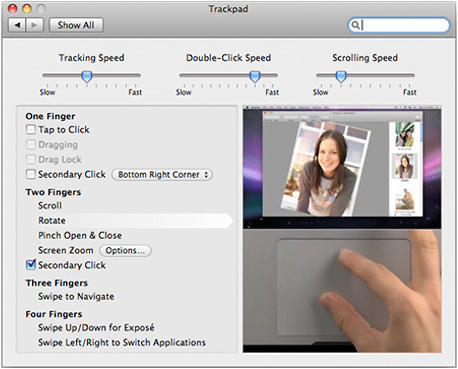
Erratic behavior with the glass trackpad on new Mac notebooks appears to be a growing concern for some Apple customers. A buyer emailed Steve Jobs over the weekend complaining the trackpad on his new MacBook Pro was not registering physical clicks consistently and received a telephone response from Apple support indicating the company is investigating the matter, according to a report today at AppleInsider.
A survey of the discussion forums on the Apple website indicates nearly 100 threads have been opened in the past week on the subject of “trackpad problem” for the new unibody aluminum notebooks, with most users complaining the trackpad does not always register a click when it should, while some also report the pad loses all functionality at its outer edges, and several believe the sensitivity of the trackpad leads to erratic, unpredictable behavior.
With any new product there is bound to be something of a learning curve while users become familiar with its capabilities, and the new trackpads certainly have been designed to support a wide range of two, three, and four-finger gestures that could be causing some users confusion and frustration.
I asked my colleague Pete Mortensen, who wrote glowingly about his new MacBook a couple of weeks ago, how he’s finding life with the new trackpad. “I actually do get some of those issues some of the time – not always, but sometimes,” he says, noting, “it’s worst in the bottom edge dead center. Moving up a little or millimeters to the side fixes it.”
How about you, dear reader? Have you found the new trackpads quirky? And if so, do you think it’s something you’ll get used to, or does Apple have a production issue on its hands?
I asked Pete if the trackpad behavior made him long for his 12″ PowerBook G4 and he replied, “I don’t miss my 12″ G4 at all!”
If you’re going down under, or know someone who is, have them pick up an iPod for you. The free fall of the Australian dollar has made it the cheapest place to buy one.
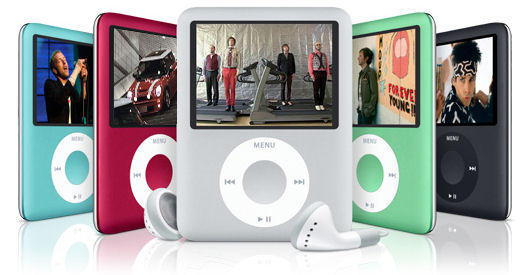
A survey of 62 countries found that an Apple iPod 8gb nano, measured in US dollars, cost $131.95 US dollars in Australia. That’s five percent cheaper than in Indonesia, where the same iPod would cost $138.47.
In Hong Kong, which used to top the cheap iPod scale, the same MP3 player now costs $148.36, almost exactly what it retails for in the US, $149.
Ok, so a “currency discount” of about 14% percent isn’t enough to warrant consumer electronics spending spree down under but it’s interesting to see how the iPod indicator/Big Mac idex on these prices fluctuates.
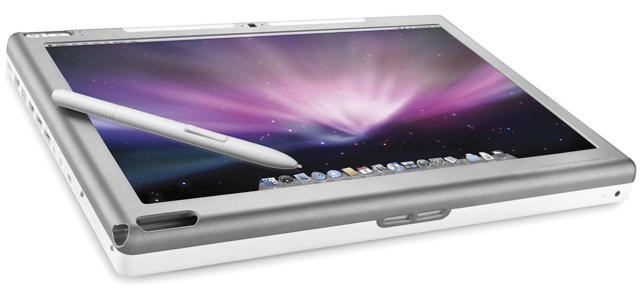
Other World Computing, an Illinois-based technology company, announced today the availability of a new service that converts your existing Intel Core 2 Duo based MacBook into a tablet computer that lets you draw and write directly on the screen.
Called Modservice, for prices starting at $1300, OWC will convert your Apple machine into an Axiotron Modbook.
MacBook owners who want to convert their computer into a Modbook can also have OWC upgrade the base features of the MacBook for additonal performance and capabilities. Available services include memory upgrades up to 4.0GB; higher capacity and/or faster internal hard drives up to 500GB; and faster DVD and CD burning with a new SuperDrive. They offer a Hard Drive Data Transfer option so your data can be backed-up and reloaded after the Modbook conversion is completed.
The Modbook has the same input/output features of the MacBook, retaining the full range of MacBook connectivity options via 10/100/1000BASE-T Gigabit Ethernet, USB 2.0 (two ports), FireWire® 400 (one port), Bluetooth 2.0 and AirPort Extreme Wi-Fi 802.11n.
Intended for artists, mobile users, students and professionals, the Modbook uses integrated Wacom pen-enabled digitizer technology to offer users unique flexibility and control over the creative process.
It should be noted pre-modded Modbooks are also available from Axiotron, starting at $2200.
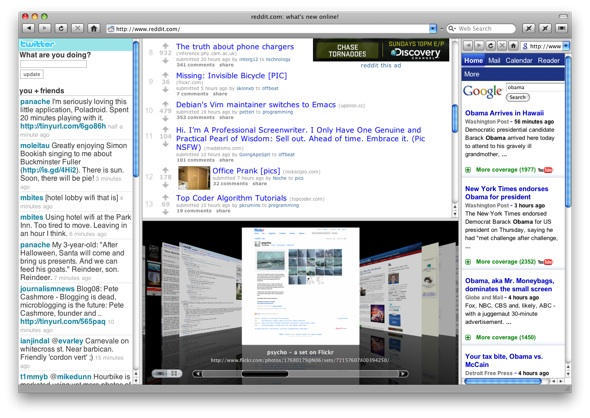
Hands up if you’re a fan of Fluid, the app that turns any web site (or web application) into a standalone application. Yeah, me too.
If you’ve been following the screencasts and Twitterings of Fluid developer Todd Ditchendorf, you might have noticed some news floating around; he has now launched his official browser spin-off, Cruz.
If you’re confused about the name, don’t worry, you have every right to be. This app was going to be called “Mecca”, but then Todd changed his mind. What was that all about?
The Cult decided to get in touch with Todd and ask him to explain the background. He was kind enough to give us some answers…
Proving yet again that it pays to shop around, at least two recently-released apps are offering broadly the same functionality. One is free; the other is free (with adverts) or costs three bucks. But which is the better option?
Boxee announced product upgrades today giving users of its Mac-Ubuntu-AppleTV media center application seamless integration with Hulu and CBS.com offerings through the Boxee interface.
Making a bid for wider recognition of its product at CEA i-Stage in Las Vegas, Boxee is preparing to move from the invitation-only Alpha stage into beta release of a service that aims “to bring all your entertainment into one place.” The company plans to send out 10,000 invitations to its final Alpha release today.
Be sure to watch the video embedded above for a good overview of what Boxee is all about, and check out the Techzilla Boxee Review we posted a few weeks ago.
The iconic HOPE poster of Barack Obama by the artist Sheppard Fairey has inspired a slew of knockoffs and imitators, many of which have been collected at Rene Wanner’s poster page.
I took a shot at it using a widely known Steve Jobs portrait and the how-to tutorial from Vectortuts, and invite Cult of Mac readers to do the same.
Send us your Fairey treatments of Jobs, or Jony Ive, Phil Schiller, Tim Cook or any of your favorite Apple luminaries, and we’ll feature the best here on the site.
To kick start your inspiration, here’s a gallery of some we like from Wanner’s page: