Mobile menu toggle

Search results for: Apple One

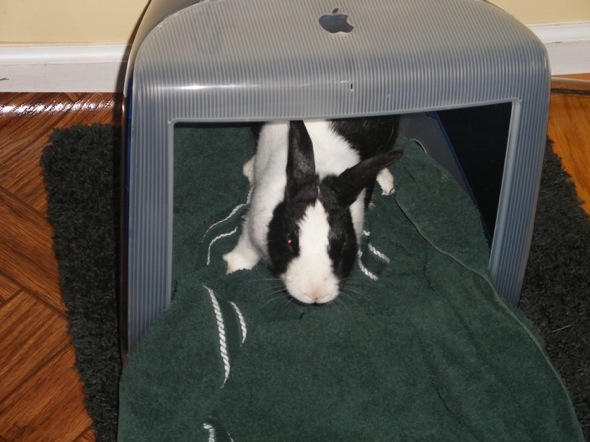
Meet Miles the iBunny

By

post-3638-image-835cdfecbb73ab971feb1f07faaa7cfd-jpg

This is Miles the iBunny, enjoying the comfort of his hutch, formerly a classic first gen iMac.

Owner Lisa Balbes of Balbes Consultants told us: “Four Macs is not enough for one family. We currently have six for our family of four (one is an original SE). We pass them down through the family, and my pet rabbit Miles is at the bottom of the Mac chain. Here he is in his iBed.

“I travel a lot for business, and recently realized I had visited several Apple stores. I have now made it a goal to eventually visit all of them. Does that qualify me as a Mac fanatic?”

I don’t think we need answer that one, do you?

Woz Undaunted by Industry Slowdown

By

post-3620-image-d0d187dcae1ed84b7d72684fb23363a9-jpg

Image via Bob Pearce/smh.com.au

Steve Wozniak thinks “It is time for the whole computer industry to maybe have a bit of a slowdown,” according to comments published in a wide-ranging interview with the Telegraph UK.

With shares of Apple, Inc. off 45% from August highs at $179, Wozniak thinks the spate of analyst downgrades for the near-term prospects of the company he founded are likely “correct.” He said, “For twenty years we have been in this replacement and upgrade market” that he finds unsustainable.

“Things like [the iPod], if you look back to transistor radios and Walkmans, they kind of die out after a while,” he predicted, referring to a major Apple profit center in recent years.

Wozniak also appeared critical of Apple’s latest groundbreaking product, the iPhone, and the direction development of third-party applications has taken. “Consumers aren’t getting all they want when companies are very proprietary and lock their products down,” he opined, saying, “I would like to write some more powerful apps than what you’re allowed.”

And while, as some analysts believe, Apple may be in a better position to withstand an industry slowdown than other technology companies, because of the near-religious devotion some consumers have toward Apple products, Woniak said neither he nor Steve Jobs was ever comfortable with such attitudes. We “don’t like the fact that it’s a bit of a religion,” he said of the company’s cult followers.

“I would like to have the users influence the next generation,” he said. “With a religion you’re not allowed to challenge anything. I want our customers to challenge us.”

One area of the Telegraph interview with a disturbingly false ring to it, however, concerned Wozniak’s description of Steve Job’s position in Apple’s stream of internal intelligence. He claimed that, when it comes to the introduction of new products, “nobody, not even Steve Jobs” knows what’s next.

“I think he would be sitting there [unaware] right up until the day it is introduced.” Ya think?
Industrial Designer: Rumored ‘Brick’ Process Doesn’t Add Up

By

post-3600-image-75d1b3937b2b368d7e7c915177e9e16c-jpg
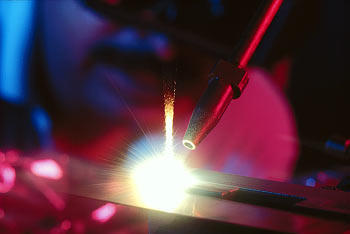
Image via Accufusion

The Apple Blogotubes are a-buzz with boffo Interblag bloviating at a rumor from 9to5mac.com that Apple’s rumored “Brick” product was actually a nickname for a new manufacturing process that will use “lasers and jets of water to carve the MacBooks out of a brick of aluminum.” More, it’s a “game-changer;” “totally revolutionary;” “Apple’s biggest innovation in a decade.”

…Yeah, maybe not.

As Adam Richardson, an industrial designer at consultancy frog design and CNet blogger, points out, lasers and waterjets have been used in manufacturing for ages — by Apple.

The glowing LED that appears behind a “solid” front face of the MacBooks is apparently achieved with laser-cutting to thin out and partially perforate the wall in that one area.

Richardson also speculates that the existing iPod Shuffle is manufactured using a similar process, and even the MacBook Air has some telltale signs that it draws on really interesting and unusual manufacturing techniques. But would Apple actually carve an entire laptop out of one block of aluminum? And would it save any money?

On such a small product this is do-able. On a large product like a laptop this would typically result in a massive amount of waste (so kiss your green credentials goodbye). And the notion that this is somehow cheaper than stamping thin sheets or molding plastic is completely wrong – it’s much more expensive.

Yeah… no.

I’ve been talking with other industrial designers about this issue, and they all agree that the reasoning behind the current Brick rumor doesn’t add up. One friend of mine guessed it would add up to $50 in manufacturing costs and might not be any stronger or lighter than more traditional manufacturing approaches.

Does Apple have a game-changing laptop in the wings that will reinvent the MacBook and MacBook Pro design language? For their sake, they’d better. Will it be milled from a single block of aluminum? Not in this lifetime.

Matter/Anti-Matter

OObject Lists All Your Mac Lusts

By

post-3591-image-f5f217b45496849775b2e4dfc1c31250-jpg

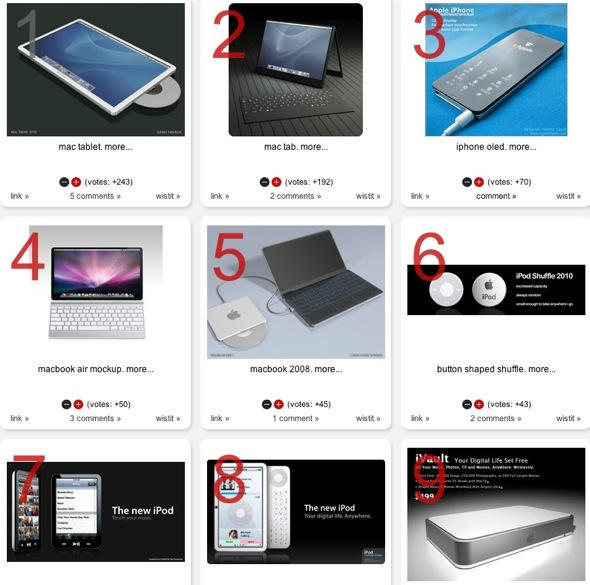
OObject is a curious bloggish sort of site where each post is a collation of objects, brought together under a particular theme. They have a whole category for Apple stuff, including the 19 all time worst Apple products, 12 blatant iPod knock-offs, and 15 best Stevenotes.

You’ll probably be most interested in the 15 best Apple product concept mockups, though. You’ll have seen most of them before, but it’s nice to see them all together at last.

The list of 20 famous Mac users could do with a little work, though: putting Steve Jobs in there doesn’t really count.

iProduct Placement: Confessions of a Shopoholic

By

post-3578-image-3ba663a2e9d28c1acaf6c9912a72b58b-jpg

Movie stills for forthcoming chick flick “Confessions of a Shopoholic” show star Isla Fisher sitting in front of a MacBook. She’s pretty in pink and so is her computer case.

The movie, based on Sophie Kinsella’s book of the same title, is about a 25-year-old financial journalist who can’t stop overheating her credit cards. And finds a wealthy husband. Or something like that.

Film producers didn’t have to go too far to put a Mac in the movie.

On page 335 of the book, the Becky Bloomwood character has “a crisp copy of the Financial Times under one arm, a pair of tortisehell glasses perched on my head, my clunky executive briefcase in one hand and an AppleMac laptop (sic) in the other. Maybe I over did it.”

Nah, we think it’s just the right touch.

Cult of Mac Readers – Become a Boxee Alpha Tester!

By

post-3573-image-babf8c4bdd23332facc79b6536459517-jpg

Interested in trying out a cool media center for use with your Apple TV? Cult of Mac readers are invited to receive expedited applications for testing the alpha release of Boxee, a music, video and picture management solution to let your Apple TV play practically any DRM-free multimedia file. Follow this link to receive your alpha testing invitation.

Boxee for (Intel based) Mac works on OS X 10.4 (Tiger) and 10.5 (Leopard). Boxee for Linux is supported on Ubuntu 7.10 (Gutsy Gibbon) or 8.04 (Hardy Heron) x86 (not x86_64) operating systems. The Boxee patch works with the 2.2 update to Apple TV, but remember to install the update before you install the Boxee patch.

Detailed instructions for installing the Boxee patch after the jump.

Made on a Mac – Amazing Tilt-Shift Videos Turn Sydney into “Model” City

By

cult_logo_featured_image_missing_default1920x1080


Bathtub III from Keith Loutit on Vimeo.

There is no end to the creative wonders made possible with Apple gear, it seems. Combining a variety of techniques including tilt-shift and time-lapse photography, Sydney-based photographer Keith Loutit uses his iMac to produce short films like those presented here, which turn ordinary places into scenes worth a second look.

Loutit also employs Apple software in his workflow, using Automator for file management and preparation; QuickTime pro for assembling stills onto video format; Aperture for archiving of frames as higher quality stills; and Final Cut Studio – mostly final cut pro, for color, compressor and motion for editing, toning and export.


Beached from Keith Loutit on Vimeo.

Asked how he gets the stunning effects, Loutit is unwilling to give away the store, but allows that “I use two lenses, one Medium format, both converted to tilt further than most manufacturer lenses will tilt on a 35mm body.”

Steve Jobs: Thanks, I’ll Park It Myself

By

post-3535-image-28d31d3e587363fb26d26b48cc863962-jpg

Image by lodev via Flickr

Maybe it’s a perk of being consistently named among the most influential people of one’s era.

Perhaps it’s bravado borne of having put a ding in the universe.

Whatever it is, Steve Jobs seems to think nothing of driving a car without license plates and parking in handicapped parking spaces, as the picture above, captured on September 30th by Flickr user lodev shows.

The pic is but the latest in an ongoing parade of evidence Jobs is prone to park wherever he pleases.

It almost begs us to start a Spot-Jobs-in-the Blue-Zone contest, doesn’t it?

Opinion: Forget the Dock, Master The Menu Bar

By

cult_logo_featured_image_missing_default1920x1080

gilest-20080924.jpg

I’ve never got on very well with the Dock, the app launcher Apple puts at the bottom of the screen. It does very little that I find useful, and many things that simply bug me. Thank goodness for the Command+Option+D shortcut that hides it out of the way. That’s where my Dock spends most of its life out of my sight.

That said, there are still some aspects of daily computing life that need to be kept close to hand. Things that I want access to, at a moment’s notice, no matter what app I’m using. And things I want to use, briefly, without leaving that app.

And that’s why I spend a lot of time investigating and trying out various Menu Bar widgets and applications. The Menu Bar is the mini dock at the top right of the screen where the system clock lives, plus other customizable widgets called Menu Bar apps.

My goal has always been to get the greatest utility from the smallest number of Menu Bar apps – because of course, Menu Bar space is limited.

Consequently I’m very, very fussy about what apps get to stay there.

The current line-up looks like this, from left to right:

giles-menubar-20081001.jpg

XMenu, ByteController, I Love Stars, Anxiety, Jumpcut, Time Machine, iChat, MenuMeters, Airport, Volume, Battery, Bluetooth, clock, Fast User Switching, and Spotlight.

Read on for a guided tour of some of the third party extras in that list.