Mobile menu toggle

Search results for: Apple One

Leaked Screenshots Show Google’s Upcoming Maps App For iOS 6

By

maps2

Amidst the criticism of Apple’s new iOS 6 Maps app, many users have been (not so patiently) waiting for Google to release their own official Maps application. While Google has confirmed that they have yet to submit an application to the App Store, they certainly have one in development. If these photos that were leaked today are to be believed, we could have our first glimpse of Google’s new Maps app.

While the interface isn’t impressive by any means, it sure beats the likes of Google’s miserable Gmail app it released last year. From the blurry pictures posted by developer Ben Guild, it appears that Google has brought over some Android design language into the app. Ben says the app will support the iPhone 5’s increased resolution, and will offer similar two-finger rotation gestures as the current iOS Maps app.


iOS Charge Up Pack—No Excuse Not To Have Extras Now [Deals]

By

medium_fanooki640

This is short and sweet for a Sunday. Have an iOS device with a 30-pin (old school?) connector? Have extra chargers, car charger, cable, or headphones? No? You should. Keep a set in your car. Keep a set in your bag (a set that doesn’t come out of your bag except on the go). Right now we’ve got a power bundle for $20—Stay Charged With The iOS Power-Pack Bundle: Charging Adapters, Headphones, & an Apple Dock, Oh My!—than is just the ticket to have extras around. Snap this up, it’s a great deal.

This Week’s Must-Have iOS Apps: The Magazine, Taskbox, Recall & More [Roundup]

By

Screen Shot 2012-10-14 at 09.06.54

Kicking off this week’s must-have apps roundup is a brand new Newsstand publication that’s “loosely about technology,” from Instapaper developer Marco Arment. We also have an awesome new email client that turns items in your inbox into tasks and to-dos, a great little iPhone app for remembering recommendations, the ultimate unarchiver, and more.

This Week’s Must-Have iOS Games: Crazy Taxi, Ivy The Kiwi?, E.T. & More [Roundup]

By

Screen Shot 2012-10-13 at 11.55.00

This week’s must-have apps roundup includes two classic console games that have been reborn on iOS, including Sega’s hugely enjoyable Crazy Taxi, and Acclaim’s 1999 classic Re-Volt — both of which first made their debut on the Dreamcast. It also includes a great little action platformer called Ivy The Kiwi?, a wonderful puzzle game called Girls Like Robots, and more.

Have You Actually Used Passbook Yet? [Let’s Talk]

By

passbookapp

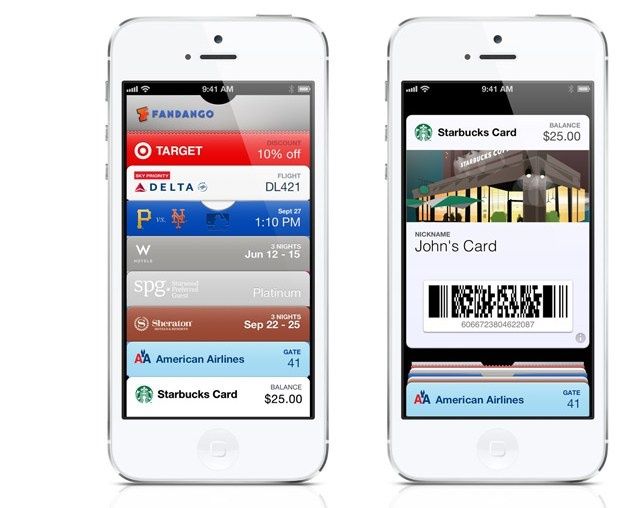
Passbook is supposed to be one of the big new features of iOS 6. Its magical card keeping system is supposed to help you ditch all your coupons, tickets, passes, rewards cards, and maybe even replace your wallet all together someday. The only problem is that there aren’t a lot of places you can actually use Passbook yet.

It’s not that Passbook isn’t a great feature. It’s awesome. People really want to use it. The MLB wants it to replace their ticketing system someday. But because it’s only been out for a few weeks, there are a limited number of apps that take advantage of it, which makes it seem like a bit of a let down. On the CultCast last night we talked about how we haven’t had the opportunity to use Passbook much, but we’re wondering what your experience has been with it so far. Have you actually used it? If so, what do you think? If you haven’t used it, what can be done to get more businesses and people on board?

Click here to go to the Cult of Mac Forums and tell us about your experiences with Passbook so far.

See What Your Friends Are Tweeting In Your Contacts App [OS X Tips]

By

View Tweets

Here’s a hidden little piece of OS X Mountain Lion: you can view your friends’ tweets from within the Contacts app, provided you’ve added your Twitter account to OS X, and then updated your Contacts with the social networking service. Now that Twitter is directly integrated within OS X, you can connect to the service with many different apps, like the Notification Center and Contacts.

Here’s how.

Your iOS 6 Device Is Tracking You For Advertisers, But It’s Easy To Turn It Off

By

exportracking

With iOS 6, Apple has officially deprecated the UDID as a valid means for advertisers to track app users. The UDID functioned sort of like a Social Security Number for your iPhone, allowing advertisers and third parties to track your behavior across multiple apps… a troubling privacy concern for many. But UDID tracking also had many beneficial advantages, like allowing developers to troubleshoot crashing apps and the like, which inspired some third-parties when their many companies started releasing their own alternatives to UDID.

Apple wasn’t going to leave advertisers and developers without an alternative to use in their apps, though. New in iOS 6 is two new IDs: IDFA and IDFV. Yes, both IDs still track you, and the IDFA is specifically used by advertisers to collect data on you. But the good news is that this tracking can easily be turned off, and it’s much less invasive than the UDID.

Give Your A4-Powered iOS Device iOS 6’s 3D Flyover And Turn-By-Turn [Jailbreak]

By

It could be some time before you can rely on Apple's new Maps app.
Want this on your iPhone 4? Now you can.

While Apple’s new Maps app has received a lot of criticism since its debut last month, it does offer a number of nifty features that weren’t available in iOS 5, including 3D Flyover and voice-guided, turn-by-turn navigation. However, these are features that are only available on the latest devices, including the iPhone 4S, the iPhone 5, the new iPad, and the fifth-generation iPod touch.

At least that’s the case if you handset isn’t jailbroken. If it is, you can now get these features on A4-powered devices like the iPhone 4, and the fourth-generation iPod touch thanks to a new tweak called ‘Unlock iOS 6 Maps’.