Mobile menu toggle

Search results for: Apple One

Samsung Launches Copycat App Store To Combat iTunes And Google Play

By

contentandservices

We all know that Samsung loves to copy Apple more than anything in the world. It’s embarrassing  And while most of the copying has been limited to hardware, Samsung’s decided to step up its game on the software front, too.

Yesterday Samsung introduced its version of Apple’s iTunes Store, except it’s got a really bad interface and even worse name. They’re calling it “Samsung Content & Services“, and with a little magic pixie dust, Samsung hopes its customers will think it’s as good as the App Store or Google Play.

Quick Hack Speeds Up Retina MacBook’s Wake From Sleep [OS X Tips]

By

IMG_0005

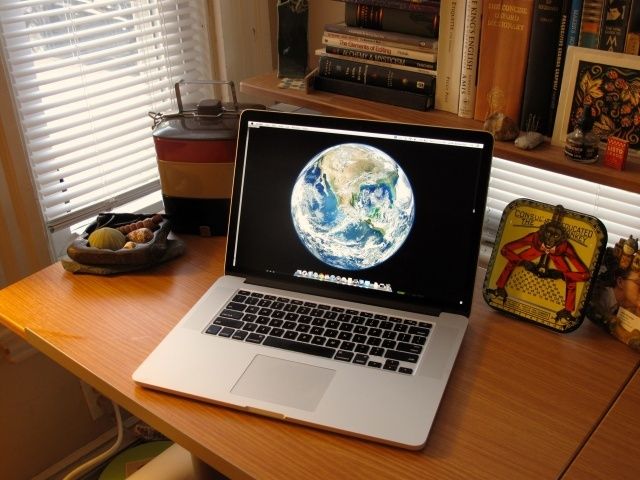
The Retina MacBooks are fabulous machines. They’re super thin, powerful, and just plain sexy. But have you ever opened your Retina MacBook and watched the screen just sit there in limbo for a few seconds before it actually comes alive again? It’s frustrating that you can see the password box, but you can’t actually type anything until the MacBook fully wakes up.

Apple has baked a feature called “standby mode” into the Retina MacBook Pros and the post-2010 MacBook Airs. Standby mode is the reason newer MacBooks sometimes take a little longer to wake, and there happens to be a simple terminal command you can enter in OS X to change the timing.

Google Updates Gmail For iOS To Improve Ability To Edit Multiple Emails

By

gmailupdate21


Gmail is already one of the best email apps on iOS and it’s getting just a little bit better today. Google just released an update for the native Gmail app for iOS.

The new Gmail for iOS app comes with a couple of new features, including the ability to swipe left and right to move between messages, and better editing options for a batch of multiple emails.

Here are the full release notes:

I’m Ditching The iPad For Work And Going Back To The Mac [Opinion]

By

wpid-Photo-24-Sep-2012-1439.jpg

As I never tire of telling people, I do all my work using an iPad. Research, communication, writing and photo editing – all of these are now second nature for me on both the iPad mini and the full-sized iPad 3. I love the portability, I love the stripped-down “workflow” which lets me get stuff done way faster than I can on the Mac, mostly due to lack of OS X’s inherent distractions.

In fact, I am so happy with the iPad as a work machine that I thought that I’d never buy another Mac. I figured that, by the time my iMac died, iOS would have caught up with most of the “truck” tasks I still need to do: keeping a big photo library, running a BitTorrent client.

So why am I writing this post on a brand-new MacBook Air? One thing: My arm is fucking killing me.

Replace Your MacBook’s Keys With These All Wood Danish Mid-Century Chiclets

By

key9

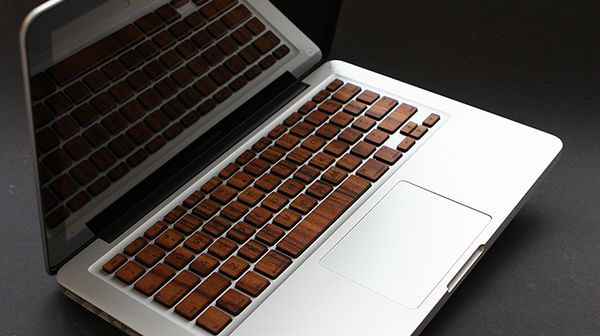
I’m a sucker for wood paneling my Apple products, and so I’m absolutely going to have to do this: the guys over at RAWBKNY (whom we’ve written about before) are now selling laser-etched replacement keys for the MacBook Pro.

They look great, and Michael over at RAWBKNY says that while they are only designed for the non-Retina MacBook Pro right now, he’s tweaking it so it should work on the Retina MacBook Pro and MacBook Airs soon.

We’ve got a review unit on the way to see how well these work, but be warned: replacing every key on your MacBook is likely to be a time consuming process. $40 will get you a set.

Source: RAWBKNY

Flipboard 2.0 Arrives With Customizable Magazines, Web Bookmarklet, Commenting, And More

By

fan_1200_750

Today Flipboard received a huge 2.0 update that brings a slew of new features and additions, most notably the ability to create custom magazines and share them with friends. You can assemble articles, photos, audio and video into a collage of content that Flipboard will format. It’s a big step towards putting curation in the hands of Flipboard users, and it’s implemented beautifully.

Twitterrific For iOS Finally Gets Push Notifications In Latest 5.2 Update

By

twitterrific_photo.png

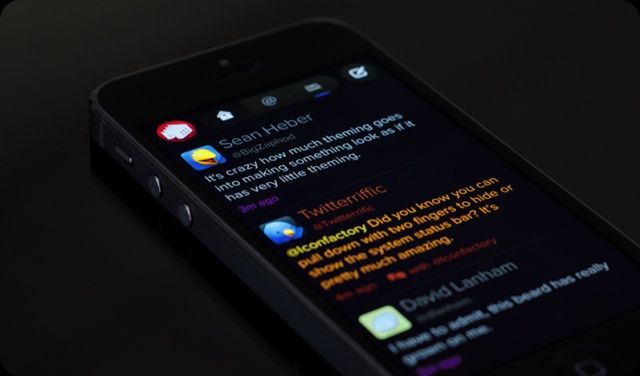
There’s no denying that Twitterrific 5 is a beautiful third-party Twitter client for the iPhone and iPad, but the app has been lacking a huge feature until today: push notifications. Now that push has become an expected feature in modern Twitter apps, it was only a matter of time before The Iconfactory added it to their app.

You can get push notifications for new mentions, direct messages, favorites, retweets, and followers. The catch is that only 1,000 Twitterrific users will get access to the feature initially. Availability will be then rolled out gradually to new users.