Mobile menu toggle

Search results for: Apple One

High-Class Italian Leather iPad Sleeve Has A High Price To Match

By

1

I used to use a sleeve-style case with my original iPad, and I loved it. Sleeves protect the iPad while you carry it, and let you experience the full slimline awesomeness of a naked tablet when you take it out to use. Then Apple made the iPad 2 and the Smart Cover and that was it. The only time I change cases now is if I need something rugged, or if I’m testing one for review.

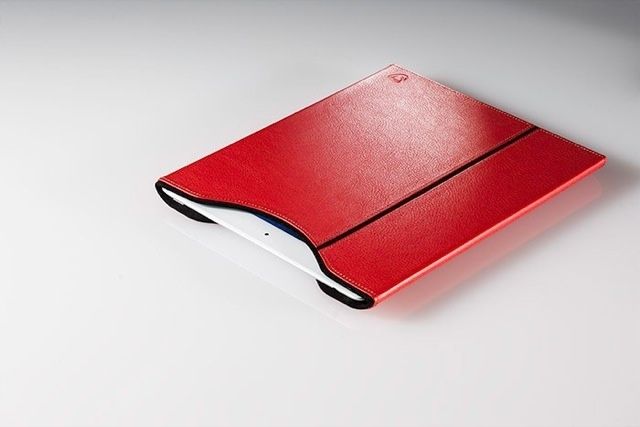
But I’m tempted by the Calypso Tab, a lovely leather sleeve for the regular iPad and the mini. It’s a softish hard shell, and it looks fantastic.


Quicksilver App Launcher For Mac Hits Version 1.0 After 10-Year Beta

By

Screen Shot 2013-03-26 at 11.55.11 AM

Remember Quicksilver? The lightweight Mac utility used to be the go-to app launcher on the desktop, but that was years ago. A lack of updates combined with the rise of more feature-rich alternatives like Alfred turned the attention away from Quicksilver long ago.

Now the developers behind the app are breathing new life into Quicksilver with a major update. Quicksilver 1.0 has been released, which marks the end of the 10-year beta period the app has been in since 2003.

iOS 7 Needs To Come With This Simple App Switcher Concept [Video]

By

iOSappswitcher

One of the most common complaints that we hear about iOS is that it’s getting boring. We’ve been using practically the same interface for over 5 years and haven’t seen any major changes, so people are hoping for something new and exciting with iOS 7.

Jesse Head’s iOS 7 App Switcher concept comes with the type of UI changes we’re hoping to see. The simple concept makes switching between apps more effective. You wouldn’t have to deal with thumbing through a row of little app icons, but instead would see a bunch of app tiles with live previews. You can swipe to quit, search for apps, and control your music or brightness in a flash.

Here’s a video of the concept in action:

nvALT Update Fixes Syncing Issues, Adds Awesomeness

By

1364212664.jpg

Anyone who is serious about taking notes doesn’t use Apple’s Reminders app. Or at least, they don’t use it to store endless snippets of information (Reminder is fantastic for shopping lists, though). Note nerds use nvALT (OS X), the tricked-out version of Notational Velocity customized by Brett “I just built this. Again” Terpstra, in combination with Dropbox or Simplenote (iOS).

And Brett’s latest version, 2.2, is near enough release that you may as well grab it and use it. Hell, Brett himself says that it’s “more stable than 2.1 is right now.”

Policeman Reports Son For Fraud Over $5,620 iTunes Bill

By

ipadhearthstone

Stories about kids who gain access to their parents’ iTunes passwords and run up huge bills on apps and in-app purchases are becoming all too common. The latest, concerning 13-year-old Cameron Crossan from the U.K., has an interesting twist.

When Cameron ran up a £3,700 ($5,620) iTunes bill playing iPad games, his father, policeman Doug Crossan, called Apple to get a refund. Apple refused to give the Crossans their money back, so Doug went down a different route. He reported his son for fraud.

Mastering iCloud On Your Mac: Track Your Notes [OS X Tips]

By

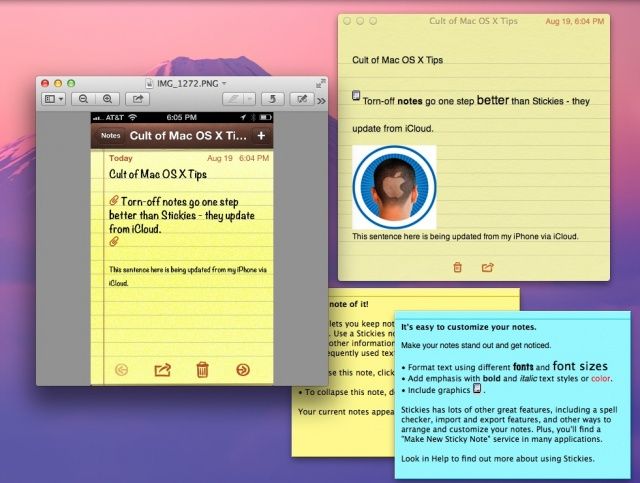
Stickies are still cool, but Notes synced via iCloud may actually be more functional.
I still like Stickies, but Notes synced via iCloud may actually be better.

I’ve been a big fan of Apple’s Stickies app since way back in System 7.5. It’s great to be able to have a little floating place to type notes and keep track of things right on the Mac, without having to resort to anything as mundane as an actual, paper-based sticky note.

The one thing Stickies doesn’t do well is synchronize across devices. With OS X Mountain Lion, however, you can make this happen using Notes and iCloud.

Last Chance! The Ultimate OS X Mountain Lion Server Course [Deals]

By

CoM - ML Server

Want to harness the power and flexibility of Apple’s Mountain Lion Server? Whether you are setting it up for a school, home network or business, with this Cult of Mac Deals offer you will learn the most effective way to use everything Apple’s Mountain Lion server has to offer.

For only $39 you can take home more than 9 hours of actionable content and over 110 lectures of informative instruction.