If a picture is worth a thousand words, a GIF must be worth… well, a lot more. And they’re only getting more popular, which is why you need Giphy’s new keyboard for iOS, which puts all the GIFs you could ever need at your fingertips.
Get a lifetime of access to thousands of lessons in web development. Photo: Cult of Mac Deals
So you want to be a web developer. It’s a dense and diverse field, so you better get studying. A lifetime of access to this bundle of OSTraining Developer Courses is a great place to get started.
With more than 3,000 video tutorials from subject experts and unlimited access to a sprawling training library, you’ll become skilled at building on open source platforms like WordPress and with languages like JavaScript, HTML and more. You can get a lifetime subscription now for just $65.
The Chrysler Pacifica could soon drive itself. Photo: Fiat ChryslerThe Chrysler Pacifica could soon drive itself. Photo: Fiat Chrysler
Google is on the verge of signing a new deal with Fiat Chrysler Automobiles to build “several dozen” self-driving minivans, according to a new report.
The first models could be on the road sometime this year for the first phase of the self-driving vehicle partnership, but it’s not yet clear what the main objective is.
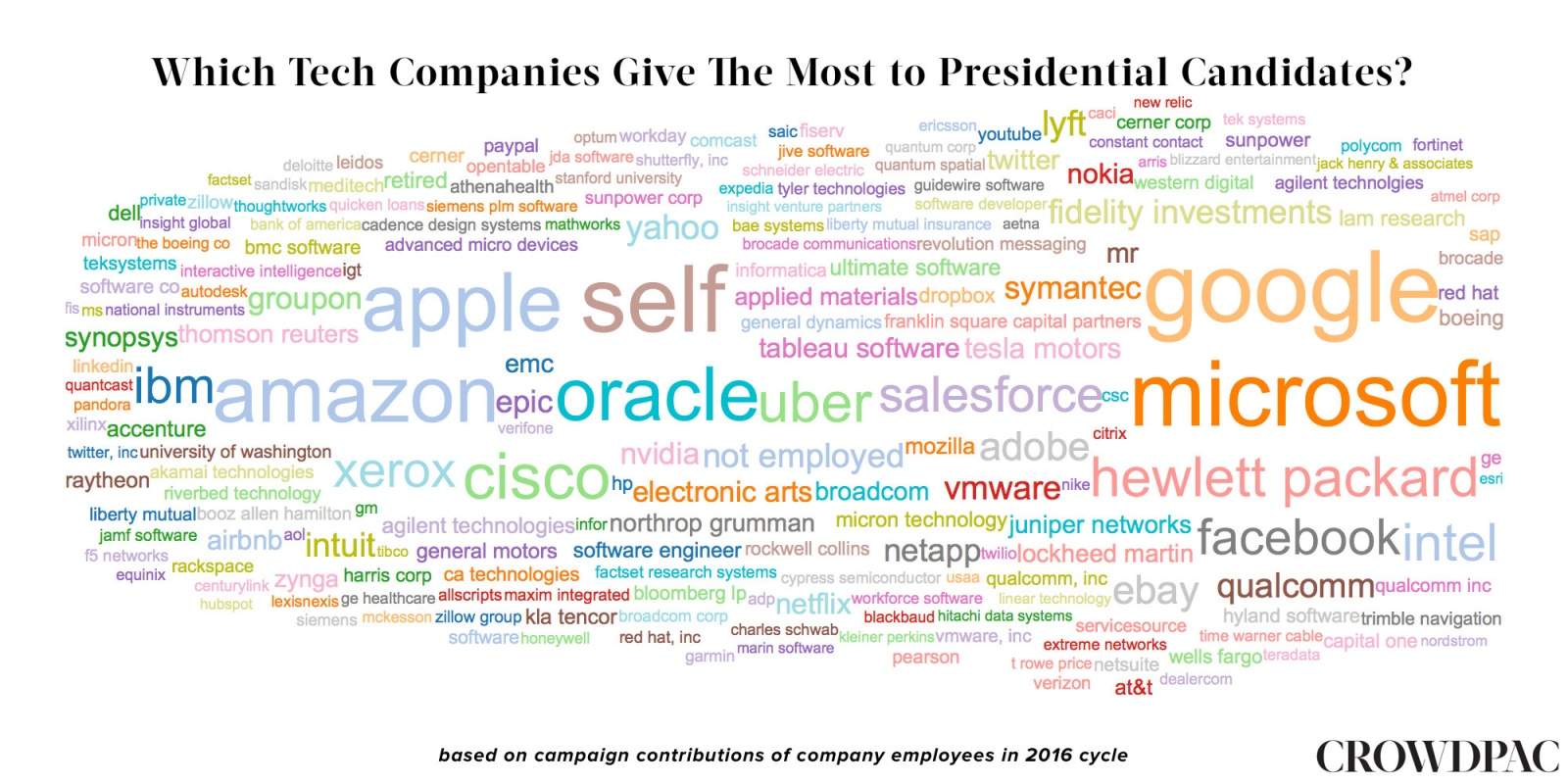
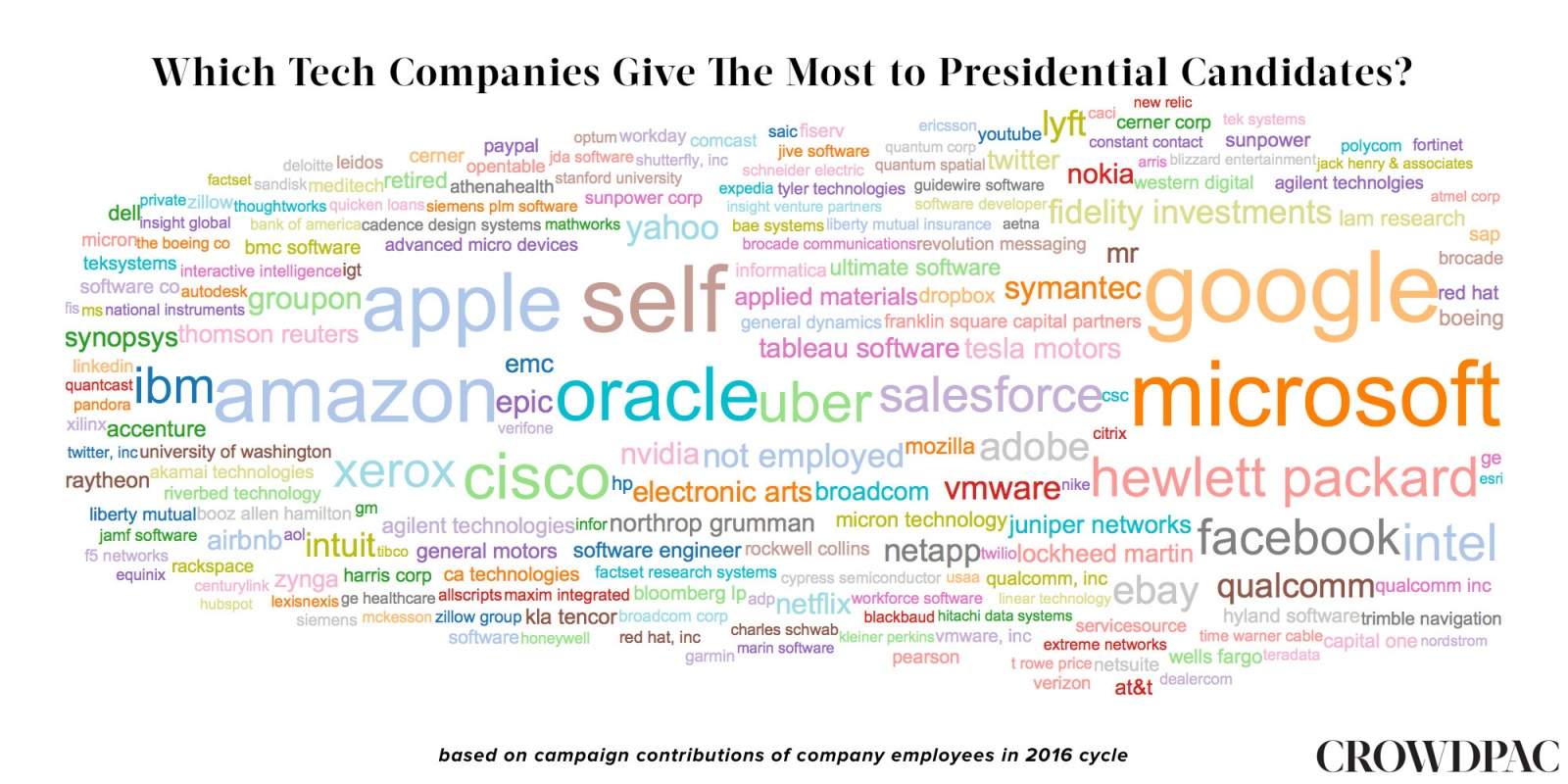
You won’t find a lot of Trump yard signs in the valley. Source: CrowdPAC
Silicon Valley campaign donations have poured way more money into the presidential bids of Democrats than Republicans, surprising nobody, ever.
This shocking revelation comes from a report from CrowdPAC, a non-partisan, political crowdfunding organization that has discovered that the companies most likely to donate to campaigns are Google, Apple, Microsoft, and Amazon. And while the findings don’t include fine-grain data like individual amounts or the actual numbers of employees, they do make one overwhelming conclusion:
Shut down Twitter so you can get things done. Photo: Marco Arment
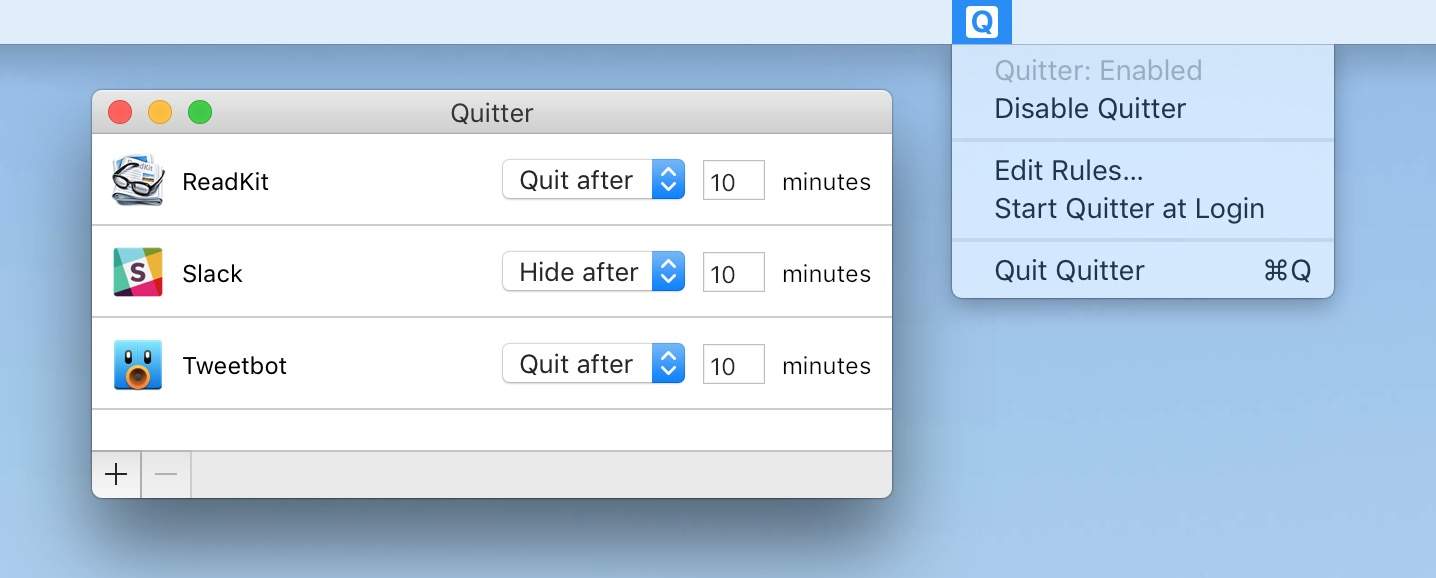
You know how it is: you spend way too much time on Twitter or Slack when you should be working. Ideally, you’d just not launch them, but that’s not super feasible if you also use these apps for work.
The answer, then, is an app that will hide or quit apps for you after a certain amount of idle time. Called Quitter, it sits nicely in your Mac’s menu bar and makes sure you don’t fall down the Twitter hole.
This bizarre 3-D printed dress is part of the Apple-sponsored Manus x Machina exhibition. Photo: Nicholas Alan Cope/The Met
An Apple-sponsored exhibition featuring dozens of weirdly wonderful gowns — some produced using 3-D printers, lasers and other exotic techniques — should challenge people’s assumptions that handmade items are inherently better, according to Jony Ive.
Apple’s chief design officer talked up the power of machine-powered manufacturing when he took center stage at this morning’s press preview for the Metropolitan Museum of Art’s Manus x Machina exhibition. The show, which opens today in New York City, explores the relationship between fashion and technology with a gallery of more than 150 unique couture gowns from designers such as Gabrielle “Coco” Chanel, Karl Lagerfeld, Christian Dior, Miuccia Prada and Yves Saint Laurent.
What are this week's hottest apps? Photo: Ste Smith/Cult of Mac
Looking to get up to speed on the week’s hottest apps? We’ve got your back!
Since my colleague Evan Killham has already covered the latest hot iOS games, I’m focusing on non-gaming apps this week: whether that’s an all-new custom keyboard, relaunched Q&A platform, or an update to an existing live-streaming favorite. Check out our picks below.
We have a little bit of everything this time. Photo: Ste Smith/Cult of Mac
April has arrived, which means that the cold and snowy weather is ostensibly behind us. In my case, I’ve traded it in for cold and rainy weather. But it’s still an improvement, so I’ll take it.
And if you’re looking for a way to celebrate the slightly improved temperatures, what better way than taking some cool, new iOS games for a spin outside? Just go to a park, sit in the sun, and jam your nose into your iPhone or iPad and ignore all of the beauty and wonder that surrounds you. Because we live in the future now, and that’s what we do.
Plus, these games are really good. Check them out.
Here's what you need to know about Cult of Mac's reviews policies. Photos: Jim Merithew and David Pierini/Cult of Mac
At Cult of Mac, we review all sorts of products, from the latest electronics lovingly created by Apple (and by Cupertino’s competitors) to smartphone accessories, sporting goods, kitchen appliances and other essentials — basically, anything that makes our lives better.
If we review something, we’ve spent time putting the product through its paces, messing around with it, comparing it to similar products and generally evaluating it to death. We’re here to represent the interests of our readers, not manufacturers, and will confidently and honestly report back on what we experience without bias.
Positive reviews should be read as recommendations to the reader and not as promotions for the manufacturer. With that said, Cult of Mac makes these promises as part of our effort to be transparent about our ground rules for writers and our policies on review units and affiliate links.
Reviews and affiliate links disclosure
We don’t mix business with editorial.
We clearly mark every review we publish.
We use affiliate links when applicable, but they have no bearing on our editorial ethics. Writers have no involvement in our affiliate link program.
We are a participant in the Amazon Services LLC Associates Program, an affiliate advertising program designed to provide a means for us to earn fees by linking to Amazon.com and affiliated sites.
We receive no money or compensation for reviews aside from the usual advertising revenue generated by pageviews, and the small commissions paid by affiliate sites when a reader follows a link from our site to their store and makes a purchase.
We disclose when we receive a review unit from a company.
We cannot review every product we receive.
Please submit review requests to [email protected]. We treat all correspondence as confidential. If you like, you can send review units for possible review to:
Cult of Mac
3150 18th Street
Suite 277, PMB 201
San Francisco, CA 94110
Sponsored posts on Cult of Mac
From time to time, we run sponsored posts, which are clearly marked as such. These sponsored posts take many forms, and sometimes read like reviews.
Don't even ask what this iPad looked like before. Photo: Evan Killham/Cult of Mac
Best List: Whoosh Screen Shine Duo+
I don’t try to get my screens all fingerprinted and gross — they just get that way all on their own. It’s inevitable, really; we touch most of the screens we use throughout the day, and our hands are way dirtier than we think. I own more microfiber cloths than I do Lightning cables, but apparently my hands are grubbier than a normal human’s, so I need some more help. And apparently, that extra step is Whoosh Screen Shine.
It’s a screen-cleaning system that adds a bit of spray into the mix and claims it can repel fingerprints. I tried out the Duo+ version, which includes both desk- and travel-sized bottles, and it’s made my endless smudge hunt much more bearable.