Mobile menu toggle

Search results for: Apple One

Abode Iota becomes first home security system with HomeKit

By

Abode Iota is a security system by itself
Building your smart home is about to get a whole lot easier.
Photo: Abode

Abode finally scored HomeKit certification for its Iota home security hub. This allows iPhone and iPad users to arm and disarm the system, get alerts, and access the video feed coming from this gateway. Even better, sensors connected through this hub can also be controlled via HomeKit.

Hold down the Option key to unlock Mac’s hidden menu bar actions

By

menu widgets
Not that kind of menu item.
Photo: Croissant/Unsplash

The Option key (sometimes marked ⌥ on your Mac’s keyboard) offers you extra options, whether you’re using the keyboard or the mouse. Hold it down while dragging a file, for example, and it will create a duplicate of that file, instead of just moving it1. The Option key works everywhere — in menus, too. Today, we’re going to see what happens when you Option-click on the status menu icons up on the right side of your Mac’s menu bar. The Bluetooth, volume, Wi-Fi, Time Machine and Notification Center widgets, to be precise.

Option-clicking on these icons gives you far greater control of some of your Mac’s core functionality. You might be surprised at what you can do up there.

Steam for iOS lets you join friends on PC for local multiplayer

By

Valve Steam
Enjoy Remote Play Together today.
Photo: Valve

Gamers using the Steam Link app on iOS can now enjoy multiplayer games with friends who use a PC.

Valve’s new Remote Play Together feature, announced last month, is already out of beta and available to all. And it works across Windows, macOS, and Linux — as well as Android and iOS.

Screen Time improvements move closer with third iOS 13.3 beta

By

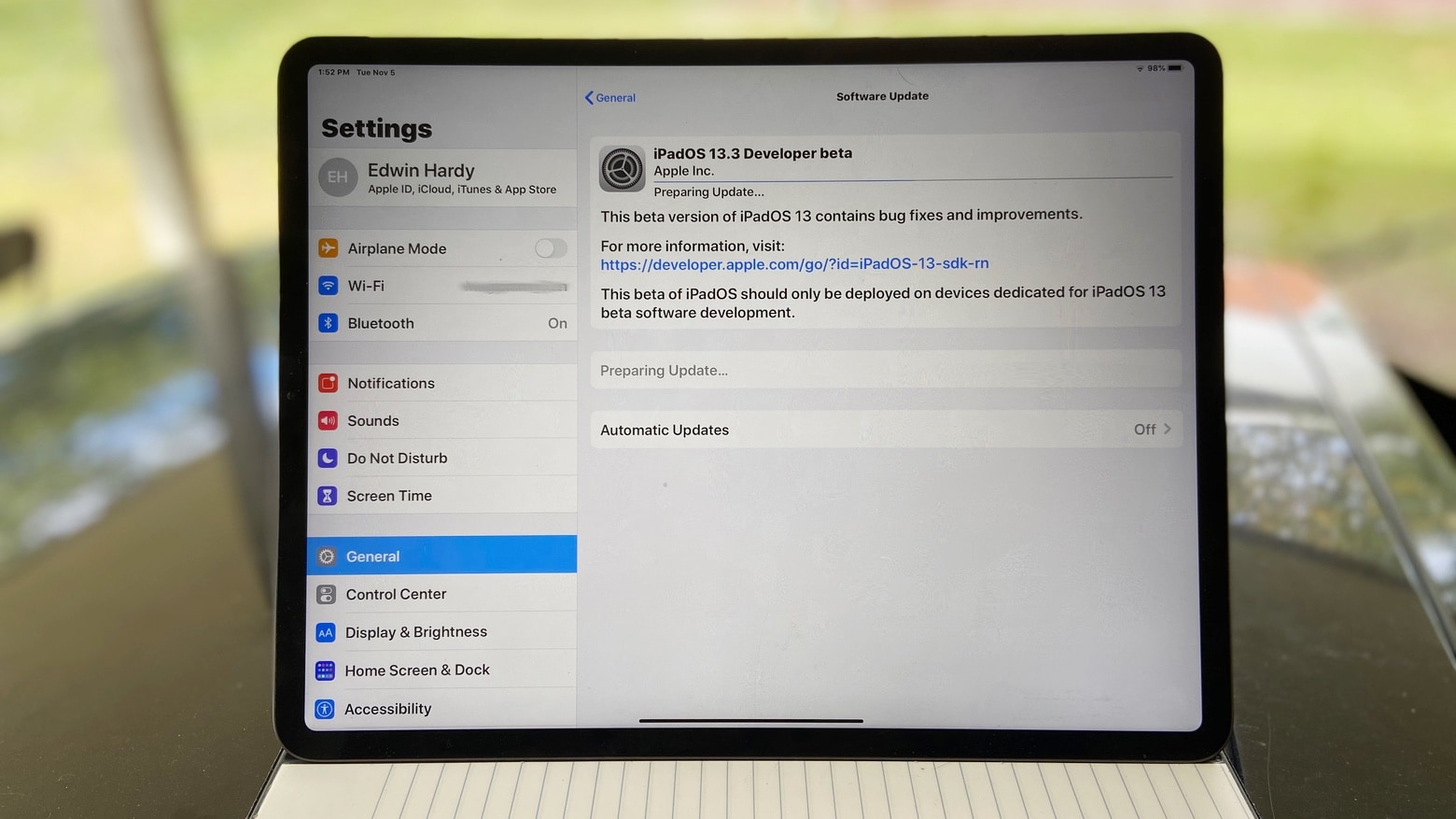
iPadOS 13.3 Developer beta
Developers can download iPadOS 13.3, along with the nearly identical iOS 13.3.
Photo: Ed Hardy/Cult of Mac

Pre-release testing of iOS 13.3 and the iPad equivalent keeps chugging along. This is the third week in a row Apple introduced new beta versions.

When the full version is released, it will add an important feature to Screen Time, allowing parents to limit with whom their children communicate.

Nintendo introduces 2 paid subscriptions for Animal Crossing: Pocket Camp

By

Nintendo introduces 2 paid subscriptions for Animal Crossing: Pocket Camp
Nintendo has changed its approach to mobile games.
Image: Nintendo

Nintendo has revealed details of a pair of paid subscriptions coming to Animal Crossing: Pocket Camp. We wrote about news of the subscriptions earlier this week, but no pricing information was available at the time.

The new “Pocket Camp Club” subscriptions follow shortly after Nintendo introduced a similar subscription for Mario Kart Tour, with a “Gold Pass” priced at $4.99 per month.

The meaning of life, according to Tim Cook

By

TimCook
Tim Cook's driving force won't surprise you at all.
Photo: Salesforce

Apple CEO Tim Cook sat down with Salesforce co-CEO Marc Benioff for his company’s Dreamforce conference this afternoon but instead of diving into Apple’s boring enterprise efforts, Cook was ready to discuss heavier topics.

Sitting in the Yerba Buena Center for the Arts where Apple revealed some of its biggest product updates before Apple Park was built, Cook shared his thoughts on privacy, environmental conservation, innovation, memories of Steve Jobs and what motivates him.

Want a 16-inch MacBook Pro? Sell your old model for the best price!

By

MacBook-Pro-display
Selling your old MacBook is easier than you think.
Photo: Tianyi Ma/Unsplash

Apple’s long-awaited 16-inch MacBook Pro is on sale now, and it’s (almost) everything we hoped it would be. If you’re lusting after one, Cult of Mac’s buyback program can help make it more affordable.

We pay great prices for used MacBook, MacBook Air, and MacBook Pro units — and we make the whole process quick and simple. We also cough up real cash, so you can spend it anywhere you like.

How to highlight text and add post-its in Safari

By

Highlighter for Safari.
Highlight in Safari.
Photo: Denise Jans/Unsplash

There are a handful of webpages I keep referring back to, often reading the same parts over and over. They may be part of an instruction manual, or other reference material1. And sometimes, while researching an article, I want to highlight sections and phrases to find them more easily. Just like using a highlighter marker on a sheet of paper.

Until now, I’ve never found good way to do it. Apps required me to sign up for an account, or store my highlights on their servers, or pay a subscription. Or the app was just plain clunky. Then I found Highlighter for Safari.

The best accessories for your new 16-inch MacBook Pro

By

WaterField Designs Executive Leather Laptop Briefcase
Bag 'em! It's time to accessorize that monster laptop.
Photo: WaterField Designs

Your shiny new 16-inch MacBook Pro arrives this week, and of course you want to deck it out with all the latest accessories. What you need will depend on what you use your computer for, but almost everyone will want a case, a keyboard and a mouse. And there are plenty of other MacBook Pro accessories you might need to get the job done.

Check out our guide for dongles, cables and even battery packs that will help you get the most out of your new MacBook Pro.