Mobile menu toggle

Roll Up For The Pre-Show Show!

By

post-6629-image-1878175f89c4068bb4fa8f032304b345-jpg

Ladies and gentlemen!

Take your seats! Blow your noses! Switch off your iPhones! The time is drawing near for the annual Exposition Of Wonder And Amazement that is: Macworld Expo!

Pray cease your wild applause, ladies and gentlemen. We are gathered to celebrate the ending of Another Round Of Mostly Incorrect Rumors, and to cheer on our Leader, His Lordship Steve of Jobs, as he fails to take the Stage of Reality Distortion and instead leaves the task to his minion, Phil “Igor” Schiller.

But before we embark on this journey of discovery, let us enjoy a few brief moments of quiet and calm. Let us take this opportunity to revel in some of the rumors and gossips that have slaked our thirst for actual Apple product news in recent weeks:

  • iWork as a cloud app? I don’t think so. Well, iMovie then. Whaaaa? I can really see my ISP going crazy happy about people editing movie files over their pipes. More crazy than happy, though.
  • iPhoto as an iPhone app? My iPhone crashes often enough as it is…
  • How about a Red iPhone? I fear not with that font, dear friends, not with that font
  • Updated Mac minis? Yes! Yes please!

Iiiiiin short: lots of waffle and claptrap. Some of it might even turn out to be true. Or so vague in the first instance that even the slightest mention of a product will validate the rumor.

Even though Steve won’t be on stage (which, as Leander has pointed out, isn’t necessarily a bad thing), the advice this year is the same as the advice every other year: sit back, relax, spend Tuesday with your loved ones, and worry about the keynote later. You can be sure that it will be summarized on one or two web sites. We might even mention it here.

Oh, and don’t buy any new Macs between now and tomorrow. But you knew that already.

(Picture: trialsanderrors, under CC License.)

Let Your Your Mobile Device Decide

By

post-6616-image-8c7d6f10990b82d60aaa8dca15ba68c8-jpg


Did you know your iPhone and iPod Touch may contain the inscrutable wisdom of the Spheres? Two free applications on the iTunes AppStore promise to take the guesswork out of hard decision making, with the same whimsy and clarity offered by the once wildly popular Magic Eight Ball you might remember from your youth.

The Magic iBall app borrows its name and a similar look from the classic Eight Ball, and offers a choice of “themes” – from the standard black ball to a gold “bling” ball to a smiley face ball. It also offers a choice of answer “themes” – classic fortune teller, zen, weird and more – that are somewhat confusingly accessed and enabled from your device’s Settings menu and not from within the app itself.

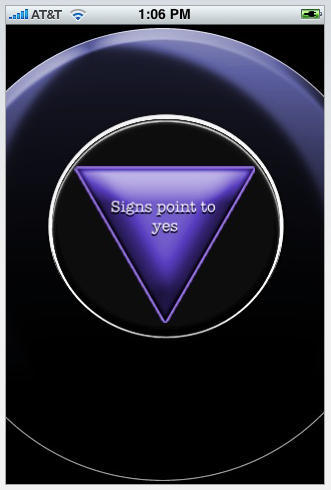
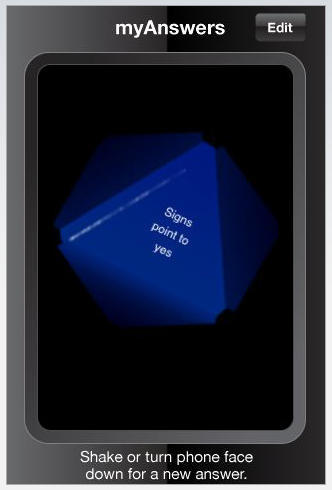
Not as groovy looking as Magic iBall at first blush, in the end I think I prefer the look and feel of My Answers, which features a multi-sided triangle die floating in dark liquid, similar to the old Eight Ball decision-making assistant.

Both apps work on the same principle: turn the touchscreen face down, ask your question, and turn the device over – your answer appears, like magic. Another attractive feature to My Answers is its 20 fully customizable answers. You can stick with the default yes, no, maybe-type answers delivered in “fortune teller lingo (Signs Point to Yes), or make up your own personal directives.

These apps could come in handy this week at Macworld. Will there be an iPhone Nano? Will there be a new Mac mini? Is Steve Jobs really OK? The Magic Eight Ball knows all…

Paper Football Comes to iPhone, iPod Touch

By

post-6611-image-8edc4379a8338a0bf2035851c8c7d64a-jpg

Just in time for the NFL playoffs, you can relive the glory days of your youth (applies predominately to American males of a certain age; your mileage may vary) with a free PaperFootball game for iPhone and iPod Touch.

Just like you did on school cafeteria tables back in the day, use touchscreen swipe gestures to try and get a triangular “paper football” to hang over the edge of the table and even “kick” for extra points. Play against your device or against a friend.

PaperFootball has pretty cool, colorful graphics and is certainly nothing more than a time waster, but in this reviewer’s humble opinion, it’s better than having your mobile device make farting sounds. And I mentioned it’s free, right?

Three Reasons I’m Actually Looking Forward To Phil Schiller’s Keynote

By

post-6606-image-61aa2a52a929cccccc584682f30a9596-jpg

Phil Schiller at a WWDC beerbash. Photo by Graham Ballantyne (CC license).

I’m actually looking forward to Phil Schiller’s keynote on Tuesday for three reasons:

1. He is genuinely funny. He’s been great in keynotes past, and he can easily carry a whole keynote alone. See Charles Arthur’s report from Paris Macworld in 2004, after Schiller stepped in for Jobs. The big surprise? Schiller was a gas: The dramatic news from the Apple Expo: Phil Schiller is *funny*!

2. He’s not Steve Jobs. He’s not perfect like Steve Jobs. He seems like a regular guy and a bit of a schlub — and I like that. Here he is at a programmer’s beer bash — the kind of event you could NEVER imagine Jobs attending.

3. He’ll deliver a great “One Last Thing.” Because of the controversy and disappointment surrounding the speech, Phil must go out on a high note. I’m hoping for a surprise appearance from Steve Jobs. Hopefully he won’t announce his retirement from Apple.

Phil Schiller has a posse; CC photo by JL! who snapped the poster near his office — no other info is given.

MacWorld Party List and Other Useful Links

By

post-6603-image-eb7abdaeb2af300399bb7eb7ce70d0a3-jpg

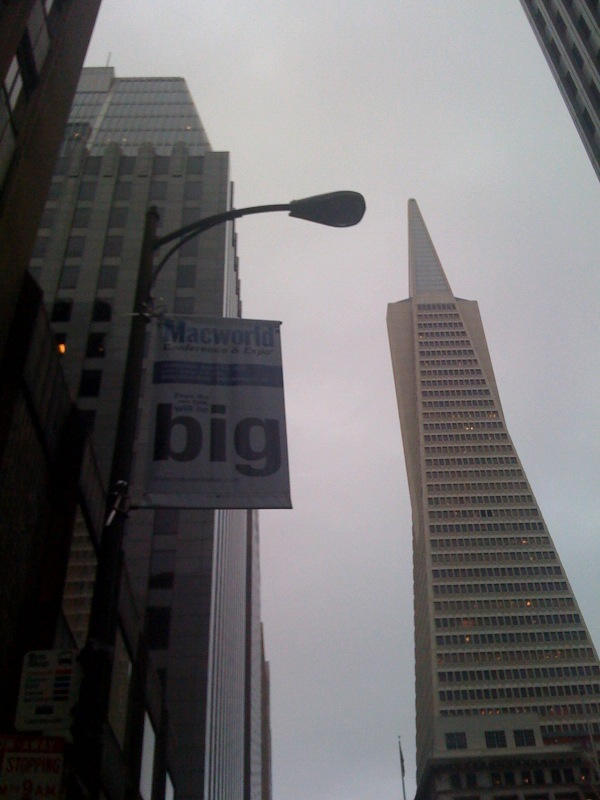
iPhone snap of a Macworld banner by Steve Rhodes (CC licensed).

Here’s some useful links for this week’s Macworld:

iMacworld iPhone app — IDG has a handy-looking show guide for the iPhone (I haven’t tried it yet). The app, iMacworld, includes exhibitors, products and conference sessions. You can download the application here.

Hess Memorial Events List — The Hess Memorial Events List (named after the late MacWeek editor Robert Hess and maintained by Ilene Hoffman) is probably the most comprehensive list of happenings, but unfortunately isn’t in a calendar friendly format.

#Macworld and MWSF 09 on Twitter — The Twitter hashtag for this year’s Macworld is a battle between #Macworld and #mwsf09. Try also Macworld

Macworld on FriendFeed

Macworld on Upcoming.org

Macworld on SocialCalendario

Macworld 2009 on Flickr

Several links via Macworldbound.com — “The Definitive Guide to Macworld for First-timers.”

iPhone Gloves Take the Winter Chill Off

By

post-6593-image-50a902e4a27a8eea6ff14b27b3fa8fb3-jpg
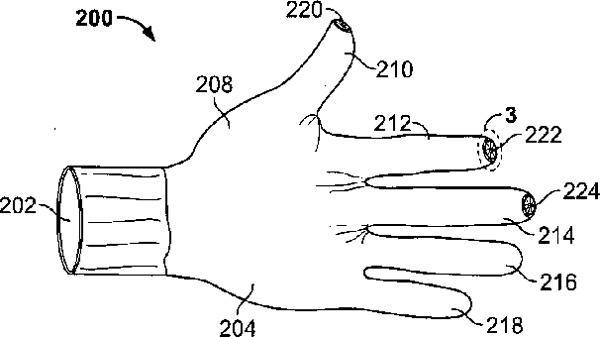
Apple's iPhone Glove Patent Drawing

Plenty of chatter yesterday in the Apple blogosphere about the patent application for special iPhone gloves Apple filed back in June 2007, the day before the original iPhone made its commerical debut.

In the meantime, a few companies have already produced products intended to ease the need for iPhone users in the northern latitudes to actually go inside to use their Jesus Phones during the winter. Click on images in the gallery below to see the Apple patent illustration and few solutions on the market today. And let us know in comments how you manage to fulfill your iPhone jones in places where chilly winds blow.

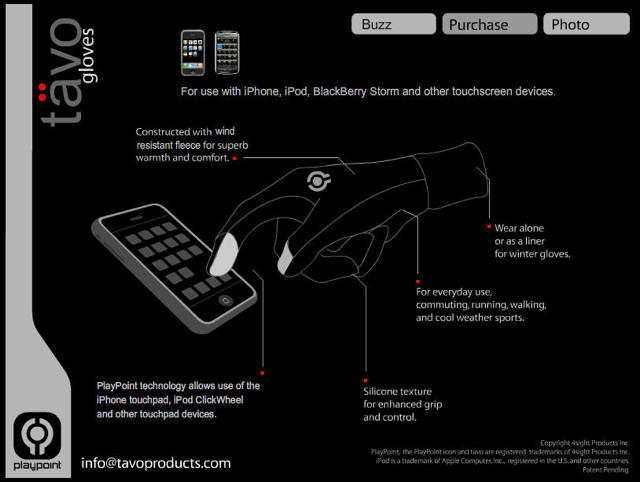
Tavo Gloves @ tavoproducts.com

Freehand Gloves @ swissmiss.typepad.com
 
Dots iPhone Gloves @ dotsgloves.com

iPod Defense Rocks Student Murder Case

By

post-6588-image-5c5a3c2e8da56ea9594009779543bfa0-jpg

In 2007, British student Meredith Kercher was murdered in Italy, during a study abroad program in hill town Perugia.

About a year later, Rudy Guede was sentenced to 30 years for his part in the killing, for which Kercher’s roommate, American student Amanda “Foxy Knoxy” Knox and her boyfriend, Italian IT grad, Raffaele Sollecito, are still awaiting trial.

Guede’s appeal now before the Italian court hinges on an iPod.

During what has been hypothesized was some sort of late-night Halloween sex game where the 21-year-old Kercher was an unwilling participant, Guede maintains he was in the bathroom of the young women’s apartment.

While she was being killed with a knife, he was listening to music on iCarta, a toilet paper holder roll that doubles as an iPod dock.

Guede’s lawyers tried to head off what they thought might be viewed as a sort of Twinkie defense for the digital age in a statement to Italian media (below translation mine):

“It is nothing more than a confirmation of how some abnormal behaviors are apparently normal among young people today,” said laywers Valter Biscotti and Nicodemo Gentile. “Just as Facebook is their virtual world, they now listen to music everywhere, even in the bathroom. The marketing of such products implies a certain routine use.”

The statement was published today in Italian papers, without information on how the legal team might use or prove the bathroom listening alibi.

Steam Up Your iPhotos with iSteam

By

post-6584-image-1671c2f0069f1ed1ba8e65674c6af2ab-jpg

Add a new layer of creativity to the things you can do with your iPhone and your photos – with iSteam, a cool new app from UK developer consortium, Great Apps. iSteam uses features of the iPhone and iPod Touch including the accelerometer, multitouch, microphone and speakers to turn the touch screen into something resembling your bathrooom mirror after a hot shower, or a window on a winter day.

Blow on the microphone to “fog up” the surface of the phone (iPod Touch users need an external mic) and use your fingers to write messages and draw, just like you would on a steamy window. Realistic water droplets form on the image and leave trail marks that can be manipulated by tilting the device; shake it up to clear the screen and start over. iSteam even has finger squeaking sounds included.

Images can be saved to the Camera Roll using the screen capture method (hold the Home key & press the lock button) or emailed to iPhone and iPod Touch owning contacts directly from iSteam.

Vintage Coke Machine Office

By

post-6580-image-b26b77bd6888f750754fd16c33bfdb25-JPG

Craftster.org member DogGrrl posted pictures of their excellent room, painstakingly painted and decorated to look like a diner. Just the murals are impressive enough to warrant it a second look, but buried on the fourth page of the thread is a link to DogGrrl’s office:

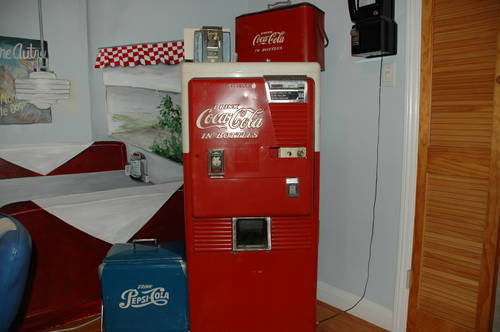
A vintage Coke machine on the outside…

and an impressive iMac house on the inside!

DogGrrl says:
To compliment my new dining room mural I bought an old unworking coke machine, gutted it and then sent it to a friend to weld some shelves onto it. Tada! Here is my new new computer cabinet! The Pepsi and Coke picnic coolers I am using to house my files/office stuff.

Well done indeed. There’s a nice keyboard tray in there, a shelf for the printer, space for files and a phone, and the inside of the door is neatly multi-purposed as a magnetic calendar and note holder!

Once More for Old Time’s Sake – Apple Preps for Macworld Swan Song

By

post-6574-image-a26718638634a27b51ea1497222d5059-jpg
A Worker Cleans Apple logo on Beijing Storefront
Image © Cancan Chu/Getty Images

If you’ve ever wondered what it might be like to work at Apple, out in the wild are more than a couple of tell-all accounts penned by former employees, and as the company prepares for its final Macworld appearance next week in San Francisco, the UK Guardian has one, published Friday, by Chuq von Rospach, a former Apple employee who has taken his experience there and turned it into a little cottage industry of freelance writing.

Von Rospach’s piece for the Guardian waxes a bit nostalgic for the days when Steve Jobs delivered the Macworld keynote, but he says nevertheless “still tune in with great anticipation” to this year’s speech by Phil Schiller, especially because word on the street says Apple will bow out of Macworld with a hiss and not a bang.

The piece is rather on the long side, and true to form for the genre, is more about the author than about the experience of working at Apple, but von Rospach does provide a glimpse of behind-the-scenes observations that are rarely seen in Apple’s context and, for those interested in one person’s perspective, provides a worthwhile read.

Google Reveals Hidden Menu in iPhone App

By

post-6570-image-f32dfa235f4775df0e1d8f6a3a09714c-jpg

“Easter eggs” is a term that’s come to describe little screens, menus and functionalities software coders hide in their work. Sometimes these things are uncovered by intrepid users, who take as a point of pride the mission to peek behind as many curtains as they can find in an application; sometimes there’s either enough lack of interest in finding the Easter eggs or they are so well-hidden developers end up revealing them on their own.

Those wacky kids in Mountain View, CA who write the Google blog posted Friday about a “Bells and Whistles” Easter egg menu for the company’s voice-enabled iPhone app. The screen is revealed by repeated attempts to swipe upward on the iPhone’s touch screen from the Settings menu. At first glance, there appears to be nothing below the tab labelled “About” but continue swiping upward on the screen (five swipes in my case), and a “Bells and Whistles” tab will appear.

From the B&W tab you can change the app’s theme color, its default sound effect and more. OK. Now that’s out of the way, let’s see what else we can accomplish today…

Via Venture Beat

Turn Your Old iPods into Speakers

By

ipod_speaker_mod_1.jpg

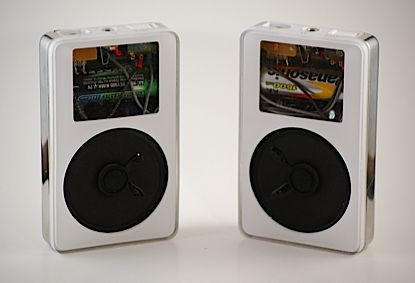
Props to Jordan Horwich who re-engineered a pair of old iPods into speakers.

He’s managed to take out the innards of what look like first gen iPods and replace them with a 2.25-inch speaker cone, volume control, Altoids Tin Speaker and a battery holder.

Bulky by today’s standards, getting a speaker into an old iPod still requires a good deal of fiddling. If you’re feeling up to the task, check out Horwich’s DIY detailed guide.

Horwich had to buy the old iPods to make his speakers (spending about $100 on the iPods and the equipment) but if you’re like me you might have one or two barely working ones in Mac limbo, though it may not look as good without a matching pair.

Via Slash Gear

iProduct Placement: IT Crowd Parties with iPods While Rome Burns

By

post-6565-image-235cde56904bfc806cabfebd92440669-jpg

The third season opening episode of Channel 4’s award-winning sitcom IT Crowd features a scene where clueless exec Douglas Reynholm performs the modern equivalent of fiddling while Rome Burns.

Instead of listening to talk about cutbacks, he’s busy with an iPod party with the all-female accounting department.

Exec 1 (Denholm): “You seem to lack a basic understanding of exactly how much trouble this company is in. We have a financial crisis here. And if you don’t mind me saying, your attitude seems incredibly cavalier.”

Reynholm “What? Can’t hear you, we’re having an iPod party.”

While the trademark white earbuds abound, there’s never a shot of an actual iPod.
Update: sharp-eyed CoM reader Mark spotted a pink shuffle on the hip of the accountant at far right.

Class-Action Lawsuit Over iMac Display Problems

By

post-1284-image-97e186e3db391903d8e632d155e2805e-jpg

As many toasted 2009 with a bit of bubbly, a Florida man celebrated by launching a class-action lawsuit against Apple. The lawsuit claims Cupertino remained mum about vertical lines appearing in iMac displays.

“Apple remained silent knowing its iMac display screens would malfunction while consumers purchased iMacs, made warranty claims arising from the vertical lines on display screens, and made out of warranty repairs related to vertical lines,” alleges the lawsuit filed New Year’s Eve by Aram Hovsepian, who bought an iMac in October, 2006 and began noticing the display problem March of 2008.

The lawsuit alleges Apple violated California’s Unfair Business Practices Act and the state’s Consumers Legal Remedy Act.

Report: New Mac Mini to Support Dual Displays

By

post-3074-image-5f1b7d1b44aedd05616ee68239b8dffa-jpg

With expectations lowered for the upcoming Macworld Expo in San Francisco, talk has drifted from a new iPhone to sprucing up the little Mac mini. The mini is said to include support for dual displays, according to a Friday report.

The updated mini will sport both a Mini DVI connector and a Mini DisplayPort, which was recently introduced with new unibody MacBooks, according to unnamed sources “familiar with the company’s plans” quoted by Apple Insider.

The mini, introduced in 2005, has lacked dual display capability, something available in other Macs. The reason for the graphic refresh: the reported use of the more powerful GeForce 9400 chipset to replace the Intel GMA 950 integrated graphics.

The Curious Appeal Of Windows 7

By

post-6555-image-a6aeaf9b3f1b1d30400e6e49e6d4dc2a-jpg

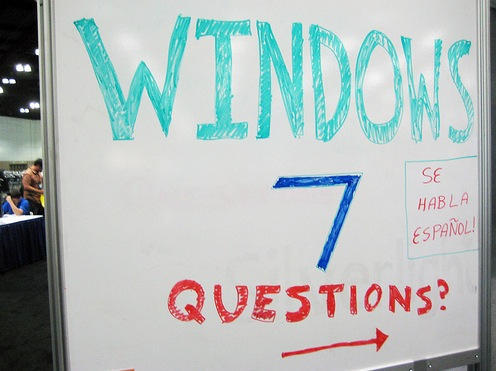
I probably shouldn’t be saying this on a Mac site, but reputation be damned: I’m quite interested to see Windows 7. Let me explain why. (Hang on while I put on my flame-proof jacket. There.)

THING THE FIRST: I want a netbook. I want a cheap, tiny, low-power little computer that does text editing and web browsing. Something I can chuck in my bag and forget about, but be sure it’ll be there as and when I need it. I don’t want to play games on it. I don’t want to mess with my photos on it. I don’t want to make phone calls on it. It doesn’t need a lot of disk space. But it does need a keyboard.

THING THE SECOND: I cannot afford to buy a MacBook Air. And anyway, it doesn’t offer the battery life I’m looking for.

THING THE THIRD: I don’t think Apple’s going to be producing a netbook like this any time soon.

THING THE FOURTH: But I wish they would.

THING THE FIFTH: Windows 7 is on the way, it’ll run on netbooks, and – this is the important bit – I think it’s the first version of Windows that I might have a chance of getting on with.

Why?

Because it, ahem, borrows rather a lot of ideas from Mac OS X.

Let’s see now: it removes unnecessary icons from the Desktop. It makes the Task Bar more Dock-like. It adds a system-wide search box to the Start Menu, from which you can launch apps, open files, access preferences (sorry, options), much in the manner of the Spotlight menu.

What’s more, reports tell us that Windows 7 is less bloated than Vista, runs on more humble spec machines, is somewhat more secure, and runs faster too.

So, in summary: this is the first version of Windows I’ve seen that I’ve seriously considered actually using. And until Apple finds that string of DNA that enables it to make cheap, low-power computers, it will remain an option I’ll consider.

Or maybe I should just get a Linux-based netbook (and optionally install OS X on it regardless) and save myself the bother.

(Picture used under CC license: thanks to adKinn.)

Survive Time Warner’s Viacom Blackout with TVUPlayer

By

post-6549-image-05990f92c74236fa748bf8200d1110b7-jpg

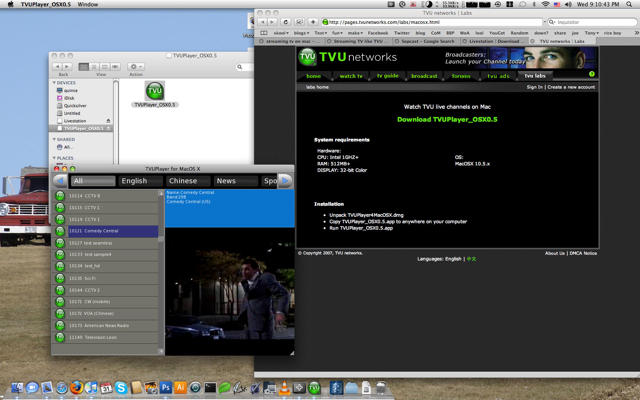
With Viacom demanding higher fees for their channels to be run on Time Warner Cable, it looks like you might have to turn to the Internet for your Colbert Report and Dora the Explorer. That time might come as soon as tonight, with a blackout on Time Warner Cable and Brighthouse Network customers threatened for tonight at midnight.

Fear not. With TVUPlayer you can watch most of the 19 channels that might be removed if an agreement can’t be reached. At least you can watch the key ones: Comedy Central, Spike TV, Nickelodeon and MTV are all available to stream. The quality’s not great, but it’s better than nothing isn’t it?

‘iPod Killer’ Commits Suicide

By

post-6543-image-7f46f7569d02b5c38cd67ad160755a58-jpg

Apparently distraught over their utter lack of market-share, all of the approximately eighteen 30-gig Zunes in the wild have apparently committed mass suicide (is their number large enough to be considered a “mass suicide” or is it simply “suicide together”? –ed).

No word on the fate of fat-harry-zune tattoo guy.

You can read more on this breaking story as it develops at Wired or Ars.

Update: I don’t know why the picture of the dude with the Zune tattoo shows up on the RSS feed, next to the title making folks believe that he might be an ‘iPod killer’ or that he might have killed himself.  Sorry zune tattoo guy…

IDG To Hold Town Hall on Macworld Future

By

post-6540-image-535acd02f6370fd1eac3d6fa129ce1b9-jpg

IDG, promoter of the Macworld Expo 2009 in San Francisco, Calif. next week, is asking Mac fans to help shape a future without Apple. A Town Hall event is set for Jan. 7.

The Town Hall is designed to help IDG “shape Macworld in 2010 and beyond,” according to a statement.

Acknowledging 2009 will be without Apple CEO Steve Jobs and the last year the Cupertino, Calif.-based company will participate, future Macworld’s will increase the focus on the “Mac community,” including users and product developers, IDC said.

Soon after Apple announced its plans to drop Macworld appearances, the event’s organizers vowed to continue. Analysts have scaled back their expectations for Macworld Expo.

The Town Hall will be held at 5 p.m. Pacific Time in Moscone Center’s Gateway Ballroom.

A Mac Tablet Mockup – For Your Consideration

By

post-6530-image-8e402db446866c71310e8b782e911e9a-jpg

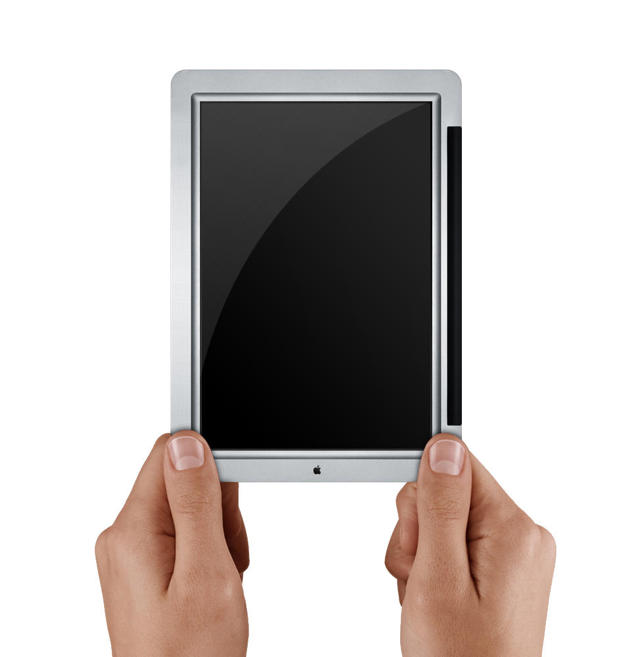
Image © 2008 John Ellenich

7″ Screen, 1.6GHz Atom, 1GB of RAM, 32 GB of flash storage, Wifi, bluetooth, modified iPhone OS (Snow Leopard)

Flickr user tacojohn has a vision of the much-rumored Mac Tablet Apple has been said to be working on since at least September 2007.

Ahead of Macworld next week in San Francisco, the Apple rumor mill has been busy ginning up interest to counter the let-down of Steve Jobs’ decision to skip Apple’s final appearance at the popular trade show, and Tuesday a TechCrunch report cited a trio of three independent sources close to Apple who say to “expect a large screen iPod touch device to be released in the Fall of ’09, with a 7 or 9 inch screen.”

“Prototypes have been seen and handled by one of our sources,” according to the report, and “Apple is talking to OEMs in Asia now about mass production,” the publication said. It added there were some early concerns among Apple managers over the potential market for such a device, but implied those fears have been quelled by the blistering success of the App Store:

“The difference now is the iTunes app store, which has thousands of games and other applications that are perfect for a touch screen device with an accelerometer.”

Looks cool to us.

Via AppleInsider

Concern Over Jobs’ Health Jumps the Shark

By

post-6527-image-02a6b0b8f41f97ad0d37fe04b5bd9844-jpg

Digg founder Kevin Rose announced his concern for Steve Jobs’ health Tuesday, but there’s always a subtext to such public displays of empathy. We’re not sure what it is in Rose’s case, but a few guesses are he:

a) puts way too much stock in what he reads on Gizmodo
b) is more worried about getting publicity for his own Internet venture
c) is a typically clueless amateur money manager
d) lives to see his name on the Internet
e) all of the above

On top of which, he’s either a very careless typist or an embarrassingly poor speller.

iPhone Apps Let You Play Dr. Doolittle

By

post-6521-image-42f949c292ee2c78845ecefac97a98b1-jpg

Gigabye Solutions updated its line of crazy 99¢ singing animal apps for iPhone Tuesday, adding the camel to a lineup that already included your singing monkey, orangutan, cat, puppy and snowman.

Singing Characters use low-level sound API’s to provide very low latency responses to nearby sounds. Advanced sound leveling technology adjusts for different speech volumes automatically.

Sit them on your desk at work and they’ll talk at the same time as other people in the office. They are a sure-fire tension cutter at that next awkward sales meeting.

Captivate 3 year-olds endlessly with the talking cat that copies everything they say.

Limitations in the iPhone SDK prevent Singing Characters from singing along to the music you have playing on your iPhone in iTunes, but they will sing along with music playing from an external device.

Zephyr – Your Message in a Bottle for iPhone, iPod Touch

By

post-6518-image-3ff8d4c2532d46f0069a434fe359b58e-jpg

From Smule, creators of the internationally captivating Ocarina app for the iPhone, comes Zephyr, a 99¢ app that is part snow globe, part artboard, part multi-media messaging device, part chain letter and altogether fun.

Classified as a Social Networking application in the App Store, Zephyr invites users to use the touchscreen to draw pictures and messages rendered in snowflakes, while the app simultaneously translates touch and movement into distinctive wind sounds to complement the written message. You can erase a composition entirely by shaking the phone or erase parts with a two finger swipe gesture. When you’re happy with your creation you can send it off anonymously into the ether, where it will be received by another Zephyr user.

The chain continues when the recipient of your message expresses “love” for it by tapping a heart icon that appears on the screen with a received message. The more a message is loved, the more it will be passed forward.

You can also receive a message, see the stops it made on its way to you and decide whether or not it will continue on its journey around the world.

No word yet on whether Smule developers plan to update the app with different iconography for the changing seasons.

Turn Your iPhone into a NYE Noisemaker

By

post-6514-image-4c682b6e5293ec6377bc1fcedac07ccb-jpg

Don’t forget to download your free New Years Blowout Horn and 2009 Countdown app Wednesday (if you haven’t already got this little NYE party favor).

Blow into your iPhone’s mic, Ocarina-style, and hear the party horn. See the horn unravel on the touchscreen. Play Auld Lang Syne by pressing the i button. Comes complete with a countdown timer.

What will they think of next?