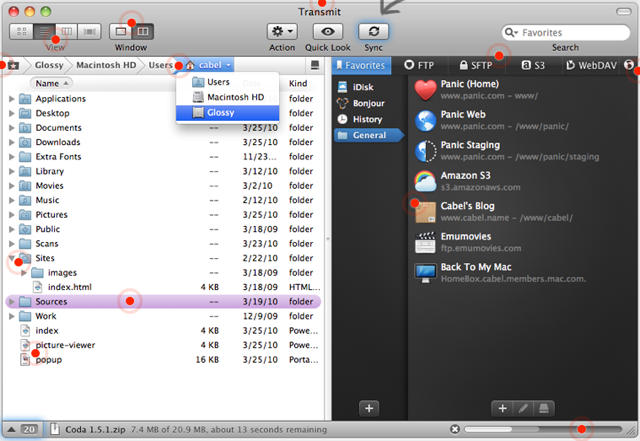
Transmit, the popular OS X FTP client by Panic Support, has finally broken its half decade run of version 3.x executables and finally released version 4.0, a significant and shiny upgrade that boasts faster performance, a new user interface and several fantastic new features.
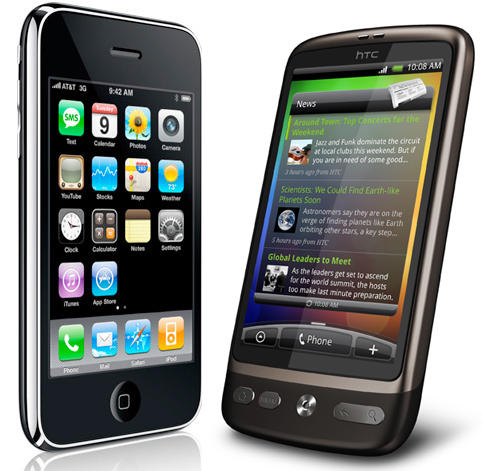
HTC just got a powerful new ally in its patent fight against Apple.
Following Google’s announcement that they would support their frequent manufacturing partner in its defense against complaints made by Apple that HTC handsets infringe upon a number of key iPhone-related patents, Microsoft has issued a press release saying that they have signed a broad patent-sharing agreement with HTC.
According to the agreement, Microsoft will license its patents to HTC across all of their phones. If the phone is a Google Android handset, HTC will pay them a couple bucks in royalties on every handset sold.
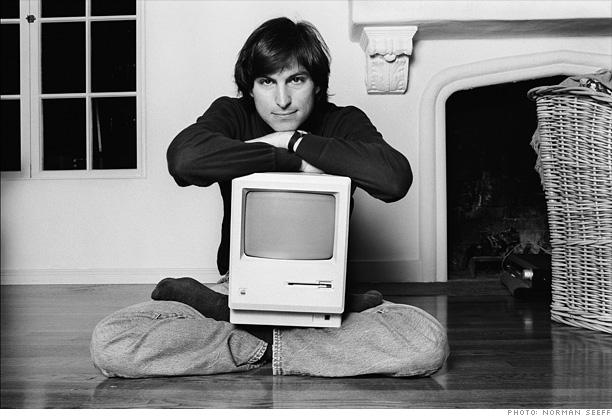
In part 8 of “My Close Encounters With Steve Jobs,” Macworld founder David Bunnell describes how Steve Jobs and IDG publisher Pat McGovern sign a deal to launch Macworld in conjunction with the Mac.
In the last tip, we showed you three standard views for looking at files in a Finder window.
There’s a fourth view, though. It’s called Cover Flow, and we’ve given it a tip all of its own because you’re likely to see it in many different places.
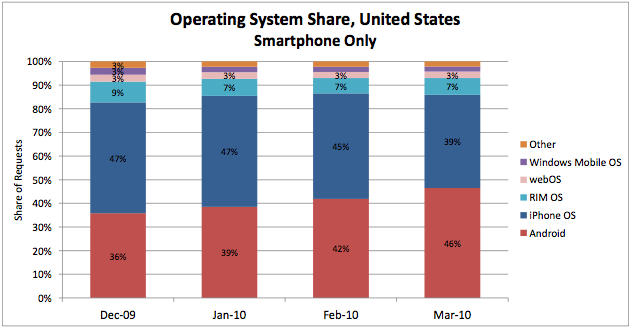
The Blagoblogs are a-buzz with a report that shows Android has overtaken the iPhone in mobile web traffic. This would be concerning were it not for two things:
The report only shows Android overtaking iPhone in the U.S. (it’s still dominating globally)
The report is created by AdMod, the mobile advertising company owned by Google, and is based on mobile traffic through its network. In other words, it doesn’t count any traffic directed through areas it doesn’t serve, including any by Apple-owned Quattro and many iPhone apps built on other platforms.
Since AdMob is a key part of Google’s mobile strategy at this point and is a key component to any ad-supported Android applications, this is almost exactly the trend we should expect to see. And this trend will only become more dramatic as Apple rolls out iAds in iPhone OS 4.0, which won’t wipe out third-party ad providers in iPhone apps but will likely come to dominate. Don’t be surprised to see a report six months from now showing Apple’s mobile web traffic dropping by half or more.
All of which suggests that a mobile ad network isn’t the best source for reporting the totality of mobile web traffic. Wouldn’t it be nice if all the mobile carriers got together and shared what they knew?
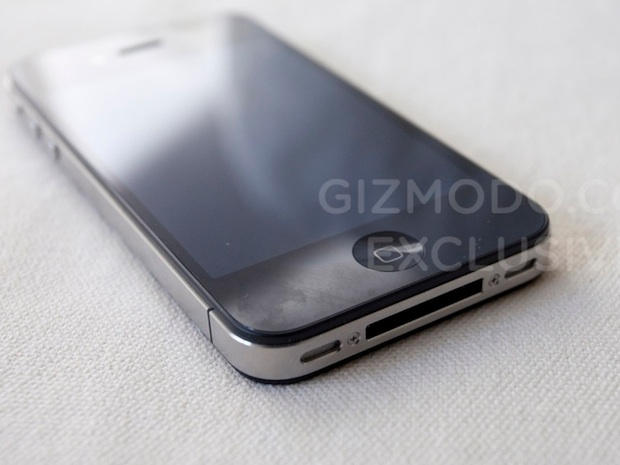
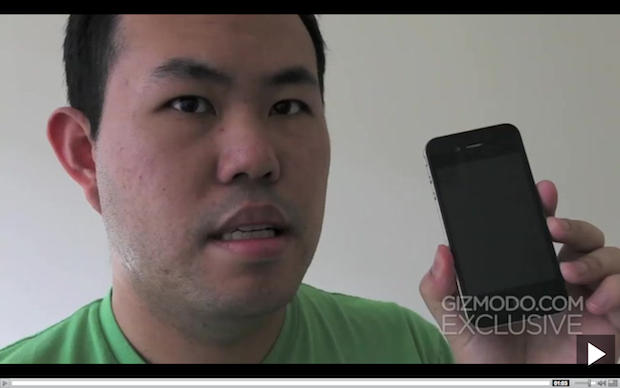
Police have identified and interviewed the person who found Apple’s iPhone 4G at a bar, the San Jose Business Journal reports.
Also, it looks like Gray Powell, the engineer who lost the iPhone at the bar, and an Apple lawyer reported it as a theft. However, the District Attorney still hasn’t determined whether the case is a crime.
Investigators said they have identified and interviewed the person who took the phone from the Gourmet Haus Staudt on March 18 after it was left there by Apple engineer Gray Powell following a birthday celebration. Officials were unable to tell the Business Journal whether that person, whose name has not been released, was the same person who eventually sold the phone to tech Web site Gizmodo.com. […]
Wagstaffe said that an outside counsel for Apple, along with Apple engineer Powell, called the District Attorney’s office on Wednesday or Thursday of last week to report a theft had occurred and they wanted it investigated.
I Love Stars is one of those apps that does one thing and does it very well. It sits in your Menu Bar and lets you rate songs as they’re playing in iTunes.
So the iPad is a runaway hit and there’s no stopping the iPhone: the Telegraph still finds reason to harrumph at Apple with a “Bottom Ten” of what they consider the Cupertino company’s worst products.
The surprise: iTunes tops the list as Apple’s worst product to date.
If these schadenfreuderankings are evergreens for news outlets, they are usually topped by obvious turkeys like the Lisa and Apple III. Both of these commercial flops are still “less bad” than iTunes, however, ranking six and eight respectively.
Another piece of the iPhonegate puzzle has fallen into place. It’s been officially revealed for the first time that Apple reported it’s iPhone 4G protoype as “stolen,” not lost, according to the Wall Street Journal:
Stephen Wagstaffe, the chief deputy district attorney for San Mateo County, said Apple contacted authorities and “advised us there had been a theft,” which led to the search warrant and an investigation.
Until now, it’s been rumored that Apple considered the iPhone stolen — but hasn’t been officially confirmed. The distinction, of course, is crucial. If authorities conclude the iPhone was stolen, Gizmodo may be on the hook for buying stolen property. If the iPhone was lost, Gizmodo may be in the clear. However, under California law, a lost item that isn’t properly returned to its owner may also sometimes be considered stolen.
The authorities themselves don’t seem to have reached a conclusion yet. It is still unclear if they are investigating Gizmodo or the person who sold Gizmodo the phone. CNet spoke to the San Mateo District Attorney , reporting that it “has not been able to confirm whether the felony investigation is targeting Gizmodo staff, the iPhone seller, or someone else.”
If the authorities conclude that Gizmodo bought stolen property, staff may face up to a year in prison. But if police and the District Attorney are pursuing the seller, the raid on Gizmodo editor Jason Chen’s home may not have been warranted. Gizmodo may be protected under California shield laws, which prohibit judges from issuing search warrants against editorial publications, including online news sites. Techcrunch reports that the investigation has been “paused” while authorities decide whether Gizmodo is shielded or not.
We start off with a new batch of lower prices on some App Store items, including “Guerrilla Bob,” a third-person shooter. Everyone has their 15 minutes of fame, and I guess it’s Gray Powell’s turn. Don’t know the name? Powell is reportedly the Apple engineer that helped exposed the iPhone 4G prototype. Get a t-shirt and become part of the “in” crowd. (Woz even has one.) Also on tap is a deal on a family pack of Apple’s MobileMe “cloud” services.
We also check out other items, including “Super Turbo Action Pig,” and iPhone game where a pig gets his revenge, tracking down the butcher. There are other Mac-related bargains, of course, such as MYOB’s AccountEdge and more. As always, details on everything is available on CoM’s “Daily Deals” page, which starts right after the jump.
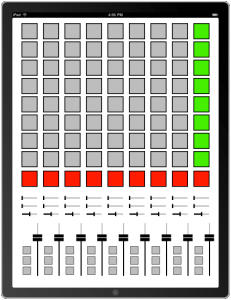
Jameson Proctor, fellow Brooklyn resident and newly established app developer, has brought us a fantastic iPad Midi Controller for $4.99.
MxNM LE, which stands for Mix N Match MIDI Limited Edition, offers 135 virtual buttons sliders and knobs for your programming pleasure and you’ll need to use the MxNM WiFi Server to connect your iPad to your sequencing software of choice. The next update will allow the user to add labels to each control. I can’t wait for an OSC release to give me my monome fix.
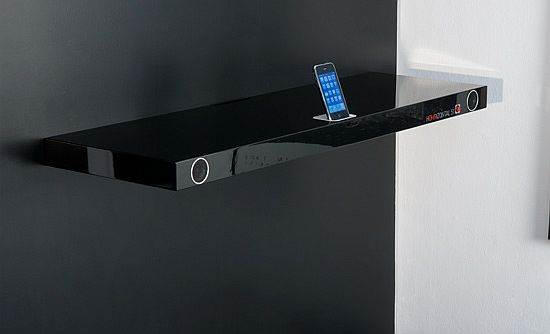
The Horizontal 51 sound board from Finite Elemente isn’t just a shelf, it’s an iPod docking solution with integrated Surround Sound speakers with a 25WPC amplifier and a frequency range of 50 to 25,000Hz, as well as other available connections for TV, PCs and MP3 players. The shelf itself can support up to 25KG of weight, so if you don’t want to put plants or books on it, it can probably support the weight of a light HDTV. It’s an attractive solution, but $664 is a lot of money to spend on a shelf, no matter how many devices it can integrate with.
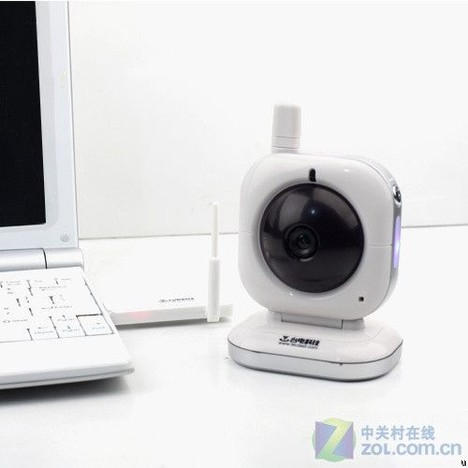
Unless you have a Mac Mini or Mac Pro, there’s not a lot of reason to buy a third-party webcam if you’re on a modern Apple machine, but Telcast’s latest webcam, the W900, does one thing your built-in iSight won’t: it’s a wireless web cam that can transmit 5 megapixel video and images at distances up to 200 meters.
A welcome advance in webcam technology that should prevent at least a few MacBooks from vibrating off the lubricated bedside table top on anniversary night. The Telcast W900 costs $117.
I’ve been eagerly anticipating the release of Steam for Mac since it was first announced back in early March, but Valve has continued to be mum about their games delivery platform’s Mac-specific details. An informative thread on the official Steam forums, though, has a lot of information about what Mac gamers can expect when Steam for Mac lands in May.
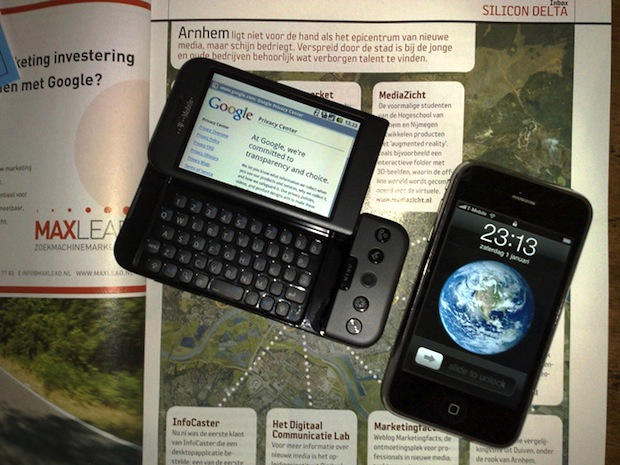
Google’s Android Marketplace, a rival to Apple’s iPhone App Store, reached the 50,000 mark over the weekend, according to one company tracking cell phone application sites. Although a far cry from Apple’s nearly 200,000 apps, Android may be on pace to hit the 100,000 milestone by September, according to reports.
About a month ago, the Android Market, the nearest competitor to the App Store, reached the 40,000 mark. The 50,000 figure comes from AndroLib, which tracks 10 smartphone marketplaces.
The Gizmodo Leak May Force Apple's Hand, One Analyst Says.
Gizmodo’s unofficial unveiling of Apple’s iPhone 4G may force the Cupertino, Calif. company to launch its next handset sooner than planned, a Wall Street analyst tells Cult of Mac. The leak could erode sales of current iPhones as consumers hold off until the new smartphone is available.
“This leads us to believe they [Apple] may come out with a new [iPhone] sooner versus later,” Piper Jaffray analyst Gene Munster writes in a Tuesday email.
Apple CEO Steve Jobs isn’t exactly known to mince words with his customers or employees, and his characteristic bluntness even extends as far as his conversations with other CEOs.
Take this conversation he had with eerie William Macy lookalike and Nike CEO Mark Parker upon the introduction of the Nike+ product line. Asking Parker for advice on how to run his company, Jobs bluntly replied: “Get rid of the crappy stuff.”
“I expected a little laugh,” Parker said. “But there was a pause and no laugh at the end.”
No, Mark, Jobs is dead serious about excising the crap. Well, except for the Apple TV.
Artists make use of the tools around them. The iPhone is one of the newer ones in the toolkit, and it’s unique capabilities and limitations make for some interesting results.
Norm Zarr says about the Art of iPhone Photography:
“It’s a challenge to take great photos with an iPhone. Compared to most any digital camera, it doesn’t stand up as a camera. But the integration of the iPhone camera, the internet, and the hundreds of camera App’s has made it truly a mobile photographic workstation. This brilliant connection of technologies makes the power of iPhone far beyond the camera itself.”
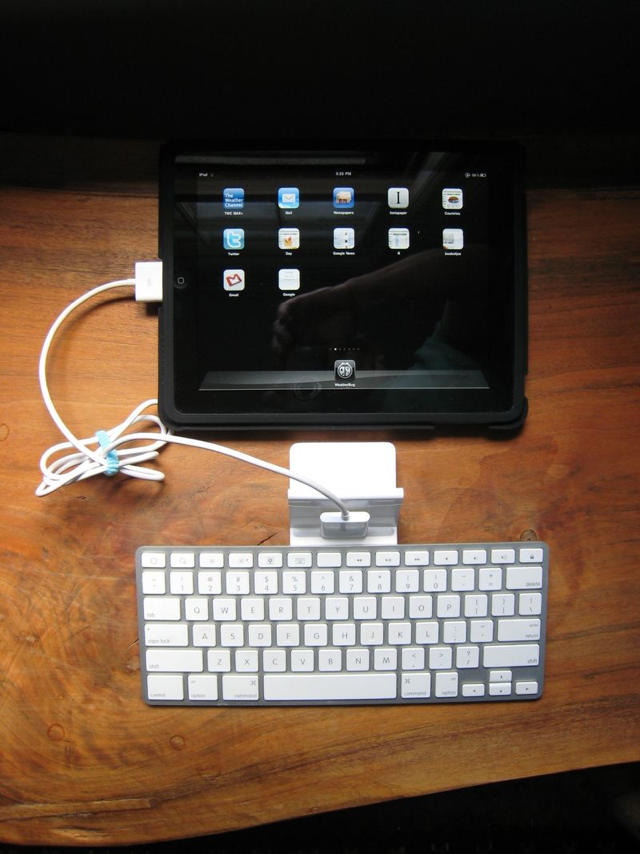
Apple’s own iPad dock gives an easy and handy way to use a physical keyboard with your tablet, but one annoyance is the official dock’s inability to allow you to type when the device is in a landscape position.
It’s slightly irritating, but the Book of Joe has an easy-to-follow instruction manual on how to dock your iPad in a landscape position.
Essentially, you prop up your iPad (in Joe’s case, with the official iPad case) and use an iPod cable extender to connect the iPad to the dock connector. It’s a lot more of a kludge than it has to be, and I imagine a bluetooth keyboard and a sixty-nine cent business card holder would be a better solution for the price. Still, if you’ve got this stuff lying around already, it’s not a bad hack… at least until a third-party accessory maker comes out with a dock that allows typing in both landscape and vertical orientations.
Surprise surprise. There’s a new morsel of PC malware out there plaguing Windows machines. Nothing to write about there: it’s non-news, the equivalent of Paris Hilton getting a polite note from the Center of Disease Control.
What makes this bit of malware interesting to Apple heads, though, is the way it’s propagated: through an e-mail urging victims to download a new version of iTunes that has been upgraded for “best iPad performance, newer features and security.” Download the infected executable and the code, called Backdoor.Bifrose.AADY, then tries to slurps up the victim’s software serial numbers, IM, e-mail and protect storage login details.
Needless to say, even if you’re on a PC, you’re better off going directly to Apple.com or allowing iTunes to alert you to a new update than downloading a strange executable from even the most earnest of Russian malware mafioso.
“You are looking at Jason Chen’s computers. They were found lost at the San Mateo Country Police Headqaurters. We got them. We disassembled them. They’re the real thing, and here are all the details.”
A Dell XPS!? An Acer tower?!? Oh, Jason… a gadget blogger should know better.
We’ve shown you a first generation iPhone dual-booting into Android OS, but want to do it yourself? You’re in luck! Here’s an easy to follow seventy step guide, simple enough for that even a drunk, googly-eyed neonate could figure it out.
We’re slightly kidding: a lot of this instruction list is devoted to things like setting up virtualized Ubuntu installs, so it’s really only fifty steps. Still, that’s an order of magnitude too many steps for a guy whose technical sophistication tops out at dragging the install icon to his Applications folder.
Are you Cylon enough to attempt it though? God speed, and let us know how you get along in the comments.
Need another reason to justify your purchase of a frivolous iPad? Pop Cap Games shows us just how valuable the iPad touchscreen surface is for gaming in a demo of Plants Vs. Zombies HD.
Apparently, the iPad can handle 11 simultaneous points of contact, which is perfect for the man with six fingers on his right hand. Or if you’re into playing games with friends and stuff, this makes for some great multiplayer action. Imagine 11-way air hockey, or 11-way Hungry Hungry Hippos. Which reminds me, when is the board game Crossfire coming to the App Store?
This is the cutest game demo video I have ever seen. It’s almost as cute as the trailer for Babies.