Mobile menu toggle

Survey: iPhone Users More Likely To Regret Facebook Status Updates

By

gadgetology051410_chart1new

Soused and slurring, I know I’ve certainly made the regrettable Facebook status update or Tweet on my iPhone in my time, and if the latest Retrevo survey is anything to go by, it looks like I’m not alone: they claim iPhone users are twice as likely to regret making a Facebook status update as people without smartphones.

Even amongst smartphone users, in fact, iPhone users have a slight lead when it comes to the average Blackberry or Android users when it comes to making an unwise post on Facebook.

Unfortunately, these errant status updates aren’t all worth giggling about: an amazing one-third of the people who told Retrevo they regretted a post claimed it either ruined their marriage or caused strife in their home life. I’ve certainly fallen foul of the latter: it turns out girlfriends don’t appreciate it when you publicly broadcast their gastronomic failings and your own resulting gastrointestinal distress.

What about you, oh Cultists of Mac? Surely, some of our droogs must have some darkly humorous iPhone text, Tweet or Facebook mishaps to relate. The comments are as good a place as any for them!

AT&T Relents, Allows iPhone Tethering In OS 4.0?

By

tether 1

In the biggest iPhone OS news since Apple unveiled the fourth iteration of the phone’s OS — and as a possible result of the rumored, forthcoming pitched battle between AT&T and Verizon for the souls of iPhone users — it looks as though the iPhone will now gain the ability to tether.

The screencaps above, which floated up in a developer’s forum, are clear evidence that Internet tethering through the iPhone will likely now be supported with the release of OS 4.0.

App OKs Food For Halal Or Vegetarian Eaters (Non-US Only, Though)

By

cult_logo_featured_image_missing_default1920x1080

I’ll eat any old crap — and I mean, any; even hot dogs from an NYC hotdog stand.

But not everyone is as cavalier about what they put in their mouths. Try being vegetarian for a bit, or eating only food that is halal — Islamic law that describes how food must be prepared — and things get significantly more complicated (but yeah, accepting that NYC hotdog stand visits are a no-no is probably a good place to start). So an Auckland, New Zealand-based developer created two slightly different apps that’ll make life easier in both cases.

Anttenna: The New Craigslist?

By

anttenna

Think of it as Craigslist — but on steroids that give it super-speed and spidey-senses, and without the alarming hey-why-is-hair-growing-there side effects.

Just like Craigslist, users can trade goods or services; but Anttenna (no, that’s not a typo) also leverages phone tech like geotagging to create local micro-marketplaces based on the location of users, and then connects them through social-network tool Twitter — which the app is built on — for more immediate buyer-seller communication than Craigslist’s increasingly snail-paced-seeming email system.

It doesn’t yet have the massive throng of participants that makes Craigslist such a powerhouse, and its sophistication may actually hurt it, as one of the appeals of Craigslist is its simplicity. But who knows; a year or two from now, we may all be hearing things like “so hey, did you ant your old MacBook already?”

iPad Controlled Video Blimp

By

cult_logo_featured_image_missing_default1920x1080

Today is a good day for innovation.

The crew over at BreakfastNY created a helium filled blimp controlled by an iPad’s accelerometer and demoed it at a crowded party that I wasn’t invited to. Thanks, guys.

So the Blimp was cool and everything but they were able to stream live video feed from the blimp to a big screen while guests took turns taking iPad Blimp for a spin. Here’s a description from BreakfastNY:

This year’s Design Week after-party featured a silent auction of 23 KidRobot Munny characters created by the world’s top industrial designers. To show off these creations to the thousand guests, we flew a 52″ camera-enabled blimp over their heads. The blimp (a modified BlimpDuino) was controlled by an iPad which was receiving the live video-feed from the cockpit. When guests looked up, they watched as their faces were transformed into those of the Munny characters up for auction. The feed also went up on a big screen at the event and the event’s site allowing everyone to get in on the action.

httpvhd://www.youtube.com/watch?v=KRlQTBPtYfc&feature=player_embedded

Woz Watch: Apple Co-Founder Trains for Segway Polo Finals

By

Photo by Patrick Tehan/Mercury News

The San Jose Mercury News hit stands today with a front page story on Steve Wozniak’s Segway Polo Team training for the International Segway Polo Association Woz Challenge Cup finals next month.

As far as Woz athletics go, this is a smidge more elitist than his recent roller derby hosting gig, it takes place in sunny Barbados from June 10th – 13th.

Segway Polo isn’t a very complicated sport — two teams of five players each try to ram a ball through the goal post of opponents — but that doesn’t mean Woz won’t do anything necessary to win, the paper reports:

Giving the ball a mighty whack, Wozniak watched as his shot dribbled to within a few feet of the goal — and then stopped. Complaining that his wrist strap slipped, he spun his Segway and went hurtling off to the other end, where he attempted to disrupt a shot by his wife, Janet Wozniak, by throwing his mallet at the ball. He did this despite a decree in the Segway polo rule book written specifically to stop him from doing this.

“As you can see,” says Woz’s Silicon Valley Aftershocks teammate, George Clark, “he will even cheat on his wife.”

“Only in Segway polo,” Woz clarifies.

His Silicon Valley Aftershocks team is determined to avenge last year’s defeat in Cologne, Germany. We’ll keep you posted.

Via San Jose Mercury News

iPhone App Registers Silicon Valley Voters

By

post-43374-image-93817a550aad4d8dafeb14b6aea5ffad-jpg

httpv://www.youtube.com/watch?v=k1sdtiwCJ9s

Voters in Santa Clara County can now register via iPhone and iPad for upcoming elections.

An Oakland company called Verafirma has been pushing an app that collects signatures via iPhone, iPad and other touchscreen devices. First touted as a way to sign petitions, Verafirma works much the same way bank technology does to accept digital John Hancocks. It doesn’t store signatures electronically.  Once sent, they are printed out and when the ballot is cast, that paper signature is compared to the electronic one.

Verafirma’s efforts paid off, if just in the nick of time: the Santa Clara County Registrar of Voters decided last week that voter signatures collected via electronic devices as well as those on paper are also valid. Voter registration ends May 24 for state primary elections taking place on June 8.

Behold iPhone 4G – It Will Even Make Coffee!

By

cult_logo_featured_image_missing_default1920x1080

https://www.youtube.com/watch?v=Prf5Oy1n7iM

Think you already know all the new iPhone 4G will do?  A tip-o-the-hat to Cult of Mac reader Mario Baluci, who wrote to tell us about this short rendering of the upcoming iPhone (or what it may look like) that he created as a promo for his Make Coffee iPhone app.  Silly, but the video is nicely done.

Perhaps rev2 will control one of the webcam coffee machines still dripping away on the internet…

Facebook Nerd Debate: Best iPhone Case Edition

By

iPhone 3G _ 3GS Defender Series Case __ OtterBox.com

We here at Cult of Mac receive a ton of email asking “What’s the best _____?” or “I just got a new iP___,  tell me what sweet apps I should purchase!” Though we try to cover the vast realm of the best of Apple products, software, and accessories we know that crowdsourcing it to you guys will give us some interesting results.

We’re posting questions on our Facebook Page or Twitter profile and taking your answers into consideration. Here’s the first question of our Nerd Debates: “What’s the best iPhone case out there and why?”

Tweetie 2 is Gone: Twitter For iPhone Coming Soon

By

post-43326-image-7aa17cafc3ac0c89383c077619844efd-jpg

Our favorite app for the iPhone, Tweetie 2, has made a quick getaway from the App Store. It looks like Tweetie 2’s new owners, Twitter, might be replacing it with it’s Twitter for iPhone app in mere moments (or this week).

The recent update to Tweetie 2 included a slot machine pop-up that would run if you pulled down to refresh. It was pretty cool the first time I experienced it-actually the first two times since you had to pull twice to see the message “Coming Soon: Tweetie will be Twitter for iPhone.”

But soon after I hated everything about it and I never wanted to see the message again. It took me a while but you can actually pull down to refresh gently enough so as not to disturb the slot machine monster that I wish would die.

Twitter for iPhone should be released tomorrow. Keep it here for the details.

How-To Transfer Your Stanza Library Into iBooks

By

post-43328-image-c89c7a597cedd71d08ab493dd9237f4a-jpg

Over at Gadget Lab, our favorite yoga-practicing nicotine golem of a gadget blogger, the pseudonymous Charlie Sorrel, has posted a fantastic guide on how to transfer your existing Stanza e-book library into iBooks.

The process is tricky, but as Charlie points out, since Stanza was purchased by Amazon last year, the likelihood of a native iPad port is in question as Amazon focuses on Kindle for iPad. Right now, then, this is the only way to transfer your existing library, along with cover art and keywords, to the iPad’s native e-book reading format. For guys like me, with an extensive Stanza library, this is a must read tutorial.

Air Display App Turns Your iPad Into A Secondary Display For Your Mac

By

post-43323-image-3cc552778b6d0b946d6a80505f9846c6-jpg

Software makers Avataron are now ready to turn your iPad into a functional mini-monitor for your Mac with their latest app, Air Display.

The app uses your iPad’s WiFi connection to transmit video data between it and your Mac (although you’ll first have to install a System Preference pane on your desktop or laptop machine). The app even allows the iPad’s touchscreen to be used as a mouse, so you can “click” icons with your fingers on your iPad’s extended desktop.

Pretty neat. Air Display isn’t out yet, but it will be submitted to the App Store next week, and if there aren’t any hiccups, you should be able to download it soon for the price of $9.99… significantly cheaper than even the cheapest of secondary displays.

Cerulean RX Receiver Lets Your iPad Stream Music To Stereo Docks

By

cerulean

In theory, the iPad can use the same 30-pin dock donnector to interface with any existing iPhone or iPod accessory, the practicality is that there’s simply no way you’re going to smash it into an existing speaker dock’s iPod port.

The Cerulean RX Stereo Bluetooth Receiver can help with that: it’s a simple wireless adapter that is small enough to fit in any iPod dock and, once connected to your iPad (or any other iPod product), it will happily stream music from across the room over A2DP, no batteries required. And if you’re using it with an iPhone, it’ll even pause and resume music during a call.

A cool accessory that would go a long way to making an iPad work well with a high-end speaker dock, but unfortunately, it’s not cheap: expect to pay $89.99.

Chart: The iPhone Is The Biggest Slice of Apple’s Business

By

revenuebycategoryq210

Over at 9to5Mac, Jordan Golson put together this simple but illuminating pie chart illustrating Apple’s revenue breakdown by category for Q2 2010.

It really just makes everything immediately clear about Apple’s business, does’t it? The Mac and OS X are also-rans now: Apple’s present and future is the iPhone OS, which accounts for almost as much revenue as Apple’s Mac and iPod units combined. Cupertino’s moving to a mobile future, not one defined by thirty-year old, desktop-oriented expectations.

I can’t wait to see Q3’s numbers. My guess is it’s going to contradict what Apple has been saying in its advertisements all along: the iPad isn’t the future of computing. It’s the present.

Chart: Apple Doesn’t Spend Much On Lobbying Compared To Other Big Tech Companies

By

post-43309-image-100917806b422132e1a9ed9e460a930d-jpg

When it comes to throwing their muscle around Congress, where does Apple stack up compared to the other big names in tech?

Business Insider has taken a look at the numbers.and the answer is surprising: not that much. In fact, they spend the least of most of the big tech companies when it comes to lobbying a percent of revenue. In fact, compared to Google, which spends half what it spends on advertising on lobbying, Apple’s barely rubbing elbows with politicians at all.

That makes sense though: Google mucks about in the murky waters of privacy, and that means they need to be conscious and have regulators on their side. Apple, by comparison, doesn’t have such a big target painted on their chest… although I imagine that lobbying budget will go up if it seriously looks like the DoJo is going to investigate Apple for anti-trust violations in regards to Adobe’s recent complaints.

[via 9to5Mac]

Apple Updates Entry-Level MacBook With New Processor and GPU, Bigger Battery

By

post-43301-image-3f48a449365bc18157ece6b966f0e548-jpg

Well, score one for the Vietnamese. As rumored yesterday, Apple has stealthily upgrade the entry level plastic unibody MacBook to bring it more up to line with the specs of the entry-level 13-inch MacBook Pro.

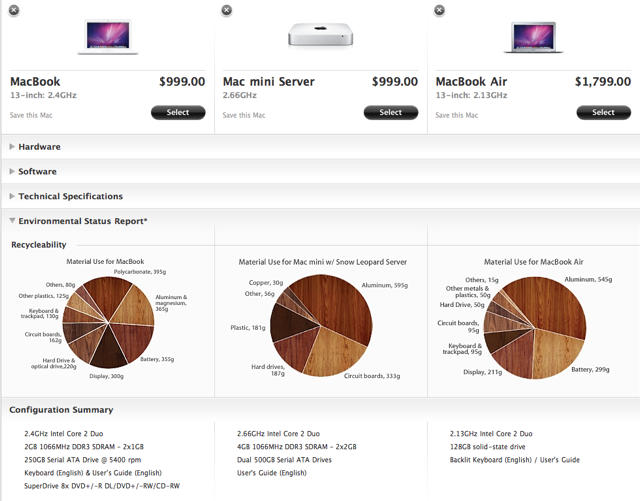
Here’s what the new MacBook looks like: on the outside, it’s the same, but its electronic innards now contain a 2.4GHz Intel Core 2 Duo processor, 2GB of RAM, a 250GB 5400RPM hard drive and an NVIDIA GeForce 320M integrated GPU.

The biggest update is actually the battery: it now gets the same 63.5 watt hour batter as the 13-inch MacBook Pro, which gives it up to 10 hours of wireless productivity. That’s actually netbook range, now.

The new MacBook is a better deal than ever, and as usual, it only costs $999.

50 Mac Essentials #7: 1Password

By

post-43291-image-edf38d447391958de952c026f16e654d-jpg

Passwords. Loathe them or detest them from the depths of your innermost soul, they are a fact of life on today’s internet. And so many people use the same one everywhere.

1Password is aptly named. Once you give it control of your passwords, you don’t ever have to worry about remembering passwords again. You’ll only have to remember one – the one that unlocks 1Password itself.

Daily Deals: App Store Freebies, iPad Price Drops and $99 iPod nano

By

cult_logo_featured_image_missing_default1920x1080

774749-large774749-large774749-large

We start out another week with a new crop of App Store deals. First up is the latest App Store freebies, including “Turn the World,” a puzzle game. A memorization puzzle game, “Mindshapes” leads off the iPad app price cuts. Finally, we round out our featured deals with an Apple Store offer: 8GB iPod nano for $99.

Details on these and many other items ( such as unibody MacBook Pros starting at $929) are available on CoM’s “Daily Deals” page right after the jump.

Cult Favorite: We’re Smarter Than You, And We’ll Prove It With Highly Addictive, Socially Wired ‘Qrank’ Quiz App

By

qrank

Sure, the app store is swimming in trivia quiz games, but Qrank is different — and ever since the game raised its shiny little head up off the App Store floor earlier this month it’s had us hooked like sugar junkies to a candy factory.

the free app cranks (you knew it had to be in here) out a fresh quiz every day, and you’re only allowed one crack at it per day, which is one big reason why it’s as addictive as, well, crack. That, and the way the game connects players socially — everyone has to answer the same questions, which makes it easy to let your friends know you’re smarter than them.

If you don’t have friends, the game publicly ranks you against everyone else playing that day, so you can be smarter than your state, the nation — or the whole world.

MONDAY GIVEAWAYS: SWF and FLV Player Pro by Eltima Software

By

free swf and flv player pro

We all know that Flash movies can be a PAIN sometimes, and the SWF and FLV Player Pro takes away all of those frustrations. SWF & FLV Player PRO version delivers even more functionality to you: ability to save currently played Flash movie no matter whether it is loaded from web or locally; switch to full-screen viewing mode; capture the current frame of the movie and produce a series of screenshots out of your favorite FLV or SWF movie, and more!

The great folks over at Eltima Software are giving away 20, yeah, I said TWENTY FREE licenses of the SWF and FLV Player Pro. Here’s what you gotta do to get your hands on a copy of one of these licenses that retails normally at $19.95.

  1. Follow us on Twitter (this is MANDATORY, or else we can’t DM you to send you the code if you win)
  2. Tweet this between 1:30pm May 17th and 1:30pm May 18th: “Check out @CultofMac and @EltimaSoftware giving away 20 FREE SWF/FLV Player app codes! https://ht.ly/1M8ae #cultofmac”
  3. We’ll randomly pick 20 Twitter accounts that tweeted the proper message and send the app code to you through DM.

Again, make sure that you’re following us on Twitter, because if not, we’ll skip you and move onto another Twitter user to give the code to. You must be 18 years old to enter the giveaway. Good Luck!

Sony’s Music-Streaming Bluetooth Phone Headset Not For Chatterboxes [Review]

By

Sony dr-bt160as cover  83
Y’know how you’ll be watching a basketball game and your team’ll be winning fairly comfortably, and then, bam — they’ve suddenly lost the game and you’re not quite sure how it happened? So it goes with Sony’s somewhat aging DR-BT160AS Bluetooth headset: It hits the mark on many elements, misses slightly on a few — and then somehow drops the ball at one critical spot.

Police Nab Teens Who Film Theft with iPod

By

post-43237-image-22802cfa30b920a5d30d87b048bcb85f-jpg

The urge for YouTube fame got the better of a trio of three teen crooks, whose iPod recording of an assault and robbery of another teen got them arrested.

Two 14-year-olds and a 13-year-old in Waldorf, Maryland approached a 13-year-old on a neighborhood basketball court at 5:30 pm. They reportedly tried to pick an argument with the victim, who packed up his stuff and tried to walk away from them.

The suspects attacked him, striking him on the back of his head. One of the suspects recorded the assault on his iPod while the other two stole the victim’s backpack.