Apple's product shots come from real cameras, but that's not the whole story
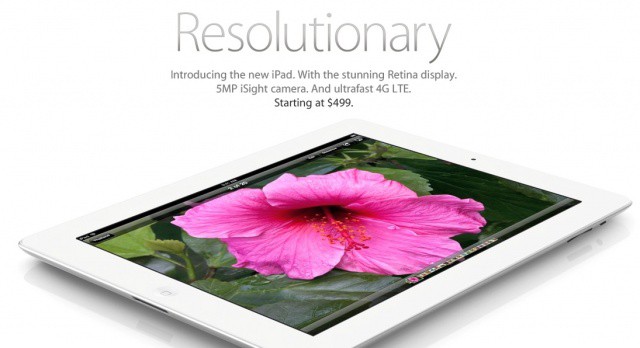
Have you ever wondered how Apple gets such beautifully clean, crisp product shots for its various devices? Are they real photos at all? Or are they just computer-generated images? The truth is somewhere in between, and shows that Apple’s obsessive attention to detail carries over to everything.
Like most OS X updates before it, with Mountain Lion comes a new default wallpaper. Like Lion, Mountain Lion’s wallpaper keeps with the galaxy theme, but we think this one’s far more beautiful, with a softer blue tone that is quite calming and peaceful to look at. Anyone know which galaxy this is?
GateKeeper is one of the big new features in Mountain Lion. It’s designed to protect against malware by limiting what kinds of software gets installed on your Mac. GateKeeper offers Mac users three levels of security: Mac App Store purchases (which have been fully vetted by Apple), Developer ID apps purchased outside the Mac App Store that are digitally signed so your Mac can verify their authenticity via Apple, and apps from all other sources.
The GateKeeper model looks great from the perspective of an individual user or family – easy to understand and use while being fairly effective at leveraging Apple’s developer program as a security solution. How it will stack up in business and enterprise environments, where mass deployment are commonplace, may be a different story.
One of the big marquee features of Mountain Lion is deeply-baked Twitter integration, built right into every Mac apps. If there was any doubt about it after iOS 5, erase it from your mind: after some aborted experiments like Ping, Apple is doubling down on social networking, and the horse they’re backing isn’t Facebook… it’s Twitter.
Mobile MIM is an iOS app used for viewing medical images like x-rays and ultrasound
Knock, Knock!
Who’s there?
Doctor.
Doctor who?
Doctor who owns an iPad, along with 26 percent of my peers.
A good pun it’s not, but the facts are worth my terrible setup: Fully one quarter of European doctors own an iPad, according to a survey of “1,207 practicing physicians in Germany, France, Spain, Italy and the UK.”
Instead of the usual high=profile launch event, Apple treated journalists to their very own personal keynotes
Imagine yourself at an Apple keynote event. A special, one-off launch for the newest version of Mac OS X. You see the familiar format: Phil Schiller and a couple of other Apple execs run through the successful sales numbers. Then they announce the new product, and then they work their way through a deck of pitch-perfect keynote slides.
It seems familiar, right? Only now imagine that you are alone. This presentation is for one person: you. This bizarro scenario is just what happened to Daring Fireball’s John Gruber last week when Apple briefed him on Mountain Lion.
AirPlay Mirroring is one of the iOS features that Apple is bringing to the Mac in Mountain Lion. It’s a feature that offers a lot of potential for mobile professionals and educators in addition to being a great supplement to a family’s living room.
AirPlay Mirroring works the second generation Apple TV. The Apple TV itself as a small and easy to carry device that can plug into any HDTV or modern projector. That simple setup combined with a Mac running Mountain Lion makes for a perfect portable presentation solution.
Don't bother trying that code, kids, it's already been redeemed.
Hey, developer kiddies! OS X 10.8 Mountain Lion and Mountain Lion server are now available to registered Apple developers over on the official Mac Dev Center. Both are downloaded through the Mac App Store after a redemption coupon.
We’re already at work downloading our copies of Mountain Lion. Keep tuned for Cult of Mac’s first look at the latest version of OS X, coming later today.
In addition to Mountain Lion, Apple is also making a number of other resources available to developers, including guidelines for developing apps for Mountain Lion, GameKit and GLKit programming guides for developing Game Center compatible games, and more. There is also a new version of Xcode, version 4.4, available to program Mountain Lion apps.
A camera-phone stand, and a bottle opener. What more could you need?
Just when you thought there was nothing more that could be squeezed into a pocket-sized multitool, Gerber comes along with the Steady, and proves our imagination to be pathetically limited. What does this many-bladed wonder bring to the transforming tool party? A camera tripod.
Gerber’s Steady Tool is aimed at real everyday use, with a slew of practical, non-specialized tools. There’s a pair of needle-nose pliers, flat and serrated blades, a bottle opener (essential), screwdrivers, wire cutters and of course a tripod and cellphone/camera mount.
The body of the tool forms one leg, while the other two stick out like a sea lion’s flippers. You can either screw a standard thread into the bottom of a camera or tripod-compatible phone cases, or you can use the suction cup to stick the sleek, smooth glass back of your iPhone 4 to the 5.8-ounce tool.
The Steady will cost you $64. Not cheap, but you do get Gerber quality, plus everything you need to conduct a booze-filled picnic.
Apple’s new version of OS X, 10.8 Mountain Lion, bakes in a lot of new features that may make existing third-party apps obsolete. Notification Center, Reminders, Messages and Twitter all step on the toes of independent developers. And worst of all, these apps come from some of the most popular categories in the App Store.
To explain OS X 10.8’s many incredible new features, Apple has released an official sneak peek at the features you’ll find in Mountain Lion. We’ve embedded it above. Watch it and tell us what you think in the comments!
One of the big threads in the Mountain Lion features that Apple has posted is much deeper integration with iCloud that Lion offers. That isn’t a surprise given Lion began a trend of bringing iOS functionality to the Mac, but it may raise some concerns for Macs in the workplace.
In Mountain Lion, Apple is bringing the iOS document syncing feature to OS X along with Mac versions of the iOS Notes and Reminders apps. There’s also a Mac version of the iOS 5 Notification Center. These are all tremendously valuable features for business users, but the fact that they function by passing business content to Apple’s iCloud servers and onto the devices of employees and their family members is likely to be a big concern for CIOs.
Speaking to The Wall Street Journal, Tim Cook has shared his thoughts on what Mountain Lion means for the future of the Mac, and has hinted Apple may be considering a grand unification of iOS and OS X somewhere down the line.
One of the big headline features in Apple’s new Mountain Lion OS is Gatekeeper, designed to keep malware and other nasties away from your computer. So is this another step towards App Store-only software on Macs?
The short answer is yes, it is. But it doesn’t have to be. Gatekeeper gives you the choice: do you want to stick to App Store-only apps, or be able to install anything from anywhere?
OS X 10.8 Mountain Lion won’t be available for most users to play with this summer, but if you’d like to try out a little slice of it already, you can already download the Messages beta for Mac, which replaces iChat and allows you to send unlimited free messages to any Mac, iPad, iPhone or iPod touch through the iMessage protocol!
In our review of OS X 10.7, we wrote that Lion was the first great PC operating system of the Post-PC age, and that any future update of OS X would continue to blur the lines between the Mac and the iPad.
Looks like we were more right than we could have imagined. Apple has just apparently announced Mac OS X 10.8 Mountain Lion, which will make its first appearance as a developer preview today ahead of an official debut this summer.
The AQUA TEK S has a face even a mother couldn't love
Apple’s designs constantly prove that beauty and practicality can exist in the same place, but that’s clearly not the only way to do things. Take a look at the AQUA TEK S, which manages to be possibly the most practical and the most ugly iPhone case ever. It bills itself as “the first ever battery powered, solar charged, rugged under water iPhone 4/4S case on Kickstarter.”
Every Cult of Mac reader should know the name Ken Segall. Leander interviewed Ken back in 2009 about naming the iMac and making Apple’s ‘Think Different’ ad campaign. Ken now runs the hilarious Apple parody site called Scoopertino and his personal blog, Observatory.
As a man that worked with Steve Jobs personally, Ken has first-hand knowledge of what drives Apple as a business, and his insights into the creative marketing and branding industry are profound. He’s got a new book coming out called Insanely Simple, and you should be excited to get your hands on this one.
Scott Hurff, a founder of video sharing site Chill, has put together the most comprehensive list of Steve Jobs videos we’ve ever seen. The Ultimate Steve Jobs Collection contains interviews, keynotes, and other gems featuring Apple’s late co-founder. With more than 100 YouTube videos ranging from the days of NeXT to the famous Standford commencement speech, this library is full of the best Steve Jobs moments.
Apple has announced some changes to the iBookstore today in an iTunes Connect letter to content publishers. Like the App Store, promo codes for iBooks can now be offered to iTunes users. Screenshots can also now be submitted for iBooks titles. This change follows the release of iBooks Author and Apple’s entrance into the digital textbook industry.
Realmac‘s Clear todo app is the talk of the Macosphere today, earning glowing reviews pretty much everywhere (including here at Cult of Mac). And rightly so: it’s totally different to everything that’s gone before, and cute and sexy and gorgeous too.
But there’s more to it than colorful todo lists. Oh yes. It makes a pretty neat colorful poetry writing thingummyjig too.
Apple includes a handy webpage for managing everything you could ever think of with your Apple ID. Unfortunately it’s tucked out of the way and kind of hard to find. In this video I’ll show you how to manage and reset your Apple ID through this website, as well as a couple handy tricks and tips that you can do with your Apple ID.
A new jailbreak app called AssistantConnect claims to bring Siri to non-4S iOS devices without needing a proxy. Unlike previous ports, AssistantConnect lets you email your Siri data between jailbroken iOS devices to enable the digital assistant. It’s a much simpler process than having to setup your own network voodoo and rely on a server that may not even work anymore.
Centrify offers DirectControl for Mobile and DirectControl for Mac
Earlier this week, Centrify launched an open beta of the company’s DirectControl for Mobile service. The service, which supports managing iPhones, iPads, and Android devices in business and enterprise settings, currently includes a subset of the features typical in other mobile device management (MDM) systems. Centrify, which is known for providing enterprise integration technologies for OS X as well as various Unix and Linux distributions, plans to maintain the current selection of controls as a free solution when the product emerges from beta while adding further management capabilities to a commercially licensed version.
Most MDM solutions are of the bolted-on variety – they run on a dedicated server or cloud offering that can pull information from enterprise systems like Microsoft’s Active Directory but use a separate management interface and data store for management profiles and other information. Centrify’s DirectControl does offer a cloud management system, but it uses Active Directory itself as the primary interface and data store, an approach that has several advantages including a very minimal learning curve for experienced systems administrators.