This is welcome: OS X 10.7 Lion adds support for the TRIM command. The addition of this deep little function will mostly be of interest to new MacBook Air owners, as it’s essential to the long-term performance of an SSD drive.
Engadget’s now reporting that “engineering issues” have led Apple to make last-minute design changes to the iPad 2 that will cause it to launch without a Retina Diplay. What a load of total crap.
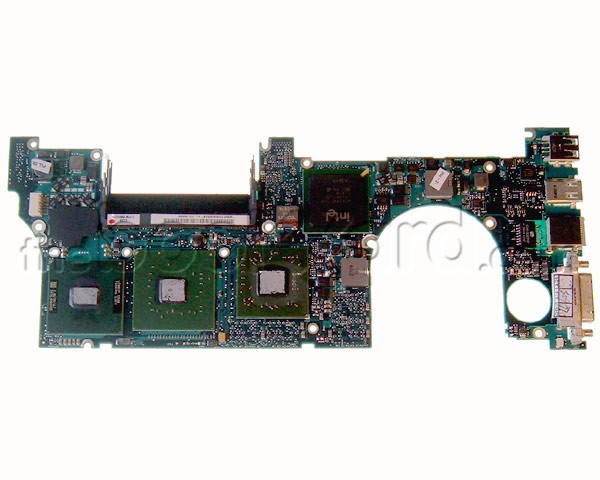
As is their wont, the boys and girls over at iFixIt rushed out to the Apple Store and picked themselves up a new 15-inch MacBook Pro to spill its guts for all of us to see.
Although externally not much has changed, internally, there’s some nice design revisions that have led iFixIt to bump the MacBook Pro up a notch on their repairability scale. It now rates a 7 out of 10, which makes the new Pros one of the more self-repairable Apple computers of recent memory: Cupertino’s engineers chose to eschew their new pentalobe torx screws entirely in the 2011 Pros.
The RAM of the new Pros has been upgraded to PC3-10600, which is the same RAM used in the 2010 revision of the iMac line, and a welcome speed boost over earlier models. The wireless card has also gotten a bit of a bump and now includes four antennas instead of three, so it might hold onto your wifi connection a little bit better.
The biggest eyebrow archer about the new MacBook Pros is this observation from iFixIt:
We uncovered gobs of thermal paste on the CPU and GPU when we removed the main heat sink. The excess paste may cause overheating issues down the road, but only time will tell.
This alarms me. The original MacBook Pros similarly used too much thermal paste, and their consequent overheating issues are now legendary. As iFixIt says, only time will tell, but it’s enough to be wary about.
Ever since Apple purchased Lala back in 2009, it’s been assumed that iTunes was going to make a leap into the cloud with a streaming music on demand service pretty much any minute now.
According to a new report by the Financial Times, though, Apple’s just been messing with us: Apple has no intention of undermining the market for paid music downloads that it absolutely dominates.
Instead, Apple keeps its plans for the cloud and its Lala acquisition as a form of insurance. An ace up their sleeve, in case the likes of Spotify, Rhapsody or Last.fm looks posed to become an industry-shaking juggernaut, similar to the way Netflix is changing the home video market.
Here’s a quick overview of Mission Control and Launchpad in OS X Lion, Apple’s upcoming major update to OS X.
Mission Control is like Expose, Spaces and Dashboard on steroids: Hit a hot corner and all the open windows fly away. You then get an overview of all the running applications, with thumbnails of open windows. There’s also your Dashboard widgets and virtual desktops in Spaces. When it was first previewed by Apple last year, critics said Mission Control was a mess, but I think it’s pretty good. It works really well. It’s much clearer than Expose, and I can see it becoming a central part of my workflow.
Launchpad, on the other hand, won’t be. Launchpad is like the Home screen on the iPad. Icons for all your apps are displayed in a grid. But it suffers from the same problem as the iPad — it’s hard to find the app you’re looking for among the clutter. Much easier to launch a search. Same in Lion.
The new MacBook Pros are seemingly superior to the last generation in every possible way, one notable downgrade seemingly lies in battery life: while old MacBook Pros were rated between eight and ten hours of battery life, the new models only get “up to 7 hours” across the board.
What’s the story? You might think it’s because of the bump to Sandy Bridge: after all, faster processors often suck up more juice. In fact, that may be part of the cause, but overall, the reason the battery life has “decreased” is because Apple is now reporting it more honestly.
It’s extremely common for computer manufacturers to wildly exaggerate battery life. That laptop you bought with ten hours of battery life might be lab tested as such just by leaving it open, idle, with the WiFi off and the display notched down to quarter brightness.
Apple’s now using a more honest testing method to arrive at battery life. Called Wireless Web protocol testing, they take each device, set the display to 50 percent brightness and then surf the 25 most popular websites, performing the main function of those sites over and over again, including playing Flash video.
So when the new MacBook Pros say they get up to 7 hours of battery life, it’s not really a downgrade: unlike the ten hours of battery life you were supposed to get last gen, but would be lucky to get half of, you can really bank on that 7 hours.
Lion is the next version of Mac OS X that will be released later this year. Apple released a developer preview today and it included a surprise inside — Mac OS X Lion Server. Mac OS X Lion Server is now a core feature of OS X Lion and included for the time being at no extra cost. You will be able to selectively setup your Mac as either a regular Mac OS X client or as a Server during the OS installation.
Once your Mac is transformed into a server you will be able to perform local or remote administration and implement server features that include: configuration of users and groups, file sharing, contacts, chat, Time Machine, VPN, mail, calendaring, push notifications, web, and wikipedia — all services that run under Mac OS X Lion Server.
The single and family license packs of MobileMe have gone AWOL in Apple online and retail stores and according to AppleInsider resellers have been advised that these products have been declared end-of-life by Apple.
The abrupt departure by these apps from retail channels indicates that something is going to happen and some of it might happen tonight during a scheduled outage that will last about a half-hour later tonight.
As you’ve probably heard, touchpad scrolling is backwards in OS X Lion. Instead of pulling your fingers down to scroll down a window, you know push your fingers up.
Confused? You will be. It undoes years of muscle memory. So why would Apple do this?
It’s easy: because of iOS. It’s the same gesture you make on the screen of an iOS device when you scroll up and down the screen. You want to scroll down? You pull the content up.
It’s another example of the influence of iOS on OS X.
Brand new from the maker of desktop Gmail client Mailplane is Replies, an app designed for people who do a lot of customer support.
The idea was born from Mailplane developer Ruben Bakker’s own success with Mailplane. He was soon so inundated with support requests, he found himself writing similar replies time and time again.
So, enter stage right: Replies, an app to make that part of his job easier.
Reuben points out that, far from turning all his emails into clones of each other, Replies saves him time on writing the dull stuff and frees up time to add personalised extras. So his messages end up being more personal and more useful, yet take less time to write than before.
One nice touch is that Replies indexes the emails in your Sent items folder, which means you can quickly search for replies you’ve written before, then insert them into new messages.
The app will be in beta soon, so if you’re interested in trying it out, go sign up to the announcement list.
Apple’s Developer Forums going crazy about the new way to install OS X Lion through the Mac App Store. There’s complaints about failed downloads, invalid redemption codes and overall installation issues. But once developers get it installed, they say the new OS is awesome and totally opens up the Mac to new possibilities.
Along with the release of OS X Lion this summer, the Lion version of Server will also be enhanced, and will feature profile management for iDevices and wireless file sharing with the iPad, easier setup and collaboration through Wiki Server 3.
While everyone else is talking about the new almighty Thunderbolt ports the new MacBook Pros are sporting, one big switch that isn’t getting all that much attention is Apple’s switch from NVIDIA GeForce GT graphics processors to AMD’s Radeon HD GPUs.
The switch takes place on the 15″ and 17″ units while the smaller 13″ MacBook Pro just has the standard Intel integrated graphics card. Apple is claiming that the switch to AMD has increased performance threefold over the old MacBook Pro models.
Apple has updated the MacBook Pro line this morning with the additions of the new 15″ and 17″-inch models.
Speed is the key feature — they come equipped with the first implementation of Thunderbolt high-speed I/O technology as well as the first quad-core processor in a laptop. Prices range from $1,199 to $2,499.
OS X Lion will usher in a new look for the Mac’s native email client, with the company promising even better organization of email threads into what it calls “conversations.”
The new Mail will automatically group messages from the same conversation — even if the subject changes along the way. Clicking a “conversation” in the inbox will reveal a streamlined feed of individual messages in chronological order, which can be easily filed or deleted individually or by an entire conversation.
Users of Mail in iOS will already be familiar with the functionality, which is presumably being brought to the desktop with improved file coordination on the developer side.
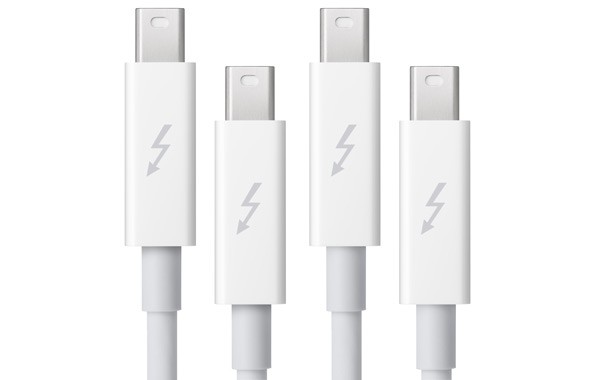
In the flurry of commentary about Apple’s release of its long-awaited update of the MacBook Pro, along with talk of new graphics and the FaceTime HD camera is word of a next-generation data transmission technology, known as Thunderbolt. The new port comes with a lighting-bolt icon, providing data speeds of up to 10 Gbps.
The first hint of use for the fast-lane built by Intel and Apple is the FaceTime HD camera, offering 720p video chats and triple the resolution of previous MacBook Pro cameras. However, there could be more uses for Thunderbolt.
Apple has just dropped the first developer preview of OS X 10.7 Lion and is now pumping it out to applicable devs through the Mac App Store. At the same time, they’ve updated their Mac OS X Lion page, revealing some new features including universal auto save, a possible new version of Safari, some new multitouch gestures, a new way to wirelessly transfer files between other Mac users, and much more.
After hints China engineers had ‘jailbroken’ the Verizon CDMA iPhone to operate on that nation’s networks, now comes word China Telecom may offer customers the new iPhone as soon as June. A key breathrough appears to be the decision to “burn” subscriber identification onto the unit instead of a SIM card, lacking in the Apple CDMA iPhone.
The iPhone 4 first undergoes testing in Guangdong then will be available to Beijing consumers, according to news agency Xinua, citing unnamed sources. Instead of visiting China Telecom offices, subscribers will be able to activate the handset over the air. Photos of a working CDMA iPhone 4 connected to the carrier’s 3G network were also published.
Apple has just update their official website with an overview of Thunderbolt, which they all-but-confirm is Light Peak and designed in collaboration with Intel Labs (who has their own press conference scheduled for later this morning).
Thunderbolt is up to 20 times faster than USB 2.0 and twice as fast as USB 3.0. It’s a single cable that consolidates almost all existing ports, from FireWire to USB to miniDisplay to eSATA. This is one cable to rule them all.
And even though the new MacBook Pros come with only one Thunderbolt port, it shouldn’t matter for end users: two 10Gbps channels on the same connector mean you can daisy chain multiple high-speed, data-intensive devices and multiple displays to the same port without using a hub… and without reducing performance.
Forget everything else about the new MacBook Pros: this is the most important Apple announcement of the week. Apple and Intel’s reticence to adopt USB 3 now makes sense: they were out to kill it and every other connector out there once and for all.
Preparation is underway at the Yerba Buena Center for the Arts, with workers busy slinging up a massive Apple banner heralding next week’s iPad 2 event.
Apple’s invite made no bones about the fact that the March 2nd event was all about the iPad 2, but the murals fronting the Yueba Buena conference center tend to foreshadow the content of the event pretty accurately. For example, the September 1st iPod event featured a guitar with an Apple logo.
So here’s the question: what do all of those colored dots foreshadow, given that this is an iPad 2 event? They could be touchpoints, but that would only seem to foreshadow the iPad 2 upping the previous generation’s display’s capacity for ten simultaneous touch points, which seems unlikely unless Apple envisions a rise in polydactylysm.
So what is it? The March 2nd invite does prominently feature an iPad, but says “Come see what 2011 will be the year of.” That means this is going to be about a lot more than the iPad 2 (which we know will be a modest update anyway). This is about what 2011 will hold for iOS.
Here’s my best guess: the dots represent nodes in the cloud, and on March 2nd, Apple’s finally going to unveil some of their cloud aspirations, starting with a radical overhaul of MobileMe.
What do you guys think? It’s a lot to take from a bunch of little dots, I know, but Apple never does anything without a reason. Those dots mean something. Leave us a comment with your best guess.
Although buyers of new MacBook Pros should have it come preinstalled on their machines, if you want FaceTime on your existing Mac, it’s going to cost you some bread, or beans, or shekels, or whatever your preferred pecuniary vernacular.
It won’t cost you much, though. Coming out of public beta, FaceTime for Mac has just hit the Mac App Store for just $0.99.
Changes over the beta aren’t significant… but explicit mention is made that 720p video calling is supported. Considering the fact that today’s MacBook Pros ship with “FaceTime HD” cameras, it looks like Apple has finally embraced the full capabilities of their 1280×1024 FaceTime nee iSight webcams.