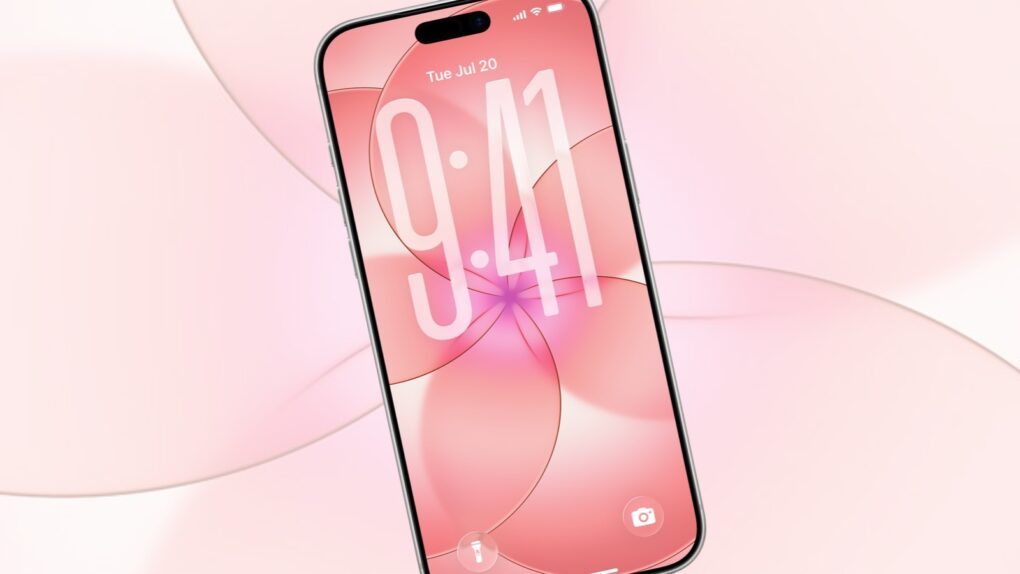
You don’t need to buy a new handset to bring a fresh look to your iPhone. Apple just unveiled the iPhone 17e, which comes with a beautiful wallpaper — and you can easily add it to your own device now.
Here’s how. (It really is easy.)
You don’t need an iPhone 17e to enjoy its beautiful wallpaper
Wallpapers are a quick, personal way to make the iPhone that millions of people carry feel uniquely your own. Because the Lock Screen and Home Screen are what you see dozens or even hundreds of times a day, bringing in a new one can make the entire phone feel fresh again.
Spring is on the way, and the colorful wallpaper that Apple includes on the upcoming iPhone 17e matches the vibe.
The image blooms like a digital flower. Five translucent circles, rendered in soft coral and rose, unfurl from a luminous center that glows with a hint of magenta. Each circle overlaps the next in gentle arcs, their edges traced by fine lines that give the composition structure without breaking its softness.
Look closely and you’ll see that this is no flower. Even so, the image is undeniably floral. And it radiates warmth, like a sunrise filtered through frosted petals, inviting the eye to linger at the glowing heart where all the curves converge.
iPhone 17e wallpaper: Download it and make it your own
Full iPhone 17e Wallpaper… Load in 4K pic.twitter.com/fBsAJrzgjk
— Asher (@asherdipps) March 2, 2026
Digital artist Asher Dipprey posted the iPhone 17e wallpaper on X shortly after Monday’s product unveiling. To add it to your iPhone, start by downloading the image from his post on the social-networking formerly known as Twitter.
Next, open the Settings app on your iPhone, then tap on Wallpaper. Now tap Add New Wallpaper.
Next, tap Photos, then tap All, and you should see the beautiful iPhone 17e wallpaper you just downloaded. Tap on it.
Now you should see a preview of what it looks like on your iPhone. Use two fingers to reposition or resize it to your liking. When you’re done, hit Add in the upper-right corner of your iPhone screen.
You’ll be given the option to make it the Unlock Screen, the Home Screen or both.
And you’re done! Enjoy the iPhone 17e wallpaper on your own device. You might even spend a moment appreciating the way the circles feel almost as if they’re slowly rotating in a calm current.
More ways to customize your iPhone
Now that you’ve downloaded the iPhone 17e wallpaper, why not take your iPhone customization even further? Check out our related how-tos:
- Transform your iPhone: Ultimate guide to custom Home Screens, widgets and icons
- Live weather, awesome astronomy, fun faces: Customize your iPhone Lock Screen
- How to customize your iPhone’s Control Center for maximum usability
- Swap your iPhone Lock Screen buttons for something more useful in iOS 18

Ed Hardy has been writing full-time about tech for 26 years, and using it for much longer than that. His intro to Apple was a Macintosh SE/30 (which he still has), but now he uses a 13-inch iPad Pro as his primary computer.
That’s because he’s a “tablet first” type of guy. Rather than use a Macbook, he connects a keyboard case to the iPad. And instead of a desktop Mac, he connects his tablet to a 27-inch display and full-size keyboard. (So don’t try to tell him that everyone has to use a Mac to be productive.)
Before coming to Cult of Mac, Ed wrote for NotebookReview, TabletPCReview and Brighthand, as well as other sites.

