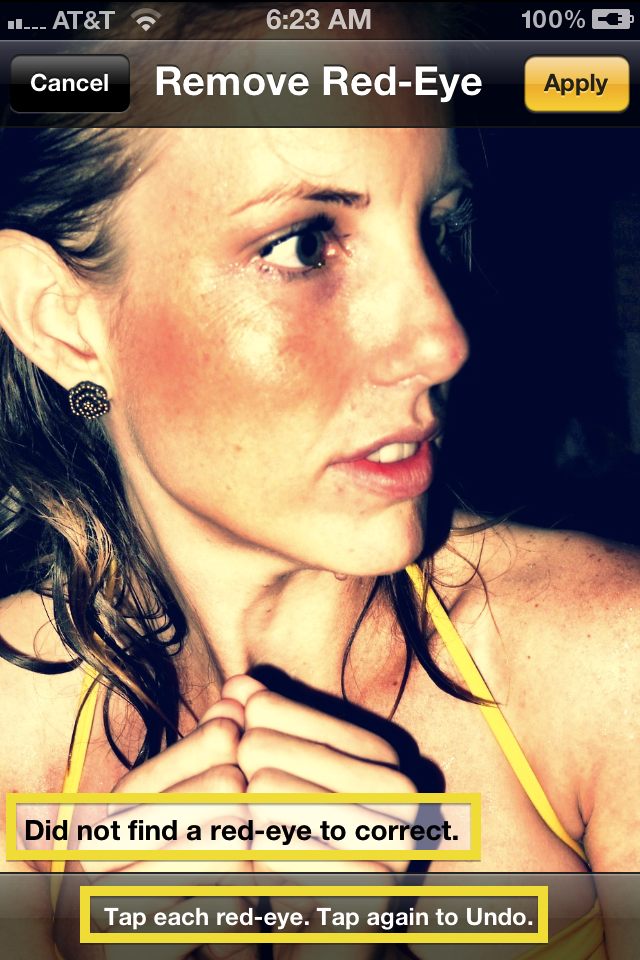
Red-Eye reduction is another feature that the iPhone has sorely missed. If people in the photograph have red-eyes, simply tap the red-eye button. You will be brought the “Remove Red-Eye” Screen where you can tap on each individual red-eye to correct it. Tapping on the fixed eye again will remove it.
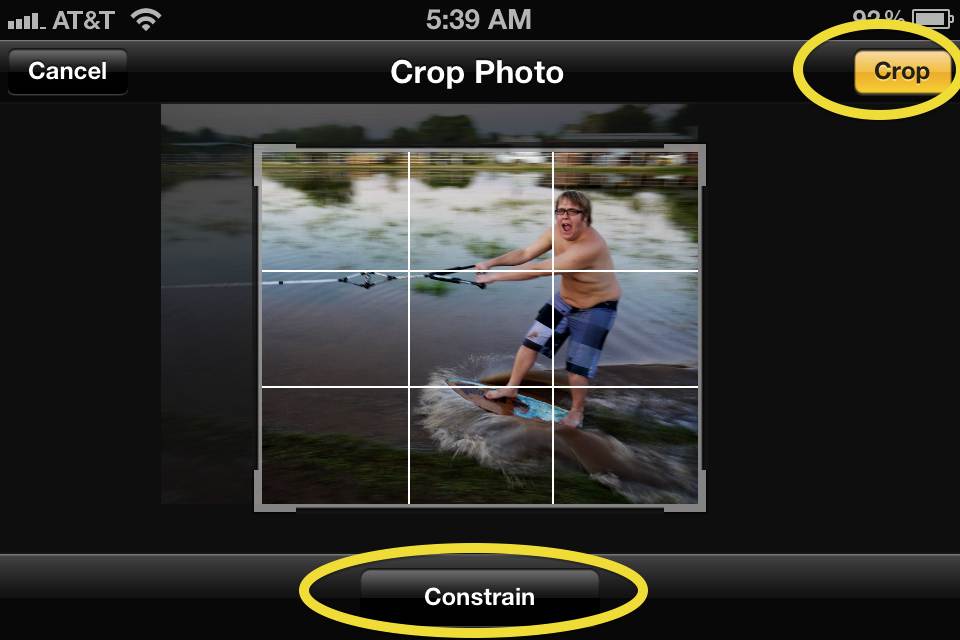
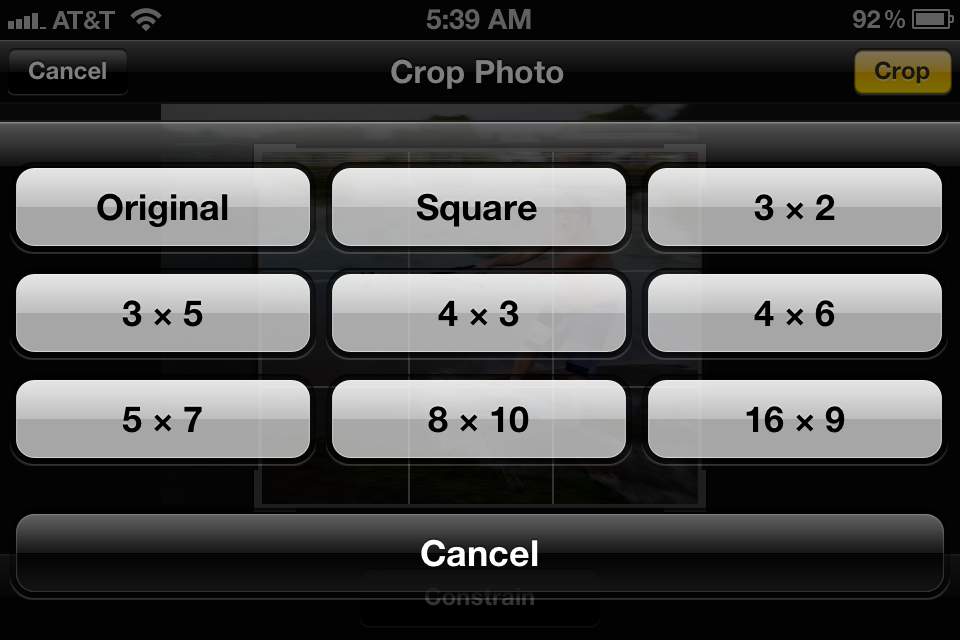
Cropping is another added feature that has been in many other camera apps but never Apple’s native camera app until now. Using the cropping feature should come pretty naturally to anyone who’s done some basic photo-editing. Simply hit the crop button and you’ll be brought to a screen where you can crop the photo according to your wishes. A neat little feature here is the “Constrain” button inside the crop screen. When a user hits the constrain button they will see a pop-up menu nine different photo-sizes to choose from.

38 responses to “iOS 5’s New Camera App Will Delight You. Here’s Our In-Depth Preview of the New Features”
The iPad 2 is probably not getting this, correct? Wouldn’t mind it.
If anyone is interested in registering their udid I am asking for a $10 payment via paypal
email me at [email protected]
100 times faster then a website!
*Speak to a real person*
*Skype available: iosguy
Find and add me on:
twitter.com/iosguy
Facebook.com/iosguy
*Please leave feedback once activation is complete*
**for those that try to activate without a registered UDID can be left without service…. and will not qualify for future updates**
*REGISTERED UDID service is good up to one year*
spread the word!
iPad 2 is getting it and it works the exact same way
I have a few developer UDID registration spots left if anyone is interested,
iosdevaccess at gmail dot com
You can then give iOS 5 a try. A small fee applies
I have some Apple Developer UDID registration spots left for purchase if
anyone is interested, you could then give iOS 5 a try.
[email protected]
its actually pretty cool on the ipad2
Sweet, thanks guys. Looking forward to it.
What I’m wondering is, is there an option to remove the geotag before sharing to twitter? Or does it do that automatically? I guess it doesn’t, and I don’t find that too appealing. I would share my location automatically.
It’s funny when people review the new camera app and fail to talk about its best addition: AE lock. With this, now you can expose your picture anyway you want. Your picture is not just a by-product of what the sensor sees, but you.
And I think double-clicking home button for camera icon is confusing. Why don’t Apple *just* add it there?
You said ehanced was turned off in both
When you save the edited picture to the camera roll … does it overwrite the old one or create a new edited pic?
I assume they didn’t because of the fear that users would often touch the button inadvertently… opening the camera app instead of the home screen.
i love it love it love it, it looks brilliant, no seriosuly it does
This is pretty slick and the way it should have been for awhile. A few apps already made use of the volume button as the shutter and Apple made the developers change it! Guess they saw the error in their ways.. Lots of UDIDs available at appledrunk dot com for those interested in trying out the iOS 5 beta.
whoops. typo
it overwrites the original
Is it possible to use camera+ as the default camera instead of apple’s app? (ie: from the homescreen lock, can I have it automatically jump into camera+ instead?)
no. That’d be really nice too
They have a print option? I’m i missing something?? That hasn’t been part of iOS has it???
There will probably be a jailbreak app to do that
yes…for a while now actually. It’s called AirPrint. Send the photo wirelessly to select printers and it prints. Haven’t done it yet but it’s pretty awesome

