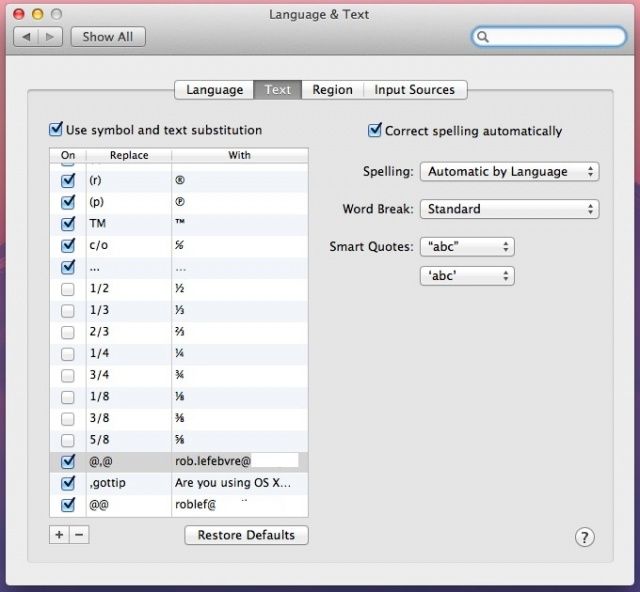
One of the 200 new features touted by Apple for OS X Mountain Lion is a boon to those of us who have to type the same text string or phrase over and over, including email addresses, phone numbers, addresses, and the like. It’s also a great way for people with motor disabilities to be able to type at a much faster rate than otherwise. Here’s how to set it up.
,email -> [email protected], so you never need to type your email when sending a message to yourself or sharing it with someone else. ,phone -> your phone number, so you can easily share your phone number without the need to type it or even remember it. ,addr -> your address, so you don’t have to type out the entire thing. ,sig -> your email signature, in case you only want to use it sometimes and not with every message. THX -> thanks!, or however you want to end an email. Code – If you write code, text expansion is really helpful. Just include code snippets and you can type out repetitive code much faster.
The options are limitless, of course. I have “@@” set up to type out my personal email address, and “@,@” set up to type out my business one. I have “##” set up to type out my cell phone number, and “addy” to type out my full address, so nice PR folks can send me cool things to review (hint hint). Whatever you choose, this new Mountain Lion feature is bound to be helpful in some way, because we all really do type the same thing over and over quite a bit. Like this next bit, which I now have set up as “,gottip” because, yeah, that’s how I roll. Are you using OS X Mountain Lion? Got a tip you want to share with us? Drop me a line or leave a comment below.
Source: Lifehacker

Rob LeFebvre is an Anchorage, Alaska-based writer and editor who has contributed to various tech, gaming and iOS sites, including 148Apps, Creative Screenwriting, Shelf-Awareness, VentureBeat, and Paste Magazine. Feel free to find Rob on Twitter @roblef, and send him a cookie once in a while; he’ll really appreciate it.

