If you see a file called CrashReporter.dmg in your Mac’s Downloads folder, don’t open it. It’s not from Apple — it’s a new strain of malware called CrashStealer. It’s wearing Apple’s own clothing, right down to the icon, name and a fake password box designed to look like standard macOS.
The malware slips past Apple’s security checks and tricks victims into typing their Mac password before draining everything of value on the machine. Anyone who’s opened an unfamiliar app in the past few weeks should pay close attention.
What is CrashStealer malware?
Cybercriminals are constantly developing new ways to sneak malware onto Macs, despite Apple’s built-in security protections. Rather than relying on obvious viruses, today’s attackers often disguise malicious software as legitimate apps, software updates or harmless files to trick users into installing them.
New threats continue to emerge as hackers search for ways to steal passwords, financial information, cryptocurrency and other sensitive data. CrashStealer is one of the latest examples.
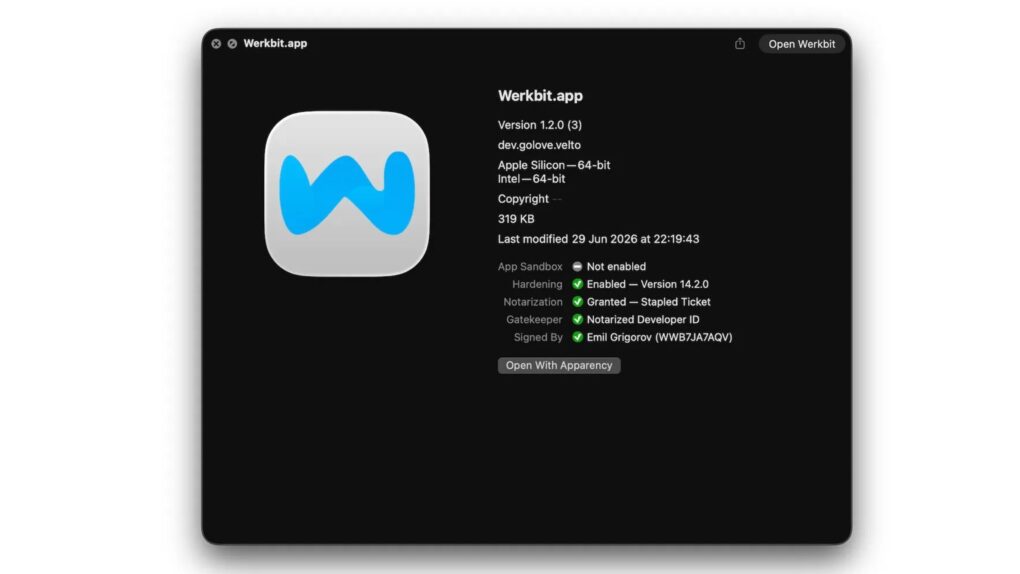
The malware didn’t show up out of nowhere. Researchers at Jamf Threat Labs say it traces back to a shady video-meeting app called Werkbit, distributed from a lookalike website registered just weeks before the attacks began.
Getting the installer requires a “meeting PIN,” keeping the malware away from casual browsers, crawlers and untargeted visitors.
Here’s the part that should worry every Mac owner. Werkbit wasn’t some sketchy, unsigned app — it carried a legitimate Apple Developer ID and was fully notarized, meaning it sailed right past macOS’ built-in malware checks without a single warning.
Apple subsequently pulled the certificate tied to the app, but only after Jamf flagged the campaign to Cupertino’s security team.
Once launched, Werkbit silently reaches out to a GitHub repository to grab hidden instructions, which lead it to an attacker-controlled server. From there, it fetches, re-signs and launches the real payload — a fake “CrashReporter” app that impersonates Apple’s crash-reporting branding, icon and bundle identifier to look like a macOS system app.
The fake password box is the best trick
CrashStealer’s cleverest move also happens to be its simplest. When launched, it shows a password prompt that looks exactly like the authorization window macOS shows all the time. This is the same one that pops up when installing a legit app or changing a system setting.
The only difference is that this one isn’t from Apple and is designed to steal your Mac password. CrashStealer even checks the password using Apple’s own “dscl” command, showing an “incorrect password” message if you get it wrong, just like the real thing.
That faux authenticity is the whole point, as it keeps prompting over and over until you type the right password. Once it gets the real password, CrashStealer unlocks your login keychain — Wi-Fi passwords, Safari logins, app credentials and cryptographic keys.
What does the CrashStealer malware steal?
According to Jamf, CrashStealer casts a wide net once it sneaks through your Mac’s front door. It targets:
- Browser data from Chrome, Edge, Brave, Opera GX, Vivaldi and other Chromium-based browsers, plus Firefox. This includes saved logins, cookies and extension data.
- Roughly 80 cryptocurrency wallet extensions like MetaMask, Phantom, Coinbase Wallet, Trust Wallet and Exodus.
- Fourteen password managers, including 1Password, Bitwarden, LastPass, Dashlane, Keeper and NordPass.
- Files from Documents and Downloads, except media files and system junk, to keep the haul small and fast to transfer.
Also, everything CrashStealer steals gets encrypted with AES-256-GCM before it’s zipped up and sent to the attacker’s server. It’s a level of care more common in serious cybercrime operations than in most average Mac-targeted scams.
It’s harder to remove than you’d think
Deleting the disk image you downloaded won’t save you from this piece of malware. CrashStealer copies itself into your Mac’s Library folder and re-signs the copy with a new signature.
It even installs a LaunchAgent to relaunch the malware every time you log in. This mechanism is why researchers are treating any machine that ran the app and typed in the password as compromised, not simply infected.
CrashStealer also checks what security software is installed on the machine before it gets to work, which helps it dodge detection.
Researchers uncovered several other lookalike meeting-app domains alongside a similar Windows installer. That suggests this isn’t a one-off Mac experiment but part of a larger, cross-platform campaign.
How to protect yourself from CrashStealer malware
Your single best defense is pretty simple — Apple’s Crash Reporter utility is already on your system. If you see an app that claims to give you the feature, that’s an instant red flag.
And don’t trust a Mac app just because it’s notarized or signed. The CrashStealer malware campaign proves that attackers can work their way around current security measures and snag valid Apple credentials.
If a meeting invite or download feels off, verify it directly with whoever supposedly sent it. Cancel any password prompt that pops up right after opening something new rather than typing through it.
It’s also worth checking System Settings > Privacy & Security > Full Disk Access and General > Login Items & Extensions for anything you don’t recognize.
If you’ve already run a suspicious CrashReporter file and entered your password, disconnect from the internet immediately. Then change your Apple Account password from a different trusted device, move any cryptocurrency to a new wallet, and consider reinstalling macOS.
CrashStealer malware stands as a stark reminder that Apple’s Gatekeeper security feature and app notarization offer just one layer of defense, not a full guarantee of safety. You’re the other layer, and a little suspicion goes a long way.

Anurag Chawake is a tech-focused writer specializing in smartphones, apps and consumer technology. His interest in computers began during the Windows 98 era, eventually leading him to explore everything from operating systems to mobile devices and PC hardware. Anurag previously contributed to The Indian Express, covering Apple, Android, gaming and the broader technology landscape.

