An Apple support document published Tuesday helps Mac users figure out which versions of its Creator Studio apps are running on their computers. It’s something no one expected in 2026, but here we are.
Currently, Apple ships two separate versions of Final Cut Pro, Logic Pro, MainStage, Motion, Compressor and Pixelmator Pro. If you happen to be a Mac owner subscribed to Apple’s Creator Studio who also uses the standalone versions of the apps in the bundle, the support document is for you.
How to tell Creator Studio apps from regular versions
Creator Studio packages six of Apple’s pro apps for video, music and design, along with “premium content” like royalty-free media assets, all for one low monthly or yearly price. The upside is unfettered access to some of Apple’s best apps. The downside? Yet another subscription.
Still, Apple allows Mac users to buy the apps individually as one-time purchases or as part of a Creator Studio subscription. Unfortunately, both versions of the apps bear the same names — and both can be installed on your Mac at the same time.
For people already using any of those standalone apps, subscribing to Creator Studio (or taking advantage of a free trial) can spell confusion. And until now, there was little to no way to tell them apart, aside from the apps’ icons, some of which look pretty similar to each other.
It’s the icons, stupid!
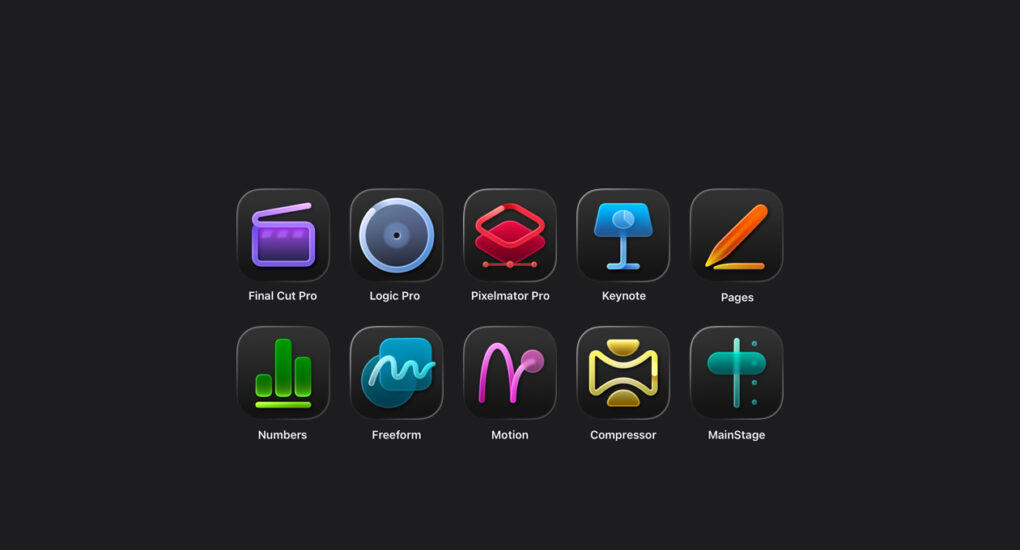
Apple created this problem, but now it has found a pretty simple solution. The Creator Studio version of all six of Apple’s creative apps boast new Liquid Glass-themed icons. The ones you purchased with a one-time payment retain their classic icons.
Apple’s support document shows a side-by-side icon comparison of the six apps, making it easy to distinguish which version you are running.
Launched earlier this year, Apple Creator Studio is available for either $12.99 per month or $129 per year. The company did this to lure new users who did not want to pay hundreds of dollars up front. Final Cut Pro, for instance, costs $299 as a standalone app.
Both versions of the apps come with the same core features, but Creator Studio subscribers will benefit from some exclusive add-ons. (A Creator Studio subscription also unlocks AI features in Apple’s Keynote, Numbers, Pages and Freeform apps.)
Same name, different features
The problem with all this wasn’t having two versions of the same apps, but not knowing which one was which.
If you subscribe to Creator Studio, make sure you use the versions of the apps with Liquid Glass icons. This can come in handy if you often use both versions and encounter a problem with a particular version.
While making one-time payments for apps like Final Cut Pro, Logic Pro, MainStage, Motion, Compressor and Pixelmator Pro might sound good on paper, there’s a tradeoff.
For just $12.99 per month, Creator Studio gives you access to a full suite of apps that would normally cost hundreds of dollars if purchased separately. Plus, you gain access to extra perks, such as royalty-free content, as well as new features Apple might add in the future.
A Creator Studio subscription makes sense for a lot of users, but Apple’s naming strategy? Not so much. The fact that Apple needed to publish a support document to explain the difference says everything.

Anurag Chawake is a tech-focused writer specializing in smartphones, apps and consumer technology. His interest in computers began during the Windows 98 era, eventually leading him to explore everything from operating systems to mobile devices and PC hardware. Anurag previously contributed to The Indian Express, covering Apple, Android, gaming and the broader technology landscape.

