Thunderbolt cables and plugs look exactly like USB-C cables and plugs, but they are incompatible. Or rather, you can plug both kinds into a Thunderbolt port and any connected peripheral will work, but you can’t plug Thunderbolt into USB-C. Or rather you can plug it in, but it won’t work. You see? We’re confused already.
But what happens when you plug a Thunderbolt accessory into the new 2018 iPad Pro?
Thunderbolt ≠ USB-C
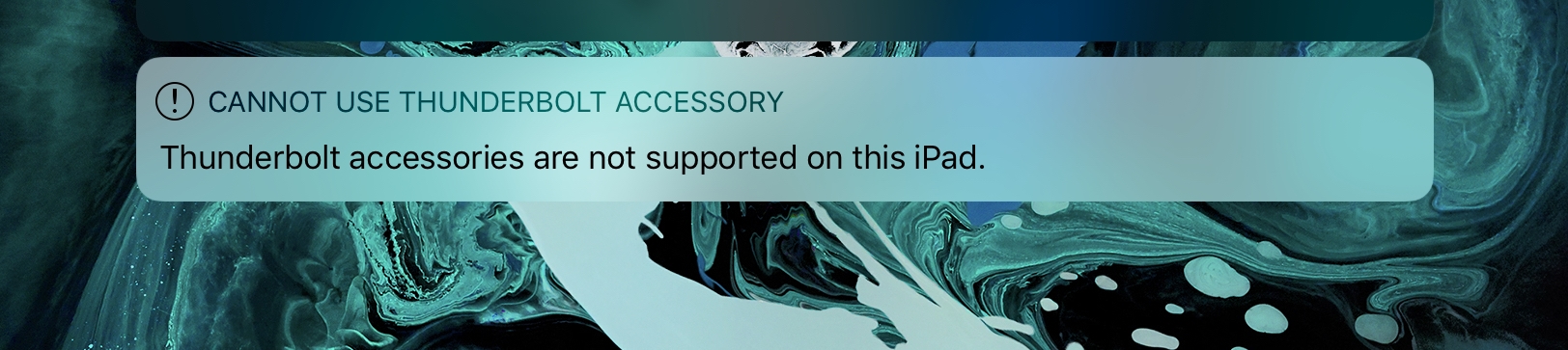
As you can see in the above image, the new iPad Pro, with its USB-C port, recognizes the Thunderbolt accessory, and tells you that it’s not compatible. That’s a handy warning, because it’s so easy to hook up a Thunderbolt device thanks to the identical-looking cables.
In this case, I was testing a Universal Audio Thunderbolt audio interface. I connected it using the basic USB-C cable that Apple provides with the new 2018 iPad Pro, and I saw this warning. That means that the iPad can detect a connected Thunderbolt device, even through a non-Thunderbolt cable.
Perhaps future iPads will come with Thunderbolt, or perhaps not. Right now I’d be happy with support for external storage via USB-C.

Charlie Sorrel writes reviews and how-tos. Follow Charlie on Twitter at @mistercharlie, and at micro.blog on @mistercharlie