Mobile menu toggle

iPad - page 50

Everything we think we know about iOS 13 for iPhone

By

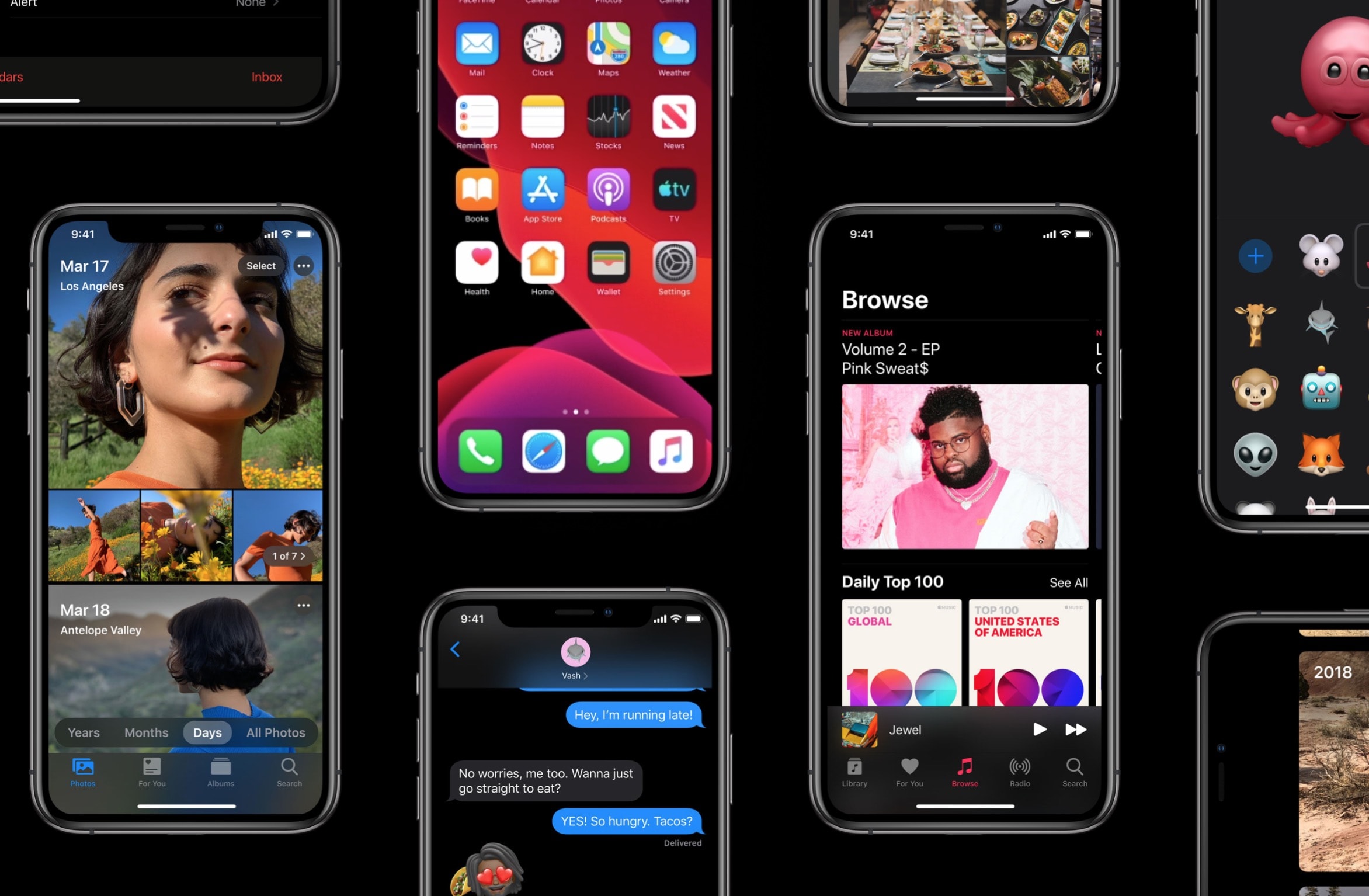
We hope iOS 13 looks a lot like this.
Photo: Alvaro Pabesio

The big iOS 13 news is all about the iPad. Or at least, we expect it to be based on rumors and leaks. But what about the iPhone? How will iOS 13 shape up on the most popular of iOS devices? Will it be a dead year, while the iPad gets all the (somewhat overdue) attention? Or will it be just as exciting for iPhone owners?

The good news is, the iOS update will probably be huge overall. In recent years, Apple has managed to lock down the secrecy around software, but this year the rumors — based on purported leaks — abound. That might mean the iOS 13 is bursting with new stuff.

So, let’s take a look.

Stunning iOS 13 concept packs all the features we want

By

We hope iOS 13 looks a lot like this.
Photo: Alvaro Pabesio

WWDC 2019 and the grand unveiling of iOS 13 is just over a week away and based on the rumors, it could be one of the biggest iPhone and iPad upgrades ever.

Designer Alvaro Pabesio published a beautiful new concept that showcases what some of the most popular requested features could look like. Dark Mode, an updated Files, a redesigned volume indicator, iMessage profiles and more are on full display, plus some tweaks that Alvaro dreamed up himself.

Take a look:

Apple pulls popular iOS game after Chinese company steals its name

By

Clicker Heroes
Clicker Heroes is gone and may not be back.
Photo: Playsaurus

Apple has kicked a popular iOS game out of the App Store after a Chinese company stole its name.

Clicker Heroes, which first made its debut on iPhone and iPad back in 2015, is a highly-rated idle RPG from Playsaurus. It’s usually free to download, but it’s no longer available on iOS.

There’s currently no word on if or when it will return, but it doesn’t look good.

How to use a GIF for your iPhone wallpaper

By

Look at this wallpaper. Just look at it.Look at this wallpaper. Just look at it.
Look at this wallpaper. Just look at it.
Photo: Jake Cvnningham/Flickr CC

Wouldn’t it be great if you could take that awesome (and hilarious!) GIF, and use it as an animated wallpaper for your iPhone? You could wake your iPhone, press on the screen, and watch the action unfold. Over and over. And over.

Sadly, GIF wallpapers are impossible. Or are they? Well, you can’t set an actual GIF to run as your lock-screen wallpaper, but you can convert any GIF into a Live Photo, and use that to animate your iPhone’s lock screen.

Here’s how.

Samsung screens could be packed into OLED MacBook Pro, iPad Pro

By

MacBook-Pro-concept
What a future MacBook Pro might look like.
Photo: Viktor Kadar

Samsung will be at least one of the suppliers for future MacBook Pro and iPad Pro upgrades with OLED displays, according to a new report.

The South Korean company, which already supplies OLED screens for the iPhone, has reportedly provided Apple with sample panels ahead of big product refreshes — but there’s no word on when we’ll see them.

Pegatron moving iPad and MacBook manufacturing out of China

By

The screen really is beautiful.
New iPads could be made in Indonesia.
Photo: Charlie Sorrel/Cult of Mac

Apple manufacturer Pegatron is reportedly set to start assembling MacBooks and iPads in Indonesia, starting next month.

The news comes at a time when more and more people are concerned about a burgeoning trade war between the U.S. and China. Because a large number of Apple’s products are manufactured in China, the possibility of new import tariffs could have a detrimental impact on the company.

iOS 13 wishlist: 6-ish ways Apple could improve audio

By

This is what pre-iOS 13 audio looks like to a visitor from next year.
Photo: Charlie Sorrel/Cult of Mac


There’s one big thing I wish for when I kneel next to my bed at night, cross my fingers and think of iOS 13: better audio. Not better quality audio. That’s already great. I just want better control, and better features.

And this isn’t just specialized podcasting or music-making stuff. There are problems everywhere. You know how when you’re listening to music, and you open up the camera app, and your music stops playing? That kind of problem. Which is number one one on my list by the way. Check out the rest:

How to escape iPad autocorrect text-entry nightmares

By

Escape the nightmare that is iOS autocorrect.
Photo: Charlie Sorrel/ Cult of Mac

I love and hate typing on the iPad Pro’s on-screen keyboard. I love that it’s a proper keyboard, with a number row, and extra punctuation keys. But I hate that auto-correction is more of a comedy lexical lottery than an actual correction feature. So I finally decided to do something about it. I switched off autocorrect on my iPad, and here’s what happened.

Factory makes other iPad synths look like toys

By

Factory sounds great, and looks ok.
Photo: Charlie Sorrel/Cult of Mac

Factory is an aptly-named new iPad synthesizer from SugarBytes. In fact, calling it a synth is underselling it — kind of like calling GarageBand a “tape recorder”. Factory does synthesize sounds, but it also has built-in effects, a sequencer, an arpeggiator, and a totally wild DJ-style crossfader, which lets you morph between presets.

The app is ultra-flexible, as capable of finely-crafted sound design as it is of sonic mayhem.

Adobe invites iPad users to beta test ‘real Photoshop’ app

By

Photoshop on iPad
“Real Photoshop” is coming to the iPad this year.
Screenshot: Adobe

Adobe is working on a brand new Photoshop app that will bring its most powerful editing tools to iPad. It will make its debut sometime this year, but a lucky few will get the chance to test it early.

Creative Cloud subscribers can now sign up for a chance to get access to the beta.

Grand Theft Auto: Chinatown Wars updated for latest iOS devices

By

GTA Chinatown Wars
Get your hands on the latest version today.
Photo: Rockstar Games

Grand Theft Auto: Chinatown Wars now plays nicely with modern iOS devices.

Rockstar’s mobile hit is the fourth in the GTA franchise to add support for iPhone and iPad variants with edge-to-edge displays and the latest A12 processors. The latest version is free for those who have already purchased Chinatown Wars.

Clothing brand LRG becomes Apple Music’s latest tastemaker

By

Apple Music
The new LRG playlists on Apple Music have a little something for everyone.
Photo: Apple

Apple Music enlisted clothing company LRG to become the latest company to handpick songs for a new set of curated playlists.

LRG, short for Lifted Research Group, became popular for its street wear thanks to endorsements from some of the biggest rappers and R&B artists in the world. As you’d expect, its new playlists are highly influenced by those genres too.

Four ways to send email attachments on iPhone and iPad

By

A rather poor email metaphor.
Photo: Charlie Sorrel/Cult of Mac

In the bad old days, there used to be just one way to send an email attachment from your iPhone. You had to find the file or image, and use the share sheet to send it via email. Then, you’d add the address, subject line and message, and send the mail. And if you needed to add another file to that email? Tough.

Now, things are much better. There are now several ways to send mail with attachments on iOS — the exact number depends on whether you’re using the iPhone or iPad. Let’s check them out.

Wildly customizable keyboard unleashes iPad creativity

By

The new Buchla Thunder layout for the Sensel Morph.
Photo: Sensel

The Sensel Morph is a different kind of “keyboard” for the iPad or Mac. It’s a pressure-sensitive panel onto which you can slap various silicone overlays, turning it from a QWERTY keyboard into a piano, a movie-editing controller or many other specialized interfaces.

It’s a customizable, wildly imaginative input device designed for musicians, video editors, illustrators, writers and other creative types.

Force Apple Music to play all songs at the same volume with Sound Check

By

Sound Check evens out the volume of Apple Music songs.
Photo: Charlie Sorrel/Cult of Mac

The song you’re listening to on your iPhone is a bit too quiet, so you adjust the volume. Perfect. Then the song ends, and the next one blasts your ears. You fumble your iPhone from your pocket and tap the volume down a notch or two.

Thanks, Apple Music. Why can’t you just play all the songs at the same volume? Obviously that’s what everyone wants.

Wait, what’s that? You can? How?

What we learned from Apple’s surprising earnings report

By

European Commission could get even tougher on tech in 2020
Image: Ste Smith/Cult of Mac

Wall Street received surprisingly better-than-expected news from Apple’s Q2 2019 earnings report today — and the stock is soaring in after-hours trading.

iPhone sales remain down, but pretty much every other facet of the company’s business is firing on all cylinders. Customers are falling in love with the iPad all over again. Services are booming. And Apple’s wearables business is now the size of a Fortune 200 company.

Despite plenty of doom and gloom from analysts over the last 12 months, Apple’s future is looking bright again.

Get awesome deals on iPads, from entry-level to pro [Deals & Steals]

By

The 11-inch iPad Pro is a total screamer.
Even if you don't need all the power of this iPad Pro, you can still save loads of cash.
Photo: Apple

Amazon is serving up sweet deals on iPads right now. You can grab the latest entry-level model for just $249. Or, if you can’t put that sweet 11-inch iPad Pro out of your mind, you can make the purchase price a lot less painful with today’s $300 discounts.

Also in today’s Deals & Steals roundup: Inexpensive HomeKit-compatible light bulbs and amazing deals on wireless chargers and USB-C cables!

iOS 12.3 beta 4 arrives with fresh fixes for iPhone and iPad [Updated]

By

The Apple TV app gets a raft of new features in iOS 12.3.
Photo: Ed Hardy/Cult of Mac

Apple seeded the fourth beta of iOS 12.3 to developers this morning, just one week after the last beta was released. iOS 12.3 beta 4 brings with it a number of changes for iPhone and iPad, including changes to the Apple TV app, Wallet app tweaks and tons of bug fixes.

Update: The public can now also download iOS 12.3 beta 4, allowing anyone to test out the new features.

iPad Pro could work with USB-C mouse very soon

By

Mighty Mouse
Who wouldn't want their iPad experience to be a bit Mightier?
Photo: Feureau/Wikipedia CC

Among its other new features, iOS 13 could bring USB-C mouse support to the iPad, a new report claims.

The rumor comes courtesy of MacStories editor Federico Viticci, who revealed it on the latest episode of his podcast. While he didn’t (unsurprisingly) single out names, he mentioned that he had heard it from a “couple of people.”

Slope makes iPad a sleek second screen for Mac [10% discount]

By

Turning a tablet into an external display for your laptop isn't totally unheard of, but Slope makes it look oh so good.
Photo: Wiplabs

Slope, a beautifully designed minimalist tablet stand, transforms your iPad into a second Mac screen or even a mini iMac.

Whether you’re pairing iPad with Apple Pencil, Smart Keyboard, or using it as an external display for MacBook or iMac, Slope positions and displays your tablet with utmost style and security.

It’s the perfect way to integrate your new iPad Pro into your desktop setup and Apple ecosystem. This is especially significant with the rumored macOS 10.15 update, code-named “Sidecar,” enabling an iPad to act as a second screen for running macOS software.

How to make music with an iPad and a ‘classic’ Swedish synth

By

These two will make beautiful music together.
A perfect music-making combo.
Photo: Charlie Sorrel/Cult of Mac

At first glance, the decade-old OP-1 synthesizer from Swedish musical instrument makers Teenage Engineering looks about as standalone as it gets.

The tiny device couples a short, piano-style keyboard with a screen. And it contains a drum machine, several synthesizers, a sampler, a handful of sequencers, a virtual four-track tape recorder and even an FM radio. You can create entire tracks on it with no other gear, or you can hook it up to electric guitars and microphones and bring the outside world in.

But it also pairs surprisingly well with an iPad. You can record audio back and forth, but things go much deeper than that. You also can use the OP-1’s hardware keyboard to play instruments on the iPad, and use iPad MIDI apps to control the synthesizers on the OP-1.

Making music with an iPad and a synth

If you own both pieces of gear already, hopefully this how-to will give you some new ideas about making music with an iPad. But if you only own an iPad, this in-depth article will provide tips for using your tablet with other music gear.

And if you know nothing about the OP-1, or about Teenage Engineering’s work in general, you’ll learn why the company is kind of the Apple of the synth world. Teenage Engineering is known for its incredible interface design — and for having a quirky personality similar to 1984-era Apple, when the brand-new Mac was making waves.

Sell your old iPad and bag a bargain upgrade today

By

The new camera dumps all over the one in the first-gen iPad Pro.
It’s a great time to upgrade your iPad.
Photo: Andrea Nepori

Amazon and Best Buy are now offering some of the biggest discounts we’ve seen on Apple’s latest iPad Pro lineup. And you can make yours even more affordable by selling your old model when you upgrade.

Cult of Mac offers real cash for your old Apple devices, and we typically pay more than anyone else. What’s more, it’s incredibly quick and simple, and we will even buy back battered tech in need of repair.