The Oxford English Dictionary will not be printed again thanks in part to the iPad, Alastair Jamieson reports for The Telegraph:
Simon Winchester, author of ‘The Meaning of Everything: The Story of the Oxford English Dictionary’, said the switch towards online formats was “prescient”. He said: “Until six months ago I was clinging to the idea that printed books would likely last for ever. Since the arrival of the iPad I am now wholly convinced otherwise.”
Same but different. Each of the four musicians in the iPad Orchestra plays something different, but their instruments are identical: Apple’s iPad. In this video, the quartet — their separate parts identified only by the white letters on their black t-shirts — play a lovely rendition of Ilya Plauvonov’s Sweet Dream on a matching quartet of iPads.
It’s breathtakingly shot and edited, but be warned against watching this too early in the day: as the lullaby-like title of the song might imply, this is a very pretty and soothing composition that will get you ready for naptime.
There are hundreds of decent iPad cases out there. Unfortunately, very few leave you room for anything other than the iPad itself. What about your stand, your wireless keyboard, your charger or your headphones? Carrying all the accoutrements needed to set your iPad up and use it more like a notebook may seem to defeat the purpose somewhat, but a lot of us use our tablets like that every day. If you like to carry your iPad fully loaded, the Incase Travel Kit Plus ($59.95) is a great solution.
Cult of Mac has been going nuts with iPad and iPhone app giveaways lately, and today is no different! Today, we’ve got some great apps for your iPhone and iPad. We’ll pick 5 random winners to win 4 great apps. If you want a chance to get your hands on some of these sweet apps this week, then follow the instructions carefully below:
“Like” Us On Facebook (you must do this, if you’re not a fan of us, we can’t contact you if you win).
Post a link to your favorite Cult of Mac article from the past week on our Facebook Wall. Make sure you post it on OUR wall, not your own.
Your wall post will be your entry into the giveaway, only ONE entry is allowed per person, and the giveaway will last until 11:59pm tonight. We’ll contact the winners later this week and explain how to get the codes!
Optional step: If you want to go the extra mile, you can post it in your Facebook status and status tag us. Do it ’cause you love us.
Special Thanks to Appular for helping us put together these app code giveaways! If you’ve got a mobile app that you’d like marketed effectively, contact the good folks at Appular!
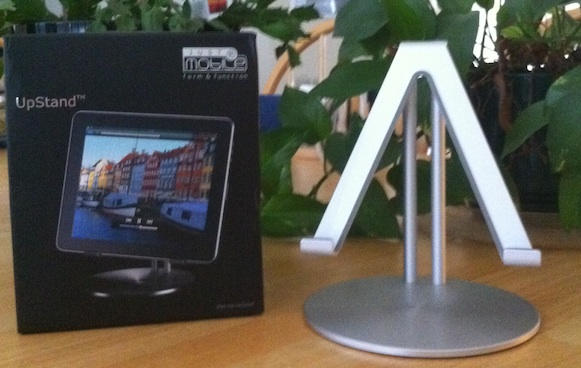
The Just Mobile UpStand iPad stand is simply perfect. The form factor the stand assumes and the material it is made of coupled with how much it weighs makes it the perfect place to perch my iPad on. The stand sits just right upon my desk and holds my iPad horizontally or vertically leaving complete access to all buttons, switches, and ports — especially the docking connector.
Click the read link for more information about this product and a gallery of photos of it in use.
The iPad is definitely making an impact on people’s lives and as a result there are numerous examples of the device being used in new and innovative ways every day. iPads are cropping up everywhere — inside of old Macs, inside of cars and just about everywhere in this unique video about iPads and velcro. Now iPads are making inroads into the walls of our homes.
For those who like to work when they travel – and can afford a chauffeured Mercedes – news today of the iPad Car! High end tuning shop Brabus has created iBusiness, a mobile office on wheels.
Based on the Mercedes-Benz S600, the Brabus iBusiness four-seater luxury sedan packs in a range of multimedia features, including two iPads in the rear seats with Bluetooth keyboards and mouse, an ultra-small Mac minicomputer under the rear shelf and a 64GB Apple iPod Touch. The German super tuners have fitted the Mercedes S600 iBusiness with a 15.2-inch TFT display with 16:9 aspect ratio and USB 2.0 ports in the rear compartment to hook up peripherals to the Mac. You can connect to the internet via UMTS and HSDPA. The two iPads control the complete BRABUS multimedia system and the car’s standard S-Class COMAND system with all functions such as radio, navigation system and telephone. [Born Rich]
With this setup, I don’t know that I’d want to get out of the car when I arrived at my destination.
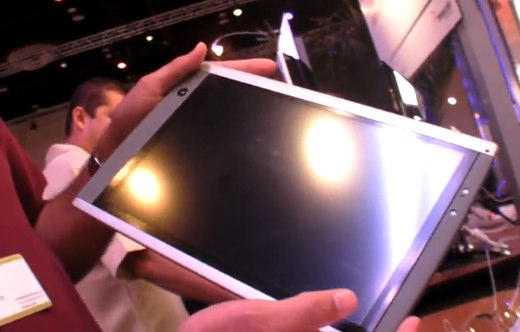
Back in June, SurfaceInk made a splash for themselves by demonstrating a 12.1-inch Ubuntu-powered tablet, clearly positioned as a possible competitor against the iPad. Seems like that might have been a mistake: as it turns out, Apple was a SurfaceInk client, and let’s just say Cupertino wasn’t too peachy on the idea of doing business with a company in bed with the enemy.
According to SurfaceInk CEO Eric Bauswell, the two companies decided to part waysbecause of “Apple’s growing awareness of our turnkey capabilities.” SurfaceInk won’t say just what they did for Apple, but given the company’s engineering work for companies like Palm and HP, it’s easy to guess that they had some sort of hand in the iPad.
What really irked Apple, though, was SurfaceInk’s 12.1-inch prototype that used a Freescale i.MX51 800MHz Cortex A8 chipset, ready to sell the reference design to any company that wanted their own would-be iPad killer and claiming they could ship such a device out by Q1 2011.
Of course, what might seem like a mistake on SurfaceInk’s part in alienating a lucrative client may very well end up proving extraordinarily lucrative: there are a lot of electronics makers out there who are scrambling to get their pants back up after the iPad proverbially dropped them, unawares. There’s a lot of lucre to be made selling as many of those guys tablets to rebrand as possible.
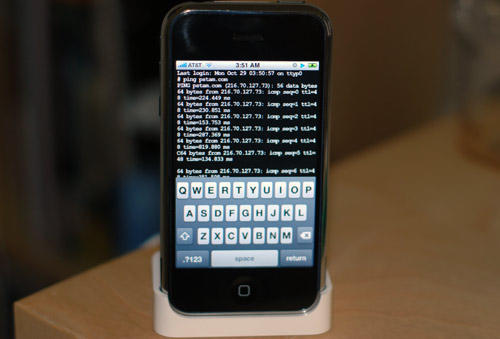
The iPhone Dev-Team will not release a jailbreak for iOS 4.0.2/3.2.2.
“With FW 4.1 still in its beta stages, it makes no sense to escalate the ‘cat & mouse’ with Apple for FW updates that only fix the jailbreak holes,” the Dev Team says on its blog. “To quote WOPR, ‘the only winning move is not to play.'”
As an avid watcher of movies, I was thrilled by the prospect of watching the latest releases on my iPad. In practice however, I haven’t watched a single film all the way through and the reason is this – the iPad is simply too awkward to hold at the right angle for long periods of time. Even when placed on your lap, you end up getting leg ache after trying to stay in the right position.
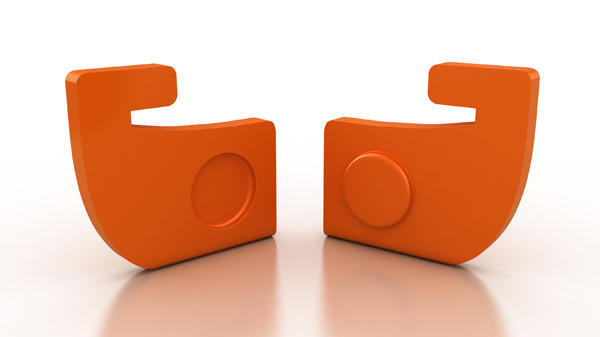
MoviePeg from UK design house magneticNorth offers a solution to this problem by offering a versatile and compact stand solution, for a very reasonable $19.
The first of the would-be, Android-toting iPad killers is about to arrive in the Samsung Galaxy Tab. It’s set to debut at next week’s IFA conference in Berlin, but as you can see, Samsung’s already teasing the device.
We’ve got to admit: the rapid fire staccato of intercut images in the promotional video actually does get our pulse pounding a bit… well, as much as our pulse ever pounds for an Apple knock-off product, that is.
As far as specs, nothing’s official except it’s 7-inch form factor yet, but the Galaxy Tab is tagged to feature an AMOLED display (distressingly rumored to run at a resolution of only 800 x 480, the same resolution as the four-inch Galaxy S smartphone) and run Android 2.2. As you can see, the Tab’s shape is different than the iPad too, allowing for one-handed holding.
The one obvious advantage the Tab has over the iPad is video-calling support, thanks to a forward facing camera… but that camera’s also rumored to be pretty chintzy, only supporting a 320×240 resolution. There’s also a rear mounted 3.1MP camera, according to scuttlebutt.
Can the Galaxy Tab trump the iPad? We doubt it: spec-wise, the Tab is looking underwhelming, even in the areas where it bests the iPad. Still, can’t fault an electronics manufacturer for trying.
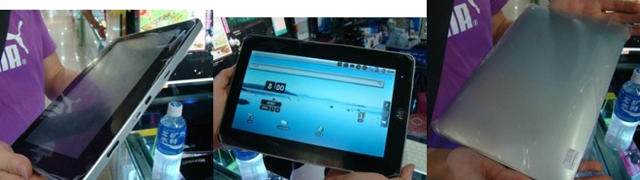
Not that we ever expect elegant, fully-realized products from China’s plucky constabulary of Apple knock-off shops, but apparently, it takes a lot more to make an iPad killer than just aping the design and slapping Android on it.
Reviewed by Giz-China, the ePad seems to be an excellent example of what you get if you try to save yourself a couple of hundred bucks when you buy yourself a tablet.
It looks like an iPad superficially, but where the iPad has an aluminum unibody casing, the ePad has a cheap plastic back that’s easy to break. Unlike the iPad, though, at least the ePad has you covered with all your missing features, including a USB port, HDMI port, a microSD card reader and even a front-facing camera.
The display is where things really start falling apart, though. According to Giz-China, the ePad’s display looks “dull and washed out” and is “terrible” compared to the iPad.
As for performance, sure, the ePad boasts a 1GHz ARM A8 CPU… but apparently, even that isn’t enough to get this baby running right. The ePad is apparently plagued by choppy video and app launching so slow, the reviewer compares it to Commodore 64.
Bizarrely, after that litany of complaints, Giz-China ultimately declared the ePad a better device than the iPad in their head-to-head faceoff… only to contradict themselves a sentence later. I’ll have a snootful of whatever you guys are having, it seems like a real loosener.
I’m certainly no expert, but I’ve often felt that a lot of what is behind Japan’s seeming eccentricities — the fascination with robots and automation, as well as the strict adherence to a social protocol that can seem , to Westerners, distant and stand-offish — to the crushing biomass of their overcrowded cities. In a country of shoebox sized apartments and packed trains, the only personal space you can get isn’t physical, but psychological.
One of the examples I like to point to is just the experience of walking into a diner. In America, you’d go in, sit at the counter, order your food from a waitress and get it delivered to you a few minutes later. In Japan, though, it is handled with what can seem to be an absurd level of detachment from your server: orders are placed through a touchscreen or ticket machine, where you pay for your food. That ticket is placed, without a word, upon the tray of someone working behind the counter, who later — and just as silently — brings you your food.
I was really interested, then, to see this iPad self-ordering system pop up on Japan Probe. Designed by Sharp Systems Products, it allows Japanese diners to order from a menu on their iPad, completely obviating the need for the aforementioned touchscreen ordering systems or ticketing machines. It’s a more feature rich implementation too: for example, you can pinch to make a picture of your food bigger, or drill down for ingredients.
Interesting stuff. It’s an obvious fit for a country like Japan, but I wonder if this isn’t the inevitable path that American dining will take as well: the tablet as a dynamic, self-updating menu.
Cult of Mac is blowing minds and iDevices with some great apps for your iPhone and iPad. We’ll pick 5 random winners to win 6 great apps. If you want a chance to get your hands on some great apps this week, then follow the instructions carefully below:
Follow us on Twitter (you must do this, if you’re not following us, we can’t contact you if you win).
Tweet this: @cultofmac and @appular are making it rain with FREE iPhone and iPad apps! #cultofmac
Your tweet will be your entry into the giveaway, only ONE entry is allowed per person, and the giveaway will last until 11:59pm tonight. We’ll contact the winners on Tuesday or Wednesday and how to get the codes!
Optional step – Tell us what you think about these apps if you own them already in the comments section.
Special Thanks to Appular for helping us put together these app code giveaways! If you’ve got a mobile app that you’d like marketed effectively, contact the good folks at Appular!
After being caught completely unprepared for the iPad’s debut, this Christmas season is looking to be a slugfest between different electronics companies each aiming to out iPad the other.
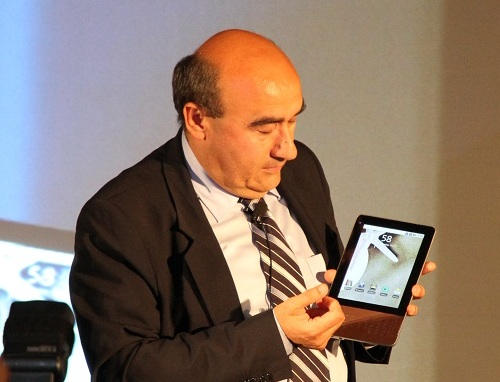
What’s the outcome going to be? According to Acer chairman JT Wang speaking to the Chinese language paper the Economic Daily News, Wang said that by the time the tablet market “stabilizes” Apple’s share will plummet from almost 100 percent to close to 20-30 percent.
While we’re skeptical that the drop will be quite so profound, this isn’t really news that Apple fans should be discouraged by. Apple barely controls 15% of the smartphone market. Android, in comparison, controls 17%, RIM 18% and Symbian a whopping 41% of the smartphone market. But so what? That hasn’t stopped Apple from making billions off of the iPhone. It hasn’t stopped the iPhone from leading the way in the mobile arena. And even though Apple’s in fourth place, it hasn’t stopped the iPhone from being absolutely synonymous with the very definition of a smartphone. iPhone is in a class by itself.
The same thing’s going to happen here. Everyone is going to release a poorly realized tablet to compete with the iPad, and since they can’t license iOS, they’ll install Android, webOS or Windows on their devices. I have no doubt that, very quickly, those operating systems will be fatter slices on the tablet marketshare pie chart than iOS will be… but so what? There’ll still only be one iPad; all the other tablets will just be competing with each other.
Sonos product manager Joni Hoadley shows off the company's upcoming iPad app.
Sonos’ awesome-looking iPad app has been delayed until the end of September, the company just said in a statement:
“Delivering the highest quality products that exceed our customers’ expectations has always been our mission at Sonos. Nothing less will do. Which is why we are postponing the shipment of our new Sonos Controller for iPad app until the end of September. We’re disappointed, but know that the result will be worth the wait. In the meantime, customers can continue to use the Sonos Controller for iPhone app on their iPad.”
We got a sneak peek of the app earlier in the summer and were very impressed. Sonos sells wireless music players that make it easy to get multi-room audio around your house. The iPad app that makes digital music very easy — especially listening to online music services.
With the iPad and iPhone’s increasing popularity in enterprise environments, Apple might finally be ready to take serious steps to beef up iOS device security: a new patent titled “Systems and Methods for Identifying Unauthorized Users of an Electronic Device” describe future iPhones and iPads that could bond with its owner and initiative security measures if an unknown person was trying to access it.
According to the patent, future iOS devices cold use voice print analysis, face analysis and even the rhythm of a user’s heartbeat to determine whether or not the current user was the one that device has been paired to. It would also be able to detect suspicious activity like hacking attempts, or “particular activities that [indicate] suspicious behavior.” Presumably, that could be anything, from the order in which apps are launched to the speed and staccato of a user’s typing.
If an unauthorized user was detected, the iOS device in question could then go into lockdown mode, taking a FaceTime snapshot of the user’s face while simultaneously logging all keystrokes and phone calls made, as well as the GPS location of the device at the time of the unauthorized entry. Furthermore, a warning could be pushed into the cloud to the user’s authorized owner, as well as the automatic uploading of sensitive data and then a complete, spontaneous device wipe.
It’s an interesting patent, and it would certainly go a long way to satisfying the security misgivings many corporations have about iOS devices. Unfortunately, Apple patents just as often as not flow forth from Cupertino like corporate fever dreams; until we actually see these features in action on a real-world device, there’s no telling how serious Apple is taking this parent.
Like prison cakes, iOS updates tend to have secret files baked into the firmware, each capable of sawing through the bars of Apple’s own internal clampdown to free details on upcoming products. The latest beta of iOS 4.1 is no exception, offering a tantalizing first glimpse of three upcoming iOS devices.
The first two tipped products aren’t particularly surprising: a reference to an iPod 4,1 is clearly pointing towards next month’s updated iPod Touch, which is likely to boast an A4 CPU, FaceTime support and a Retina Display.
Similarly, once you know that iProd 1,1 was the internal Apple coding reference to the first-gen iPad, iProd 2,1 is easy to peg as a second-gen iPad. What’s curious here, though, is the fact that Apple’s officially programming support for a second generation iPad at all into iOS 4.1. If Apple sticks to a yearly product update for the iPad, we’re eight months away from an update to the tablet; does the reference to iProd 2,1 in an iOS update scheduled for next month indicate a surprising hardware refresh for the iPad line later this year, possibly fixing the begrudged lack of FaceTime support?
The final reference, though, is the most intriguing: an unknown device described as “unknownHardware” tagged with a unique Apple product ID of 20547. Smart money is this being an iOS-driven update to the AppleTV, although we’ve all been surprised by Apple before. Only September’s annual iPod event will give us partial answers.
OPlayer, from olimsoft, is an iOS application for both iPhone/iPod Touch and iPad, that claims to boost your device’s media capabilities by allowing playback of a huge list of audio and video file formats.
The list of supported formats is pretty impressive, and will save you a great deal of effort if you often find yourself having to convert movies to watch on your device while you’re on the move. A fairly big video file can take a while to convert and it’s not the most exciting of tasks. But with OPlayer conversion isn’t needed – simply transfer your media to your device.
The full list of supported formats includes MP3, WMA, RM, AAC, WMV, AVI, MKV, RMVB, XVID, MP4, MOV, 3GP and MPG.
You can transfer files to your device using the File Sharing feature within iTunes or you can download them using the built-in browser from your computer, from the internet or from an FTP server. It’s also possible to stream media to your device over Wi-Fi and 3G.
The release of OPlayer, and of CineXPlayer last week, in to the App Store certainly suggests that Apple is relaxing some of its restrictions on app approvals, most likely in a bid to discourage users from jailbreaking their devices. Will this open the doors for other third-party media players?
Get OPlayer for your iPhone & iPod Touch from the App Store here, or get the HD version for your iPad here.
The robber who ripped off a man’s pinky to steal an iPad is now accused of trying to organize a hit on the victim from jail. On June 29, Brandon Smith sent a letter from jail to a crony to wipe out victim Bill Jordan. Here’s what the letter said:
“YOU GET THIS DONE! AND I GO ON ANYTHING I’ll rob a bank if you want me too. Just do this for your boy and I got you for sure. You know how we do it.”
“That’s the address, so handle it A.S.A.P.” He concludes the letter by saying: “I really need this otherwise it’s a wrap!! If you do this, case is dropped. NO WITNESS.”
Jordan’s son says that detectives and Witness Protection agents were at Jordan’s house 20 minutes after the threatening missive was intercepted. Jordan has considered changing his name and moving out of state.
Jordan, 59, had part of his finger amputated after Brandon Smith wrested a just-purchased iPad from him in the parking lot outside Denver’s Cherry Creek Mall store in April. The Apple bag was looped around Jordan’s hand and the thief jerked hard several times to get it off — so hard that flesh came of Jordan’s left pinky. A surgeon later had to amputate part of the damaged little finger on his dominant hand.
There are many questions still unanswered about the case. A big one: if Smith was arrested in part due to parking lot surveillance video, how did he think killing Jordan would resolve his case?
As an Apple blogger, I should be utterly aghast at this advertisement from Free Tax USA of an iPad meeting the pointy end of a sniper bullet, but my real gut reaction is just how viscerally satisfying it looks to shoot an iPad in the face. Someone should make a first person shooter of this for the App Store.
While the iPod is busy powering bar taps, the iPad gets in on the fun at Yelp powering an iPad controlled keg for the office. During the 2nd annual Hackathon these serious beer-reseachers knew they had to do something equally productive with Apple’s latest iWonder:
At Yelp, we don’t mess around with our beer. To make sure we never run dry or get a bad pint, the geniuses on this team — John B., Gabe H., Alex D., Julien R., and Jeff M. — built the Kegbot. Controlled by an iPad app, you can tell how much beer is being emptied (and at what rate: cough, John), as well as leave a 5 star review for your brew.
Authorization for pouring your favorite brew comes from a swipe of one’s RFID employee ID badge (after hours, we assume). Of course there’s also a webpage you can check from your desk to see the status of the KegMate. I wonder if Yelp paychecks now include a deduction for beer expenses?
The iPad is hands down the best mobile internet browsing device I’ve ever owned. Its design, shape, and the easy to use iOS interface make surfing the web feel a lot more natural and less awkward than a notebook. Therefore, it is nice that Apple is allowing alternatives to the default Safari browser which lacks features we’ve been used to using on our computers.
One of those alternatives is a new browser called iLunascape from Lunascape, Inc. and it is available for free (iTunes link) in the iTunes App Store.
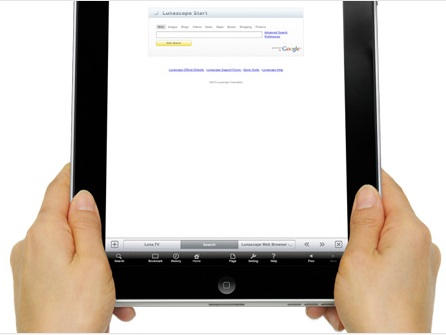
This browser takes a new approach to browser user interfaces (UI) on the iPad and I’m wondering why no one else has thought of this yet. The developer’s new specialized UI called the “In Reach Interface” has clustered most common movements and tabs down near the bottom of the iPad display where the user generally holds the device. In addition to this the iPad user experience is the center of attention, but now includes desktop-class tab browsing, easy screen capture and storage, fast and smooth scrolling, simple bookmarking, and iPad rotation controls.
Holding iLunascape in portrait mode on an iPad. Note clustered controls at the bottom.
iLunascape may not be for everyone, since not everyone holds their iPad the same way. However, if you are looking to replace Safari this app is a good start with its unique interface and useful desktop like features. Its free and if you care about your browsing experience on the iPad — go get it.
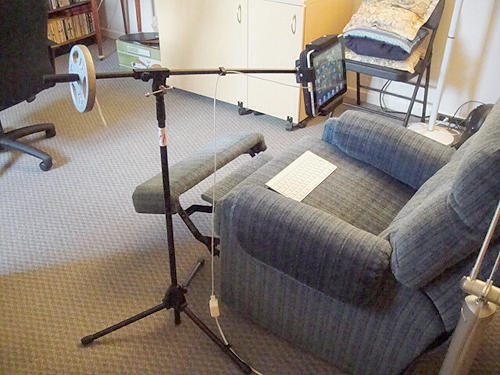
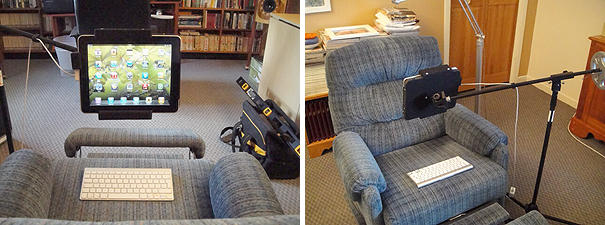
iPad furniture may be a growing trend, but not everybody can afford $2500 for an iPad Chair (myself included). Now the cheap geeks are getting in on the fun. iVan at iPadFORUMS.net tells us of this useful domestic repurposing project:
I bought a microphone boom stand. Unfortunately this one is a little cheapish and not quite sturdy enough so I had to add a 5 pound counterweight to offset the iPad’s heft and that of the supporting panel.
That panel is cut from half inch MDF covered in black self adhesive felt material. So are the rails that maintain the pad. I affixed it to the boom with a speaker wall mount bracket.
Total cost of project, $80.
Armchair not included. You knew you were saving that weight set in the basement for something!
Apple will build future iPhone and other gadgets from Liquidmetal, says a former top researcher at Liquidmetal Technologies, whose technology Apple is licensing.
“I think they’re going to make the iPhone out of it,” said Dr. Jan Schroers, the former director of research at Liquidmetal Technologies, the first company to commercially develop the space-age technology. “It’s quite obvious from what Liquidmetal has done in the past and what the technology is capable of.”
Apple has signed an exclusive agreement to use the Liquidmetal Technologies’ IP in consumer electronic products. Liquidmetal is a high-strength metal that can be processed like plastic. NASA has says it is “poised to redefine materials science as we know it in the 21st century.”
Dr. Schroers is the second high-level executive from Liquidmetal to say Apple has ambitious plans for the revolutionary material. Last week, the alloy’s co-inventor, Atakan Peker, predicted that Apple may use Liquidmetal for a new antenna to replace the problematic part in the iPhone 4.
Speaking exclusively to CultofMac.com, Schroers said Apple could create very intricate and beautiful gadget cases by blow-molding melted alloy like glass. Schroers has created one-piece perfume jars from Liquidmetal using a blow mold (see the picture below).
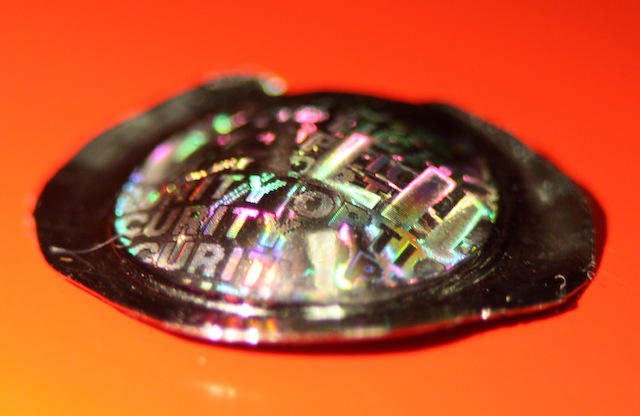
The technology could also create permanent holographic logos that are etched right into the metal, or elaborate patterns that generate color effects.
“You can really do some novel things with metal that previously were impossible,” he said. “In two years, you could see something the world has never seen in metal.”
This perfume bottle is made of metal but was blow-molded like plastic. It is completely seamless.