
PayPal is making it super-easy to send friends money, thanks to new Siri support introduced in the company’s iOS app today.
Now you can use voice commands to tell Siri how much money to send, and who to send it to. All you have to do is set up the PayPal app to give Siri access. Here’s how to do it:
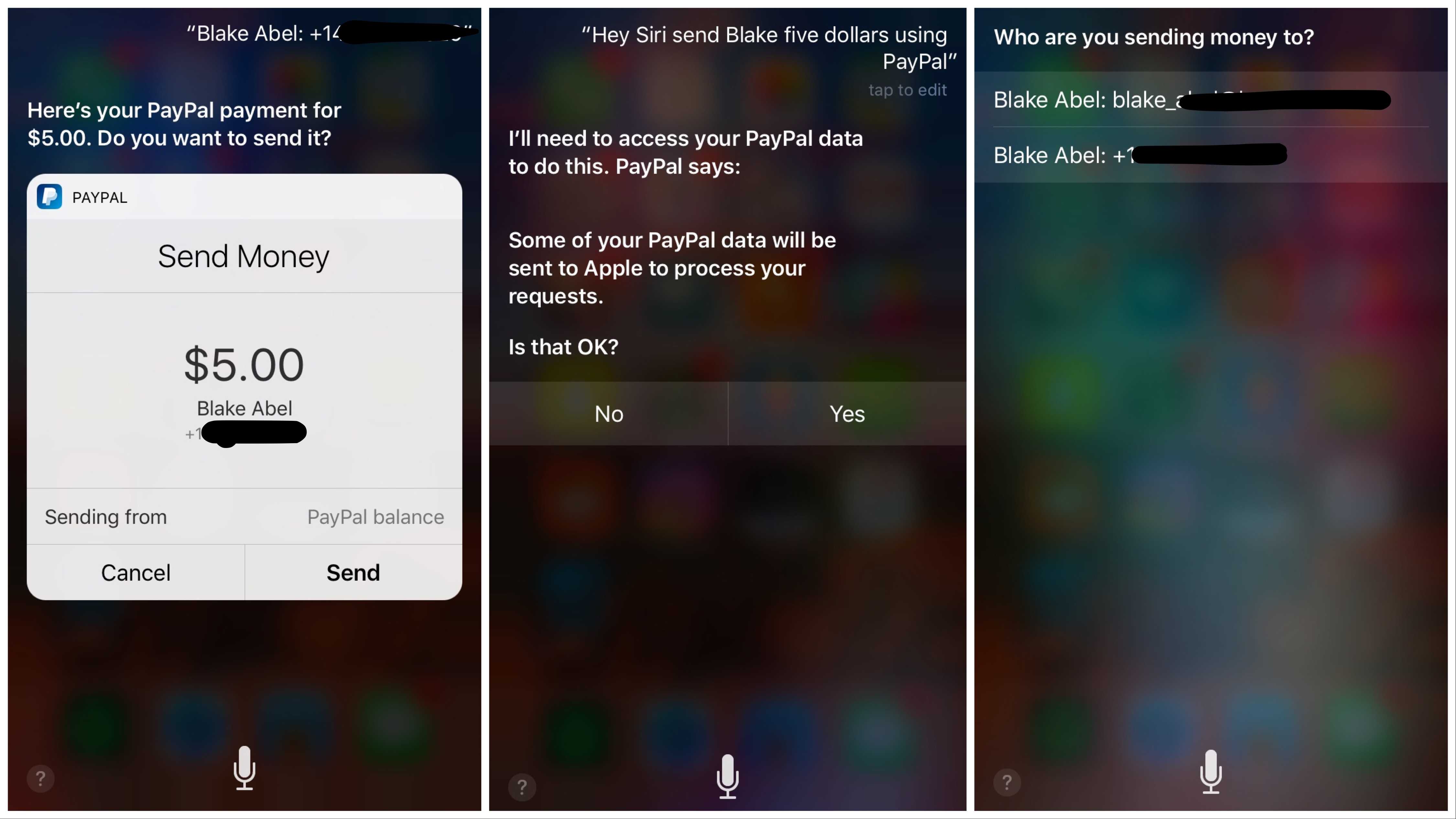
1. Make sure the PayPal app on your iPhone has been updated to version 6.7
2. Press and hold the Home button to bring up Siri.
3. Tell Siri, “Send $50 to [insert friend’s name].”
4. Tap Yes so Siri can access your PayPal data.
5. Select the email or phone number of the person you want to send money to.
6. Hit Send when the confirmation screen pops up.
You do have to unlock your iPhone with your PIN or Touch ID to use the feature. That should prevent someone from secretly draining your bank account. The new feature already works in more than 30 countries, too, so you can potentially use it wherever your travels take you.

Buster Hein is a freelance writer who lives in Phoenix, Arizona. Twitter: @bst3r.


4 responses to “How to use Siri to send people money with PayPal”
Just wondering if the person you are sending the money to needs a PayPal account? How do they actually get their money?
Does this work from one country (currency) to another?
1 yr ago I decided to quit my last work and it was a best decision i made in my life… I started doing a job on-line, for a company I discovered online, for several hours each day, and my income now is much bigger then it was on my last work… Last payment i got was for 9000 bucks… The best thing about this gig is that i have more free time for my kids… KORTA.NU/MDe
It’s been 1 year since I left my office job and i couldn’t be happier now… I started doing work from home, for a company I stumbled upon on-line, several hours every day, and I make much more than i did on my office work… My last month payment was for Nine thousand bucks… Superb thing about this gig is that now i have more free time with my kids… CHILP.IT/8d93f4b
Does it work in France? I need to try it , it’s definitely a time saving