iPadOS 27 is out, and maybe you’re looking for a reason to install it. Or you might have already installed it and want to know more about it. I’m here to help.
Apple hypes the AI capabilities, but the most popular iPad model doesn’t support Apple Intelligence. And maybe AI isn’t your thing.
Good news: iPadOS 27 brings a long list of non-AI changes that affect everyday iPad use. Some are visual refinements while others improve performance, stability, file transfers, Safari, Mail, Messages and more.
Here are the best new iPadOS 27 features that aren’t AI.
Many iPadOS 27 features involve AI. But maybe not the best ones.
Cupertino puts a huge emphasis on Apple Intelligence with iPadOS 27, trumpeting “Introducing Siri AI. Truly helpful. Truly yours.”
But you must be using an iPad Air or an iPad Pro with an M-series processor for access to Apple Intelligence. That leaves the budget iPad out in the cold, including the A16 version released last year.
And even if your tablet is supported, you might not care. Those who primarily use a tablet for browsing the web, watching videos, reading or playing games might feel that AI features are unnecessary extras rather than essential tools.
Fortunately, iPadOS 27 is about much more than turning the tablet into an AI assistant. That’s what you have an iPhone for, after all. Here’s what else the new operating system version offers.
Table of contents: Best iPadOS 27 features
- Liquid Glass gets easier on the eye
- iPadOS 27 is more stable
- And quicker app launches
- Using external drives gets much faster
- iPadOS 27 adds a Safari Menu Bar
- Mail and Messages apps get some welcome polish
- And yes, there’s a lot of AI
Liquid Glass gets easier on the eye
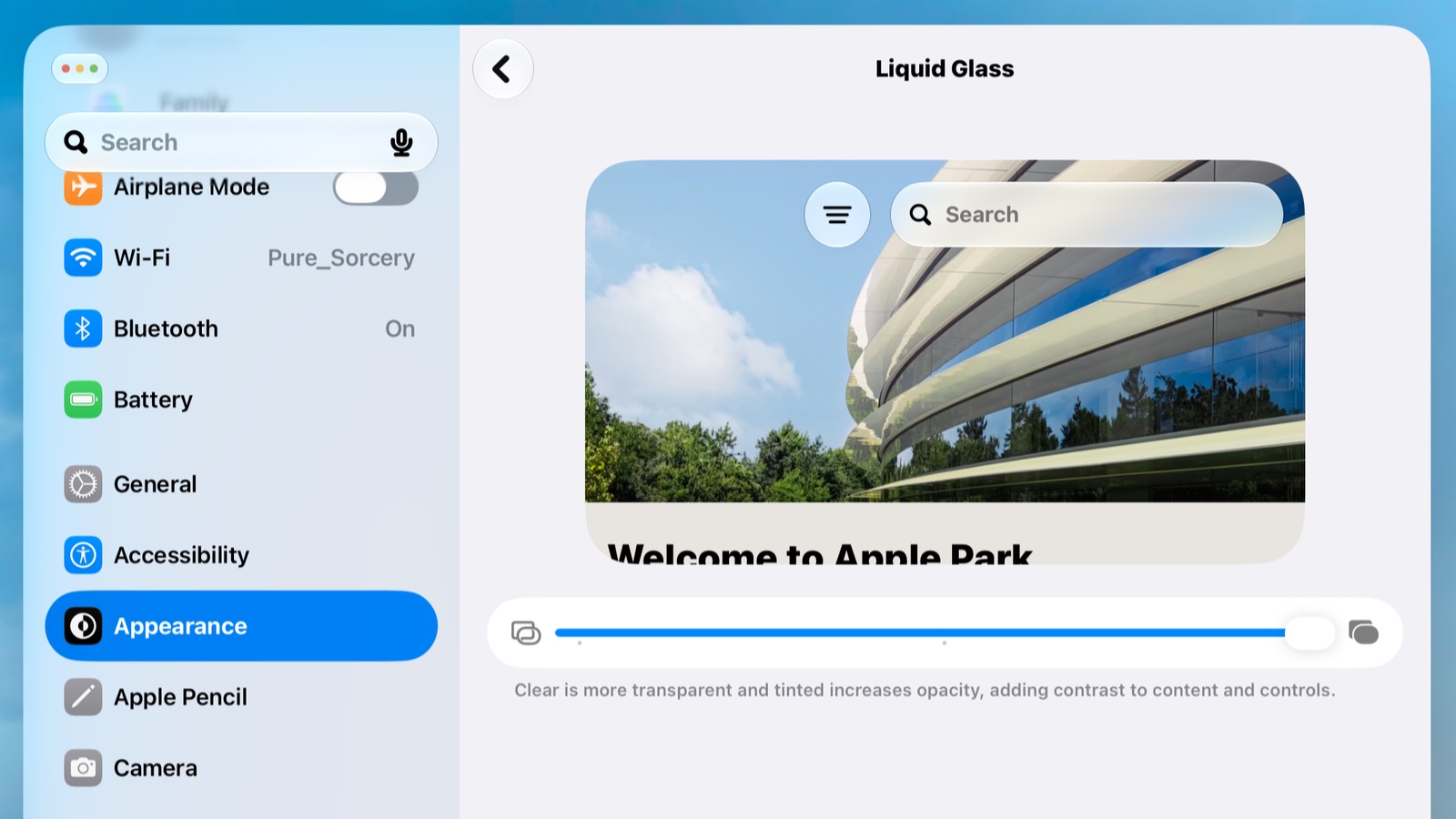
Liquid Glass was surprisingly controversial in iPadOS 26. Many people rejected Apple’s revamped look. With iPadOS 27, Apple continues to refine it, promising “more uniform refraction and improved contrast,” while app icons get sharper and more detailed.
But if you still have problems with it, a new slider lets you adjust the appearance of Liquid Glass, ranging from an ultra-clear look to a more heavily tinted appearance. That should be welcome news for anyone who found the original design a little too translucent.
Go into Settings > Appearance > Liquid Glass to find the slider.
Screenshot: Ed Hardy/Cult of Mac
iPadOS 27 is more stable
At the iPadOS 27 introduction during WWDC in June, Craig Federighi, senior vice president of Software Engineering, promised that Apple was “making our software platforms faster, more reliable, and more delightful than ever before.”
It looks like Apple has largely delivered on that promise. iPadOS 27 users are reporting fewer of the crashes, stutters and lags that plagued some iPads running iPadOS 26. It’ll likely get even better when iPadOS 27.2 brings additional bug fixes.
And quicker app launches
iPadOS 27 also makes everyday iPad use feel snappier by improving how quickly apps launch. Apple optimized the operating system to reduce the time it takes to get an application up and running, so frequently used apps should feel more responsive when you tap their icons.
It’s not the sort of feature that gets as much attention as Apple’s new AI capabilities, but faster app launches are the kind of improvement you’ll notice every day — particularly if you regularly switch between several apps.
Using external drives gets much faster
Speaking of speed increases, Apple promises that browsing and transferring files between an iPad and an external drive can be up to five times faster in iPadOS 27.
That’s particularly significant for people who use an iPad Pro or iPad Air as a serious computer and regularly move large video, photo or other files between the tablet and external storage.
AirDrop transfers also got faster, making it easier to move files between Apple devices.
iPadOS 27 adds a Safari Menu Bar

Photo: Ed Hardy/Cult of Mac
iPadOS 26 brought the macOS menu bar over to iPad. This year, iPadOS 27 gives you the option to keep it permanently visible rather than having it automatically hide.
The change makes the iPad feel a little more like a Mac when you’re using a keyboard and trackpad — something many power users keep asking for.
Mail and Messages apps get some welcome polish
iPad users should be all too familiar with the Mail app still showing that there are unread messages after these were read on another device. Apple made backend improvements so that unread counts and read statuses now synchronize more reliably across iOS, iPadOS and macOS. The same goes for text messages.
Also, expect individual emails and heavy threads to open noticeably faster with iPadOS 27, while searching is less prone to returning incomplete results.
And yes, there’s a lot of AI
These are my favorite changes in iPadOS 27 because they directly affect how I use my iPad Pro every day. But there are dozens of other smaller improvements that help make the iPad easier to use.
Plus, I deliberately left out all the AI-related changes. Those include a smarter Siri that offers conversational capabilities and the ability to work with information across Apple’s apps. Visual Intelligence can also analyze what’s displayed on an iPad’s screen.
The changes are profound. Apple Intelligence spreads into Photos, Safari, Notes, Mail, Messages, Shortcuts and other parts of iPadOS.
So while I hit many of the high points, my list is far from a complete catalogue of everything new in iPadOS 27. I’ll leave that to Apple.
If you haven’t installed the upgrade, it’s available now. And if you have, make sure you’re taking advantage of these new features.

Ed Hardy has been writing full-time about tech for 26 years, and using it for much longer than that. His intro to Apple was a Macintosh SE/30 (which he still has), but now he uses a 13-inch iPad Pro as his primary computer.
That’s because he’s a “tablet first” type of guy. Rather than use a Macbook, he connects a keyboard case to the iPad. And instead of a desktop Mac, he connects his tablet to a 27-inch display and full-size keyboard. (So don’t try to tell him that everyone has to use a Mac to be productive.)
Before coming to Cult of Mac, Ed wrote for NotebookReview, TabletPCReview and Brighthand, as well as other sites.

