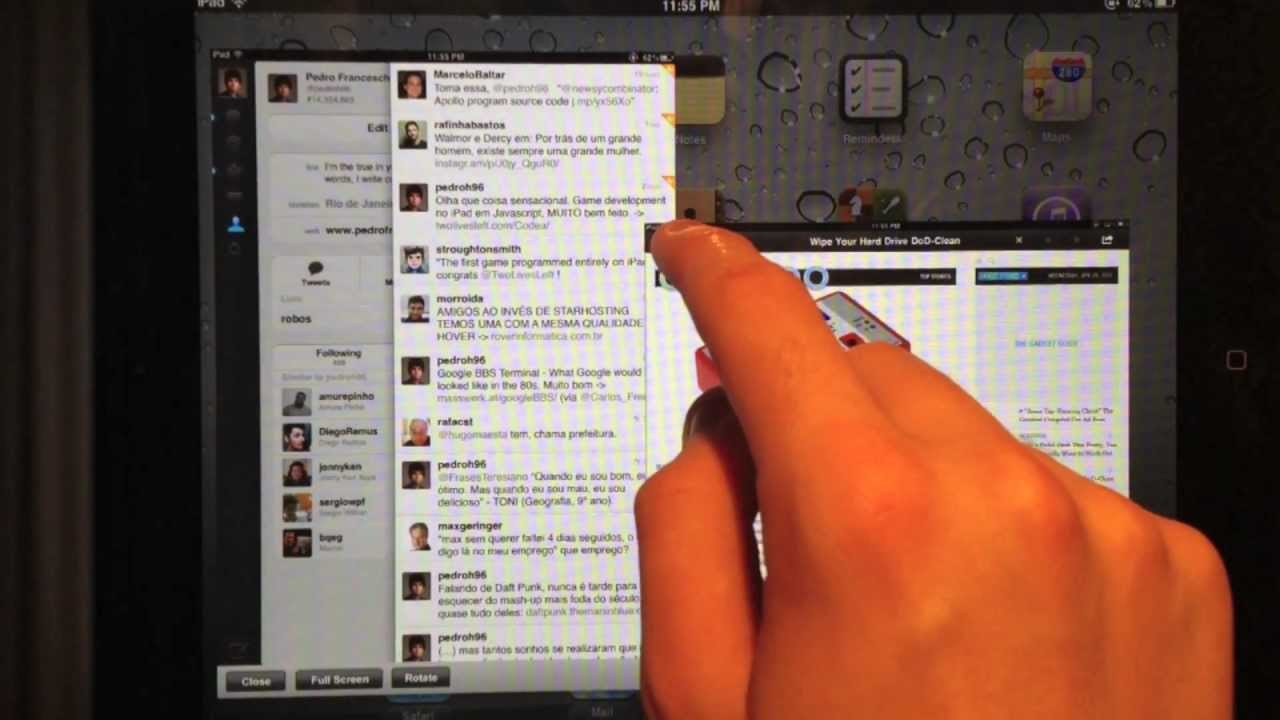
When Windows 8 debuts as a tablet OS later this year, it will have one major advantage over the iPad for people who want to use a Windows 8 slate as a laptop replacement: you can run apps side-by-side, consulting a document in one pane while writing up an email, say, in another.
I’ve been saying since last year that this is a killer feature Apple should try to lift in iOS 6, but up until now, all we’ve seen are jailbreak hacks sloppily emulate the functionality. No longer. A hack has finally come along that does it right.
Quasar by Pedro Franceschi looks to be a lot slicker than what we’ve seen in the past though. It features the ability to view multiple apps at the same time, while resizing windows, switching their orientation and even re-arranging their location on the screen.
The hack is expensive at $9.99 and requires a jailbroken iPad to work, which means new iPads need not apply. Still, if iOS 6 introduces side-by-side apps and then doesn’t handle them this slickly, it’ll be a serious disappointment. Apple should snatch up this Pedro kid… fast.
Quasar: A Window Manager For iPad [The Big Boss] via Gizmodo]
19 responses to “This Is What True Multitasking In iOS 6 Should Look Like [Video]”
But why!? Cause some people mental limit to have WINDOWS on a electronic device!? I prefer my apps open fullscreen as they do actually, the user friendliness of the iDevice is FUNDAMENTAL…opening, resizing, closing, dragging windows around a 11″ screen is something the 99% of users, doesn’t need at all…
This just looks awkward and difficult to get anything done since now the font sizes are small and there’s just no focus. Honestly I think that multi-tasking = no tasking…not getting anything done. Life’s too short to worry about trying to accomplish several different workflows at once.
That looks terrible. dragging different windows around and manually resizing them is a step backwards. It’s in complete opposition to the simplicity, friendliness, and focus that makes iOS such a pleasure to use on my iPad.
I’ll grant that being able to have 2 app windows open at the same time is a neat and useful trick that Windows 8 pulls off in a nice way. However, the “solution” for iOS presented in this video is not the answer. Not by a mile.
Vote for Pedro!
I’m not a fan of this. With the 4 fingers left and right swipe to switch between multiple apps, this concept wouldn’t be useful to me. I’d rather run them in full screen and swipe back and forth personally. On a 10″ screen it doesn’t make sense IMO to run 2 apps on the screen at once.
I’ll never understand why people feel the need to run apps side-by-side on a mobile device. Number one, you can’t, as a human being, multitask even if you think you can. Number two, the screen is already small as shit. What are you doing, wearing magnifying glasses on your head?
First, Windows 8 doesn’t exist as a real product yet, so it’ premature to say they’ve pulled it off.
Second, it remains to be seen what’s required of developers to support this split screen kludge and whether they do it well.
Finally, it also remains to be seen whether it holds up to actual use, which I suspect it probably won’t.
OMG no.
This is SO lame.
Is it just me, or is “slick” becoming the new “sexy” when describing phones? I’m seeing it with increasing frequency and it’s just… not a good word for technology. It’s kind of gross.
Why would you want all of that cluttering your screen? Perhaps the author should either jailbreak his iOS device or simply leave his Apple Credentials Card at the door and go buy this terrible looking ‘multitasking’ device, and leave the iOS everyone else prefers..alone.
That is utterly hellish, overly cluttered, and far too complicated.
The Post PC era is about having powerful yet simple computing on the go, not bringing back convoluted, confusing means of control from a bygone era.
This is great for the Jailbreak option, but I don’t want this in my iOS 6. I’d rather see Apple copy Windows 8 and only allow applications side by side than have to deal with resizing and placing applications in certain places. This looks rediculous.
Horrible! Why devolve back to windows?
That has to be the stupidest thing I’ll see today. Windows is going the other way with Metro, why go backwards with iOS?
No thanks, Apple and iOS are built upon simplicity and ease of use, this is a step back
Why not just use OS X if want to Multitasking like that… This is absolutely terrible. Hey creator… you are SuX.
That looks ridiculous.
How are guys like these allowed to write articles about technology?
This is a fantastic job don’t listen to people moaning about how bad it looks like. It’s a great piece of work and one of the features I was looking to have on my iPad. I mean it makes writing my assignments so much easier. I mean I don’t know about you guys but when I’m writing something I like to have my reading articles and iWork/office on the same screen so I don’t have to go back each time to consult the article. Makes copying, pasting and referencing so much easier. Plus it doesn’t look at all like windows it looks like mac os x, beautiful. You can resize and reposition the windows and still have them in full screen if you like to
Looks cluttered. I don’t think I would be more productive with this.

