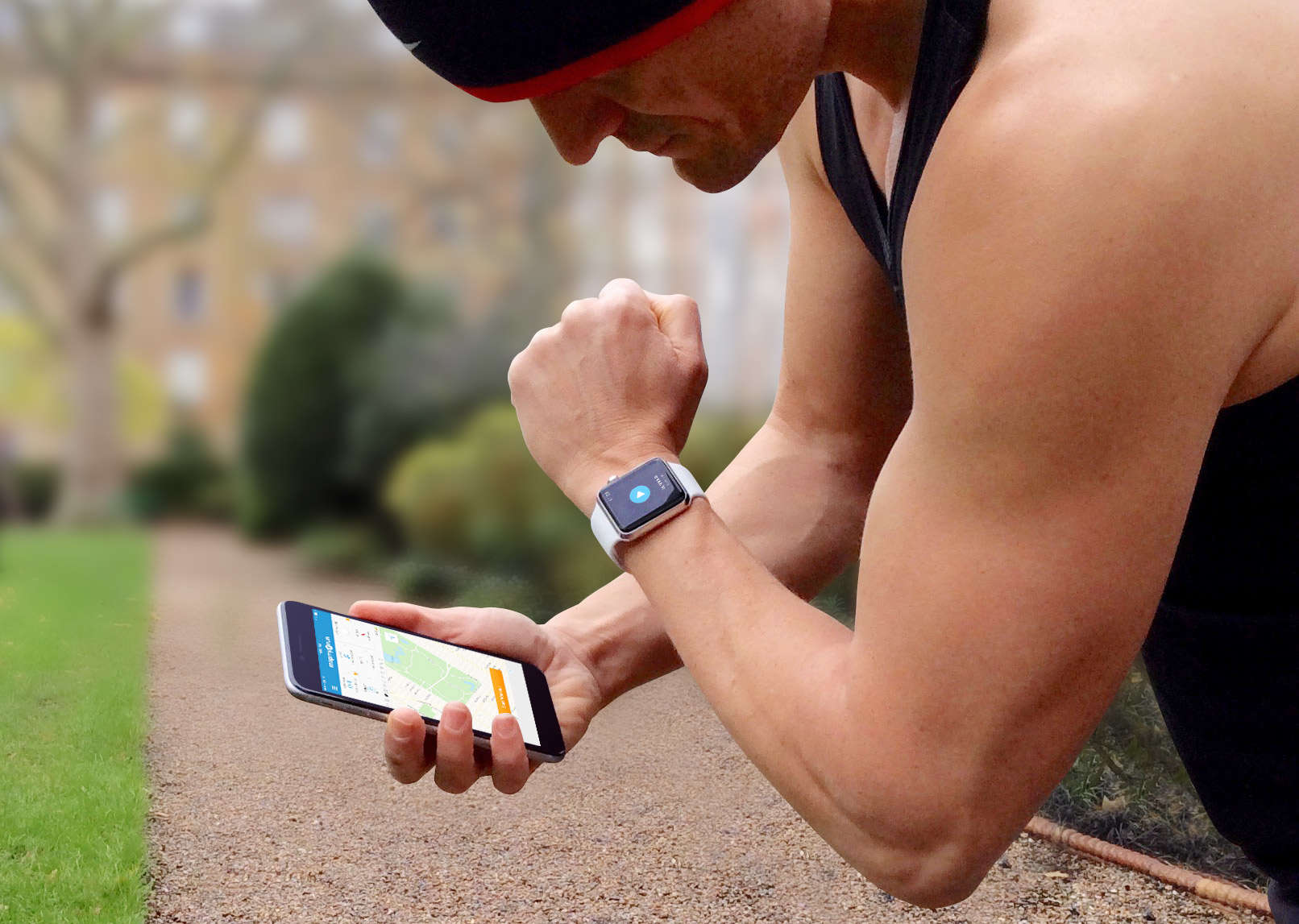
There are so many iPhone apps for runners, it’s hard to decide which one to use. Should you go for a familiar brand like Nike, or a specialist like Runkeeper?
Ultimately, all running apps do pretty much the same thing: They use GPS to track how far and how fast you run. But when you take a closer look, their features and prices vary considerably. So I’ve done the leg work for you, to help you find the right running app faster.
Running apps: Similar, but not the same
Every app listed here provides the basics — they all log your runs (breaking your pace down into split times for each mile or kilometer), monitor your heart rate via Bluetooth accessories, and save your workout data in the iOS Health app via the HealthKit API.
The one outlier among these running apps is Apple’s own Workout app, which lacks features that come as standard in other running apps, such as GPS route mapping and automatically pausing your workout when you stop running.
Beyond the basics, features vary considerable from one app to another. The subscription-free apps (Apple Workout, Nike+ Running and iSmoothRun) don’t provide much or any social support. Strava offers limited features as you actually log your run, but excels at providing analysis after your workout.
Finding the right running app depends very much upon which of these areas is most important to you.
Round 1: The price of fitness

Most running apps provide a free, ad-supported version as well as a premium version with more features and an annual subscription cost of around $30. Strava is the most expensive app I’ve found, charging double the price of a typical annual subscription.
These apps’ premium features tend to be training programs, extra statistics, heart rate training zones and color traces. This last feature involves highlighting your route on a map in different colors to show how fast you were going. This is very useful, but it is odd that some apps charge for it, when Nike gives it away.
I’ve include premium features where available, so the first year’s cost is what counts; this is what you would pay to access all the extra features. I’ve arrived at this figure by adding the purchase price to the annual subscription fee required.
The best app in terms of value is Nike+ Running, which provides the most features at the lowest cost. Round 1 to Nike.
Round 2: During your run
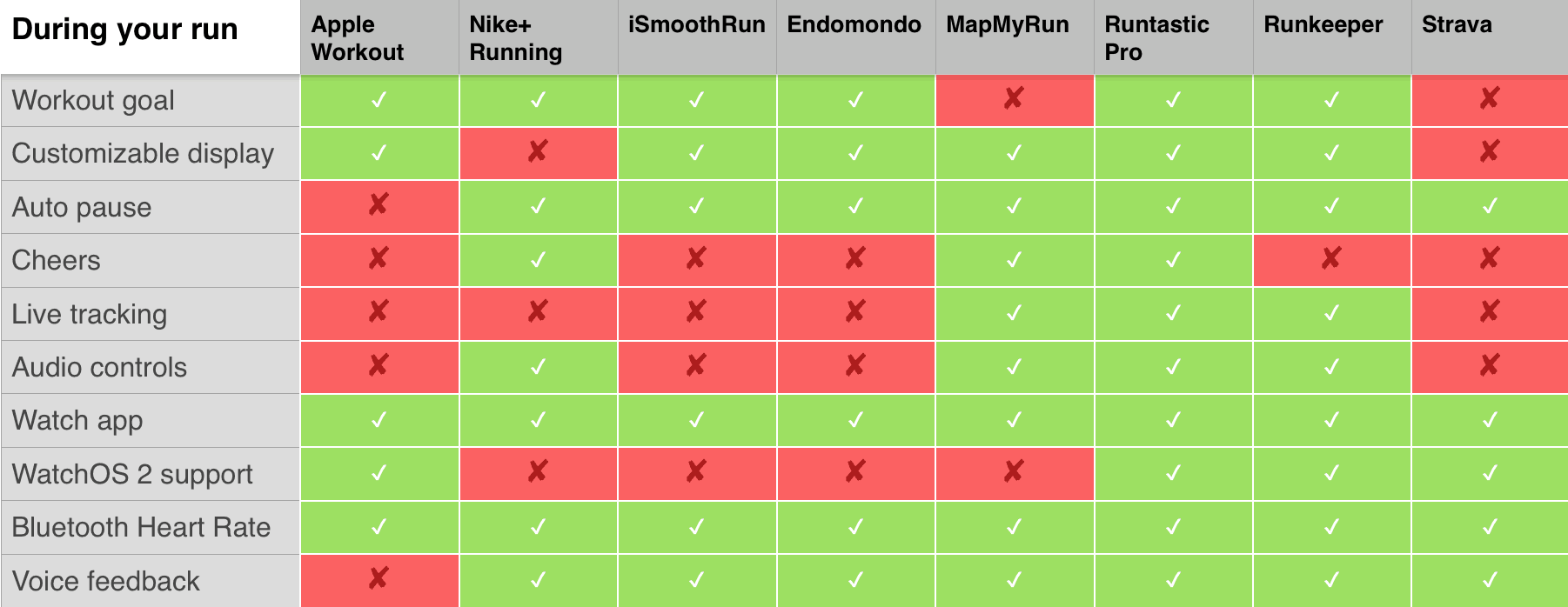
The first thing you want from any running app is for it to be easy and enjoyable to use when you are actually running. A good app will provide you with tailored feedback focusing on the stats most important to you.
That is why it is useful to be able to set a goal at the beginning of the workout — how far you plan to run or how long you want to work out for — so you can get feedback on your progress toward that goal. Oddly, many of the “premium” apps do not currently provide this feature, even though it is built into free apps like Nike+.
The ability to customize what data is displayed on screen during a workout also helps, and it is disappointing that an expensive app like Strava does not provide this basic feature.
All the apps I looked at included support for Apple Watch, but most still do not support the new fitness features in watchOS 2. Strava just updated its app this week, adding watchOS 2 support. iSmoothRun acknowledges that it is “very restricted” in its Watch support, arguing that the limitations are “imposed by Apple and we can’t do anything about it.”
Both Runtastic Pro and Runkeeper support watchOS 2, and that, combined with their focus on a great workout experience, is why they came first and second in this round.
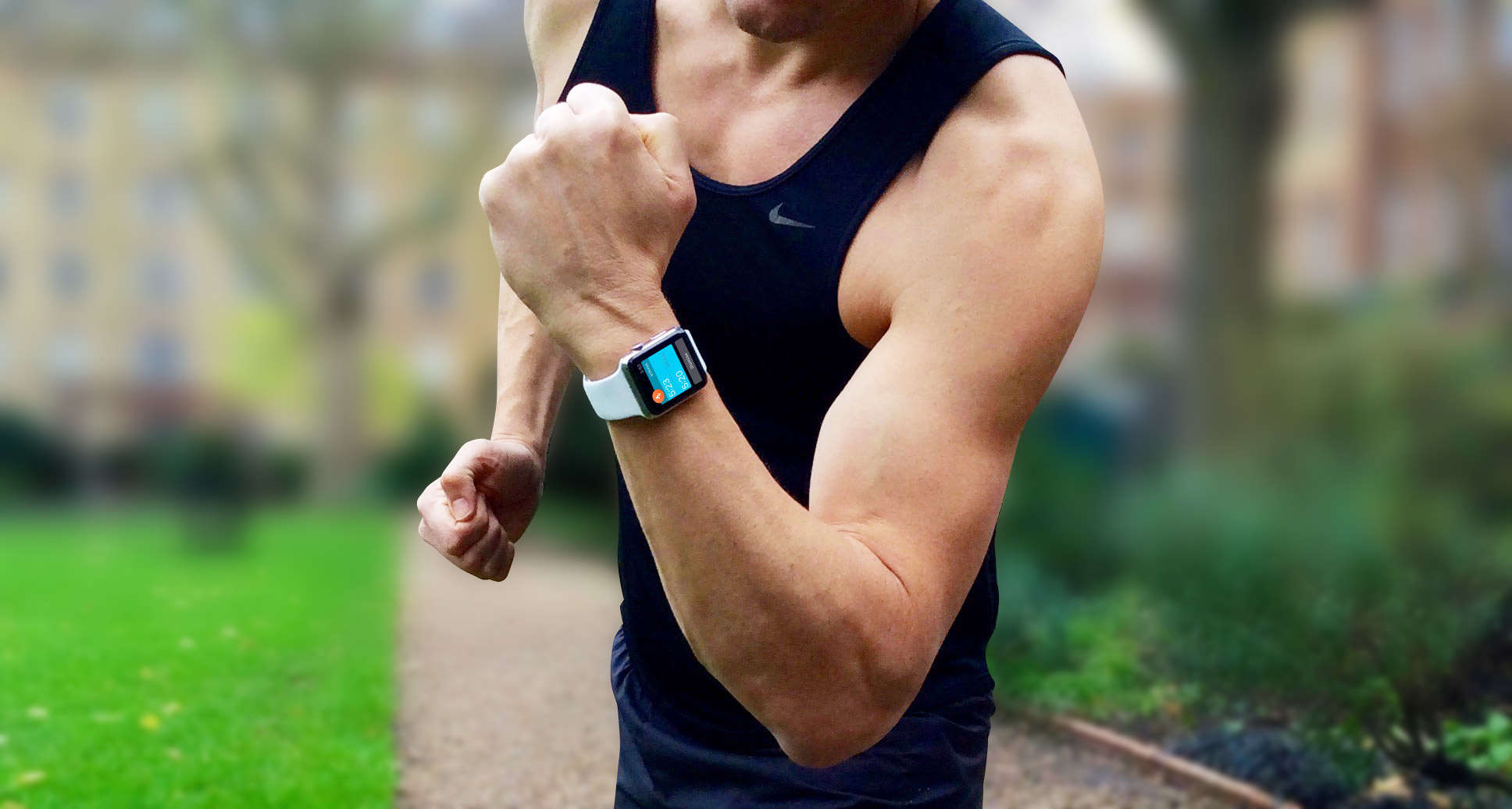
Photo: Graham Bower/Cult of Mac
Round 3: Get social
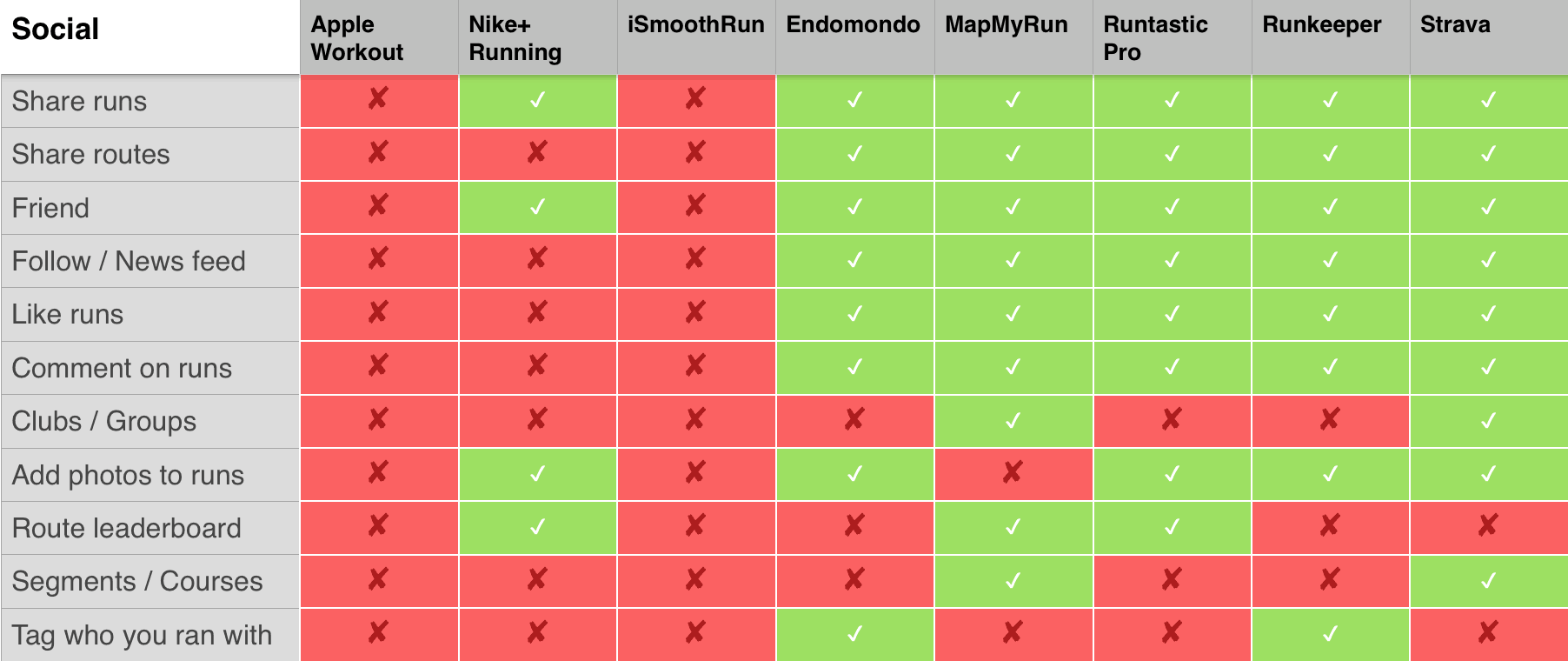
One of the most important things to consider when picking a running app is whether any of your friends are already using one. It can be very motivating to compare your runs with friends’ workouts, compete on a leaderboard and set challenges for each other. To do this, you all need to be using the same app. So ask your friends, colleagues and family — find out what apps they are using, and if one app is more popular than the others, it makes sense for you to choose that one, too.
If none of your friends are runners, it’s about time you coaxed them off the couch! Then pick an app you can use together that offers good social features.
Social is an area where the free apps come up short. Apple’s Workout app provides literally no social features, while Nike+ offers only limited social support. The best of the bunch are MapMyRun and Strava, which allow you to set up your own running clubs. (You can join the Cult of Mac running club on Strava now.)
Round 4: Motivation
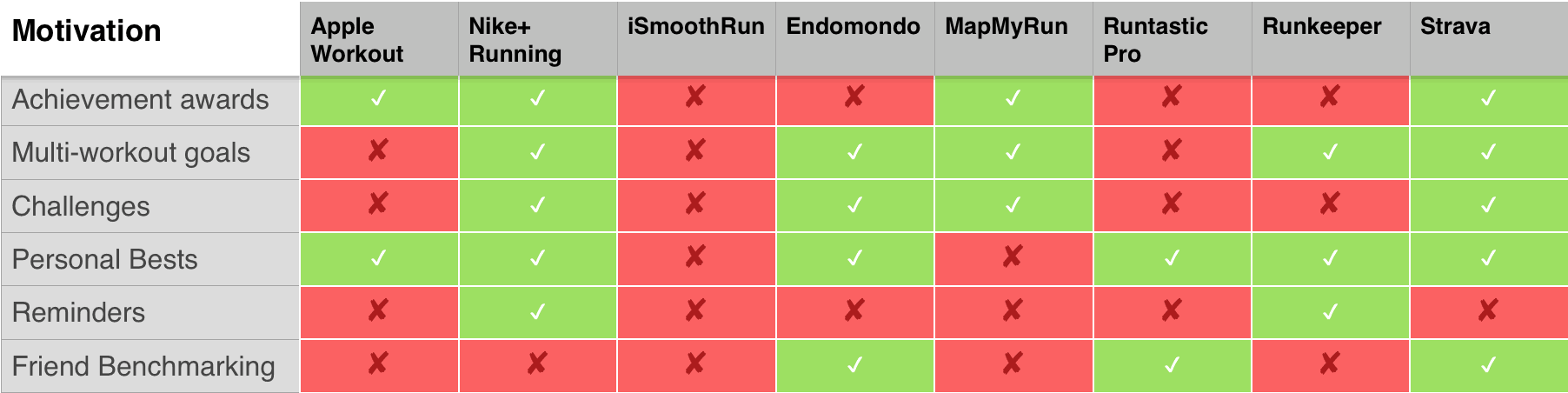
I find simply logging my runs and reviewing my progress over time to be motivation enough. But most apps provide a little more carrot and stick, in case you need help getting off your ass.
Motivational features vary widely from one app to another, with little consensus on what might be most effective. Some offer virtual medals for achievements, while others encourage competition through challenges and comparison with friends.
The free apps hold their own against the paid apps in terms of motivation, with Strava and Nike+ providing the most comprehensive range of motivational features.
Round 5: History
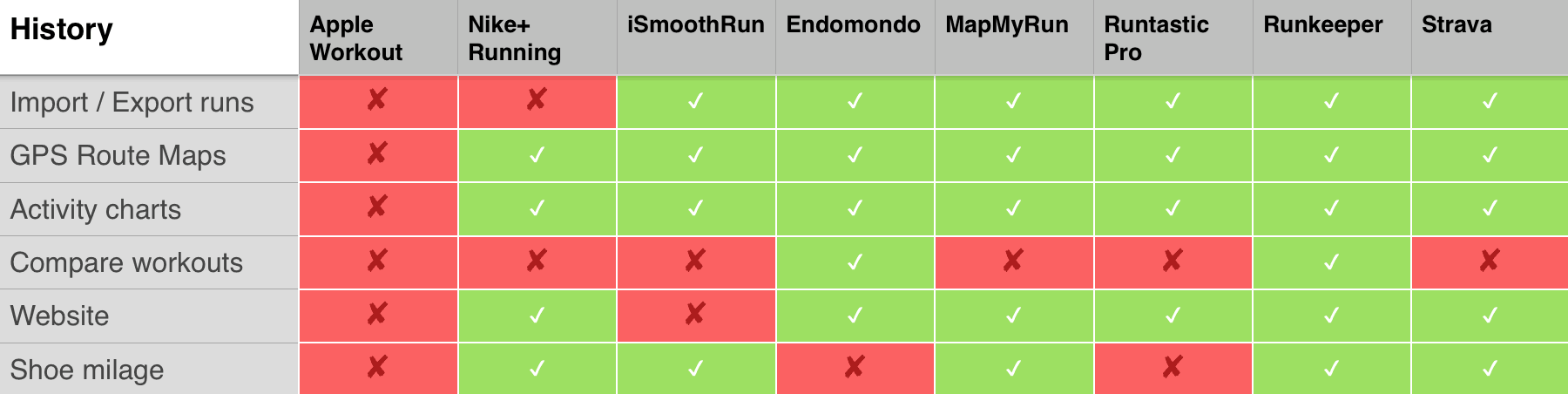
All the apps are pretty similar in the history reporting they provide, with the exception of Apple’s Workout app, which is absurdly limited in this respect. With no iOS companion app, the Workout app must bundle all your running data into the Activity app, where frankly it gets lost. Apple does not even provide charts to visualize your progress.
The only significant difference I found between the premium apps is that some enable you to compare workouts while others don’t. Logging shoe mileage is also not available on all apps, although perhaps not surprisingly Nike+ does includes this feature — it’s a great way to remind runners to replace old running shoes with shiny new Nikes.
This round goes to Runkeeper, which managed to tick every box.
Round 6: Planning and training

Most apps charge a premium for training plans, so it is impressive that the Nike+ Running Coach service is free. Of the subscription apps, only MapMyRun and Strava matched Nike+ in this category.
And the winner is …
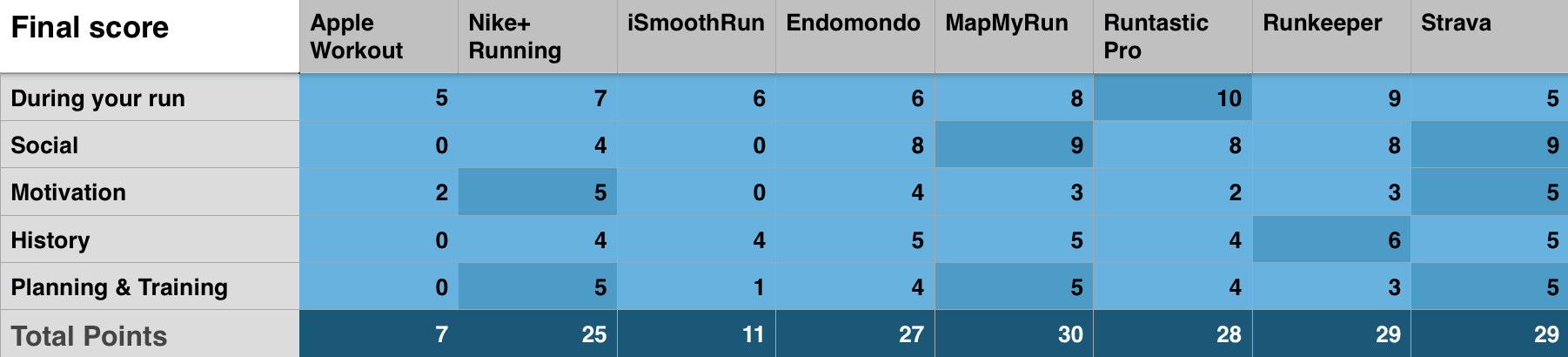
MapMyRun takes the prize. I had not used it before because I always thought of it as a “me too” app. Its icon and functionality seemed similar to competitors such as Runtastic and Runkeeper. With its acquisition by Under Armour, and that company’s subsequent purchase of Endomondo, I assumed MapMyRun would get merged into its stablemates and disappear. Instead, MapMyRun is continuing to innovate and add new features.
Of course, there’s more to an app than the number of features it boasts. There are also what techies call the “non-functional requirements” — how well it performs the task. This is where things like ease of use and design become important.
Look and feel can be a bit subjective. Personally, I think most running apps look cluttered and garish. The presence of advertising in the free versions does not help. That’s why, despite its high price tag, I still favor Strava, which took joint-second place in this comparison. The Strava website design is elegant, simple and well-thought-out.
In fact, Strava would have won if its in-run features had not let it down. If Strava focuses on improving the running experience, and gets more competitive on price, it will give MapMyRun a run for the money.

Graham Bower is a designer, writer, fitness geek, and long-time Apple user. He is the co-host of Apple Core a podcast about the history of Apple. In his spare time, Graham writes fantasy and sci-fi novels. Connect with Graham on Bluesky or at www.grahambower.com.


11 responses to “How to choose the right running app for you”
I’m not a professional runner by any means – I’m not even a runner (I use Nike+ to log my walks) but I love it and your charts made me do a double take.
They’re wrong.
I don’t know if Nike+ is the best overall, but it has plenty of features that you say it doesn’t.
My wife and I use Nike+ (she DOES run), and we can not only see our own (and each others) personal bests in a wide variety of categories, but it also has the ubiquitous “post to facebook” function where you can post not only your time, but also your route (providing you ran “outside” and used the GPS tracker. It’s quite accurate too). It’s third-party, for sure, but you didn’t mention it anywhere.
Also, in the Nike+ app, there’s a subheader labelled “CHALLENGES” where you can choose a distance, invite friends, and race to the finish line with a variety of different challenges. It also has a built-in coach to train you to 5K, 10K, 21.1 and 42.2K. It tracks what you ran on (road, path, etc) and your mood once you’ve finished running.
Like I said, it may still not stack up to be the best (and I’m not saying it is), but you gotta have all the facts in your report if you want us to be able to make an informed decision. Thanks for reading this rant!
I think I would agree with Graham regarding the social features of Nike+: within the Nike+ app or web service is not possible to check at all your friend’s routes, only some general statistics. You cannot even see when they run and how many km in each run. But it is true that regarding motivation, Nike+ has some features like challenging friends that are not mentioned. But overall, I really liked the article and the comparison. Maybe Sportstracker would have been worth mentioning, but maybe it is not so popular.
Thanks for the feedback Robbie. I’ve just double-checked, and you are right about challenges and personal bests – I had missed these before. I’ve updated the article to reflect this, which adds another two points to the score for Nike+.
I already had a tick against Nike+ for “share run” which is about sharing to social networks, so I think I have that feature covered.
I want this to be as accurate as possible, so I welcome any feedback and corrections.
My Friend runkeeper Do have a shoe mileage tracking :-) Cu on the road
Thanks for the tip, Thomas. I’ve corrected the post. This puts Runkeeper in joint-second place, alongside Strava.
Problem with all the apps reviewed is they all use Apple Maps. Fine if road running but useless if off road and in the country. Try Runmeter, that uses Google Maps
Great article, however, I stay with Runtastic. It is the most cost effective. When you pay the premmium price you get access to a bunch of features in their webpages. In addition, the premium subscription works not only for Runtastic (running app), but also for Runtastic Results and other apps, in which professional features require the Runtastic Premium Subscription. I know this article is about running, but still, that’s a point worth considering when you are willing to pay.
Graham, you should check with Apple… that watch seems to make you flex in every photo – you likely have one of their super-HEAVY lead demos.
Btw, being free, and full function Nike+ is a clear winner. Even more so when you consider the integration with Nike fuel and steps; also with it’s trophies, anniversaries, special/holiday awards etc.
I use iSmooth running and it lets me keep my data and export it to other running social communities (Nike, map murine and Strava). It also lets me lay in all kinds of workout plans from tempo, speedwork, etc. A one-time charge of $4.99 and well worth the dough. What is very disappointing is how limited the Apple Watch and phone are with workout functionality. I guess that leaves the door open to developers.
That’s “map my run” not “map my urine”
My main thing is that I want to track HR data, and I’m tired of wearing a separate device to track that. Puts Runkeeper #1 on my list. However, I miss being able to see current pace on my main screen like I could configure iSmoothRun to do. I should add that I’m using the apple watch and I stuff my phone in a pocket/belt.